




Что это такое?
 Опенсорсный консольный инструмент для безопасности, который с помощью eBPF перехватывает SSL/TLS-трафик в открытом виде — без установки CA-сертификатов и MITM-прокси. Он также может проверять команды в shell и запросы к базам данных на хосте.
Опенсорсный консольный инструмент для безопасности, который с помощью eBPF перехватывает SSL/TLS-трафик в открытом виде — без установки CA-сертификатов и MITM-прокси. Он также может проверять команды в shell и запросы к базам данных на хосте.Это библиотека, которую я подключаю к своему коду, или отдельный инструмент?Отдельный консольный инструмент, который вы запускаете через sudo на машине, которую хотите наблюдать, — это не библиотека. Есть ещё eCaptureQ — отдельный кроссплатформенный GUI-клиент на Rust, Tauri и React.
Отдельный консольный инструмент, который вы запускаете через sudo на машине, которую хотите наблюдать, — это не библиотека. Есть ещё eCaptureQ — отдельный кроссплатформенный GUI-клиент на Rust, Tauri и React.Как его запустить?Скачайте ELF-архив под свою архитектуру с GitHub Releases, распакуйте и выполните 'sudo ecapture --help'. На Linux можно также использовать Docker-образ; инструмент сам находит системную библиотеку OpenSSL и начинает захват открытого трафика.
Скачайте ELF-архив под свою архитектуру с GitHub Releases, распакуйте и выполните 'sudo ecapture --help'. На Linux можно также использовать Docker-образ; инструмент сам находит системную библиотеку OpenSSL и начинает захват открытого трафика.Нужны ли мне root-права или какие-то сертификаты для работы?Root нужен обязательно — либо права ROOT, либо определённые Linux capabilities; в гайде Minimum Privileges описана настройка с минимальными правами. Сертификаты устанавливать не надо: OpenSSL, LibreSSL, BoringSSL, GnuTLS, NSS/NSPR и TLS-библиотека Go поддерживаются из коробки.
Root нужен обязательно — либо права ROOT, либо определённые Linux capabilities; в гайде Minimum Privileges описана настройка с минимальными правами. Сертификаты устанавливать не надо: OpenSSL, LibreSSL, BoringSSL, GnuTLS, NSS/NSPR и TLS-библиотека Go поддерживаются из коробки.О каких главных подводных камнях стоит знать заранее?Windows и macOS не поддерживаются, а Docker-образ работает только на Linux — он запускается с привилегиями, о чём README предупреждает как о моменте безопасности. Для программ, скомпилированных со статическим OpenSSL, передайте путь к бинарнику через флаг --libssl.
Windows и macOS не поддерживаются, а Docker-образ работает только на Linux — он запускается с привилегиями, о чём README предупреждает как о моменте безопасности. Для программ, скомпилированных со статическим OpenSSL, передайте путь к бинарнику через флаг --libssl.На каких системах он работает?Linux и Android, на x86_64 (ядро 4.18 или новее) и aarch64/arm64 (ядро 5.5 или новее); требования к ядру зависят от архитектуры процессора.
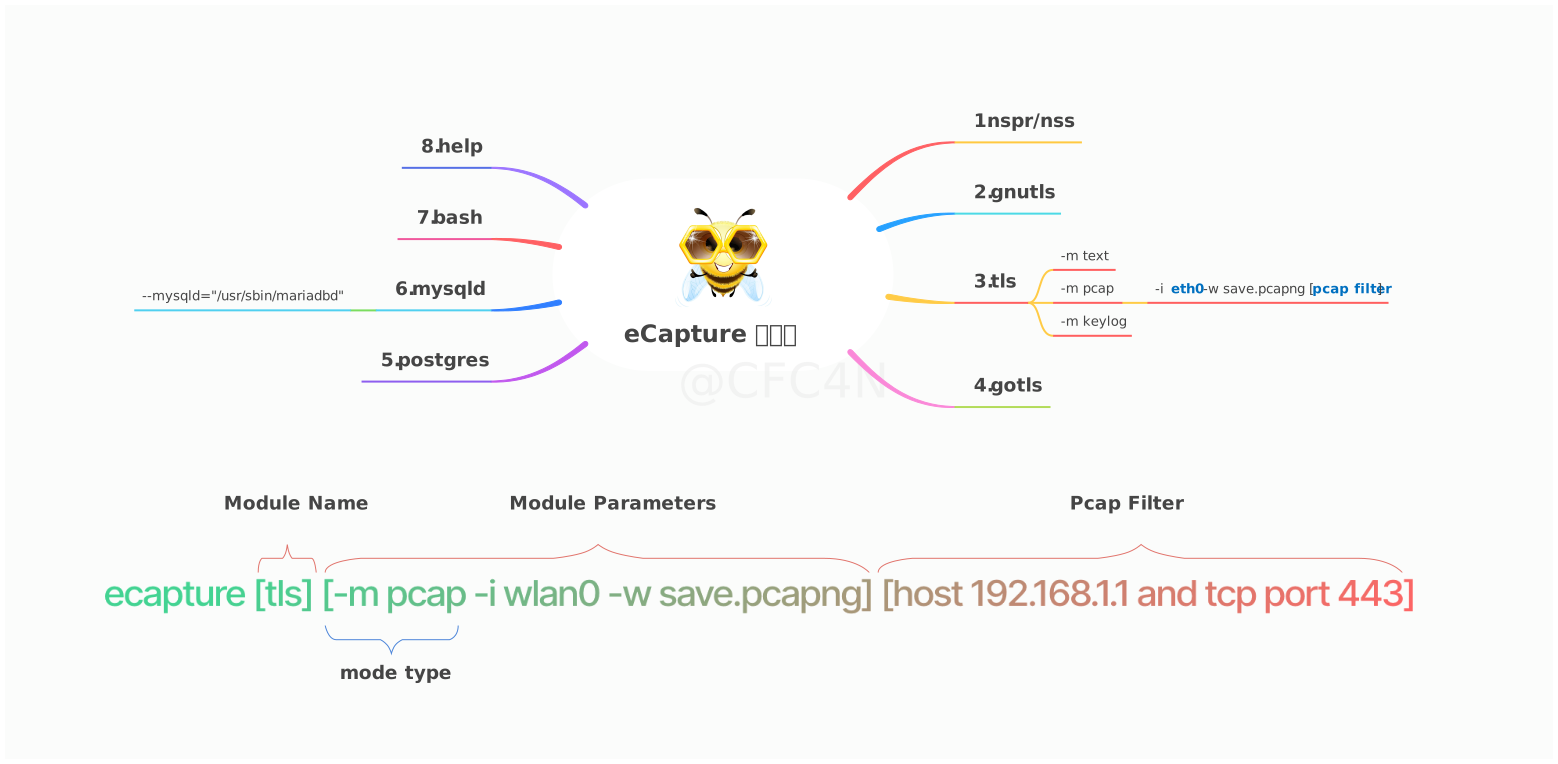
Linux и Android, на x86_64 (ядро 4.18 или новее) и aarch64/arm64 (ядро 5.5 или новее); требования к ядру зависят от архитектуры процессора.Что ещё он может перехватывать, кроме HTTPS-трафика?Всего восемь модулей. Помимо TLS-библиотек (OpenSSL, GnuTLS, NSS, Go TLS) он проверяет команды bash и zsh для аудита безопасности хоста, а также захватывает SQL-запросы из mysqld 5.6/5.7/8.0 и MariaDB, плюс PostgreSQL 10+.
Всего восемь модулей. Помимо TLS-библиотек (OpenSSL, GnuTLS, NSS, Go TLS) он проверяет команды bash и zsh для аудита безопасности хоста, а также захватывает SQL-запросы из mysqld 5.6/5.7/8.0 и MariaDB, плюс PostgreSQL 10+.Как выгрузить перехваченные данные?У модуля OpenSSL три режима: text выводит открытый текст в терминал или файл; pcap/pcapng сохраняет файл pcapng, который можно открыть в Wireshark (HTTP/1.x, HTTP/2 поверх TCP и HTTP/3 QUIC поверх UDP); keylog записывает мастер-ключи TLS для расшифровки в Wireshark или tshark. События также можно пересылать в такие инструменты, как Burp Suite.
У модуля OpenSSL три режима: text выводит открытый текст в терминал или файл; pcap/pcapng сохраняет файл pcapng, который можно открыть в Wireshark (HTTP/1.x, HTTP/2 поверх TCP и HTTP/3 QUIC поверх UDP); keylog записывает мастер-ключи TLS для расшифровки в Wireshark или tshark. События также можно пересылать в такие инструменты, как Burp Suite.Есть ли GUI, или это только терминал?Есть eCaptureQ — кроссплатформенный GUI-клиент на Rust + Tauri + React. В режиме Integrated он работает на Linux/Android, а в режиме Remote клиенты на Windows, macOS или Linux подключаются к сервису eCapture, запущенному на другой машине.
Есть eCaptureQ — кроссплатформенный GUI-клиент на Rust + Tauri + React. В режиме Integrated он работает на Linux/Android, а в режиме Remote клиенты на Windows, macOS или Linux подключаются к сервису eCapture, запущенному на другой машине.Как он расшифровывает TLS без CA-сертификата?Он не перехватывает сеть, а подключает eBPF uprobes к функциям SSL/TLS-библиотеки внутри целевого процесса и читает открытый текст и TLS-ключи напрямую — поэтому сертификата, которому должны доверять клиенты, просто нет. Смещение uprobe можно даже задать вручную, чтобы поддержать программы со статически слинкованным OpenSSL.
Он не перехватывает сеть, а подключает eBPF uprobes к функциям SSL/TLS-библиотеки внутри целевого процесса и читает открытый текст и TLS-ключи напрямую — поэтому сертификата, которому должны доверять клиенты, просто нет. Смещение uprobe можно даже задать вручную, чтобы поддержать программы со статически слинкованным OpenSSL.What are similar projects?kubeshark, brook, openssl, cilium, scapy, openvpn, smartdns, vps-security-enhancement-scripts
kubeshark, brook, openssl, cilium, scapy, openvpn, smartdns, vps-security-enhancement-scriptsWhich topics is it in?packet-capture, network-analysis, ebpf, ssl, network-security, tls, mysql, observability, encryption, golang, security-tools, c
packet-capture, network-analysis, ebpf, ssl, network-security, tls, mysql, observability, encryption, golang, security-tools, c