




What is this?
 An open-source command-line security tool that uses eBPF to capture SSL/TLS traffic in plaintext — no CA certificate installation or MITM proxy needed. It can also audit shell commands and database queries on the host.
An open-source command-line security tool that uses eBPF to capture SSL/TLS traffic in plaintext — no CA certificate installation or MITM proxy needed. It can also audit shell commands and database queries on the host.Is this a library I add to my own code, or a standalone tool?A standalone command-line tool you run with sudo on the machine you want to monitor — not a library. There is also eCaptureQ, a separate cross-platform GUI client built with Rust, Tauri and React.
A standalone command-line tool you run with sudo on the machine you want to monitor — not a library. There is also eCaptureQ, a separate cross-platform GUI client built with Rust, Tauri and React.How do I get it running?Download the ELF zip for your architecture from GitHub Releases, unzip it and run 'sudo ecapture --help'. On Linux you can also use the Docker image; the tool auto-detects the system's OpenSSL library and starts capturing plaintext.
Download the ELF zip for your architecture from GitHub Releases, unzip it and run 'sudo ecapture --help'. On Linux you can also use the Docker image; the tool auto-detects the system's OpenSSL library and starts capturing plaintext.Do I need root access or any certificates to run it?Root is required — either ROOT permission or specific Linux capabilities, and a Minimum Privileges guide documents the least-privilege setup. No certificates to install: it supports OpenSSL, LibreSSL, BoringSSL, GnuTLS, NSS/NSPR and Go's TLS library out of the box.
Root is required — either ROOT permission or specific Linux capabilities, and a Minimum Privileges guide documents the least-privilege setup. No certificates to install: it supports OpenSSL, LibreSSL, BoringSSL, GnuTLS, NSS/NSPR and Go's TLS library out of the box.What are the biggest gotchas to know upfront?Windows and macOS are not supported, and the Docker image is Linux-only — it runs privileged, which the README flags as a security note. For statically compiled OpenSSL programs, pass the binary path via the --libssl flag.
Windows and macOS are not supported, and the Docker image is Linux-only — it runs privileged, which the README flags as a security note. For statically compiled OpenSSL programs, pass the binary path via the --libssl flag.Which systems does it run on?Linux and Android, on x86_64 (kernel 4.18 or newer) and aarch64/arm64 (kernel 5.5 or newer); kernel requirements differ per CPU architecture.
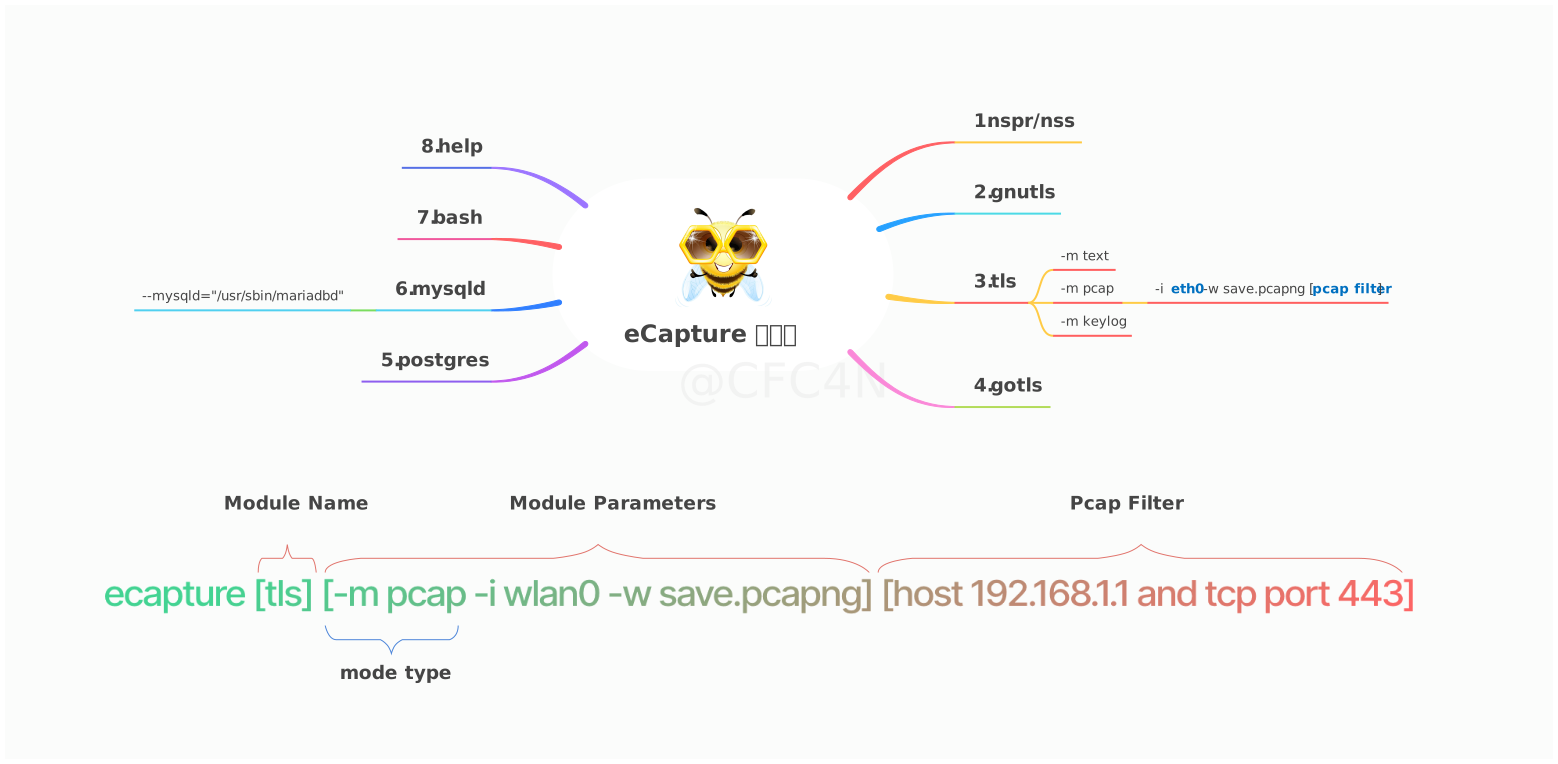
Linux and Android, on x86_64 (kernel 4.18 or newer) and aarch64/arm64 (kernel 5.5 or newer); kernel requirements differ per CPU architecture.What can it capture besides HTTPS traffic?Eight modules in total. Besides TLS libraries (OpenSSL, GnuTLS, NSS, Go TLS) it audits bash and zsh commands for host security audit, and captures SQL queries from mysqld 5.6/5.7/8.0 and MariaDB plus PostgreSQL 10+.
Eight modules in total. Besides TLS libraries (OpenSSL, GnuTLS, NSS, Go TLS) it audits bash and zsh commands for host security audit, and captures SQL queries from mysqld 5.6/5.7/8.0 and MariaDB plus PostgreSQL 10+.How do I get the captured data out?The OpenSSL module has three modes: text prints plaintext to the terminal or a file; pcap/pcapng saves a pcapng file you can open in Wireshark (HTTP/1.x, HTTP/2 over TCP and HTTP/3 QUIC over UDP); keylog writes TLS master secrets for Wireshark or tshark decryption. Events can also be forwarded to tools like Burp Suite.
The OpenSSL module has three modes: text prints plaintext to the terminal or a file; pcap/pcapng saves a pcapng file you can open in Wireshark (HTTP/1.x, HTTP/2 over TCP and HTTP/3 QUIC over UDP); keylog writes TLS master secrets for Wireshark or tshark decryption. Events can also be forwarded to tools like Burp Suite.Is there a GUI, or is it terminal-only?There is eCaptureQ, a cross-platform GUI client written in Rust + Tauri + React. Integrated mode runs on Linux/Android, and Remote mode lets Windows, macOS or Linux clients connect to an eCapture service running elsewhere.
There is eCaptureQ, a cross-platform GUI client written in Rust + Tauri + React. Integrated mode runs on Linux/Android, and Remote mode lets Windows, macOS or Linux clients connect to an eCapture service running elsewhere.How does it decrypt TLS without a CA certificate?Instead of intercepting the network, it attaches eBPF uprobes to the SSL/TLS library functions inside the target process and reads plaintext and TLS keys directly, so there is no certificate for clients to trust. The uprobe offset can even be set manually to support statically compiled OpenSSL.
Instead of intercepting the network, it attaches eBPF uprobes to the SSL/TLS library functions inside the target process and reads plaintext and TLS keys directly, so there is no certificate for clients to trust. The uprobe offset can even be set manually to support statically compiled OpenSSL.What are similar projects?kubeshark, brook, openssl, cilium, scapy, openvpn, smartdns, vps-security-enhancement-scripts
kubeshark, brook, openssl, cilium, scapy, openvpn, smartdns, vps-security-enhancement-scriptsWhich topics is it in?packet-capture, network-analysis, ebpf, ssl, network-security, tls, mysql, observability, encryption, golang, security-tools, c
packet-capture, network-analysis, ebpf, ssl, network-security, tls, mysql, observability, encryption, golang, security-tools, c