Contents
Start playing
Download the package for your platform from the latest release.
| Platform |
Package |
First launch |
| Windows x64 |
LostOdysseyRecomp-windows-x64-<version>.zip |
Extract the whole ZIP to a writable folder and run LostOdysseyRecomp.exe. Needs a CPU with AVX. |
| Linux x64 |
LostOdysseyRecomp-linux-x64-<version>.AppImage |
Make it executable with chmod +x, then run it. |
| Linux x64 |
LostOdysseyRecomp-linux-x64-<version>.flatpak |
Install the Freedesktop 26.08 runtime, then the bundle (commands). |
| macOS arm64 |
LostOdysseyRecomp-macos-arm64-<version>.dmg |
Drag LostOdysseyRecomp.app to Applications. Needs an Apple Silicon Mac with macOS 15 or later. |
| Android arm64 |
LostOdysseyRecomp-android-arm64-<version>.apk |
Install the APK and open it once. Needs a 64-bit Android 8.0+ device with Vulkan. |
- Import your game data. The importer opens when no game is found. Select an extracted game folder,
default.xex, an ISO or GOD data.
- Get the shaders. On the first start the game offers precompiled shaders for your renderer; if you skip, it compiles them once.
- Add the other discs and DLC in Settings → System → Import discs & DLC. With all four discs imported, the game changes discs on its own.
Disc 1 is required to start. Use one supported four-disc set (Asian multilingual or USA/Europe) and don't mix editions; the installation guide shows how to check yours.
macOS
The app is not notarized, so macOS blocks the first launch: try to open it once, then choose Open Anyway in System Settings → Privacy & Security. To update, replace the app with the new one. Step-by-step guide.
Android
- Game data: opening the app creates
Android/data/io.github.freefrank.lostodyssey/files/game/. Copy your extracted disc1–disc4 into it over USB, or import disc images with Game folder → Import disc images…. CTRL → Game folder can point the game at another folder or an SD card.
- Qualcomm devices: the GPU driver page opens before the first start. Download a Turnip driver there.
- Mali devices: the GPU driver page also opens first. Download the recommended PanVK driver there; it needs a Mali-G57, G68, G77, G78 or Mali-G610 and newer GPU.
- Controls: the touch controls hide when a controller is connected. CTRL sets their size, opacity and layout. Hide all touch controls hides them completely; reveal the system bars or use Android Back to show CTRL for 4 seconds.
- Updates: a new APK installs over the old one and keeps your saves.
- Saves: CTRL → Saves and logs exports saves to a ZIP and imports ZIPs from a PC, Xenia or the RGH save converter. Its Keep saves in the game folder option uses
<game folder>/save/ for syncing with a PC; it is off by default and applies at the next app start.
- Logs: CTRL → Saves and logs → Export logs saves them to a ZIP for a bug report (details).
Step-by-step guide.
Nintendo Switch
Ad0ky maintains an experimental homebrew build for Switch consoles running custom firmware. It is not part of the releases here: download it from Ad0ky's releases, which also have the install steps.
HDR
Turn on HDR in Graphics and save. HDR peak brightness opens a calibration page; LB / RB switch between the game scene and a test pattern. HDR is available on Windows, Linux and macOS.
Features
| Feature |
What you get |
| Import |
Folder, XEX, ISO and GOD sources, DLC and disc replacement. Your original files are not changed. |
| Languages |
Menus in English, Japanese, Korean, Traditional Chinese and Simplified Chinese. Game languages depend on your edition. |
| Display |
Windowed or fullscreen, monitor and GPU choice, 16:9 and 21:9 resolutions (taller screens such as 16:10 are filled), HDR and Brightness / Gamma. Cutscenes and the pause overlay use a centred 16:9 area. |
| Anti-aliasing and upscaling |
FXAA, SMAA, TAA, DLSS, FSR 3.1, XeSS (Windows Direct3D 12) and MetalFX (macOS). |
| Graphics options |
Shadow resolution 1×/2×/4×, SSAO/GTAO, anisotropic filtering, depth of field and bloom. |
| Frame rate |
30/60/90/120 FPS; VSync Off, On or FreeSync / G-SYNC Compatible VRR. Performance overlay shows the frame rate, or a bar with the upscaler, frame generation, CPU and GPU load. |
| Loading speed |
Graphics → Loading speed: Original keeps the Xbox 360 loading pace; Fast (default) loads at a higher frame rate. Effects play at normal speed either way. |
| Frame generation |
DLSS, FSR or XeSS on Windows Direct3D 12; DLSS on Windows Vulkan. It pauses while cinematic black bars are shown and resumes in gameplay. |
| DLSS 5 neural rendering |
Windows with DLSS on an RTX GPU. It needs nvngx_dlssnr.dll, which the game does not include: put your own copy (tested with 310.8.0.0) next to LostOdysseyRecomp.exe and restart. |
| Shaders |
Precompiled shaders downloaded on the first start, or compiled once and cached. |
| Audio |
Stereo, 5.1 surround, or matrix surround for an AV receiver. Cutscene dialogue has its own volume. |
| Input |
Controllers, keyboard and rumble; touch controls on Android. |
| Mods |
Windows only: texture, model, menu and font replacements, cutscene videos, text translations and language packs (which can add letters the game's fonts lack), and PlayStation button prompts, installed by hand or with Mod Organizer 2 (its plugins are in the Windows ZIP). Other platforms may load mods but are not supported. See the modding guide. Ready-made mods, such as the 4x HD texture pack, are shared in the #mods forum on Discord. |
| Achievements |
The game's 36 Xbox 360 achievements, with an Xbox 360-style notification and sound when you unlock one. Settings → System → Achievements lists them with your unlock dates and turns the notification on, silent or off. An achievement.wav next to settings.ini replaces the sound. |
| Discord status |
Windows, Linux and macOS: Discord Rich Presence shows your location, disc and activity. Settings → System → Discord status is on by default; changes take effect immediately. If status is missing, check the runtime log for connection and activity diagnostics. |
| Debug menu |
Render captures, Save Anywhere, encounter switches, teleport, fast-forward and cheats. See Debug menu. |
Controls
Controllers and the keyboard work together for player 1. If your controller is not recognized, see the input reference.
| Game action |
Keyboard |
| Start / Back |
Enter / Backspace |
| A / B / X / Y |
Z / X / A / S |
| D-pad / left stick |
Arrow keys / I, J, K, L |
| Left / right shoulder |
Q / W |
| Left / right trigger |
E / R |
| Title menu: Settings (Y) |
S |
| Title menu: Quit game (Back / View) |
Backspace |
| Debug Menu |
F1 |
These are the default keys. Settings → Gameplay → Controls changes the keys and the controller buttons, and sets the button prompts and the vibration strength.
Quitting from the title menu asks for confirmation, with No selected by default.
Press Back to zoom the minimap; hold it for about half a second to hide the minimap. For Ring actions, use the controller's right trigger or R.
Press F1, or LB+RB on a controller (L1+R1 on PlayStation layouts), to open or close the Debug Menu. The game pauses while it is open. It has three pages, Overview, Teleport and Cheats, and uses the keyboard or a controller.
| Action |
Keyboard |
Controller |
| Select a row |
↑ / ↓ |
D-pad up / down |
| Change a value |
← / → |
D-pad left / right |
| Confirm |
Enter |
A |
| Return or close |
Esc |
B |
| Previous / next page |
Q or Tab / E |
LB / RB |
| Change Cheats category |
Select the category row, then ← / → |
LT / RT |
| Open or close the overlay |
F1 |
LB+RB |
Overview: captures and game actions
Overview shows the current map and has the menu language, Capture render state, Save Anywhere, Return to title (outside battles) and an action that wins the current battle.
- Capture render state: confirm it, then close the menu. The archive is saved in
captures/ with screenshots, rendering data and logs; look through it before sharing.
- Save Anywhere turns on the game's own System → Save.
- Return to title asks for confirmation before returning to the title screen. Unsaved progress will be lost. It is unavailable from the battle transition through the victory/results screens until control returns to the field or world map. Close the save/load screen and wait for saving or loading to finish before using it.
Teleport: positions within the current map
Teleport has a position bookmark, editable X/Y/Z coordinates and the map's points of interest. On the coordinate row, press Enter to pick X, Y or Z and ←/→ to move it. Confirm, then close the menu to move.
Debug Event Room, at the bottom of the page, takes you to the game's own event-debug map (z0g_9). Hold LB and press Up there to open Scenario Jump.
| Category |
What it does |
| Quick tools |
Fast-forward, Encounter rate, Battle EXP ×2, menu animation speed, Allow memory edits, gold and HP/MP. |
| Characters |
HP/MP, EXP (0–99, not the level) and skills. |
| Inventory |
Set items and materials to 1, 10, 50 or 99, or fill whole categories. Sort the in-game inventory to refresh it. |
| Equipment |
Weapon, ring and accessory changes. |
| Party |
Party members, rows and field character. |
| Developer |
The original EDIT MENU: enable it, close F1, press LT+RT. |
Menu animations sets camp menu opening, closing and submenu transitions to Normal (1×), Fast (2×) or Faster (4×). The choice is saved; Normal is the default. Gameplay and audio keep their usual speed.
Fast-forward runs at 2×–8× while you hold the selected button (Hold) or after you press it (Toggle). Set it in Cheats → Fast-forward button (next to Speed mode); choose LT (default) or LB. With LT selected, holding RT at the same time blocks fast-forward; with LB selected, RB does. Fast-forward audio defaults to Keep pitch; choose Speed up to raise the pitch with the speed. The choices are saved.
Encounter rate offers Normal, Half, None and Every step. Half skips every other random encounter; Every step starts a battle on each step in areas with random encounters. Story battles and bosses are unaffected. Every step is a temporary testing aid: restarting restores your last Normal/Half/None choice. Battle EXP ×2 is a separate, saved switch for experience earned from won battles.
The EXP bonus applies after the game's level-based calculation and keeps its normal per-battle cap. SP and gold stay the same.
Memory edits are off by default. Back up your save, turn on Allow memory edits, choose an action, confirm Yes and close F1 to apply it.
Files and folders
The Windows ZIP is portable: everything stays in the folder you extracted it to. The AppImage, Flatpak and macOS app keep your files in your user folders:
| Package |
Settings |
Saves, cache and game data |
Logs |
| Windows ZIP |
folder with LostOdysseyRecomp.exe |
same |
same |
| Linux AppImage |
~/.config/lost-odyssey-recomp/ |
~/.local/share/lost-odyssey-recomp/ |
~/.local/state/lost-odyssey-recomp/ |
| Linux Flatpak |
~/.var/app/io.github.freefrank.LostOdysseyRecomp/config/lost-odyssey-recomp/ |
~/.var/app/io.github.freefrank.LostOdysseyRecomp/data/ |
~/.var/app/io.github.freefrank.LostOdysseyRecomp/.local/state/lost-odyssey-recomp/ |
| macOS app |
~/Library/Application Support/LostOdysseyRecomp/ |
same |
~/Library/Logs/LostOdysseyRecomp/ |
| Android |
inside the app |
saves inside the app by default, optionally <game folder>/save/; game data in Android/data/io.github.freefrank.lostodyssey/files/game/ or the chosen folder |
Android/data/io.github.freefrank.lostodyssey/files/logs/ |
| What |
Where |
Notes |
| Saves |
save/ |
Keep when updating. Xenia and Xbox 360 saves can be imported. |
| Profiles |
profile/ |
Keep when updating. |
| Settings |
settings.ini |
Delete it to go back to the default settings. |
| Imported game |
game/ with disc1/–disc4/ and dlc/ |
The importer's default location; game-path.txt remembers another one. |
| Shader cache |
cache/shaders/ |
Rebuilt if deleted. |
| Downloaded shaders |
shaders/ |
|
| Logs |
logs/runtime-*.log |
The last three runs are kept. |
| Render captures |
captures/ |
|
| Mods |
mods/ |
|
More detail is in file locations.
Command-line options
| Option |
Effect |
--game <path> |
Use this game folder (with default.xex or disc1/) or default.xex file, skipping the importer. |
--install |
Open the importer even when a game is already set up. |
--setup |
Windows: open the setup page, then start the game. |
--prepare-shaders-only |
Prepare all shaders, then exit without starting the game. |
LostOdysseyRecomp.exe --game "D:\Games\Lost Odyssey"
./LostOdysseyRecomp-linux-x64-<version>.AppImage --game ~/Games/LostOdyssey
flatpak run io.github.freefrank.LostOdysseyRecomp --game ~/Games/LostOdyssey
| Environment variable |
Effect |
LO_GRAPHICS_API |
d3d12 or vulkan on Windows. |
LO_FPS |
Frame-rate cap; 0 means uncapped. |
LO_FAST_LOADING=0/1 |
Override Loading speed: 0 selects Original pacing; 1 selects Fast. Without the override, loading_transitions=0/2 in settings.ini stores Original/Fast. Fast loading on Android and devices with a detected battery is capped at 4× the selected limit, up to 240 FPS (240 FPS if uncapped). |
LO_NO_UPDATE=1 |
Skip the update check. |
LO_MODS=0 |
Disable mods. |
LO_AUDIO_MUTE=1 |
Mute audio. |
LO_CONTROLLER_RUMBLE=0 |
Turn rumble off. |
LO_OPTISCALER_PATH |
Load your own OptiScaler.dll on Windows (setup). |
Reporting a problem
Open an issue with the version, operating system, graphics backend, GPU and driver, game edition and disc, and the steps or scene that show the problem. Attach the newest logs/runtime-<timestamp>.log. Settings → System → Debug log is on by default. If you turned it off, turn it back on, save and restart before showing the problem again.
For a visual problem, make a render capture while it is on screen. Do not attach game files, saves or personal data.
Optional log collection is off by default; see Privacy.
Screenshots
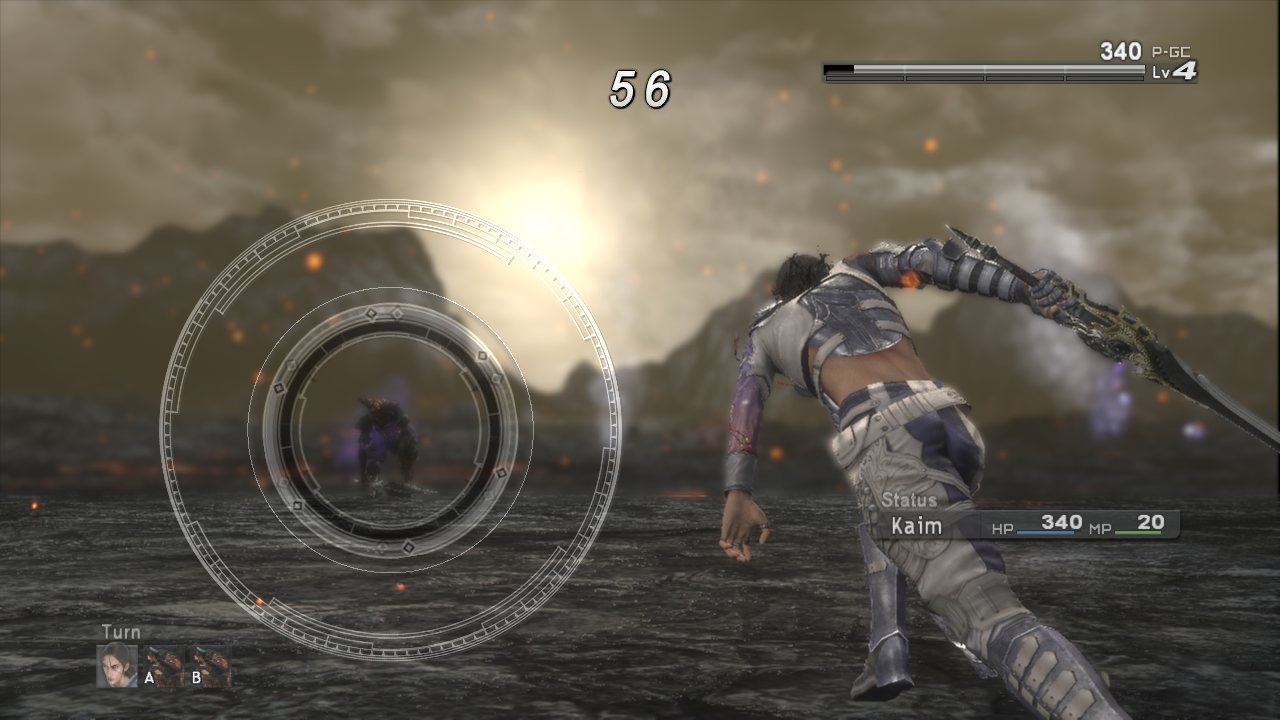
| Ring combat |
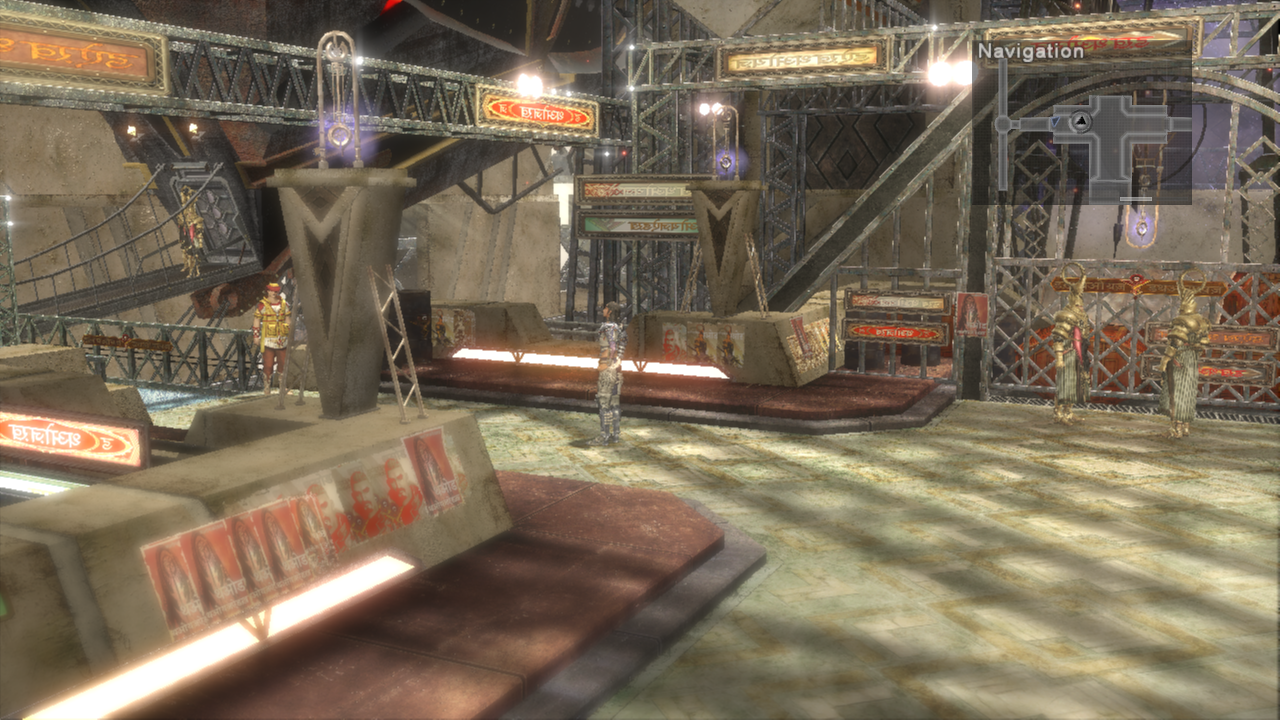
City exploration |
 |
 |
Development
See Building, Developer tools, the roadmap and the documentation index.
Thank you to CarlosVonSexron, Atlas, stratosG, iambRad, Frenzy Fresh, José Antonio Martínez Godoy, C_BAR, Arakon, Efren V, Torresmo, doc_haz, Whitesun and Cristian on Ko-fi, and to Norghat, Morgan and one anonymous supporter on Buy Me a Coffee, for supporting the project.
Credits and game data
Thanks to everyone who sent pull requests and patches: MikeRavenelle, dj5927, Xarishark, navjack, frankzzz, cngjd, faisalkindi and Ad0ky. The macOS port started from MikeRavenelle's Apple Silicon work, and Ad0ky ported the game to the Nintendo Switch on the LostOdysseyNX branch.
With research and tools from UnleashedRecomp, re:Blue, XenonRecomp, XenosRecomp, plume and Xenia. Audio uses the Xenia FFmpeg fork (license). The Android Turnip GPU drivers come from the driver list of the Eden emulator and load through libadrenotools; the Mali PanVK driver comes from panvk-kbase-android.
Lost Odyssey and its assets belong to their respective owners. This is an unofficial project. Supply data extracted from your own discs; do not commit game executables, resource archives, textures, audio, video, generated game code or captures to this repository. Dependencies retain their respective licenses.













 Lost Odyssey Recomp is an experimental native PC/console port of the Xbox 360 JRPG Lost Odyssey, built using static recompilation. It does not include any game assets, so you need your own legal copy of the game.