Latest updates -- SAM 2: Segment Anything in Images and Videos
Please check out our new release on Segment Anything Model 2 (SAM 2).
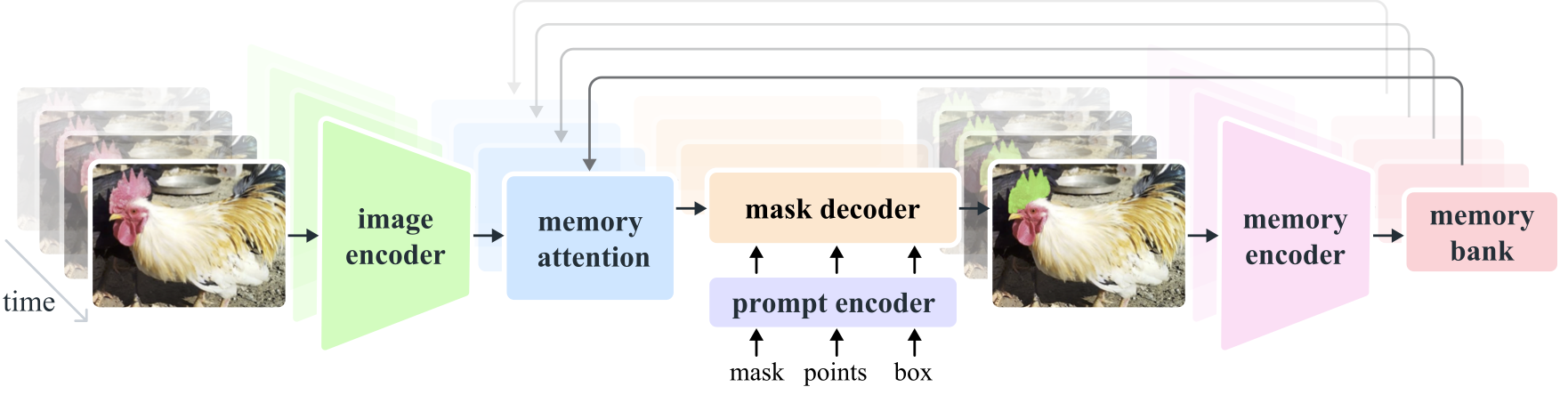
Segment Anything Model 2 (SAM 2) is a foundation model towards solving promptable visual segmentation in images and videos. We extend SAM to video by considering images as a video with a single frame. The model design is a simple transformer architecture with streaming memory for real-time video processing. We build a model-in-the-loop data engine, which improves model and data via user interaction, to collect our SA-V dataset, the largest video segmentation dataset to date. SAM 2 trained on our data provides strong performance across a wide range of tasks and visual domains.
Segment Anything
Meta AI Research, FAIR
Alexander Kirillov, Eric Mintun, Nikhila Ravi, Hanzi Mao, Chloe Rolland, Laura Gustafson, Tete Xiao, Spencer Whitehead, Alex Berg, Wan-Yen Lo, Piotr Dollar, Ross Girshick
[Paper] [Project] [Demo] [Dataset] [Blog] [BibTeX]
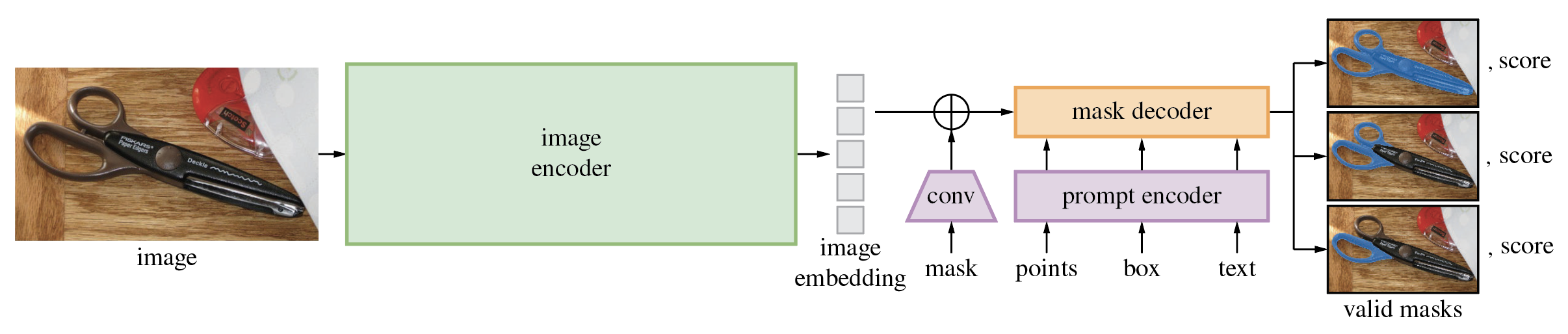
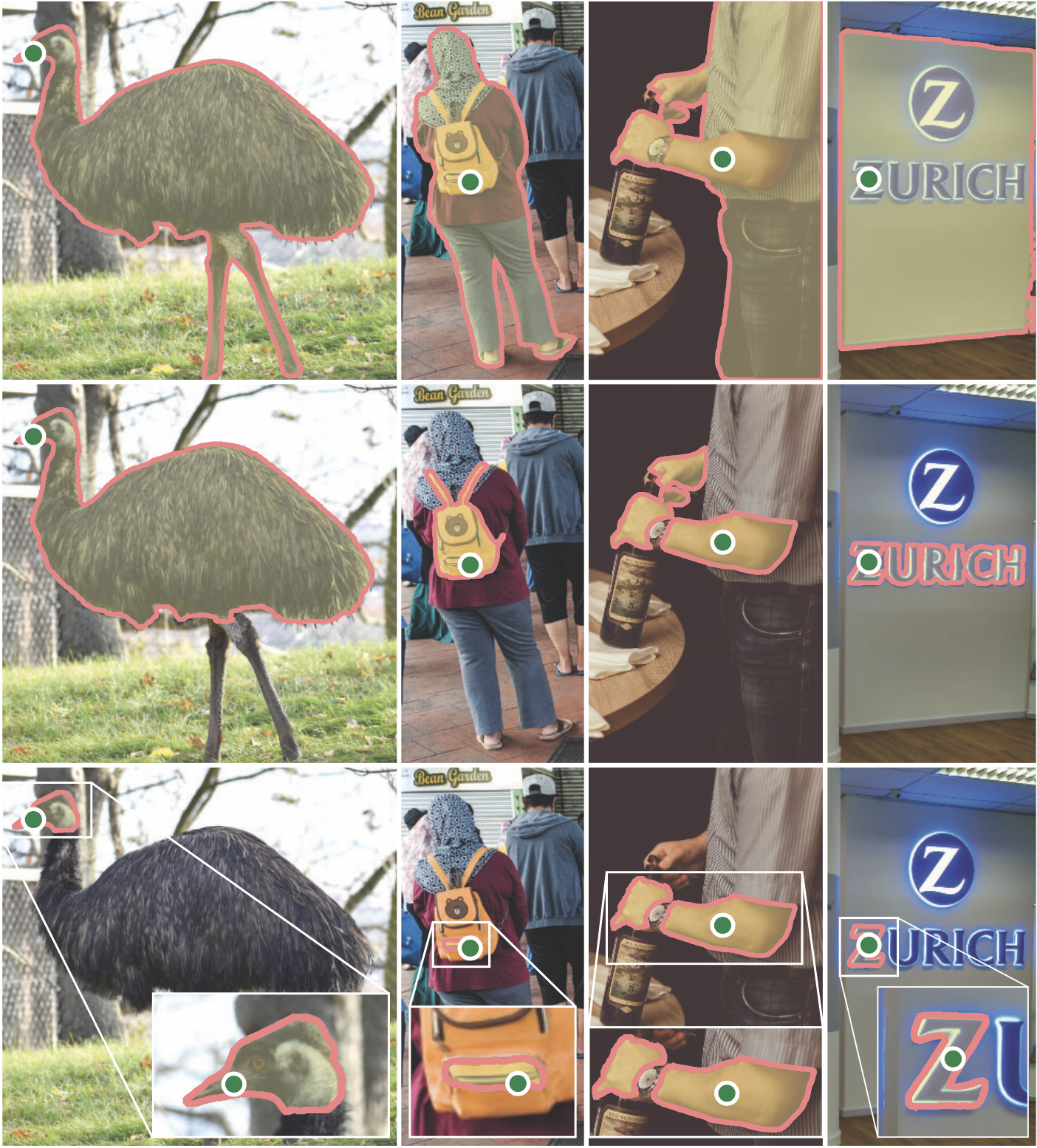
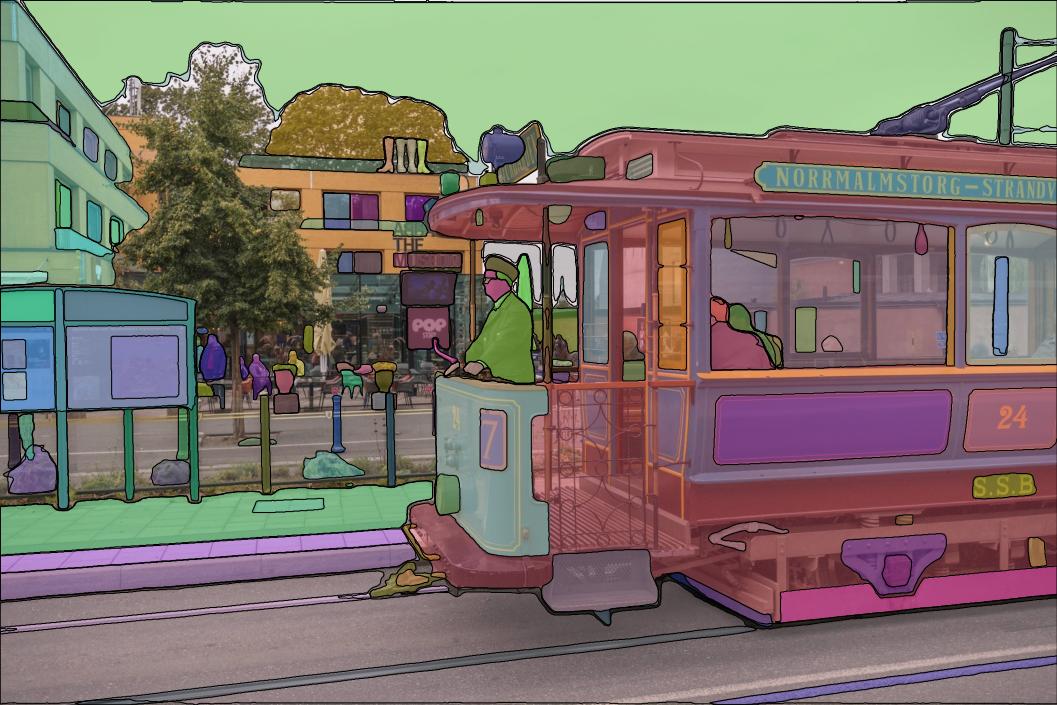
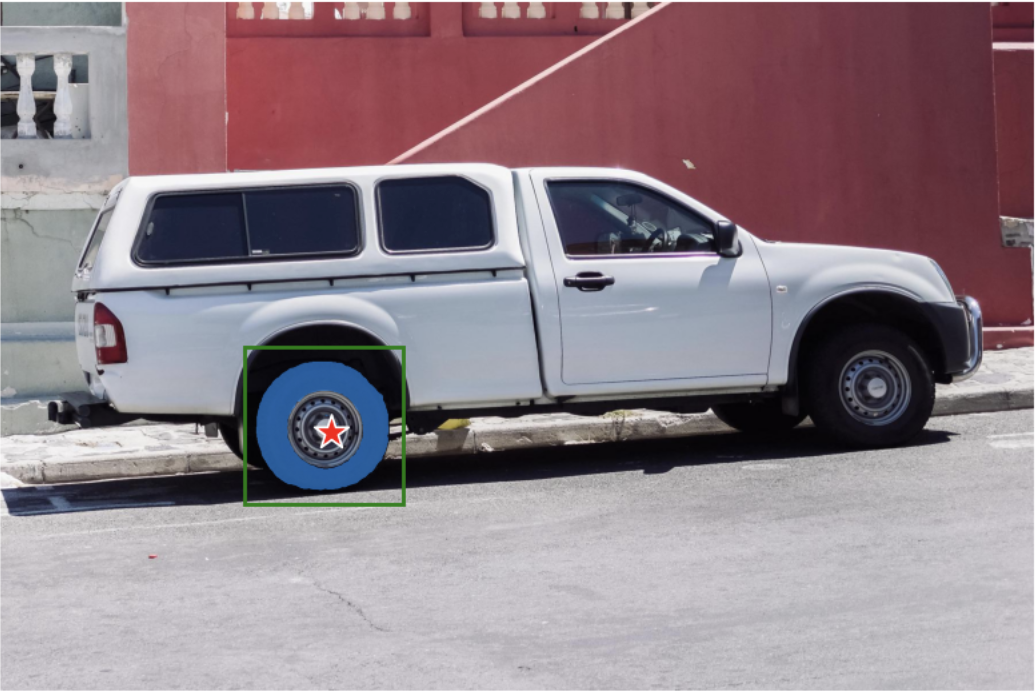
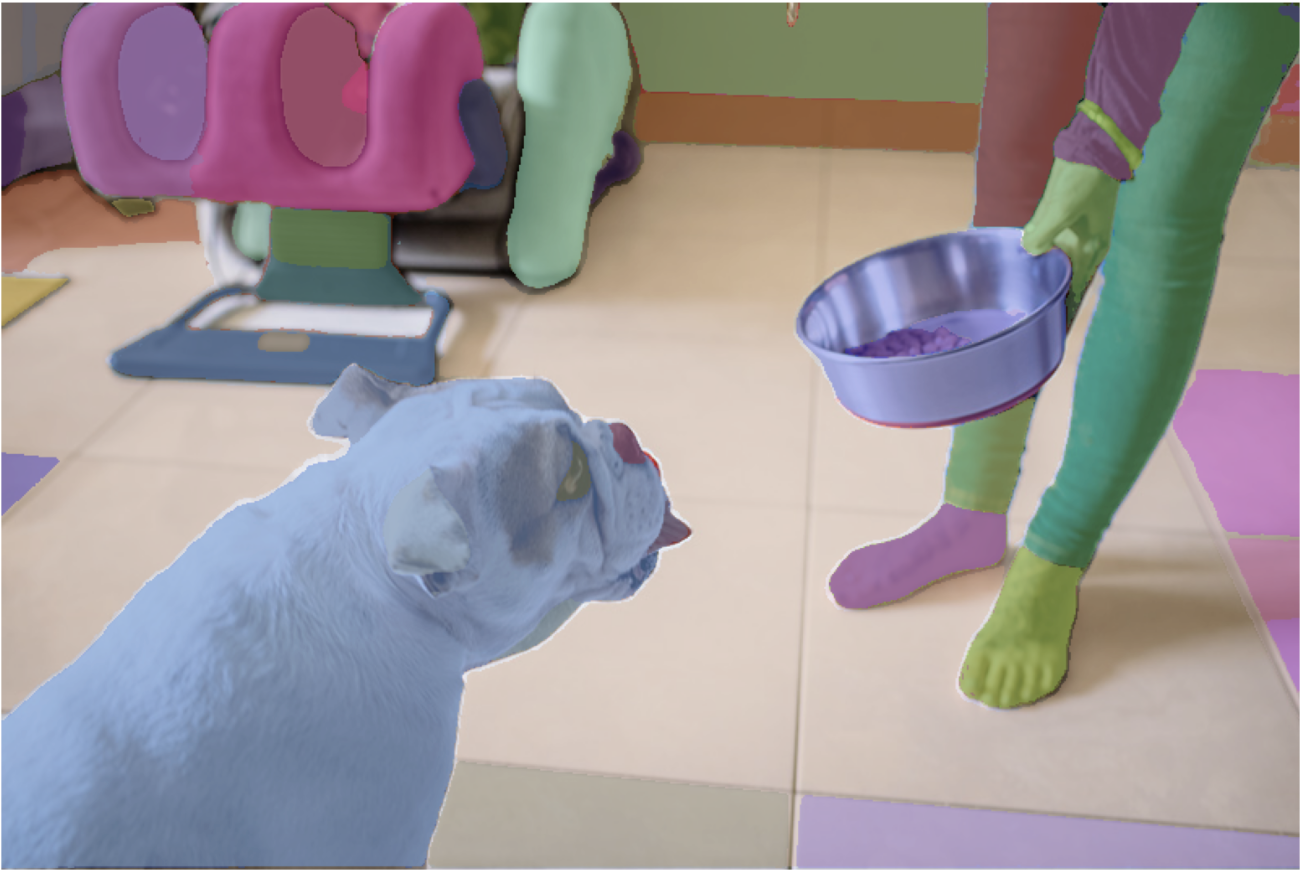
The Segment Anything Model (SAM) produces high quality object masks from input prompts such as points or boxes, and it can be used to generate masks for all objects in an image. It has been trained on a dataset of 11 million images and 1.1 billion masks, and has strong zero-shot performance on a variety of segmentation tasks.
Installation
The code requires python>=3.8, as well as pytorch>=1.7 and torchvision>=0.8. Please follow the instructions here to install both PyTorch and TorchVision dependencies. Installing both PyTorch and TorchVision with CUDA support is strongly recommended.
Install Segment Anything:
pip install git+https://github.com/facebookresearch/segment-anything.git
or clone the repository locally and install with
git clone [email protected]:facebookresearch/segment-anything.git
cd segment-anything; pip install -e .
The following optional dependencies are necessary for mask post-processing, saving masks in COCO format, the example notebooks, and exporting the model in ONNX format. jupyter is also required to run the example notebooks.
pip install opencv-python pycocotools matplotlib onnxruntime onnx
Getting Started
First download a model checkpoint. Then the model can be used in just a few lines to get masks from a given prompt:
from segment_anything import SamPredictor, sam_model_registry
sam = sam_model_registry["<model_type>"](checkpoint="<path/to/checkpoint>")
predictor = SamPredictor(sam)
predictor.set_image(<your_image>)
masks, _, _ = predictor.predict(<input_prompts>)
or generate masks for an entire image:
from segment_anything import SamAutomaticMaskGenerator, sam_model_registry
sam = sam_model_registry["<model_type>"](checkpoint="<path/to/checkpoint>")
mask_generator = SamAutomaticMaskGenerator(sam)
masks = mask_generator.generate(<your_image>)
Additionally, masks can be generated for images from the command line:
python scripts/amg.py --checkpoint <path/to/checkpoint> --model-type <model_type> --input <image_or_folder> --output <path/to/output>
See the examples notebooks on using SAM with prompts and automatically generating masks for more details.
ONNX Export
SAM's lightweight mask decoder can be exported to ONNX format so that it can be run in any environment that supports ONNX runtime, such as in-browser as showcased in the demo. Export the model with
python scripts/export_onnx_model.py --checkpoint <path/to/checkpoint> --model-type <model_type> --output <path/to/output>
See the example notebook for details on how to combine image preprocessing via SAM's backbone with mask prediction using the ONNX model. It is recommended to use the latest stable version of PyTorch for ONNX export.
Web demo
The demo/ folder has a simple one page React app which shows how to run mask prediction with the exported ONNX model in a web browser with multithreading. Please see demo/README.md for more details.
Model Checkpoints
Three model versions of the model are available with different backbone sizes. These models can be instantiated by running
from segment_anything import sam_model_registry
sam = sam_model_registry["<model_type>"](checkpoint="<path/to/checkpoint>")
Click the links below to download the checkpoint for the corresponding model type.
Dataset
See here for an overview of the datastet. The dataset can be downloaded here. By downloading the datasets you agree that you have read and accepted the terms of the SA-1B Dataset Research License.
We save masks per image as a json file. It can be loaded as a dictionary in python in the below format.
{
    "image"                 : image_info,
    "annotations"           : [annotation],
}

image_info {
    "image_id"              : int,              # Image id
    "width"                 : int,              # Image width
    "height"                : int,              # Image height
    "file_name"             : str,              # Image filename
}

annotation {
    "id"                    : int,              # Annotation id
    "segmentation"          : dict,             # Mask saved in COCO RLE format.
    "bbox"                  : [x, y, w, h],     # The box around the mask, in XYWH format
    "area"                  : int,              # The area in pixels of the mask
    "predicted_iou"         : float,            # The model's own prediction of the mask's quality
    "stability_score"       : float,            # A measure of the mask's quality
    "crop_box"              : [x, y, w, h],     # The crop of the image used to generate the mask, in XYWH format
    "point_coords"          : [[x, y]],         # The point coordinates input to the model to generate the mask
}
Image ids can be found in sa_images_ids.txt which can be downloaded using the above link as well.
To decode a mask in COCO RLE format into binary:
from pycocotools import mask as mask_utils
mask = mask_utils.decode(annotation["segmentation"])
See here for more instructions to manipulate masks stored in RLE format.
License
The model is licensed under the Apache 2.0 license.
Contributing
See contributing and the code of conduct.
Contributors
The Segment Anything project was made possible with the help of many contributors (alphabetical):
Aaron Adcock, Vaibhav Aggarwal, Morteza Behrooz, Cheng-Yang Fu, Ashley Gabriel, Ahuva Goldstand, Allen Goodman, Sumanth Gurram, Jiabo Hu, Somya Jain, Devansh Kukreja, Robert Kuo, Joshua Lane, Yanghao Li, Lilian Luong, Jitendra Malik, Mallika Malhotra, William Ngan, Omkar Parkhi, Nikhil Raina, Dirk Rowe, Neil Sejoor, Vanessa Stark, Bala Varadarajan, Bram Wasti, Zachary Winstrom
Citing Segment Anything
If you use SAM or SA-1B in your research, please use the following BibTeX entry.
@article{kirillov2023segany,
  title={Segment Anything},
  author={Kirillov, Alexander and Mintun, Eric and Ravi, Nikhila and Mao, Hanzi and Rolland, Chloe and Gustafson, Laura and Xiao, Tete and Whitehead, Spencer and Berg, Alexander C. and Lo, Wan-Yen and Doll{\'a}r, Piotr and Girshick, Ross},
  journal={arXiv:2304.02643},
  year={2023}
}

 这是 Meta AI 推出的 Segment Anything Model(SAM),一个基础模型,可以根据点或框等提示为图像生成物体掩码,也能自动为图像中的每个物体生成掩码。