Rebalancer

Rebalancer is an assignment solver library that provides a generic and intuitive API for defining any assignment problem and the ability to optimize the assignment given a variety of implemented algorithms.
An assignment problem is any problem that can be defined as a decision of how to assign objects to containers, such that each object is assigned to exactly one container, given that it satisfies a set of constraints/rules and optimizes a set of objectives/goals.
The core solver is written in C++ and runs in a single process with multi-threaded parallelism. Currently, it can handle problems with ~1M objects and containers reasonably well. It's easily extensible to support new solving algorithms and expressions. Independent of the problem definition the user can choose from multiple solving algorithms. The most common are:
- Local search starts with an arbitrary assignment, and keeps performing simple moves (such as moving an object to a different container, swapping two objects, etc.) that are valid and improve the objective, until it can't find new improvements (or hits a user-defined moves limit or time limit). This solver is not guaranteed to find a global optimal solution, but it scales very well and can handle big problems.
- Optimal solver (mixed-integer programming) represents the problem as a set of mixed-integer programming expressions, and solves it using a generic external library (Rebalancer currently supports two commercial solvers, FICO Xpress and Gurobi as well as the open source solver HiGHS). These solvers will find optimal solutions given enough time, but they don't scale to handle huge problems well.
There is a finite (but easily extensible) set of predefined expressions that can be used to represent goals and constraints. A few examples of popular ones:
- Balance: make a given dimension balanced across containers. For example, say the objects are shards and containers are hosts, each shard has a given CPU utilization, and it is desired to distribute shards across hosts in a way that overall CPU utilization of all hosts is as similar as possible.
- Capacity: limit a dimension within containers. For example, say each shard (object) has a memory requirement (dimension), each host (container) has a memory capacity (dimension), and it is required that the sum of memory required by all shards in a host doesn't exceed the memory capacity of the host.
Users interact with Rebalancer via an interface which is available in C++ and Python.
At Meta, Rebalancer has been used for dozens of large-scale resource-allocation
problems, including hardware and server allocation, ML training and inference
placement, traffic routing, and load-balancing migrations. Its design,
algorithms, and production experience are described in
"Optimizing Resource Allocation in Hyperscale Datacenters: Scalability,
Usability, and Experiences",
published at OSDI 2024.
Quick Example
Four tasks, two hosts, one capacity constraint — host0 starts overloaded with
three tasks and host1 has one. Rebalancer finds a balanced 2-2 assignment using
local search or, optionally, a MIP solver backed by HiGHS, Gurobi, or FICO Xpress:
Python
from rebalancer import ProblemSolver
from rebalancer.specs import (
    CapacitySpec, ConstraintSpec, LocalSearchSolverSpec,
    MoveTypeSpec, SingleMoveTypeSpec, SwapMoveTypeSpec, SolverSpec,
)

solver = ProblemSolver(service_name="rebalancer", service_scope="example")
(solver
    .set_object_name("task")
    .set_container_name("host")
    .set_assignment({"host0": ["task0", "task1", "task2"], "host1": ["task3"]})
    .add_object_dimension("memory", {"task0": 10, "task1": 10, "task2": 10, "task3": 10})
    .add_container_dimension("memory", {}, default_value=20.0)
    .add_constraint(ConstraintSpec(capacitySpec=CapacitySpec(
        name="memory_capacity", scope="host", dimension="memory")))
    .add_solver(SolverSpec(localSearchSolverSpec=LocalSearchSolverSpec(
        moveTypeList=[MoveTypeSpec(singleMoveTypeSpec=SingleMoveTypeSpec()),
                      MoveTypeSpec(swapMoveTypeSpec=SwapMoveTypeSpec())])))
)
solution = solver.solve()
print(solution["assignment"])
# → e.g. {'task0': 'host1', 'task1': 'host0', 'task2': 'host0', 'task3': 'host1'}
C++
auto solver = ProblemSolverFactory::makeProblemSolver("rebalancer", "example");
solver->setObjectName("task");
solver->setContainerName("host");
solver->setAssignment({
    {"host0", {"task0", "task1", "task2"}},
    {"host1", {"task3"}},
});
solver->addObjectDimension("memory",
    {{"task0", 10}, {"task1", 10}, {"task2", 10}, {"task3", 10}});
solver->addContainerDimension("memory", {}, /*defaultValue=*/ 20.0);

CapacitySpec cap;
cap.name() = "memory_capacity"; cap.scope() = "host"; cap.dimension() = "memory";
solver->addConstraint(cap);

LocalSearchSolverSpec ls;
ls.moveTypeList() = {ProblemSolver::makeMoveTypeSpec(SingleMoveTypeSpec{}),
                     ProblemSolver::makeMoveTypeSpec(SwapMoveTypeSpec{})};
solver->addSolver(ls);

auto solution = solver->solve();
// solution.assignment() maps task → host
Installation
Build from Source
Ubuntu
# Prereqs
sudo apt install git pip python3-pex libfast-float-dev libgoogle-glog-dev clang-19 clang-tools-19 clang-format-19

# Build Thrift and Folly from source
git clone https://github.com/facebook/fbthrift.git
cd fbthrift/
./build/fbcode_builder/getdeps.py install-system-deps --recursive fbthrift
pip3 install pex --user
./build/fbcode_builder/getdeps.py --scratch-path ./installed --allow-system-packages build fbthrift
cd ..

# Clone
git clone https://github.com/facebook/rebalancer.git

# Configure and build
cd rebalancer/build
cmake -GNinja \
  -DCMAKE_COLOR_DIAGNOSTICS=ON \
  -DCMAKE_PREFIX_PATH="$HOME/fbthrift/installed/installed/folly/lib/cmake/folly;$HOME/fbthrift/installed/installed/fbthrift/lib/cmake/fbthrift;$HOME/fbthrift/installed/installed/fmt/lib/cmake/fmt" \
  -DCMAKE_MODULE_PATH="$HOME/fbthrift/build/fbcode_builder/CMake" \
  -DCMAKE_BUILD_TYPE=Debug ..
ninja
HiGHS (open source MIP solver)
Pick one of the following:
# Option 1: Install via conda
conda install conda-forge::highs

# Option 2: Install via pip
pip install highspy

# Option 3: Build from source
git clone https://github.com/ERGO-Code/HiGHS.git
cd HiGHS && mkdir build && cd build
cmake -GNinja .. && ninja
macOS
Prerequisite: Install Homebrew if you don't have it.
After installing, open a new terminal so the brew command is available
(or run the eval "$(/opt/homebrew/bin/brew shellenv)" line the installer prints).
# Install dependencies
brew install cmake ninja boost fmt folly googletest fbthrift

# Clone
git clone https://github.com/facebook/rebalancer.git

# Configure and build
cd rebalancer/build
cmake -GNinja \
  -DCMAKE_COLOR_DIAGNOSTICS=ON \
  -DCMAKE_PREFIX_PATH="/opt/homebrew/lib/cmake/folly;/opt/homebrew/lib/cmake/fbthrift;/opt/homebrew/lib/cmake/fmt" \
  -DCMAKE_BUILD_TYPE=Debug ..
ninja
Fedora
sudo dnf install boost-devel.x86_64 fbthrift-devel.x86_64 glog-devel.x86_64 gtest-devel.x86_64 gmock-devel.x86_64 fmt-devel.x86_64
After Building
The default build produces the Rebalancer library. To build and run the bundled
examples, pass -DTESTS=ON to CMake and rebuild:
# From rebalancer/build/
cmake -GNinja -DTESTS=ON -DCMAKE_BUILD_TYPE=Debug ..
ninja TasksOnHosts.exe
./TasksOnHosts.exe
This runs the tasks-on-hosts example — distributing tasks across hosts by memory
capacity — and prints the resulting assignment to stdout.
More examples are in algopt/rebalancer/examples/ (shard allocation, web
balancing, knapsack, and others). Each .cpp file in that tree is built as a
standalone executable when -DTESTS=ON is set.
For Python usage, the source build does not produce a Python package.
Use pip install rebalancer instead (see PyPI below).
Install a Prebuilt Package
PyPI
pip install rebalancer
Then try the Python snippet from the Quick Example above.
Debian / Ubuntu
# Primary (requires gh CLI — https://cli.github.com)
gh release download --repo facebook/rebalancer --pattern "*.deb"
sudo dpkg -i rebalancer_*.deb

# Fallback (curl)
curl -sL $(curl -s https://api.github.com/repos/facebook/rebalancer/releases/latest \
  | grep "browser_download_url.*amd64\.deb" | cut -d'"' -f4) -o rebalancer.deb
sudo dpkg -i rebalancer.deb
The package's postinstall script runs ldconfig automatically.
Compile and run the smoke test:
curl -LO https://raw.githubusercontent.com/facebook/rebalancer/main/tools/packages/test_solve.cpp
g++ -std=c++20 test_solve.cpp -I/usr/local/include -L/usr/local/lib -lrebalancer \
    -Wl,-rpath,/usr/local/lib -o test_solve && ./test_solve
# → PASS: 2-2 split achieved
Fedora / RHEL
gh release download --repo facebook/rebalancer --pattern "*.rpm"
sudo rpm -i rebalancer-*.rpm
Compile and run the smoke test:
curl -LO https://raw.githubusercontent.com/facebook/rebalancer/main/tools/packages/test_solve.cpp
g++ -std=c++20 test_solve.cpp -I/usr/local/include -L/usr/local/lib -lrebalancer \
    -Wl,-rpath,/usr/local/lib -o test_solve && ./test_solve
# → PASS: 2-2 split achieved
macOS Homebrew
Note: A Homebrew tap is coming. Until then, install from the formula file
directly — Homebrew will fetch the prebuilt bottle from GitHub Releases.
brew install https://raw.githubusercontent.com/facebook/rebalancer/main/Formula/rebalancer.rb
Compile and run the smoke test:
curl -LO https://raw.githubusercontent.com/facebook/rebalancer/main/tools/packages/test_solve.cpp
clang++ -std=c++20 test_solve.cpp \
    -I$(brew --prefix rebalancer)/include \
    -L$(brew --prefix rebalancer)/lib -lrebalancer \
    -Wl,-rpath,$(brew --prefix rebalancer)/lib \
    -o test_solve && ./test_solve
# → PASS: 2-2 split achieved
Rebalancer Explorer
Rebalancer Explorer is a web UI for inspecting and analyzing solver runs. It lets
you browse a problem's objects, containers, constraints, and goals, and see how a
solution scores against them. This makes it a handy way to understand and debug
solver behavior.
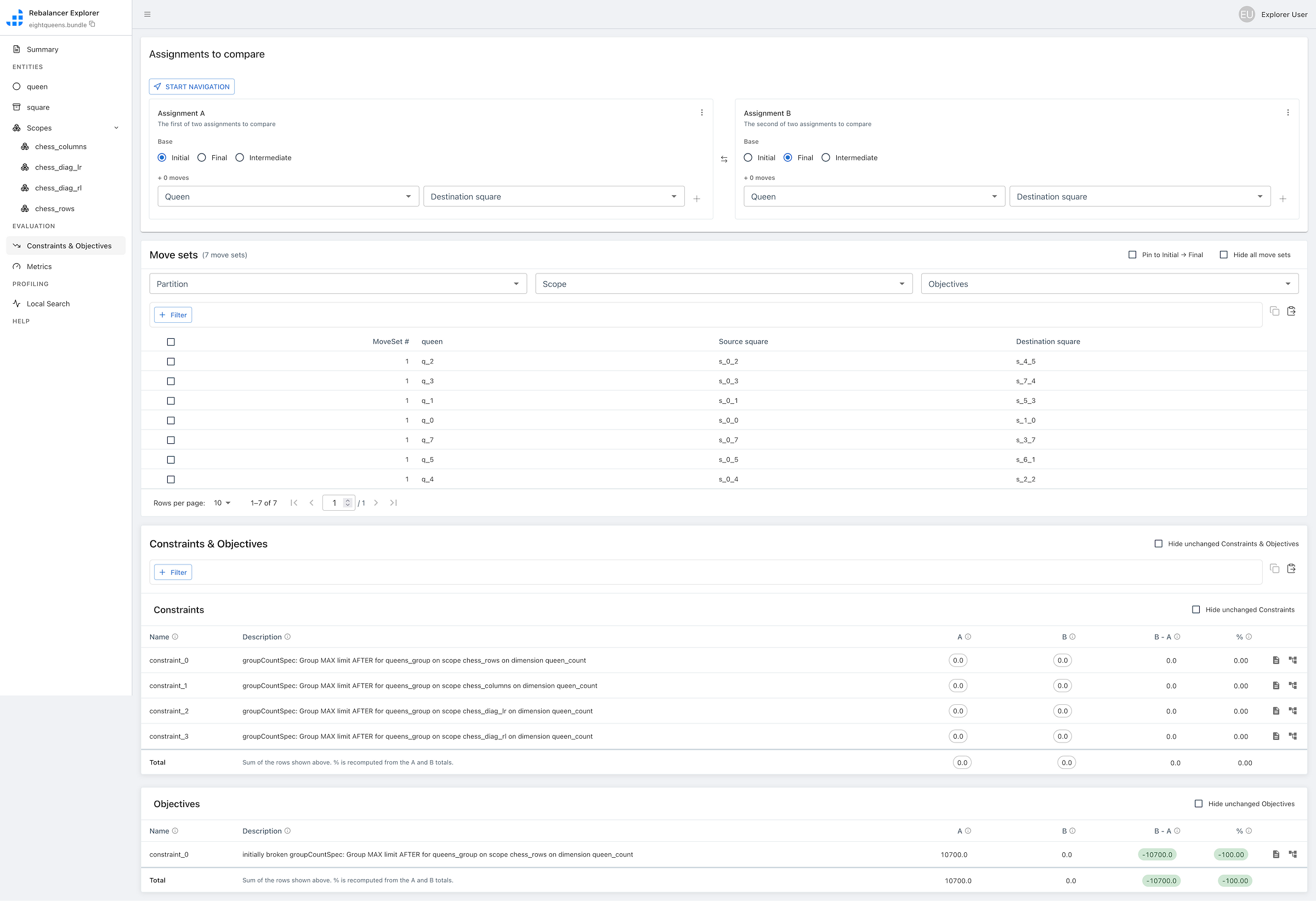
Under the hood, the Explorer backend is a C++ Thrift service that serves run data
directly from the solver. A small JSON proxy sits in front of it and exposes that
Thrift API over plain HTTP (POST /v2/<method>); the web UI calls the proxy
rather than the Thrift service directly, so the frontend needs no Thrift
toolchain and runs anywhere Node runs.
Run with Docker Compose
The quickest way to try it is the bundled docker-compose.yml, which builds and
wires up every piece — the C++ backend, the JSON proxy, and the Next.js app. From
the repository root:
docker compose up --build
Then open http://localhost:3000.
Compose also seeds a shared volume with example problem bundles, so you can load
one from the UI by name (e.g. the
sudoku.py example as
sudoku.bundle, or the
EightQueens.cpp
example as eightqueens.bundle) and explore a sample run without setting up your
own.
For running the app directly with Node (e.g. for frontend development), see
algopt/rebalancer/explorer/app/README.md.
Development Setup
Pre-commit hooks
This project uses pre-commit to run clang-format automatically before each commit.
pip install pre-commit
pre-commit install
To manually check all files:
pre-commit run --all-files
Notes on Contributing
A complexity of contributing to rebalancer is that it must compile both on Meta's build infrastructure as well as in the open source world. This dual requirement has led to a somewhat strange CMake design where CMake searches the entire directory tree for files it can build and then classifies them as library files, tests, benchmarks, or other executables. Anything that isn't a test, benchmark, or executable is bundled into the Rebalancer library which is linked against the executables. This means that if you add files to the project, you'll need to re-run CMake manually to ensure that it detects these files and bundles them.
Document/website development
- Development
- Enter the website/ directory.
- Run
yarn to install all the various things you'll want and need.
- Run
npm build to build the site.
- Run
npm run start to start a development server to preview the site.
- Deployment
- If you push a branch or make a pull request containing changes to the website/ directory or docs.yml that will launch a GitHub Action to rebuild the docs.
- The deployment step will only step will only be run if the base branch is
main or docs. This branches can only be committed to by members of the core development team.
- View the website at: https://facebook.github.io/rebalancer/
Citing Rebalancer
If you use Rebalancer in your research, please cite the following paper:
@inproceedings {298719,
author = {Neeraj Kumar and Pol Mauri Ruiz and Vijay Menon and Igor Kabiljo and Mayank Pundir and Andrew Newell and Daniel Lee and Liyuan Wang and Chunqiang Tang},
title = {Optimizing Resource Allocation in Hyperscale Datacenters: Scalability, Usability, and Experiences},
booktitle = {18th USENIX Symposium on Operating Systems Design and Implementation (OSDI 24)},
year = {2024},
isbn = {978-1-939133-40-3},
address = {Santa Clara, CA},
pages = {507--528},
url = {https://www.usenix.org/conference/osdi24/presentation/kumar},
publisher = {USENIX Association},
month = jul
}
License
Rebalancer is licensed under the Apache 2.0 License. A copy of the license
can be found here.

 Rebalancer 是一门领域特定语言和配套库,用于定义和求解分配问题,比如在约束和目标之下把对象放进容器。