Что это такое?
 ESP-IDF — официальный фреймворк для разработки от Espressif, предназначенный для создания прошивок для SoC, пришедших на смену ESP32/ESP8266. Он включает систему сборки, драйверы, сетевые стеки и инструменты.
ESP-IDF — официальный фреймворк для разработки от Espressif, предназначенный для создания прошивок для SoC, пришедших на смену ESP32/ESP8266. Он включает систему сборки, драйверы, сетевые стеки и инструменты.Это библиотека или полноценный SDK/фреймворк?Это полноценный SDK/фреймворк: в него входят установщик тулчейна, система сборки (idf.py), ОС на базе FreeRTOS, драйверы, сетевые компоненты и примеры проектов, а не одна библиотека.
Это полноценный SDK/фреймворк: в него входят установщик тулчейна, система сборки (idf.py), ОС на базе FreeRTOS, драйверы, сетевые компоненты и примеры проектов, а не одна библиотека.Как настроить проект и собрать его?Установите системные зависимости, запустите скрипт установки (install.bat/install.sh/install.ps1/install.fish), а затем в каждой оболочке перед использованием выполните source export.sh (или export.bat в Windows). После этого запускайте idf.py set-target, idf.py menuconfig, idf.py build и idf.py -p PORT flash monitor.
Установите системные зависимости, запустите скрипт установки (install.bat/install.sh/install.ps1/install.fish), а затем в каждой оболочке перед использованием выполните source export.sh (или export.bat в Windows). После этого запускайте idf.py set-target, idf.py menuconfig, idf.py build и idf.py -p PORT flash monitor.Что нужно установить, прежде чем собирать с ESP-IDF?Нужны системные зависимости для сборки, перечисленные в руководстве Getting Started, и плата или SoC от Espressif, подключённые через последовательный порт для прошивки. Также понадобится копия примера проекта или шаблон esp-idf-template, с которого можно начать.
Нужны системные зависимости для сборки, перечисленные в руководстве Getting Started, и плата или SoC от Espressif, подключённые через последовательный порт для прошивки. Также понадобится копия примера проекта или шаблон esp-idf-template, с которого можно начать.Есть подводные камни при форке или прошивке?Если вы форкаете ESP-IDF на хостинг Git, отличный от GitHub, сабмодули не подтянутся автоматически, поэтому после клонирования нужно выполнить tools/set-submodules-to-github.sh. Кроме того, idf.py flash не стирает существующее содержимое флеш-памяти, поэтому изменения разделов или OTA могут потребовать явного запуска idf.py erase-flash.
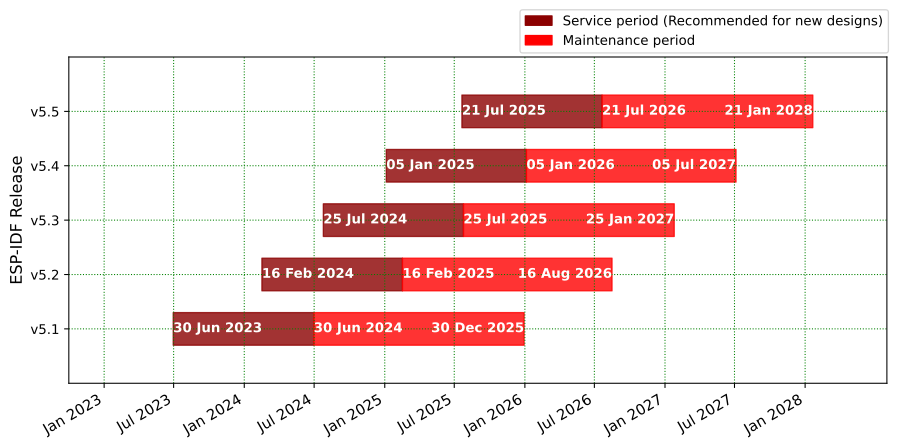
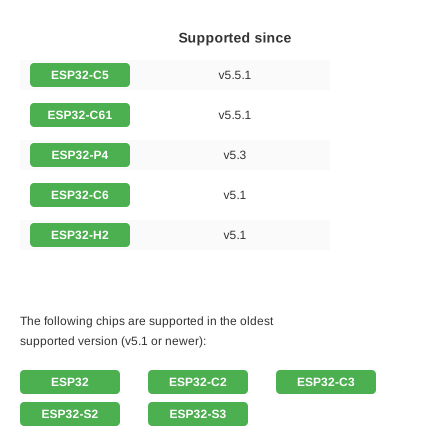
Если вы форкаете ESP-IDF на хостинг Git, отличный от GitHub, сабмодули не подтянутся автоматически, поэтому после клонирования нужно выполнить tools/set-submodules-to-github.sh. Кроме того, idf.py flash не стирает существующее содержимое флеш-памяти, поэтому изменения разделов или OTA могут потребовать явного запуска idf.py erase-flash.Какие чипы поддерживаются?Поддерживаются современные SoC от Espressif, выпущенные начиная с 2016 года. Более старые ESP8266/ESP8285 используют отдельный RTOS SDK, а у каждой серии чипов и каждого релиза есть своя документация.
Поддерживаются современные SoC от Espressif, выпущенные начиная с 2016 года. Более старые ESP8266/ESP8285 используют отдельный RTOS SDK, а у каждой серии чипов и каждого релиза есть своя документация.Можно ли в ESP-IDF смотреть вывод из последовательного порта и логи сбоев?Да, idf.py monitor использует инструмент esp-idf-monitor, чтобы показывать вывод из последовательного порта и расшифровывать дампы сбоев. Можно сразу объединить команды в idf.py flash monitor, чтобы прошить плату и смотреть логи за один шаг.
Да, idf.py monitor использует инструмент esp-idf-monitor, чтобы показывать вывод из последовательного порта и расшифровывать дампы сбоев. Можно сразу объединить команды в idf.py flash monitor, чтобы прошить плату и смотреть логи за один шаг.Как пересобрать только приложение без перепрошивки загрузчика?Используйте idf.py app, чтобы собрать только приложение, и idf.py app-flash, чтобы прошить только его. При изменении исходников сборка выполнится автоматически, а загрузчик и таблица разделов будут пропущены.
Используйте idf.py app, чтобы собрать только приложение, и idf.py app-flash, чтобы прошить только его. При изменении исходников сборка выполнится автоматически, а загрузчик и таблица разделов будут пропущены.What are similar projects?arduino-esp32, tinygo, esp32-c3-adblock, muse-gadget-sdk, Arduino, PixelFonts, oomwoo, voiceshell-muse-bridge
arduino-esp32, tinygo, esp32-c3-adblock, muse-gadget-sdk, Arduino, PixelFonts, oomwoo, voiceshell-muse-bridge