What is this?
 ESP-IDF is Espressif's official development framework for building firmware for their ESP32/ESP8266-successor SoCs, covering build system, drivers, networking stacks and tools.
ESP-IDF is Espressif's official development framework for building firmware for their ESP32/ESP8266-successor SoCs, covering build system, drivers, networking stacks and tools.Is this a library or a full SDK/framework?It's a full SDK/framework: it bundles the toolchain installer, build system (idf.py), FreeRTOS-based OS, drivers, networking, and example projects, not just a single library.
It's a full SDK/framework: it bundles the toolchain installer, build system (idf.py), FreeRTOS-based OS, drivers, networking, and example projects, not just a single library.How do I set up a project and build it?Install host dependencies, run the install script (install.bat/install.sh/install.ps1/install.fish), then source export.sh (or export.bat on Windows) in each shell before use. From there run idf.py set-target, idf.py menuconfig, idf.py build, and idf.py -p PORT flash monitor.
Install host dependencies, run the install script (install.bat/install.sh/install.ps1/install.fish), then source export.sh (or export.bat on Windows) in each shell before use. From there run idf.py set-target, idf.py menuconfig, idf.py build, and idf.py -p PORT flash monitor.What do I need before I can build with ESP-IDF?You need the host build dependencies listed in the Getting Started guide and an Espressif SoC/board connected via serial port for flashing; a copy of an example project or the esp-idf-template to start from.
You need the host build dependencies listed in the Getting Started guide and an Espressif SoC/board connected via serial port for flashing; a copy of an example project or the esp-idf-template to start from.Any gotchas when forking or flashing?If you fork ESP-IDF to a non-GitHub Git host, submodules won't resolve automatically and you must run tools/set-submodules-to-github.sh after cloning; also idf.py flash does not erase existing flash contents, so partition/OTA changes may need an explicit idf.py erase-flash.
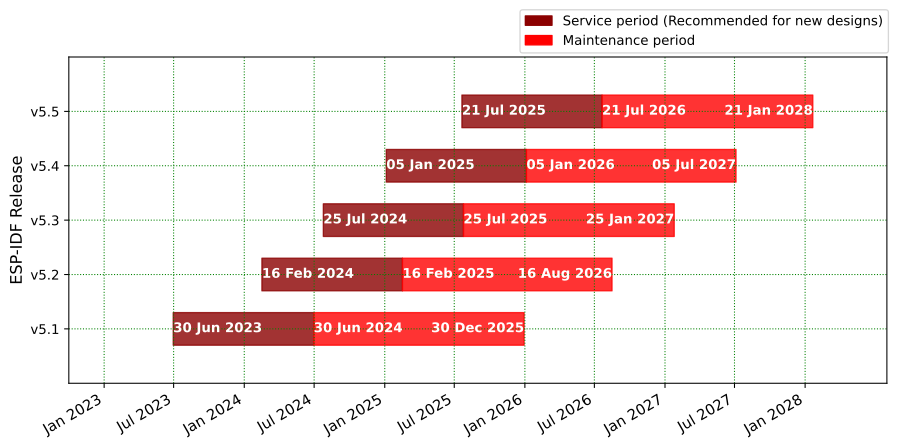
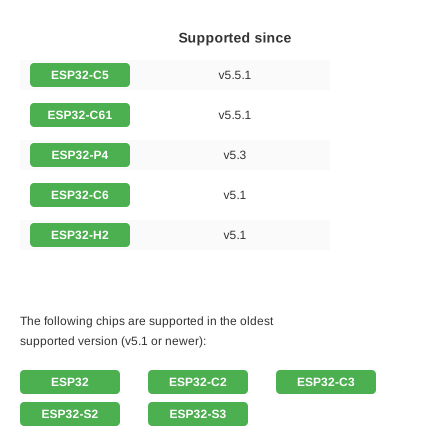
If you fork ESP-IDF to a non-GitHub Git host, submodules won't resolve automatically and you must run tools/set-submodules-to-github.sh after cloning; also idf.py flash does not erase existing flash contents, so partition/OTA changes may need an explicit idf.py erase-flash.Which chips does this support?It supports current Espressif SoCs released from 2016 onward; the older ESP8266/ESP8285 chips use the separate RTOS SDK instead, and each chip series/release has its own matching documentation.
It supports current Espressif SoCs released from 2016 onward; the older ESP8266/ESP8285 chips use the separate RTOS SDK instead, and each chip series/release has its own matching documentation.Can I view serial output and crash logs with ESP-IDF?Yes, idf.py monitor uses the esp-idf-monitor tool to show serial output and decode crash dumps; you can chain it as idf.py flash monitor to flash and watch logs in one step.
Yes, idf.py monitor uses the esp-idf-monitor tool to show serial output and decode crash dumps; you can chain it as idf.py flash monitor to flash and watch logs in one step.How do I only rebuild my app without reflashing the bootloader?Use idf.py app to build just the application and idf.py app-flash to flash only the app; it automatically rebuilds if sources changed, skipping the bootloader and partition table.
Use idf.py app to build just the application and idf.py app-flash to flash only the app; it automatically rebuilds if sources changed, skipping the bootloader and partition table.What are similar projects?arduino-esp32, tinygo, esp32-c3-adblock, muse-gadget-sdk, Arduino, PixelFonts, oomwoo, voiceshell-muse-bridge
arduino-esp32, tinygo, esp32-c3-adblock, muse-gadget-sdk, Arduino, PixelFonts, oomwoo, voiceshell-muse-bridge