
dimensional-drawing README

项目的 README,来自 github.com/enesozturk/dimensional-drawing。合并为一个 markdown 文件:README.md。

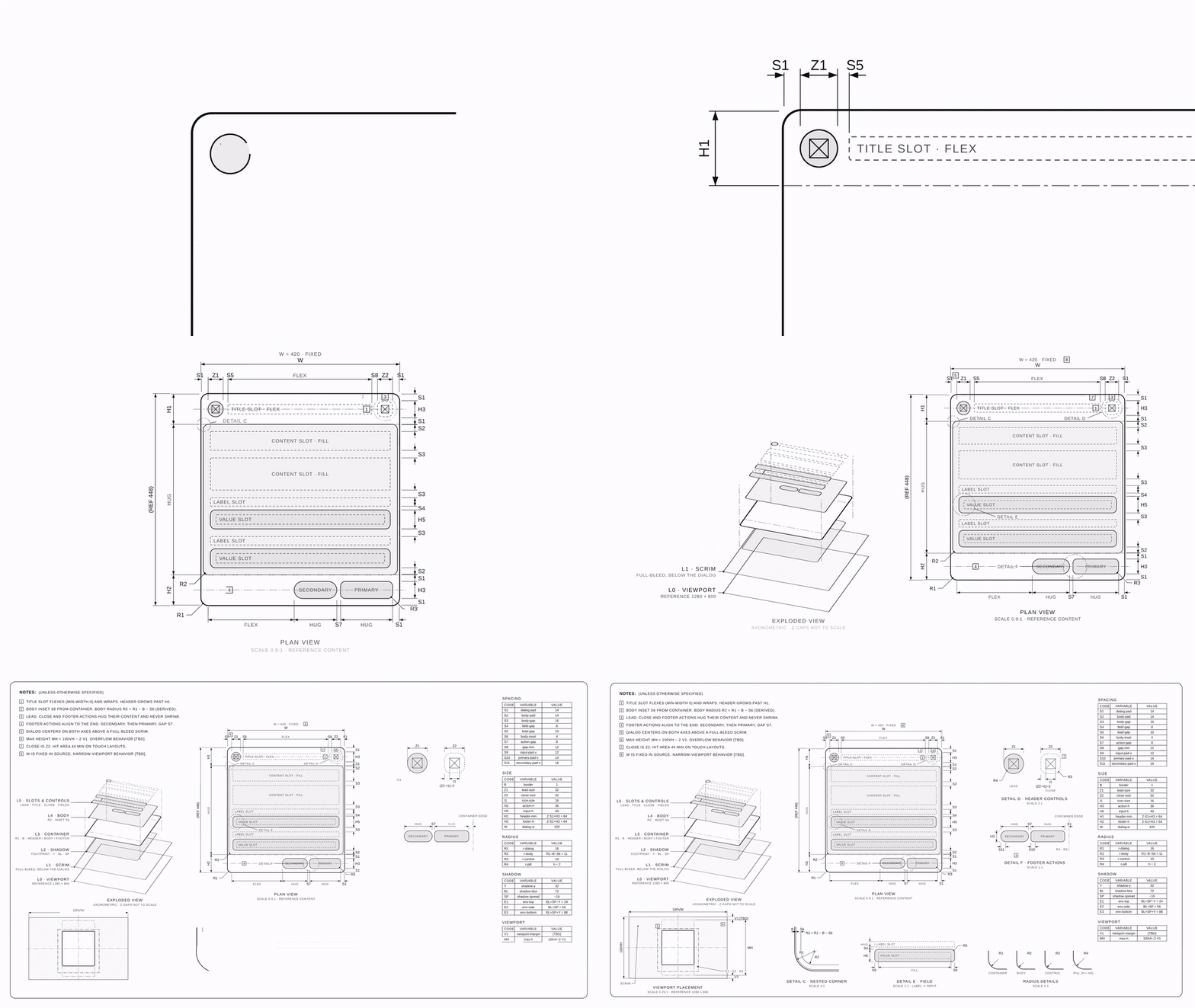
A dialog component's dimensional drawing drawing itself: header close-up, pull back to the plan view, layers lifting into an exploded view, then the full sheet

dimensional-drawing ✏️📐

Give it a UI component, get back a one-page technical drawing of it.
Paddings, gaps, corner radii, layers and viewport placement, measured and labeled like Apple's dimensional drawings.

Install · Use it · Make it move · Examples


Apple publishes dimensional drawings for every device so accessory makers can build cases that fit. They are calm, dense and beautiful: one sheet, a few views, tiny detail circles, numbers everywhere.

This repo teaches your agent to draw your components the same way. A card or a dialog becomes a spec sheet you could hand to anyone and they would rebuild its architecture: paddings, gaps, radii, layers, how it sits in the viewport. Copy and content are left out on purpose, so the drawing stays true when the text changes.

What's inside 🎁

skills/
├── dimensional-drawing/          the drawing skill
│   ├── SKILL.md
│   └── examples/                 card + dialog sheets (single HTML files)
└── dimensional-drawing-motion/   turns a sheet into a ~10 s film
    ├── SKILL.md
    ├── templates/                reference scene + stylesheet
    └── adapters/
        ├── claude-motion.md      Claude's Motion artifact (primary)
        └── headless/             Playwright + ffmpeg, no Claude needed

The house rules

⚫️ Monochrome grays only; things are told apart by line weight, dashes and hatches
🧱 Architecture, not content TITLE SLOT · FLEX, ACTION · HUG, CONTENT SLOT · FILL
🔤 Variables, not numbers S1, R2, H1 = 2·S1 + H3, R2 = R1 − B − S6
🏷️ Unbranded neutral names like UI-CARD-001
🙅 Never invent values unknowns stay [TBD]

Install

Claude Code

git clone https://github.com/enesozturk/dimensional-drawing
cp -r dimensional-drawing/skills/* ~/.claude/skills/

claude.ai / Claude desktop: zip a skill folder (for example skills/dimensional-drawing) and add it under Settings → Capabilities → Skills.

Any other agent (Codex, Cursor, Gemini CLI, …): use the skills CLI, or point your agent at the SKILL.md files.

npx skills add enesozturk/dimensional-drawing

Use it

Ask for a drawing and point at the source (a repo file, a Storybook story, a URL, a screenshot):

Make a dimensional drawing of the Card component in src/components/Card.tsx

Draw the anatomy of our settings dialog, same style as the examples

You get a title block with the key variables on top, then one dense sheet: notes, plan view, exploded layers, detail views (nested corner, radii, body), and variable tables.

It works for physical things too (third-angle views, mm, published specs only). Try a thermos 🫖.

Make it move 🎬

The motion skill animates a finished sheet like a pen drawing it while a camera moves over the paper:

  1. close-up on the header as its lines draw in
  2. pull back to the plan view while the rest draws
  3. layers lift off the plan into the exploded view (strokes first, fills after, so nothing flashes)
  4. pull back to the full sheet as the remaining views draw in

The scene is a pure function of time, so it runs in two places:

With Claude ask "animate this drawing". Claude builds it in the Motion artifact and you export MP4. This is the primary target and where the timing was tuned.
Without Claude cd skills/dimensional-drawing-motion/adapters/headless && npm install, then node render.mjs --scene ../../templates/scene-dialog.js --css ../../templates/base.css --out dialog.mp4. Needs Node 18+ and ffmpeg.

[!NOTE] Optimized for Claude Motion. The headless renderer is tested with Playwright (Chromium) + ffmpeg. Other animation libraries (Remotion, Motion Canvas, GSAP, Lottie…) are not tested.

Examples

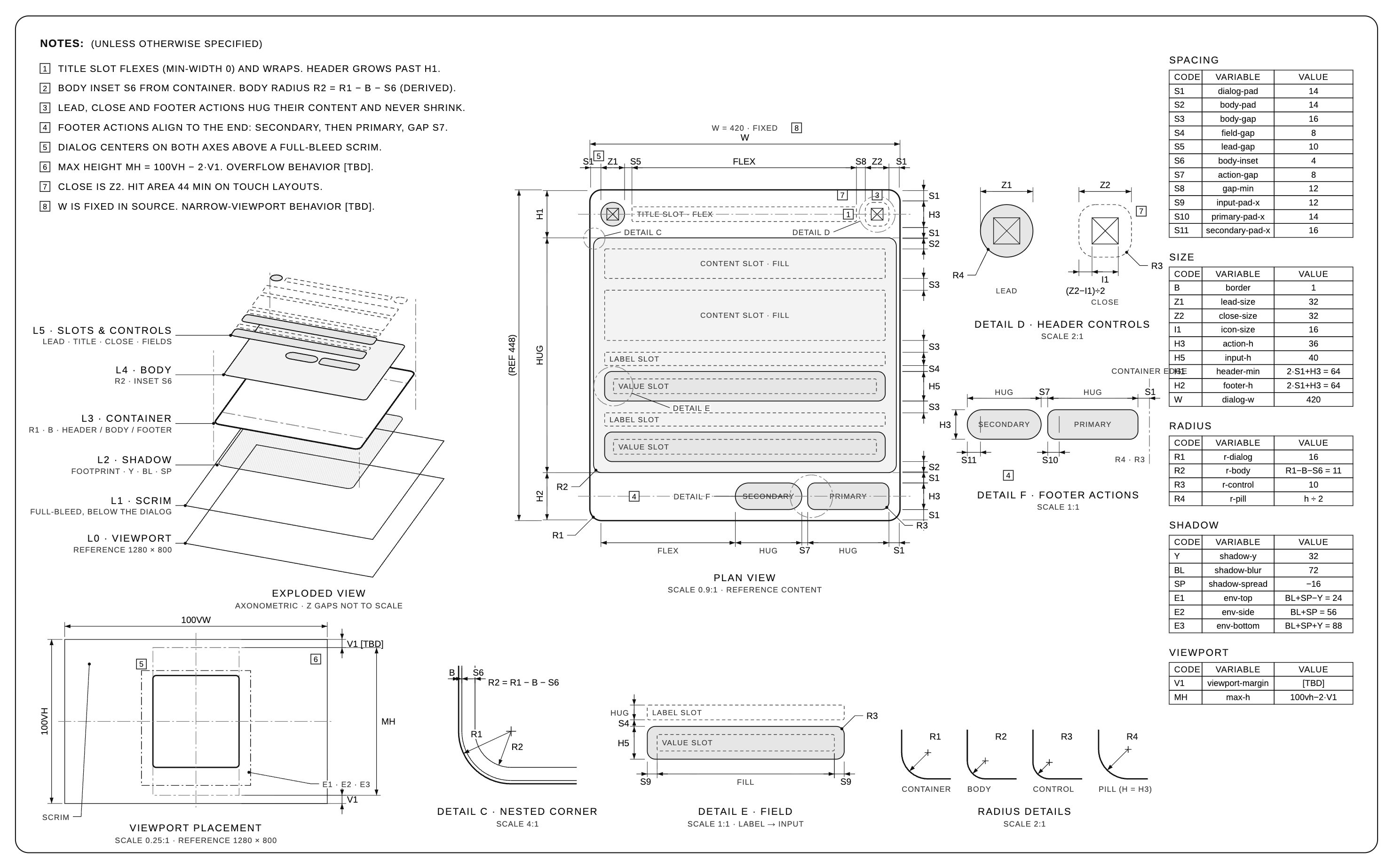
Dialog: fixed width, scrim, viewport placement, header controls, footer actions

Dimensional drawing of a dialog component

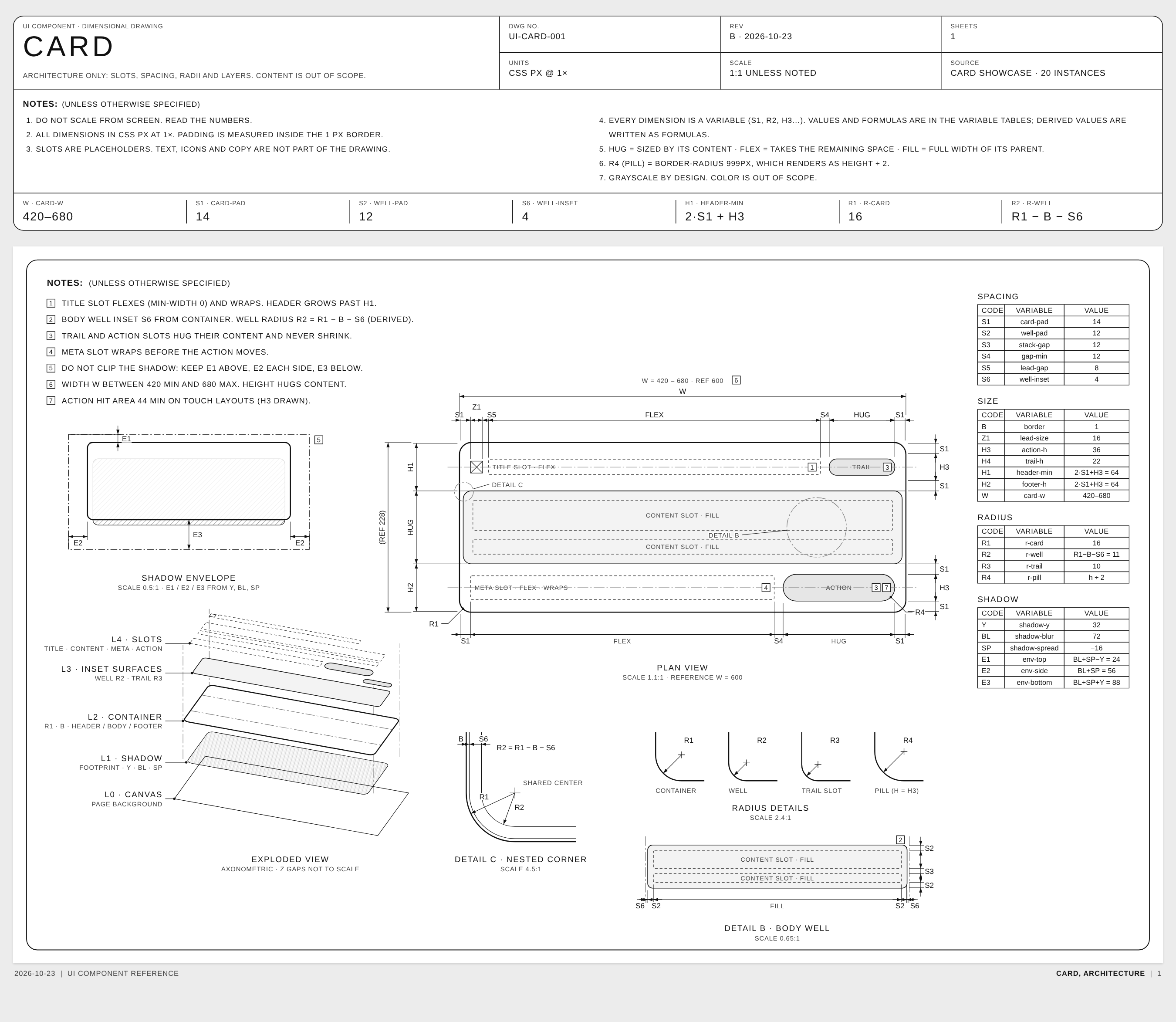
Card: flexible width, body well, nested corner, shadow envelope

Dimensional drawing of a card component

Open the HTML versions in skills/dimensional-drawing/examples. The full film is assets/dialog-motion.mp4.

Thanks 💌

License

MIT © Enes Ozturk. Draw all the things.

dimensional-drawing (enesozturk/dimensional-drawing)

正在搜索数据库…

这是什么?这是一个 Claude Agent Skill,能教编程智能体把一个 UI 组件转换成单页技术图纸,类似 Apple 配件规格表,图中用带测量标注的方式展示内边距、间距、圆角半径、图层以及视口位置。
这是我要运行的应用,还是加载到编程智能体里的技能?这是一个 skill 文件夹(包含 SKILL.md),需要加载到智能体中使用,而不是独立程序;它包含两个 skill:主要的绘图 skill,以及用于为成品图纸制作动画的动效 skill。
除了兼容的编程智能体,我还需要什么?加载 skill 后绘制组件不需要额外的东西;如果不通过 Claude 渲染动效图纸,则需要 Node 18+ 和 ffmpeg 来运行无头渲染脚本。
动画功能适用于任何渲染技术栈吗?无头动效渲染器只在 Playwright(Chromium)加 ffmpeg 的组合下测试过;Remotion、Motion Canvas、GSAP、Lottie 等其他工具尚未测试,Claude Motion 是主要的、经过专门调校的目标。
这个 skill 是给谁用的?面向希望编程智能体以可视化方式记录组件结构(间距、图层、圆角)的开发者和设计师,图纸中不会泄露任何品牌标识或实际文案。
绘图风格实际是什么样的?严格使用单色灰度,仅通过线宽、虚线和阴影线来区分元素;标注使用变量而非原始数值(如 S1、R2 = R1 − B − S6),并使用中性、无品牌的名称,例如 UI-CARD-001。未知内容标记为 [TBD],不做猜测。
它能绘制实体物体,而不只是 UI 组件吗?可以,它也支持实体物件,使用第三角投影视图和毫米单位,但只依据已发布的规格,绝不编造数字。
如何为成品图纸制作动画?使用 Claude 时,直接让它为图纸制作动画即可,它会在 Motion 工件中搭建场景并导出 MP4;不使用 Claude 时,运行无头 Node 渲染器,命令如:node render.mjs --scene scene-dialog.js --css base.css --out dialog.mp4。
在哪里可以看到示例输出?HTML 示例(一个 Dialog 和一个 Card)位于 skills/dimensional-drawing/examples,完整渲染的影片位于 assets/dialog-motion.mp4。
大小
17.4 MB
星标
2.2K
更新
提交Oct 23
时长
26天
提交 · 90 天