
Что это такое?
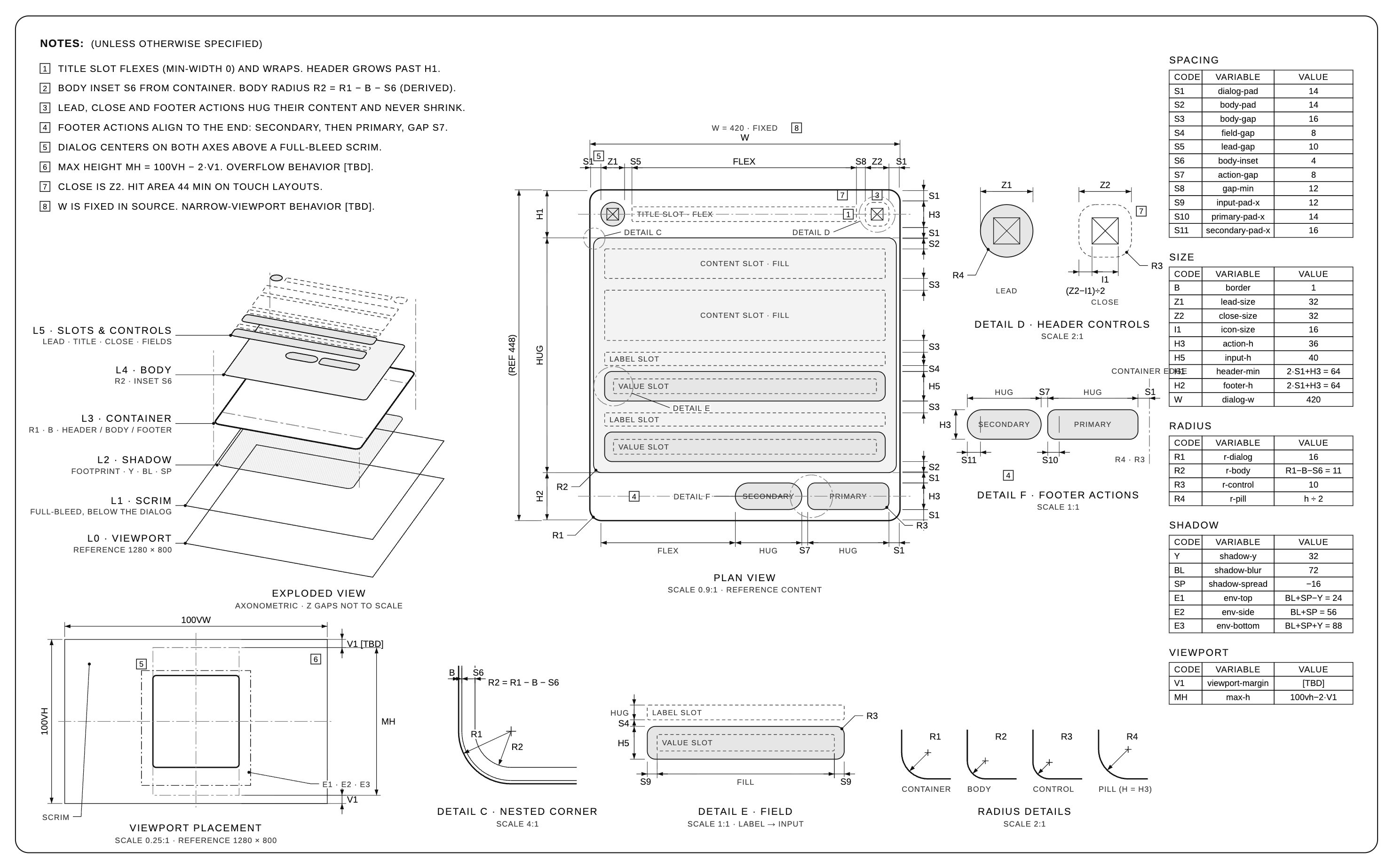
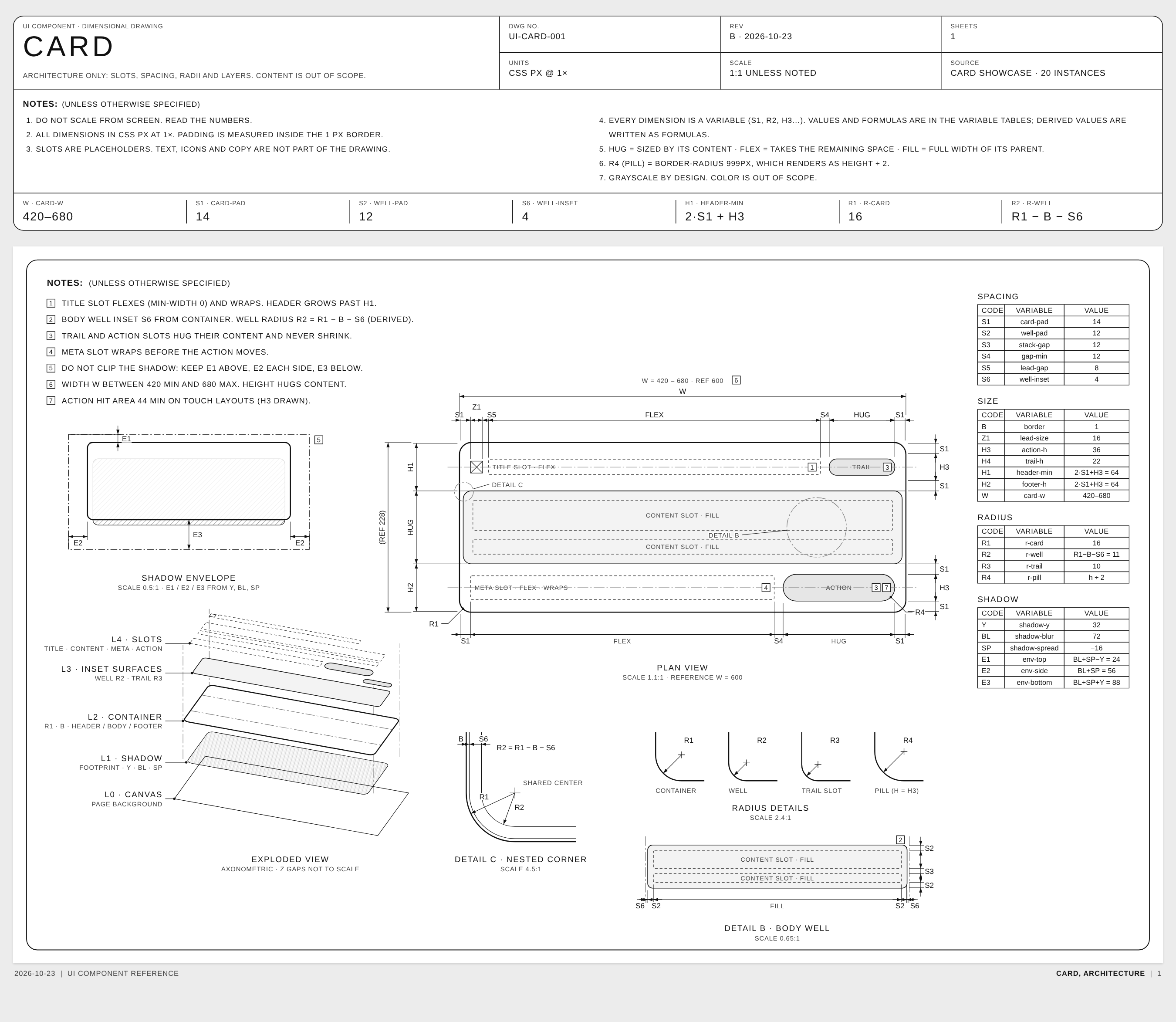
 Это навык Claude Agent Skill, который учит агента для программирования превращать UI-компонент в одностраничный технический чертёж, похожий на спецификации аксессуаров Apple. На чертеже показаны отступы, зазоры, радиусы скругления, слои и размещение во вьюпорте, а также подписи с измеренными значениями.
Это приложение, которое я запускаю, или навык, который я загружаю в агента для программирования?Это папка с навыком (файл SKILL.md), которую вы загружаете в агента, а не самостоятельная программа. В ней два навыка: основной навык для чертежей и навык анимации для оживления готового листа.
Это папка с навыком (файл SKILL.md), которую вы загружаете в агента, а не самостоятельная программа. В ней два навыка: основной навык для чертежей и навык анимации для оживления готового листа.Что нужно помимо совместимого агента для программирования?Для построения чертежа компонента после загрузки навыка ничего дополнительно не нужно. Для рендеринга анимационного листа без Claude нужны Node 18+ и ffmpeg, чтобы запустить скрипт безголового рендерера.
Для построения чертежа компонента после загрузки навыка ничего дополнительно не нужно. Для рендеринга анимационного листа без Claude нужны Node 18+ и ffmpeg, чтобы запустить скрипт безголового рендерера.Работает ли функция анимации с любым стеком рендеринга?Безголовый рендерер анимации протестирован только с Playwright (Chromium) и ffmpeg. Другие инструменты, такие как Remotion, Motion Canvas, GSAP или Lottie, не тестировались. Основная целевая платформа, под которую всё настроено, — Claude Motion.
Безголовый рендерер анимации протестирован только с Playwright (Chromium) и ffmpeg. Другие инструменты, такие как Remotion, Motion Canvas, GSAP или Lottie, не тестировались. Основная целевая платформа, под которую всё настроено, — Claude Motion.Для кого предназначен этот навык?Для разработчиков и дизайнеров, которые хотят, чтобы их агент для программирования наглядно документировал архитектуру компонента (отступы, слои, радиусы), без брендинга и без утечки реальных текстов в чертёж.
Для разработчиков и дизайнеров, которые хотят, чтобы их агент для программирования наглядно документировал архитектуру компонента (отступы, слои, радиусы), без брендинга и без утечки реальных текстов в чертёж.На что на самом деле похож стиль чертежа?Он строго монохромный, в оттенках серого: элементы различаются только толщиной линий, штрихами и штриховкой. Объекты подписываются переменными, а не сырыми числами (например, S1, R2 = R1 − B − S6), и используются нейтральные безбрендовые имена вроде UI-CARD-001. Всё неизвестное помечается как [TBD], а не угадывается.
Он строго монохромный, в оттенках серого: элементы различаются только толщиной линий, штрихами и штриховкой. Объекты подписываются переменными, а не сырыми числами (например, S1, R2 = R1 − B − S6), и используются нейтральные безбрендовые имена вроде UI-CARD-001. Всё неизвестное помечается как [TBD], а не угадывается.Может ли он рисовать физические объекты, а не только UI-компоненты?Да, он работает и с физическими предметами, используя виды по методу третьего угла и миллиметры, но только по опубликованным спецификациям, без выдуманных чисел.
Да, он работает и с физическими предметами, используя виды по методу третьего угла и миллиметры, но только по опубликованным спецификациям, без выдуманных чисел.Как анимировать готовый чертёж?С Claude достаточно попросить его анимировать чертёж, и он соберёт сцену в артефакте Motion для экспорта в MP4. Без Claude запустите безголовый рендерер на Node командой вида node render.mjs --scene scene-dialog.js --css base.css --out dialog.mp4.
С Claude достаточно попросить его анимировать чертёж, и он соберёт сцену в артефакте Motion для экспорта в MP4. Без Claude запустите безголовый рендерер на Node командой вида node render.mjs --scene scene-dialog.js --css base.css --out dialog.mp4.Где посмотреть примеры результатов?HTML-примеры (Dialog и Card) находятся в skills/dimensional-drawing/examples, а полный отрендеренный фильм — в assets/dialog-motion.mp4.
HTML-примеры (Dialog и Card) находятся в skills/dimensional-drawing/examples, а полный отрендеренный фильм — в assets/dialog-motion.mp4.Какие есть похожие проекты?evondevKit, huashu-art-motion, oil-ui, EpicInfographics, skills, open-3d-skills, unslop, guizang-product-video-skill
evondevKit, huashu-art-motion, oil-ui, EpicInfographics, skills, open-3d-skills, unslop, guizang-product-video-skillВ каких он темах?productivity-tools, skill-md, gemini-cli, claude-code-skill, playwright, ffmpeg, claude-skills, design, skill, animation, cursor, skills
productivity-tools, skill-md, gemini-cli, claude-code-skill, playwright, ffmpeg, claude-skills, design, skill, animation, cursor, skills