
Formerly Claude S40. The project was called Claude S40 up to phone
app 0.10.x / server 0.7.x, while it only talked to Claude. Since it also
speaks to OpenAI, Gemini and Grok it is called AIKON (Nokia spelled
backwards). The repository moved from emir/claude-s40 to emir/AIKON
(GitHub redirects the old address); the Java package and server names
keep the old name.
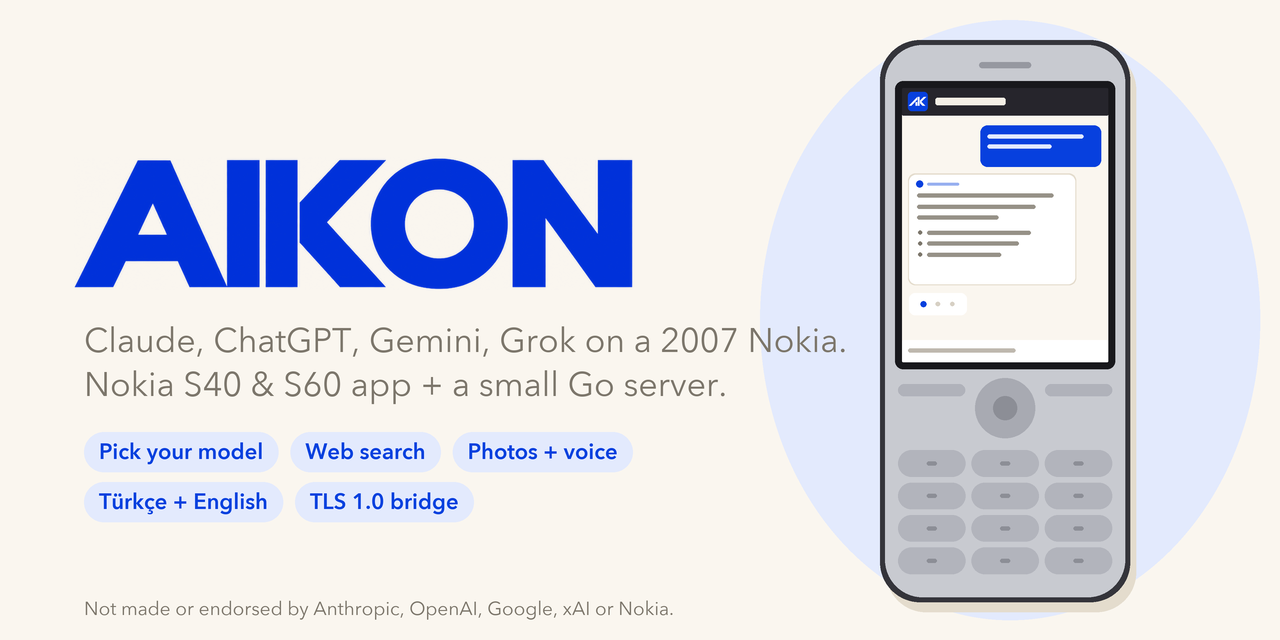
Today's AI on a 2007 Nokia. AIKON is an AI chat client for
Nokia Series 40 and Symbian S60 phones (Java ME, CLDC 1.1 / MIDP 2.0), plus
the small Go server it talks to. Pick a model per chat (Claude, OpenAI, Gemini or Grok),
type on the keypad, get the answer on a 240x320 screen: with today's news,
weather and exchange rates from web search, long answers you can page
through, and a UI in Turkish, English, Spanish, Portuguese, French, German, Russian or
Indonesian. Tested on the Nokia 6300 (S40) and
the Nokia E63 (S60 QWERTY).
Video (still as Claude S40): on a Nokia 6300, on X
Features
On the phone
- Pick the model per chat: first the provider (Claude, OpenAI, Gemini,
Grok), then one of the models the server offers; switch in the middle of
a chat with Options > Model. Every reply is labelled with its model.
- Chat: your messages in bubbles, replies full width, day headings
("Today", "Yesterday"), and a typing indicator that counts the seconds.
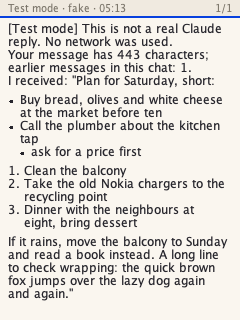
Replies keep their paragraphs and lists (dots, numbers, hanging indent);
an unsent draft waits in the input bar.
- Web search for news, weather, rates: the model searches on the server
with its provider's search tool; the phone's 2007 browser is not involved. Sources are listed under the
reply.
- Reading mode (key 7): one reply full width, page by page, whole lines
only, page number and progress line. It keeps its place when you change
the text size (key 9) or load the rest.
- Long replies in parts: "0 · Show the rest" fetches the next part
from the server for free; the model is not asked again.
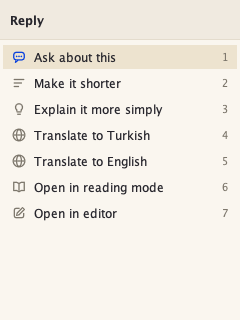
- Message actions: select a message with 1/3, press the centre key:
shorten, explain more simply, translate, ask about it, open it in the
editor. They only fill in the editor; nothing is sent until you press
Send.
- Earlier chats from the server, continue any of them; pin the ones
you want to keep at the top (kept until unpinned), delete or search
all chats (no Turkish letters needed: "sise" finds "şişe"); optional
offline copy of the last chat.
- Save to phone: a reply as a .txt file (memory card if there is one),
readable later without the network under "Saved".
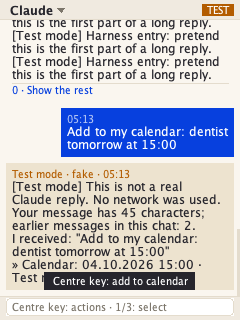
- Calendar and to-do: ask "add to my calendar: dentist tomorrow at 3"
and the reply carries a ready entry; the centre key opens a prefilled
form, and only your "Save" writes it to the phone's own calendar or to-do
list. Works from any message too.
- Voice messages: press Dictate, speak up to 30 seconds; the server
turns it into text, which opens in the editor so you can check and fix
it before you send it.
- Photos: take one with the camera or pick one from the phone and ask
about it ("what is this?", "translate this sign", "read this label");
follow-up questions in the same chat still see it.
- Your notes for the AI (Settings): "I'm Emir, I live in Istanbul, keep
it short" is sent with every message.
- Data usage: requests and approximate kilobytes today and in total.
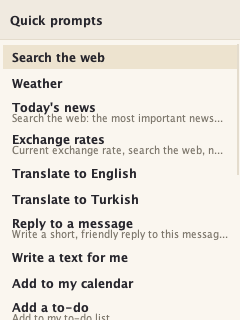
- 20 quick prompts (search the web, weather, translate, reply to a
message, add to my calendar, summarize, fix my writing, ...).
- Short notes, details on request: info and errors are one line; select
one (1/3) and press the centre key for the explanation; setup and settings
screens keep theirs under Options > Info.
- Setup wizard on first start: server address, connection test,
pairing with a 6-digit code (no long code to type); the language follows
the phone. A build that names its server skips to the pairing.
- Keypad-first: every screen works with the keypad (on QWERTY phones
like the E63, the digits printed on the letter keys); a Shortcuts screen
lists every key. Retry after an error is one key and never charges twice.
- Eight languages: English, Türkçe, Español, Português, Français,
Deutsch, Русский and Bahasa Indonesia. The app opens in the phone's
language (English for any other) and changes under Settings > Language.
The replies follow the language you write in, whatever the menus say.
- Look and feel: every screen except text entry is drawn by the app:
line icons with smooth edges, lists with two-line rows, settings with
switches that save at once, full screen. Light, dark or automatic (dark
in the evening) look, three text sizes, start-up animation and jingle,
reply chime, vibration and backlight. Texts are fitted to the screen.
On the server
- One Go binary / Docker image that speaks TLS 1.0 to the phone with a
certificate from your own private CA, and modern HTTPS to the model
providers: Claude (official SDK), OpenAI and xAI Grok (Responses API) and
Google Gemini, listed in one
MODELS setting with a DEFAULT_MODEL.
- Per-device access tokens through pairing, daily request, token,
web-search, voice-message and photo limits, no automatic retries of paid
calls.
- Optional speech-to-text for voice messages (OpenAI), with a minimal
ffmpeg in the image for the phone's AMR recordings.
- SQLite for chats (30 days, pinned ones until unpinned), search over
them, admin API on localhost only.
Screens
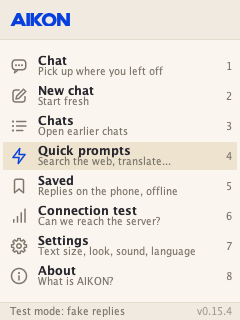
| Home |
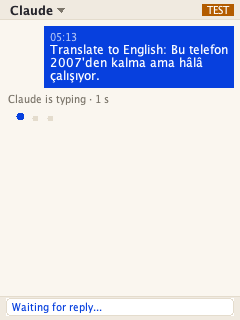
Waiting for a reply |
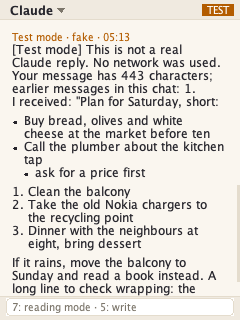
Lists and paragraphs |
Reading mode |
 |
 |
 |
 |
| A calendar entry, selected |
Message actions |
Quick prompts |
Dark theme, large text |
 |
 |
 |
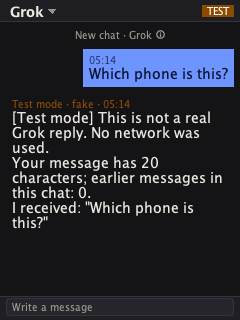 |
Screenshots are from the FreeJ2ME emulator in the app's test mode (the
"[Test mode]" replies are fake and cost nothing; the emulator reports no
calendar API, so the harness turns the calendar actions on for these
screens and never saves); the cover is a drawing.
Start-up animation: docs/images/splash.gif.
Independent side project. Not made, endorsed or supported by Anthropic,
OpenAI, Google, xAI or Nokia. See TRADEMARKS.md.
Tested on a Nokia 6300 (RM-217, firmware V06.60), and on a Nokia E63
(Symbian S60 3rd Edition FP1, 320x240, QWERTY, over WLAN; see
docs/SETUP.md). Other Series 40
phones (CLDC 1.1 / MIDP 2.0, 240x320) may work but are untested.
How it works
Nokia (Java ME app) --HTTPS: TLS 1.0, RSA, no SNI, cert from YOUR private CA--> claude-s40-server --HTTPS--> Claude / OpenAI / Gemini / Grok APIs
                                                                                     |
                                                                              SQLite (Docker volume)
A 2007 phone cannot speak modern HTTPS: the Nokia 6300 offers only TLS 1.0
with RSA key exchange, sends no SNI, and its root store stops around 2008.
Public clouds (including Cloudflare) refuse that handshake. So the server
terminates TLS itself with a certificate from a private root CA that you
put on the phone once. Details and measurements: docs/ARCHITECTURE.md.
What's inside
| Path |
What |
app/ |
The phone app: CLDC 1.1 / MIDP 2.0 MIDlet, ~220 KB JAR, UI in eight languages (see Features). Reproducible build with package checks. |
server/ |
One Go binary / Docker image (~7 MB): phone-facing TLS, chat backend (Claude via the official anthropic-sdk-go; OpenAI, Gemini, Grok over plain HTTPS), SQLite, pairing, admin API bound to localhost. |
docs/ |
SETUP.md (step by step), ARCHITECTURE.md (protocol, TLS, design). |
Get it
git clone https://github.com/emir/AIKON.git
cd aikon
Quick start
Full guide: docs/SETUP.md. In short:
- A Docker host with a public IPv4 and TCP 443 (a $4-6/month VPS is enough).
server/scripts/pki.sh ca ~/.config/claude-s40/pki and
server/scripts/pki.sh server ~/.config/claude-s40/pki <server-ip>.server/deploy/push.sh root@<server-ip> --execute (starts in test mode, no API cost).echo GATEWAY_URL=https://<server-ip> > app/app.local.properties && make -C app,
then install app/dist/AIKON.jad/.jar on the phone.- Put the root CA on the phone (
server/deploy/serve-ca.sh, compare the fingerprint).
- On the phone the setup wizard walks through the connection test and
pairing; approve the code with
server/deploy/admin.sh root@<server-ip> pair <code>.
server/deploy/set-key.sh root@<server-ip> (Claude; add openai, gemini
or xai for the others), then
S40_MOCK=0 S40_MODELS=... server/deploy/push.sh root@<server-ip> --execute to go live.
Development
make test          # server: go vet + go test -race; app: build + package checks + reproducibility
make -C app        # phone app only (downloads pinned build tools to app/.deps)
make -C server test
Requirements: Go 1.26+, JDK 11+, Python 3 with Pillow, Docker (for
deployment), OpenSSL or LibreSSL.
Privacy and cost
- The API keys live only on your server. The phone gets a per-device,
revocable access token through pairing.
- Chats are stored on your server for 30 days after the last message;
pinned chats until you unpin or delete them. The phone keeps the last
chat only if you turn on "Keep last chat on phone"; replies you save and
calendar entries you add stay on the phone. Your notes for the AI are
stored on the phone and sent with each message (never logged).
- The setup (server address, access code, notes) is also kept in a file on
the memory card so a new build needs no new pairing; revoke the device
if the card leaves your hands, or use Settings > Reset setup.
Logs contain no message text.
- Every message is an API call to the chat's model, billed to your key with
that provider. The server enforces
per-device daily request, output-token and web-search limits and never
retries a paid call automatically. Web searches are billed per search and
their results count as input tokens. Set a spending limit in each
provider's console.
- Voice messages (off unless you turn them on) go to OpenAI's
speech-to-text, billed to your OpenAI key. The recording is not stored;
the text is kept for a day so a retry never pays twice.
- Photos are scaled down to 1024 pixels and kept on your server with their
chat (30 days, or until you delete it); each photo adds about 1000 input
tokens to the messages of its chat.
Translations
The app is written in English; every other language is one text file,
app/lang/xx.txt: an English text, a TAB, its translation,
one per line. The Spanish, Portuguese, French, German, Russian and
Indonesian files are first drafts: corrections from native speakers are
very welcome (a pull request that edits the file is enough). A new language
is a new file plus its code and name in L.java (LANGS, NAMES); make -C app langs copies the files
to server/lang (the server sends them to phones, which carry only English) and shows what each
file covers, and the build refuses a file that misses a text. Languages
written right to left (Arabic, Hebrew) need layout work first, and scripts
the phones' fonts lack (Japanese, Chinese) are out of reach on this
hardware.
Contributors
License
MIT, see LICENSE. Copyright (c) 2026 Emir Karşıyakalı. Build-time tools are downloaded, not bundled
(ECJ: EPL-2.0, ProGuard: GPL-2.0, MicroEmulator API stubs: LGPL, CafeUndZopfli: Apache-2.0); none of
them end up in the phone app. The optional emulator harness
app/emu/EmuShot.java links against FreeJ2ME (GPL-3.0), which is not
included.

 AIKON 是面向老式诺基亚 Series 40 和 Symbian S60 功能机(Java ME、CLDC 1.1 / MIDP 2.0)的 AI 聊天客户端,搭配一个小型 Go 服务器把你的消息转发给 Claude、OpenAI、Gemini 或 Grok,让 2007 年代的功能机也能与现代 AI 模型聊天。