OpenClaw Zero Token
Use LLMs without API tokens — log in via browser once, then call ChatGPT, Claude, Gemini, DeepSeek, Qwen (intl/cn), Doubao, Kimi, Zhipu GLM, Grok, Xiaomi MiMo, Manus and more for free through a unified gateway.
License: MIT
English | 简体中文
Table of Contents
Overview
OpenClaw Zero Token is a fork of OpenClaw that focuses on removing API token cost by driving the official web UIs (browser login) instead of paid API keys.
Why Zero Token?
| Traditional usage |
Zero Token way |
| Buy API tokens |
Completely free |
| Pay per request |
No enforced quota |
| Credit card required |
Browser login only |
| API tokens may leak |
Credentials stored local |
Supported providers
| Provider |
Status |
Models (examples) |
| DeepSeek |
✅ tested |
deepseek-chat, deepseek-reasoner |
| Qwen International |
✅ tested |
Qwen 3.5 Plus, Qwen 3.5 Turbo |
| Qwen China |
✅ tested |
Qwen 3.5 Plus, Qwen 3.5 Turbo |
| Kimi |
✅ tested |
Moonshot v1 8K / 32K / 128K |
| Claude Web |
✅ tested |
claude-sonnet-4-6, claude-opus-4-6, claude-haiku-4-6 |
| Doubao |
✅ tested |
doubao-seed-2.0, doubao-pro |
| ChatGPT Web |
✅ tested |
GPT-4, GPT-4 Turbo |
| Gemini Web |
✅ tested |
Gemini Pro, Gemini Ultra |
| Grok Web |
✅ tested |
Grok 1, Grok 2 |
| GLM Web (Zhipu) |
✅ tested |
glm-4-Plus, glm-4-Think |
| GLM Web (International) |
✅ tested |
GLM-4 Plus, GLM-4 Think |
| Xiaomi MiMo |
✅ tested |
MiMo 2.0, MiMo 2.5 Pro |
| Manus API |
✅ tested |
Manus 1.6, Manus 1.6 Lite (API key, free quota) |
Web models can call local tools (web_search, web_fetch, exec, read, write, message) via prompt-injected tool definitions. Based on arXiv:2407.04997 and ComfyUI LLM Party (5k+ stars).
11/13 web models support tool calling (verified):
| Model |
Tool Calling |
Chat |
Notes |
| DeepSeek |
✅ |
✅ |
exec: list desktop files |
| Kimi |
✅ |
✅ |
All 6 tools verified |
| Claude |
✅ |
✅ |
web_search OK |
| ChatGPT |
✅ |
✅ |
web_search OK |
| Qwen CN |
✅ |
✅ |
web_search OK |
| Qwen Web |
✅ |
✅ |
web_search OK |
| Grok |
✅ |
✅ |
web_search OK |
| Gemini |
✅ |
⚠️ |
web_search OK, DOM polling unstable |
| Xiaomi MiMo |
✅ |
✅ |
web_search OK |
| GLM |
✅ |
✅ |
Tool calling and chat OK |
| GLM Intl |
✅ |
✅ |
Tool calling and chat OK |
| Doubao |
❌ |
⚠️ |
Excluded (stream parser limitation) |
| Perplexity |
— |
✅ |
Search engine, no tool injection |
The middleware (src/zero-token/tool-calling/) only injects tool prompts when keywords in the user message suggest a tool action — normal chat stays short to reduce ban risk.
Agent file access is restricted by the configured workspace directory (see agents.defaults.workspace).
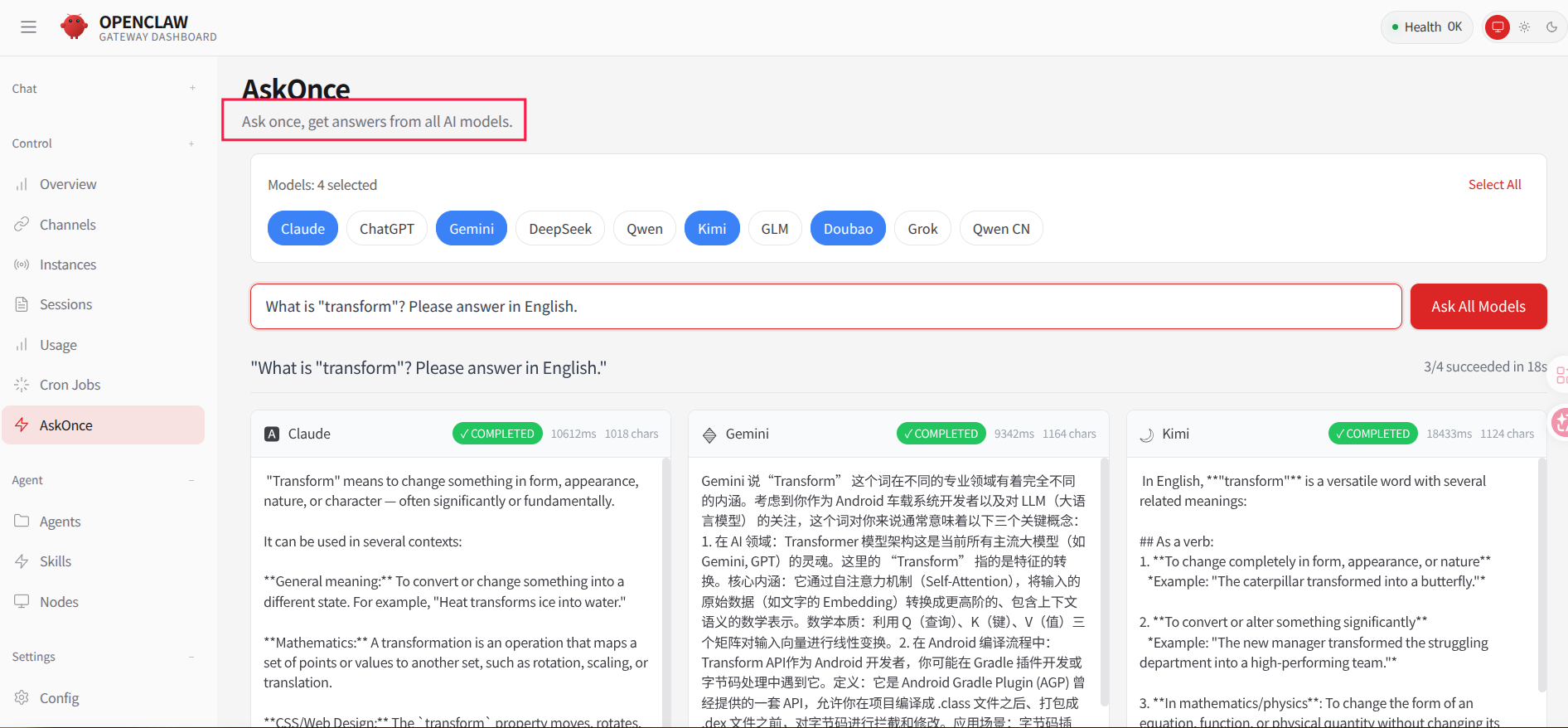
AskOnce: one question, answers from all models.
AskOnce can broadcast a single query to multiple configured providers and show their replies side by side.
How It Works
High-level architecture
┌─────────────────────────────────────────────────────────────────────────────┐
│                              OpenClaw Zero Token                            │
├─────────────────────────────────────────────────────────────────────────────┤
│                                                                              │
│  ┌─────────────┐    ┌─────────────┐    ┌─────────────┐    ┌─────────────┐  │
│  │   Web UI    │    │  CLI/TUI    │    │   Gateway   │    │  Channels   │  │
│  │  (Lit 3.x)  │    │             │    │  (Port API) │    │ (Telegram…) │  │
│  └──────┬──────┘    └──────┬──────┘    └──────┬──────┘    └──────┬──────┘  │
│         │                  │                  │                  │          │
│         └──────────────────┴──────────────────┴──────────────────┘          │
│                                    │                                         │
│                           ┌────────▼────────┐                               │
│                           │   Agent Core    │                               │
│                           │  (PI-AI Engine) │                               │
│                           └────────┬────────┘                               │
│                                    │                                         │
│  ┌───────────────────────────────────────────────────────────────────────┐  │
│  │  Provider Layer                                                       │  │
│  │  DeepSeek Web (Zero Token)                                       ✅   │  │
│  │  Qwen Web intl/cn (Zero Token)                                  ✅   │  │
│  │  Kimi (Zero Token)                                              ✅   │  │
│  │  Claude Web (Zero Token)                                        ✅   │  │
│  │  Doubao (Zero Token)                                            ✅   │  │
│  │  ChatGPT Web (Zero Token)                                       ✅   │  │
│  │  Gemini Web (Zero Token)                                        ✅   │  │
│  │  Grok Web (Zero Token)                                          ✅   │  │
│  │  GLM Web (Zero Token)                                           ✅   │  │
│  │  Xiaomi MiMo (Zero Token)                                       ✅   │  │
│  │  Manus API (Token)                                              ✅   │  │
│  └───────────────────────────────────────────────────────────────────────┘  │
│                                                                              │
└─────────────────────────────────────────────────────────────────────────────┘
DeepSeek auth flow (example)
1. Start browser
   openclaw gateway  ──▶  Chrome (CDP: 18892, user-data-dir)

2. User logs in
   Browser  ──▶  https://chat.deepseek.com  (scan / password login)

3. Capture credentials
   Playwright CDP  ──▶  listen network requests
                    └─▶ intercept Authorization header + cookies

4. Store credentials
   auth.json  ◀──  { cookie, bearer, userAgent }

5. Call web API
   DeepSeek WebClient  ──▶  DeepSeek Web API  ──▶  chat.deepseek.com
   (reuses stored cookie + bearer token)
Quick Start
Platforms
Requirements
- Node.js >= 22.12.0
- pnpm >= 9.0.0
- Chrome browser
- OS: macOS, Linux, or Windows (via WSL2)
Helper scripts (first-time & daily use)
First-time:
  1. Build          pnpm install && pnpm build && pnpm ui:build
  2. Start Chrome   ./start-chrome-debug.sh
  3. Login sites    Qwen intl/cn, Kimi, DeepSeek, ...
  4. Onboard        ./onboard.sh webauth
  5. Start server   ./server.sh

Daily:
  start-chrome-debug.sh → onboard.sh → server.sh
  server.sh [start|stop|restart|status] manages the gateway
Script overview (core 3 scripts):
| Script |
Purpose |
When to use |
start-chrome-debug.sh |
Start Chrome in debug mode |
Step 2: open browser on port 9222 for logins + onboarding |
onboard.sh |
Auth/onboarding wizard |
Step 4/5: select provider (e.g. deepseek-web) and capture credentials |
server.sh |
Manage gateway service |
Step 5 & daily use: start / stop / restart / status on port 3001 |
Installation
Clone and build
git clone https://github.com/linuxhsj/openclaw-zero-token.git
cd openclaw-zero-token
pnpm install
pnpm build
pnpm ui:build
# Start Chrome in debug mode (keep this terminal open)
./start-chrome-debug.sh

# Log into each web model in the browser tabs that open
# (DeepSeek, Qwen, Kimi, Claude, ChatGPT, Gemini, Grok, etc.)

# In a NEW terminal, run the auth wizard
./onboard.sh webauth
Start the gateway
./server.sh
Open the Web UI at the URL printed in the terminal.
Clean rebuild (if you get ERR_MODULE_NOT_FOUND)
rm -rf dist dist-runtime node_modules
pnpm install
pnpm build
pnpm ui:build
./server.sh restart
Note: Always use pnpm build (not npm run build). If you see hash mismatch errors like Cannot find module dist/xxx-HASH.js, do a clean rebuild as shown above.
Step 3: Start the gateway
./server.sh
This will start the HTTP gateway and Web UI.
Usage
Web UI
After ./server.sh the Web UI is started automatically. Open it in your browser and chat with any configured model.
Switch models
Use /model inside the chat box:
# Switch to Claude Web
/model claude-web

# Switch to Doubao
/model doubao-web

# Switch to DeepSeek
/model deepseek-web

# Or specify exact models
/model claude-web/claude-sonnet-4-6
/model doubao-web/doubao-seed-2.0
/model deepseek-web/deepseek-chat
Claude Web: Prefer the full model id: /model claude-web/claude-sonnet-4-6 (matches the catalog default). /model claude-web alone can fail to resolve or pick the intended model in some setups.
List available models
/models
Important: Only providers configured via ./onboard.sh webauth are written into openclaw.json and shown in /models.
The output shows:
- All available providers (e.g.
claude-web, doubao-web, deepseek-web)
- Models under each provider
- Currently active model
- Aliases and config
Example:
Model                                      Input      Ctx      Local Auth  Tags
doubao-web/doubao-seed-2.0                 text       63k      no    no    default,configured,alias:Doubao Browser
claude-web/claude-sonnet-4-6         text+image 195k     no    no    configured,alias:Claude Web
deepseek-web/deepseek-chat                 text       64k      no    no    configured
HTTP API
curl http://127.0.0.1:3001/v1/chat/completions \
  -H "Authorization: Bearer YOUR_GATEWAY_TOKEN" \
  -H "Content-Type: application/json" \
  -d '{
    "model": "deepseek-web/deepseek-chat",
    "messages": [{"role": "user", "content": "Hello!"}]
  }'
CLI / TUI
node openclaw.mjs tui
Configuration
Example openclaw.json
{
  "auth": {
    "profiles": {
      "deepseek-web:default": {
        "provider": "deepseek-web",
        "mode": "api_key"
      }
    }
  },
  "models": {
    "providers": {
      "deepseek-web": {
        "baseUrl": "https://chat.deepseek.com",
        "api": "deepseek-web",
        "models": [
          {
            "id": "deepseek-chat",
            "name": "DeepSeek Chat",
            "contextWindow": 64000,
            "maxTokens": 4096
          },
          {
            "id": "deepseek-reasoner",
            "name": "DeepSeek Reasoner",
            "reasoning": true,
            "contextWindow": 64000,
            "maxTokens": 8192
          }
        ]
      }
    }
  },
  "gateway": {
    "port": 3001,
    "auth": {
      "mode": "token",
      "token": "your-gateway-token"
    }
  }
}
Troubleshooting
First run: use the onboarding wizard (recommended)
./onboard.sh webauth
The wizard will create all required directories and basic files.
Fix issues: doctor command
If you already ran the project but see missing-directories or similar errors:
node dist/index.mjs doctor
The doctor command will:
- ✅ Check all required directories
- ✅ Create missing directories
- ✅ Fix common permission issues
- ✅ Validate config file structure
- ✅ Detect multiple conflicting state directories
- ✅ Print detailed suggestions
Limitations:
- ❌ Does not create
openclaw.json
- ❌ Does not create
auth-profiles.json
- ✅ If those are missing/corrupt, rerun
./onboard.sh webauth
Roadmap
Current focus
- ✅ DeepSeek Web, Qwen intl/cn, Kimi, Claude Web, Doubao, ChatGPT Web, Gemini Web, Grok Web, GLM Web, GLM intl, Xiaomi MiMo, Manus API — all tested
- 🔧 Improve credential capture robustness
- 📝 Documentation improvements
Planned
- 🔜 Auto-refresh for expired web sessions
To add a new web provider you usually need:
export async function loginPlatformWeb(params: {
  onProgress: (msg: string) => void;
  openUrl: (url: string) => Promise<boolean>;
}): Promise<{ cookie: string; bearer: string; userAgent: string }> {
  // Automate browser login and capture credentials
}
export class PlatformWebClient {
  constructor(options: { cookie: string; bearer?: string }) {}

  async chatCompletions(params: ChatParams): Promise<ReadableStream> {
    // Call platform web API
  }
}
export function createPlatformWebStreamFn(credentials: string): StreamFn {
  // Handle provider-specific streaming format
}
File Structure
openclaw-zero-token/
├── src/
│   ├── zero-token/
│   │   ├── providers/                    # Web clients + *-web-auth.ts
│   │   └── streams/                      # *-web-stream.ts + web-stream-factories.ts
│   ├── agents/
│   │   └── web-stream-factories.ts       # Re-export (stable import for runner)
│   ├── commands/
│   │   └── auth-choice.apply.deepseek-web.ts  # Auth flow
│   └── browser/
│       └── chrome.ts                     # Chrome automation
├── ui/                                   # Web UI (Lit 3.x)
├── .openclaw-zero-state/                 # Local state (ignored)
│   ├── openclaw.json                     # Config
│   └── agents/main/agent/
│       └── auth.json                     # Credentials (sensitive)
└── .gitignore                            # Includes .openclaw-zero-state/
Security Notes
- Credential storage: cookies and bearer tokens live in local
auth.json and must never be committed.
- Session lifetime: web sessions expire; you may need to re-login from time to time.
- Rate limiting: web endpoints may enforce rate limits; they are not suited for heavy production workloads.
- Compliance: this project is for personal learning and experimentation. Always follow each platform’s Terms of Service.
Sync With Upstream OpenClaw
For a Zero Token–specific file checklist and merge playbook, see Upstream sync (Zero Token).
This project is based on OpenClaw. To sync upstream changes:
git remote add upstream https://github.com/openclaw/openclaw.git
git fetch upstream
git merge upstream/main
Contributing
PRs are welcome, especially for:
- Bug fixes
- Documentation improvements
License
MIT License
Acknowledgments
Disclaimer
This project is for learning and research only.
When using it to access any third-party service, you are responsible for complying with that service’s Terms of Use.
The authors are not liable for any issues caused by misuse of this project.

 OpenClaw Zero Token is a fork of OpenClaw that lets you use major AI chat models like Claude, ChatGPT, Gemini, DeepSeek, Qwen, Doubao, Grok, Kimi, GLM and others for free, by logging into their official web UIs once in a browser instead of paying for API tokens, then routing calls to them through one unified gateway.