Rakazo


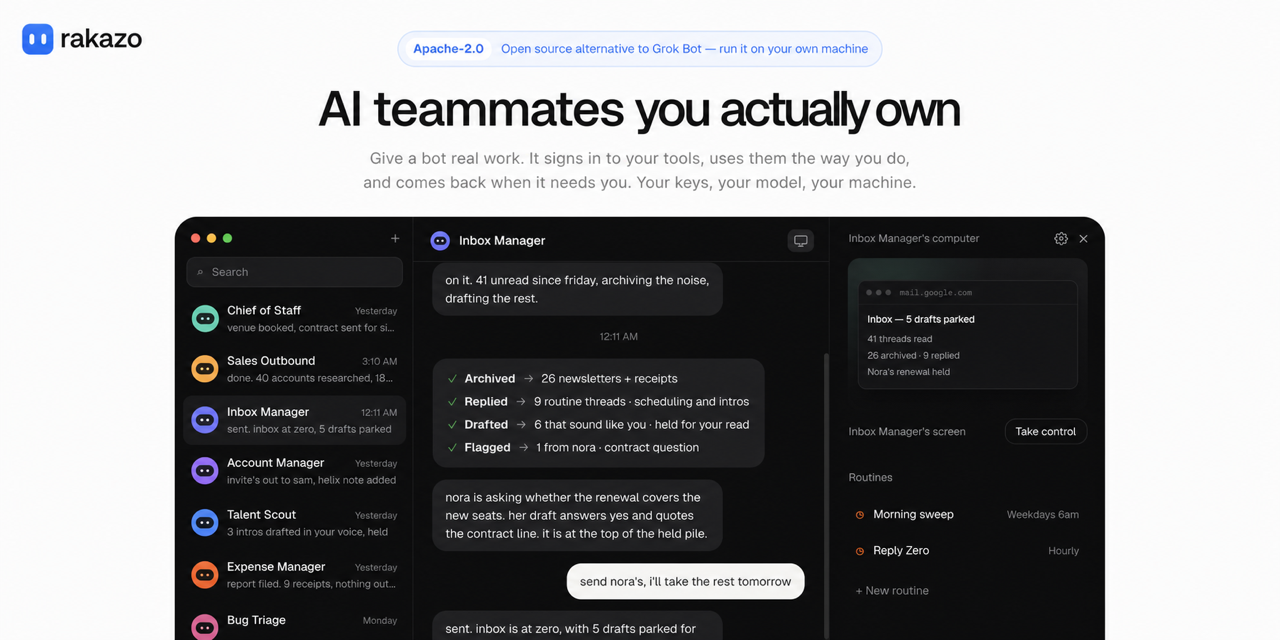
Rakazo is an open-source platform for running persistent AI teammates. It is available on the web,
as an Electron desktop app, and through an Expo mobile app. Bring your own model and computer
provider, or run the complete stack locally.
Rakazo is in beta. Learn more at rakazo.com.
Features
- Persistent bots with their own conversations, memory, routines, and history
- Voice mode: speak replies, dictate, and call a bot. Bring your own ElevenLabs, OpenAI, Cartesia, or Fish Audio key
- Shared Team Computers and isolated Private computers
- Browser, terminal, file, and graphical desktop access
- Bots that can delegate to peer bots or short-lived subagents
- Bring-your-own model credentials through Pi
- App integrations through Composio or Pipedream Connect, plus user-installed Treg, remote MCP, and OpenAPI tool sources
- Docker, E2B, Daytona, Box, and trusted local-computer support
Demo
https://github.com/user-attachments/assets/dccdeddb-2134-4a56-8eed-b2e591736b1c
Stack
- TypeScript
- React 19, Vite, and Tailwind CSS
- Electron and Expo
- Hono and oRPC
- PostgreSQL and Prisma
- Better Auth
- Graphile Worker
- Pi
- Docker, E2B, Daytona, and Box
- Composio, Pipedream Connect, MCP, and OpenAPI integrations
Quick start (published images)
You need Docker Engine, the Compose plugin, curl, and OpenSSL. No clone or Node install.
mkdir -p rakazo && cd rakazo &&
curl -fsSLO https://raw.githubusercontent.com/elie222/rakazo/main/infra/compose/install-images.sh &&
bash install-images.sh
The installer downloads the Compose files, creates .env with random secrets, and starts Rakazo.
It preserves an existing .env when rerun.
Open http://127.0.0.1:5173, create an account, and connect a model.
Local Docker computers are on by default. Optional remote providers: e2b, daytona, or box
with the matching API key.
Default image tag is edge (main builds, linux/amd64 + linux/arm64). Details and tags:
self-hosting guide.
On restricted networks, override the installer download base (RAKAZO_DOWNLOAD_BASE), skip
existing Compose files (--local / RAKAZO_DOWNLOAD_SKIP_EXISTING), or mirror the bootstrap
script URL — see
Restricted networks / mirror downloads.
For an agent-assisted install, use SETUP_PROMPT.md.
Run on a server
Bots stay on when the backend runs on a server. Use the same installer on a VPS, then connect from
the desktop app, the mobile app, or a browser.
bash install-images.sh --prepare-only
# edit .env: SANDBOX_PROVIDER=box (or e2b / daytona) with its API key, RAKAZO_HOST=your.domain
bash install-images.sh
Put HTTPS in front of port 5173; docs/self-host.md
covers the Caddy setup and host hardening. In the desktop app choose Existing instance and enter
the https:// address.
Local development (source checkout)
You need Node.js 22.22.2 or newer in the 22.x line, Node.js 24.x, or Node.js 26+;
pnpm 9; and Docker. Node.js 23.x and 25.x are not supported.
git clone https://github.com/elie222/rakazo.git
cd rakazo
cp .env.example .env
Set POSTGRES_PASSWORD (for example openssl rand -hex 16), then put the same value in
DATABASE_URL. Set BETTER_AUTH_SECRET, ENCRYPTION_KEY, and SCREEN_PROXY_SECRET to
independent long random values. Docker sandboxes also need a dedicated
SANDBOX_SUPERVISOR_TOKEN. You can also set OPENROUTER_API_KEY, or connect a supported
model provider during onboarding.
Managed app catalogs are optional. Set COMPOSIO_API_KEY for Composio, or the
PIPEDREAM_CLIENT_ID, PIPEDREAM_CLIENT_SECRET, and PIPEDREAM_PROJECT_ID trio for Pipedream
Connect. Users can add an HTTPS MCP server, Treg endpoint, or OpenAPI JSON document from
Integrations without enabling either managed catalog. Connector credentials are encrypted on the
server and are never returned by the API.
Treg is usage-metered. Self-hosters supply their own Treg token; operators embedding Treg in a
hosted product should review Treg's integration terms, which require
a written agreement for hosted resale.
docker compose --env-file .env \
  -f infra/compose/docker-compose.yml \
  -f infra/compose/docker-compose.postgres-host.yml \
  up postgres -d
pnpm install
pnpm db:generate
pnpm db:migrate
pnpm sandbox:build
pnpm dev
Postgres stays network-internal in the default Compose file (same as published images). The
postgres-host overlay publishes loopback 127.0.0.1:5433 for host-side pnpm and DB tools.
Without the overlay, open a shell with
docker compose --env-file .env -f infra/compose/docker-compose.yml exec postgres sh -c 'psql -U "$POSTGRES_USER" -d "$POSTGRES_DB"'.
Use a URI-safe POSTGRES_PASSWORD (openssl rand -hex 16). An existing pgdata volume keeps the
user, password, and database from first init, so keep those values in .env, or change them in
place with ALTER ROLE / rename. Recreate the volume only after a backup (or when the data is
disposable); docker compose down -v deletes all Postgres state.
Open http://127.0.0.1:5173, create an account, connect a model, and create
your first bot.
For deployment, provider selection, backups, and upgrades, see the
self-hosting guide.
Desktop and mobile
The Electron and Expo apps are clients of the same Rakazo API used by the web app.
With the development stack running, launch Electron with:
pnpm --filter @rakazo/desktop dev
On first run the desktop app asks whether to run Rakazo on this computer or connect to an existing
server. This computer installs and starts the published images with Docker Compose (the same
files as infra/compose/install-images.sh) under the app's data directory, so Docker Desktop,
OrbStack, or Docker Engine must be installed; the app links to them when it is not. Installed
builds pin the image tag to their own version; unpackaged builds pull edge. Developers running
pnpm dev should pick Existing instance with http://127.0.0.1:5173 instead. Public servers
must use HTTPS; HTTP is accepted only for loopback and private LAN addresses (not link-local). The
app verifies Rakazo's health endpoint before saving, and later launches go straight to that
instance. The stack keeps running after the app quits; Stop Local Stack in the application
menu turns it off.
Use Change Rakazo Server… in the application menu to reconnect. Closing that window without
saving returns to the previous instance. For development automation, set RAKAZO_WEB_URL to point
the shell somewhere else without changing the saved instance, or RAKAZO_FORCE_SETUP=1 to run
setup again.
Mobile build and release instructions live in docs/mobile-release.md.
UI language
The web (and Electron-hosted) UI supports English, Deutsch, 한국어, Türkçe, हिन्दी,
Português (Brasil), 简体中文, Español, and Русский under Settings → Language. The Expo
app supports English, 简体中文, and Русский under Account → Language. The marketing
homepage (apps/www) is available in en/de/ko/zh via footer language links (/, /de/,
/ko/, /zh/); other marketing pages stay English. The Russian marketing homepage and
native Electron setup/menu remain separate follow-up work.
Development
apps/       web, api, worker, desktop, mobile, and public website
packages/   domain, contracts, persistence, adapters, UI, and test tooling
infra/      local services and computer images
docs/       architecture, operations, and release guides
Common checks:
pnpm lint
pnpm check
pnpm test
pnpm test:integration
pnpm test:e2e
See CONTRIBUTING.md for the development workflow and test matrix.
Documentation
Contributing
Contributions are welcome. Please read CONTRIBUTING.md before opening a pull
request. For security vulnerabilities, follow SECURITY.md instead of filing a public
issue.
Rakazo is licensed under the Apache License 2.0.
Questions and ideas are welcome in the Rakazo Discord community.

 Rakazo 是一个开源平台,用于运行持久的 AI 队友(机器人),它们能长期保留自己的对话、记忆和例程。它被构建为 Grok Bot 的开源替代品,让你可以自带模型和自己的计算机/沙箱服务商,而不必依赖封闭方案。