这是什么?
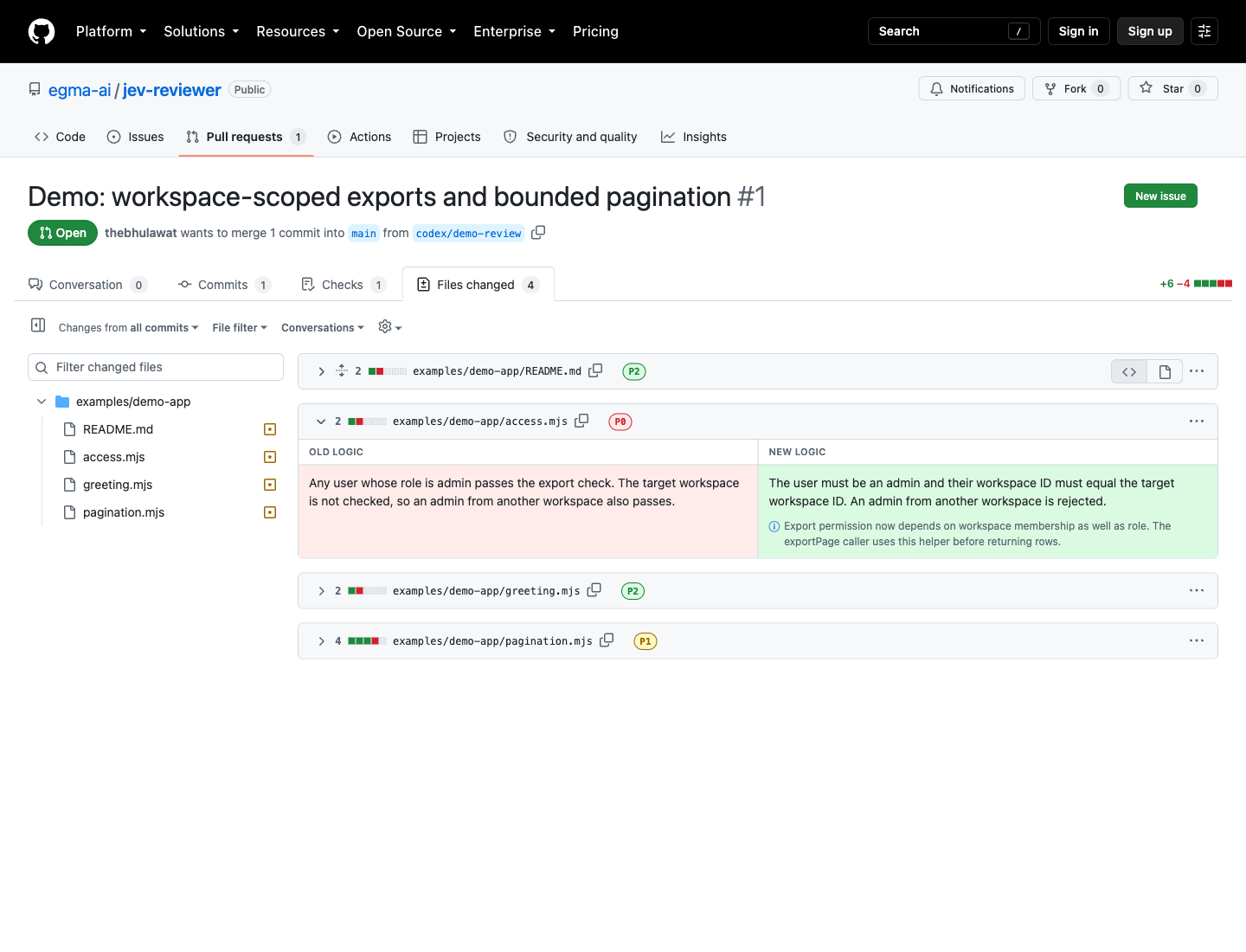
 Jev 是一款面向编程智能体所开拉取请求的本地代码评审工具:它把每个 diff 块按 P0、P1 或 P2 的关注度优先级分类,并用自然语言而非原始代码来解释变更。
Jev 是一款面向编程智能体所开拉取请求的本地代码评审工具:它把每个 diff 块按 P0、P1 或 P2 的关注度优先级分类,并用自然语言而非原始代码来解释变更。这是命令行工具、浏览器扩展,还是两者都是?它由三部分协同组成:分析 diff 的本地 Node.js 命令行工具、把解释叠加到 GitHub Files changed 页面上的 Chrome 扩展,以及你的编程智能体在开完 PR 后可以调用的智能体技能。
它由三部分协同组成:分析 diff 的本地 Node.js 命令行工具、把解释叠加到 GitHub Files changed 页面上的 Chrome 扩展,以及你的编程智能体在开完 PR 后可以调用的智能体技能。怎么用它评审我自己的 PR?把 extension/ 文件夹作为未打包的 Chrome 扩展加载,运行 'jev-reviewer token | pbcopy' 并粘贴到扩展的 Connection 弹窗里,然后打开 PR 的 Files changed 页面,开启 'Show logic in place of code'。
把 extension/ 文件夹作为未打包的 Chrome 扩展加载,运行 'jev-reviewer token | pbcopy' 并粘贴到扩展的 Connection 弹窗里,然后打开 PR 的 Files changed 页面,开启 'Show logic in place of code'。试用之前需要装好什么?需要 Node.js 22+ 和已登录的 GitHub CLI(gh auth login),以及一个 origin 与 PR 仓库一致的本地克隆;分析还需要 OpenAI API 密钥。
需要 Node.js 22+ 和已登录的 GitHub CLI(gh auth login),以及一个 origin 与 PR 仓库一致的本地克隆;分析还需要 OpenAI API 密钥。它会分析整个 diff 吗,在任何 GitHub PR 页面都能用吗?不能:默认只分析前 12 个 diff 块(用 --max-units 最多可到 100 个),未分析的文件保持 GitHub 原始代码视图,而且它只在经典 Files changed 页面上工作,不支持 GitHub 新的 /changes 页面。
不能:默认只分析前 12 个 diff 块(用 --max-units 最多可到 100 个),未分析的文件保持 GitHub 原始代码视图,而且它只在经典 Files changed 页面上工作,不支持 GitHub 新的 /changes 页面。我的代码会被发送到别处吗?会,分析步骤会把变更代码及上下文发送给 TypeSafe 和 OpenAI;Chrome 扩展本身只与 127.0.0.1:4731 上的本地服务器通信。
会,分析步骤会把变更代码及上下文发送给 TypeSafe 和 OpenAI;Chrome 扩展本身只与 127.0.0.1:4731 上的本地服务器通信。P0、P1、P2 优先级是怎么定的,我能改吗?它们表示一个变更值得多少人工关注,而不是正确性。P0 文件默认展开,P1 和 P2 默认折叠;你可以把 config/policy.json 复制成被评审仓库里的 .jev-reviewer.json 文件,或传入 --policy 来重新调整阈值。
它们表示一个变更值得多少人工关注,而不是正确性。P0 文件默认展开,P1 和 P2 默认折叠;你可以把 config/policy.json 复制成被评审仓库里的 .jev-reviewer.json 文件,或传入 --policy 来重新调整阈值。我的 API 密钥存在哪里?密钥存放在 ~/.config/jev-reviewer/credentials.json(仅所有者可读、未加密),而不是 shell 导出的环境变量,因为编程智能体的 shell 常常看不到环境变量。可以用 'node scripts/setup-keys.mjs --replace-openai' 更换 OpenAI 密钥。
密钥存放在 ~/.config/jev-reviewer/credentials.json(仅所有者可读、未加密),而不是 shell 导出的环境变量,因为编程智能体的 shell 常常看不到环境变量。可以用 'node scripts/setup-keys.mjs --replace-openai' 更换 OpenAI 密钥。不接入自己的 PR 能试用吗?可以,内置了一段演示录像,使用真实的 Jev 分类和准备好的解释文案,回放时不会调用任何服务商;另外还有一个开放的演示 PR,可以加载扩展来体验。
可以,内置了一段演示录像,使用真实的 Jev 分类和准备好的解释文案,回放时不会调用任何服务商;另外还有一个开放的演示 PR,可以加载扩展来体验。我运行 analyze 之后 PR 又有新提交,会怎样?旧报告绝不会自动显示;扩展会一直显示 GitHub 的原始代码,直到你重新运行 analyze 并点击 Refresh report。
旧报告绝不会自动显示;扩展会一直显示 GitHub 的原始代码,直到你重新运行 analyze 并点击 Refresh report。What are similar projects?perch, pr-agent, no-mistakes, 1code, open-swe, open-code-review, issue-graph, diffle
perch, pr-agent, no-mistakes, 1code, open-swe, open-code-review, issue-graph, diffleWhich topics is it in?pull-request, byok, devtools, code-quality, code-review, chrome-extension, browser-extension, github, cli-tool, git, local-first, coding-agent
pull-request, byok, devtools, code-quality, code-review, chrome-extension, browser-extension, github, cli-tool, git, local-first, coding-agent