Dux Modular Shell
Dux Modular Shell (DMS) is a complete desktop shell for niri, Hyprland, MangoWC, Sway, labwc, Scroll, Miracle WM, and other Wayland compositors. It replaces waybar, swaylock, swayidle, mako, fuzzel, polkit, and everything else you'd normally stitch together to make a desktop.
Repository Structure
This is a monorepo containing both the shell interface and the core backend services:
dux-shell/
├── quickshell/         # QML-based shell interface
│   ├── Modules/        # UI components (panels, widgets, overlays)
│   ├── Services/       # System integration (audio, network, bluetooth)
│   ├── Widgets/        # Reusable UI controls
│   └── Common/         # Shared resources and themes
├── core/               # Go backend and CLI
│   ├── cmd/            # dms CLI and duxinstall binaries
│   ├── internal/       # System integration, IPC, distro support
│   └── pkg/            # Shared packages
├── distro/             # Distribution packaging
│   ├── fedora/         # Fedora RPM specs
│   ├── debian/         # Debian packaging
│   └── nix/            # NixOS/home-manager modules
└── flake.nix           # Nix flake for declarative installation
See it in Action
More Screenshots
Installation
curl -fsSL https://install.duxlabs.dev | sh
One command installs DMS and all dependencies on Arch, Fedora, Debian, Ubuntu, openSUSE, or Gentoo.
FreeBSD: native support is included in-tree; see distro/freebsd/README.md for supported integrations and setup notes.
Manual installation guide
Features
Dynamic Theming
Wallpaper-based color schemes that automatically theme GTK, Qt, terminals, editors (vscode, vscodium), and more using matugen and dank16.
System Monitoring
Real-time CPU, RAM, GPU metrics and temperatures built into the dms daemon (powered by dgop). Process list with search and management.
Powerful Launcher
Spotlight-style search for applications, files (dsearch), emojis, running windows, calculator, and commands. Extensible with plugins.
Control Center
Unified interface for network, Bluetooth, audio devices, display settings, and night mode.
Smart Notifications
Notification center with grouping, rich text support, and keyboard navigation.
Media Integration
MPRIS player controls, calendar sync, weather widgets, and clipboard history with image previews.
Session Management
Lock screen, idle detection, auto-lock/suspend with separate AC/battery settings, and a settings front-end for dux-greeter.
Plugin System
Extend functionality with the plugin registry. DMS keeps
~/.config/dms/plugins.lock.json synchronized with managed plugin installs and
their exact Git commits, so the same plugins can be reproduced on another machine.
Supported Compositors
Works best with niri, Hyprland, Sway, MangoWC, labwc, Scroll, and Miracle WM with full workspace switching, overview integration, and monitor management. Other Wayland compositors work with reduced features.
Compositor configuration guide
Command Line Interface
Control the shell from the command line or keybinds:
dms run              # Start the shell
dms ipc call spotlight toggle
dms ipc call audio setvolume 50
dms ipc call wallpaper set /path/to/image.jpg
dms brightness list  # List available displays
dms plugins search   # Browse plugin registry
dms plugins lock     # Refresh the portable plugin lockfile
dms plugins restore ~/plugins.lock.json
Full CLI and IPC documentation
Documentation
Dux Projects
DMS is one piece of the suite. The rest lives in its own repos:
- dux-greeter - greetd login screen with the DMS aesthetic. The Greeter tab in DMS settings is the front-end for it.
- dux-calendar - Local, Google, Microsoft, and CalDAV calendars for the Dux desktop.
- dux-files - File manager for the Dux desktop; also serves the FileManager1 and portal file chooser D-Bus services.
- dgop - System monitoring TUI and Go library; its library powers the process list and dashboard widgets inside the dms daemon.
- dsearch - Fast file search that powers file results in the launcher.
- dux-qml-common - Shared QML widgets and components used by DMS, dux-greeter, dux-calendar, and dux-files.
- dux-go - Common Go modules behind the single binary apps.
Development
See component-specific documentation:
- quickshell/ - QML shell development, widgets, and modules
- core/ - Go backend, CLI tools, and system integration
- distro/ - Distribution packaging (Fedora, Debian, NixOS)
See CONTRIBUTING.md for editor setup, the i18n workflow, and Go style guidelines.
Building from Source
Core + Duxinstall:
cd core
make              # Build dms CLI
make duxinstall   # Build installer
Shell:
quickshell -p quickshell/
NixOS:
{
  inputs.dms.url = "github:duxlabs-dev/dux-shell";

  # Use in home-manager or NixOS configuration
  imports = [ inputs.dms.homeModules.dank-material-shell ];
}
Contributing
Contributions welcome. Bug fixes, widgets, features, translation, documentation and plugins all help.
Credits
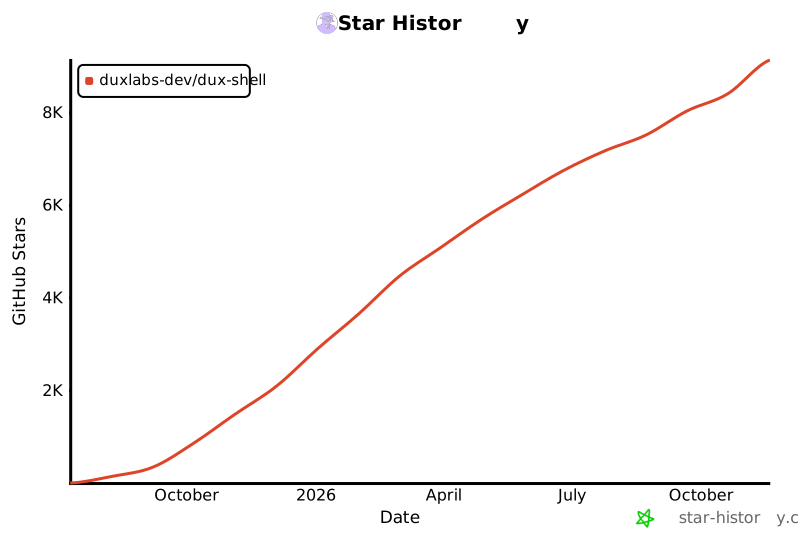
Star History
License
MIT License - See LICENSE for details.










 它是一个面向 Wayland 的完整桌面外壳,基于 Quickshell 和 Go 构建。它可以替代你通常需要自行拼凑的多个工具,例如状态栏、锁屏、空闲管理器、通知、启动器和 polkit 认证代理。