title: TorchCode
emoji: 🔥
colorFrom: red
colorTo: yellow
sdk: docker
app_port: 7860
pinned: false
🎯 Why TorchCode?
Top companies (Meta, Google DeepMind, OpenAI, etc.) expect ML engineers to implement core operations from memory on a whiteboard. Reading papers isn't enough — you need to write softmax, LayerNorm, MultiHeadAttention, and full Transformer blocks code.
TorchCode gives you a structured practice environment with:
|
Feature |
|
| 🧩 |
41 curated problems |
The most frequently asked PyTorch interview topics |
| ⚖️ |
Automated judge |
Correctness checks, gradient verification, and timing |
| 🎨 |
Instant feedback |
Colored pass/fail per test case, just like competitive programming |
| 💡 |
Hints when stuck |
Nudges without full spoilers |
| 📖 |
Reference solutions |
Study optimal implementations after your attempt |
| 📊 |
Progress tracking |
What you've solved, best times, and attempt counts |
| 🔄 |
One-click reset |
Toolbar button to reset any notebook back to its blank template — practice the same problem as many times as you want |
 |
Open in Colab |
Every notebook has an "Open in Colab" badge + toolbar button — run problems in Google Colab with zero setup |
No cloud. No signup. No GPU needed. Just make run — or try it instantly on Hugging Face.
🚀 Quick Start
Option 0 — Try it online (zero install)
Launch on Hugging Face Spaces — opens a full JupyterLab environment in your browser. Nothing to install.
Or open any problem directly in Google Colab — every notebook has an badge.
Option 0b — Use the judge in Colab (pip)
In Google Colab, install the judge from PyPI so you can run check(...) without cloning the repo:
!pip install torch-judge
Then in a notebook cell:
from torch_judge import check, status, hint, reset_progress
status()           # list all problems and your progress
check("relu")      # run tests for the "relu" task
hint("relu")       # show a hint
Option 1 — Pull the pre-built image (fastest)
docker run -p 8888:8888 -e PORT=8888 ghcr.io/duoan/torchcode:latest
If the registry image is unavailable for your platform, use Option 2 instead. This is the common path on Apple Silicon / arm64.
Option 2 — Build locally
make run
make run will try the prebuilt image first and automatically fall back to a local build when needed.
Open http://localhost:8888 — that's it. Works with both Docker and Podman (auto-detected).
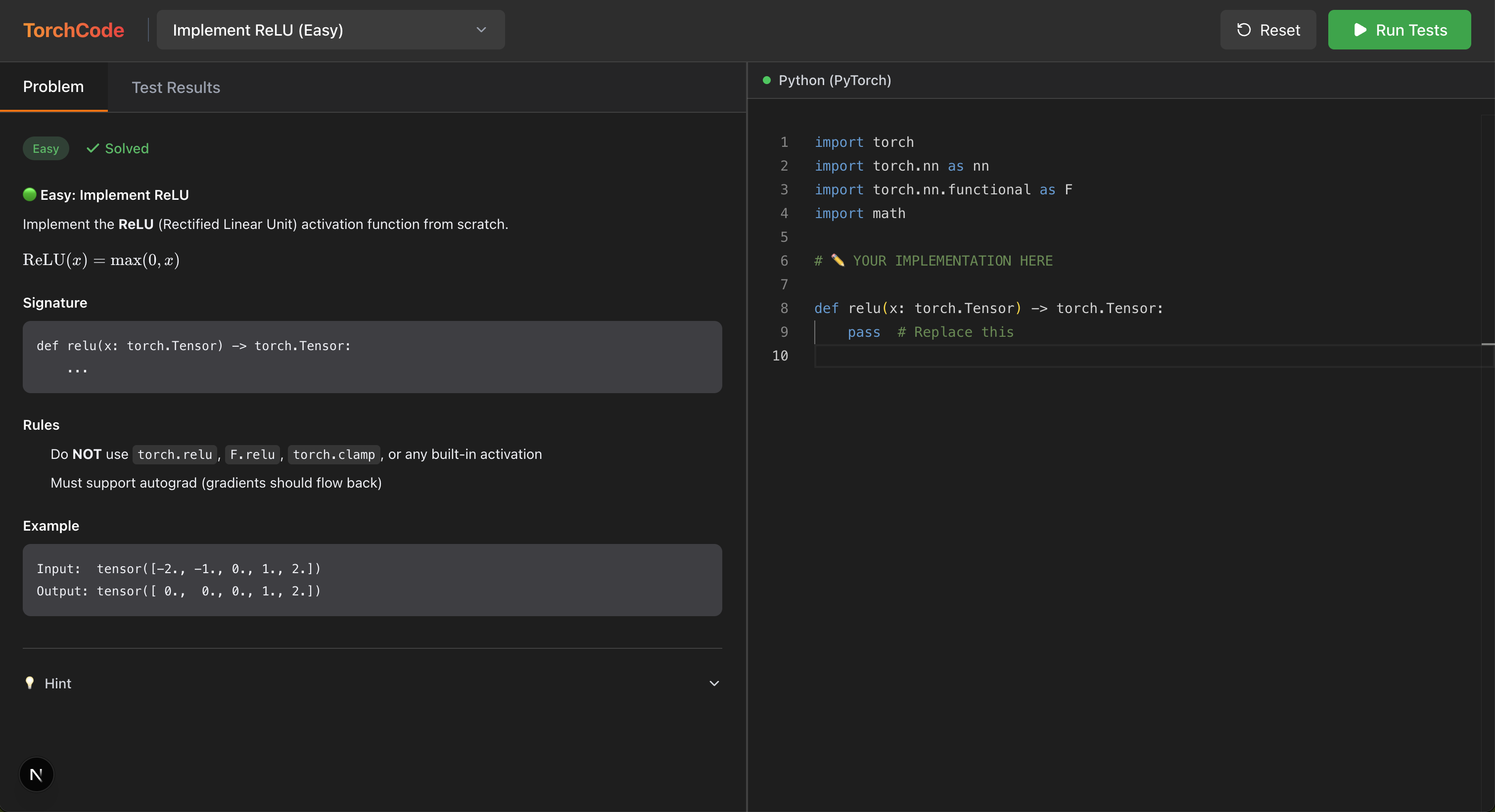
Option 3 — Standalone Web UI (Next.js + FastAPI)
For a modern, standalone coding experience with an integrated IDE and dual-pane layout:
- Start Backend (FastAPI):
pip install -r api/requirements.txt
python -m uvicorn api.main:app --port 8000 --reload
- Start Frontend (Next.js):
cd web
npm install
npm run dev
- Open http://localhost:3000 in your browser.
📋 Problem Set
Frequency: 🔥 = very likely in interviews, ⭐ = commonly asked, 💡 = emerging / differentiator
🧱 Fundamentals — "Implement X from scratch"
The bread and butter of ML coding interviews. You'll be asked to write these without torch.nn.
| # |
Problem |
What You'll Implement |
Difficulty |
Freq |
Key Concepts |
| 1 |
ReLU |
relu(x) |
 |
🔥 |
Activation functions, element-wise ops |
| 2 |
Softmax |
my_softmax(x, dim) |
|
🔥 |
Numerical stability, exp/log tricks |
| 16 |
Cross-Entropy Loss |
cross_entropy_loss(logits, targets) |
|
🔥 |
Log-softmax, logsumexp trick |
| 17 |
Dropout |
MyDropout (nn.Module) |
|
🔥 |
Train/eval mode, inverted scaling |
| 18 |
Embedding |
MyEmbedding (nn.Module) |
|
🔥 |
Lookup table, weight[indices] |
| 19 |
GELU |
my_gelu(x) |
|
⭐ |
Gaussian error linear unit, torch.erf |
| 20 |
Kaiming Init |
kaiming_init(weight) |
|
⭐ |
std = sqrt(2/fan_in), variance scaling |
| 21 |
Gradient Clipping |
clip_grad_norm(params, max_norm) |
|
⭐ |
Norm-based clipping, direction preservation |
| 31 |
Gradient Accumulation |
accumulated_step(model, opt, ...) |
|
💡 |
Micro-batching, loss scaling |
| 40 |
Linear Regression |
LinearRegression (3 methods) |
 |
🔥 |
Normal equation, GD from scratch, nn.Linear |
| 3 |
Linear Layer |
SimpleLinear (nn.Module) |
|
🔥 |
y = xW^T + b, Kaiming init, nn.Parameter |
| 4 |
LayerNorm |
my_layer_norm(x, γ, β) |
|
🔥 |
Normalization, running stats, affine transform |
| 7 |
BatchNorm |
my_batch_norm(x, γ, β) |
|
⭐ |
Batch vs layer statistics, train/eval behavior |
| 8 |
RMSNorm |
rms_norm(x, weight) |
|
⭐ |
LLaMA-style norm, simpler than LayerNorm |
| 15 |
SwiGLU MLP |
SwiGLUMLP (nn.Module) |
|
⭐ |
Gated FFN, SiLU(gate) * up, LLaMA/Mistral-style |
| 22 |
Conv2d |
my_conv2d(x, weight, ...) |
|
🔥 |
Convolution, unfold, stride/padding |
🧠 Attention Mechanisms — The heart of modern ML interviews
If you're interviewing for any role touching LLMs or Transformers, expect at least one of these.
| # |
Problem |
What You'll Implement |
Difficulty |
Freq |
Key Concepts |
| 23 |
Cross-Attention |
MultiHeadCrossAttention (nn.Module) |
|
⭐ |
Encoder-decoder, Q from decoder, K/V from encoder |
| 5 |
Scaled Dot-Product Attention |
scaled_dot_product_attention(Q, K, V) |
 |
🔥 |
softmax(QK^T/√d_k)V, the foundation of everything |
| 6 |
Multi-Head Attention |
MultiHeadAttention (nn.Module) |
|
🔥 |
Parallel heads, split/concat, projection matrices |
| 9 |
Causal Self-Attention |
causal_attention(Q, K, V) |
|
🔥 |
Autoregressive masking with -inf, GPT-style |
| 10 |
Grouped Query Attention |
GroupQueryAttention (nn.Module) |
|
⭐ |
GQA (LLaMA 2), KV sharing across heads |
| 11 |
Sliding Window Attention |
sliding_window_attention(Q, K, V, w) |
|
⭐ |
Mistral-style local attention, O(n·w) complexity |
| 12 |
Linear Attention |
linear_attention(Q, K, V) |
|
💡 |
Kernel trick, φ(Q)(φ(K)^TV), O(n·d²) |
| 14 |
KV Cache Attention |
KVCacheAttention (nn.Module) |
|
🔥 |
Incremental decoding, cache K/V, prefill vs decode |
| 24 |
RoPE |
apply_rope(q, k) |
|
🔥 |
Rotary position embedding, relative position via rotation |
| 25 |
Flash Attention |
flash_attention(Q, K, V, block_size) |
|
💡 |
Tiled attention, online softmax, memory-efficient |
🏗️ Architecture & Adaptation — Put it all together
| # |
Problem |
What You'll Implement |
Difficulty |
Freq |
Key Concepts |
| 26 |
LoRA |
LoRALinear (nn.Module) |
|
⭐ |
Low-rank adaptation, frozen base + BA update |
| 27 |
ViT Patch Embedding <a |
|
|
|
|











 TorchCode 是一个 LeetCode 风格的 PyTorch 练习平台:它提供 41 道精选编程题,让你在 Jupyter 笔记本中从零实现机器学习算子和架构(softmax、attention、GPT-2 块等),并配有自动评测器,即时检查正确性、梯度和耗时。