
xodus-nexus README

The project's README from github.com/domsvoboda/xodus-nexus. As one markdown file: README.md.

Xodus Nexus

Xodus Nexus

Your Microsoft Store PC games, on Linux.

CI License: MIT

[!CAUTION] Xodus Nexus is an independent, unofficial project built on Xodus. It is not an official project or release from the upstream Xodus developers.

Please report all issues encountered with Xodus Nexus only in the Xodus Nexus repository, not in the upstream Xodus issue tracker or support channels.

Nexus includes its own changes, so a problem in Nexus does not necessarily indicate a problem in upstream Xodus.

An Xbox-inspired launcher built on Xodus, using our patched Nexus backend and Nexus runtime. Browse the Store, install games you own or can access through a subscription, and play with one shared runtime. Xbox sign-in and cloud saves are available for supported games.

Xodus Nexus demo

Preview with sample account data.

Install

Download the latest x86_64 Linux AppImage from Releases, make it executable and open it.

For an application-menu installation on supported distributions:

curl -fsSL https://raw.githubusercontent.com/domsvoboda/xodus-nexus/main/scripts/install.sh | bash

In Settings, install the Nexus backend and Nexus runtime, then sign in with your Microsoft account. A valid game purchase or subscription is required.

If passkey sign-in gets stuck, choose Continue in browser in the sign-in window. This option requires Google Chrome, either a native installation or the Flatpak version available through Discover. Other browsers are not supported.

Setup guide and SteamOS requirements

Use

Experimental gamepad navigation supports standard-mapped controllers: D-pad or left stick to move, A to select, B to go back, X for a game's menu, LB/RB to switch pages and the right stick to scroll. Mouse, touch and keyboard controls remain available. Moving through library games selects them; A opens a game page and B returns to its card. B closes an open menu or screenshot gallery first; LB/RB changes screenshots inside the gallery. Home, My Library and Store switch on controller focus. Recent games, Settings, Install Queue and action buttons still require A. Up from the first library row reaches filters and search; Down returns to the games. Directional navigation scrolls the selected card into view. Use Steam + X for the on-screen keyboard in Game Mode; system file pickers and sign-in windows may still need mouse or touch input.

Documentation · Report an issue

How it works

Component Role
Xodus Nexus Store browsing, library, installation queue and launch controls.
Nexus backend Patched build of Xodus for account sign-in, license checks, package downloads and launch preparation.
Nexus runtime Built on Xodus Proton and Xodus XGameRuntime, with additional Nexus compatibility patches.

Every game uses the same launch path and shared runtime.

Compatible games

These results come from manual testing and user reports. Other games may work, but have not been verified and may encounter compatibility issues.

Game Playable Status
Gears of War: E-Day Yes Playable online.
Deep Rock Galactic Yes Playable online.
Minecraft Dungeons Yes Playable online with launcher 0.3.5; ownership failures also reported on other setups.
Minecraft Dungeons II Yes Playable online.
Minecraft for Windows Yes Playable online.
Minecraft Launcher Yes Sign-in and Java download/startup work with launcher 0.3.5; Java online unverified. Login failure also reported on another setup.
No Man's Sky Yes Playable online.
Valor Mortis Yes Fully playable.
Forza Horizon 6 Yes Playable online; some setups need VC++ prerequisites. Loading failures also reported.
Palworld Yes Playable online.
DOOM Eternal Yes Playable.
DOOM: The Dark Ages Yes Playable (user report).
Fallout 76 Yes Playable online; one reported setup requires gamescope to display correctly.
The Outer Worlds 2 Yes Playable.
Wolfenstein: The Old Blood Yes Playable.
Wasteland Remastered Yes Playable.
Danganronpa 2 Yes Playable.
Neon Abyss 2 Yes Playable.
Hollow Knight: Voidheart Edition Yes Playable.
Avowed Yes Playable.
Mortal Shell: Enhanced Edition Yes Playable (user report).
Sea of Thieves Yes Playable online.
Tony Hawk's Pro Skater 3 + 4 Partial Solo playable; Private Match loads a map. Joining other players and public matchmaking remain unconfirmed. (#88)
ARC Raiders No Launches but cannot connect to online services. (user report)
Hogwarts Legacy Yes Playable. (user report)
Halo: Campaign Evolved Yes Playable; may remain running after quitting. (user report)
Resonance: A Plague Tale Legacy Yes Playable; black screen reported when ending a game on Steam Deck. (user report)
Resident Evil 2 Yes Playable; may remain running after quitting. (user report)
Wreckfest Yes Playable. (user report)
TUNIC Yes Playable. (user report)
Hades Yes Playable. (user report)
Hell Let Loose: Vietnam No Crashes after Easy Anti-Cheat initialization on Arch Linux with an Arc A770. (user report)
Human: Fall Flat Partial Public online game search fails. (user report)
Wolfenstein II: The New Colossus Yes Playable. (user report)
The Dungeon of Naheulbeuk: The Amulet of Chaos Yes Playable. (user report)
Soul Hackers 2 No Reaches the menu, but starting a new game or loading a save fails. (user report)
Monster Boy and the Cursed Kingdom Yes Playable. (user report)
Hollow Knight: Silksong Yes Playable. (user report)
Teenage Mutant Ninja Turtles: Shredder's Revenge Yes Playable. (user report)
DRAGON QUEST XI S: Echoes of an Elusive Age - Definitive Edition No Crashes after the first loading screen. (user report)
ACA NEOGEO METAL SLUG No Crashes at launch. (user report)
SIGNALIS Yes Playable. (user report)
DREDGE Yes Playable. (user report)
Warhammer 40,000: Space Marine 2 Yes Playable; online unverified. (user report)
Indiana Jones and the Great Circle Yes First mission playable. (#78)
Microsoft Jewel No Crashes at launch. (user report)
Microsoft Bubble No Crashes at launch. (user report)
AI: THE SOMNIUM FILES - nirvanA Initiative Yes Playable; Store ID detection issue reported. (user report)
Minecraft Legends Yes Playable; an online session starts, but play with friends is unverified. (user report)
The Elder Scrolls: Arena No Crashes at launch. (user report)
The Elder Scrolls II: Daggerfall No Crashes at launch. (user report)
Wolfenstein: Enemy Territory Partial Playable, but cannot join PunkBuster-enabled servers. (user report)
Hell Let Loose No Crashes at startup. (user report)
Kingdom Come: Deliverance II Yes Playable. (#112)
PAC-MAN MUSEUM+ No Stops after the opening logos. (user report)
Farming Simulator 25 No Startup failure reported; updated runtime retest pending. (user report)
PowerWash Simulator 2 Yes Playable. (#69)
Young Souls Unverified Launches in Steam Deck Desktop Mode; gameplay unverified. (user report)
Remnant II Unverified Starts and exits cleanly; gameplay and online were not detailed. (user report)
The Witcher 3 No Currently crashes on launch.
LIMBO Yes Playable.
World War Z Partial Connects to online services and starts Quick Match search; joining a match is unverified.
Balatro Yes Playable.

Full compatibility list

User reports describe individual setups, not universal compatibility. The wiki links to report sources and the community spreadsheet. Launch-only reports do not confirm gameplay or online support.

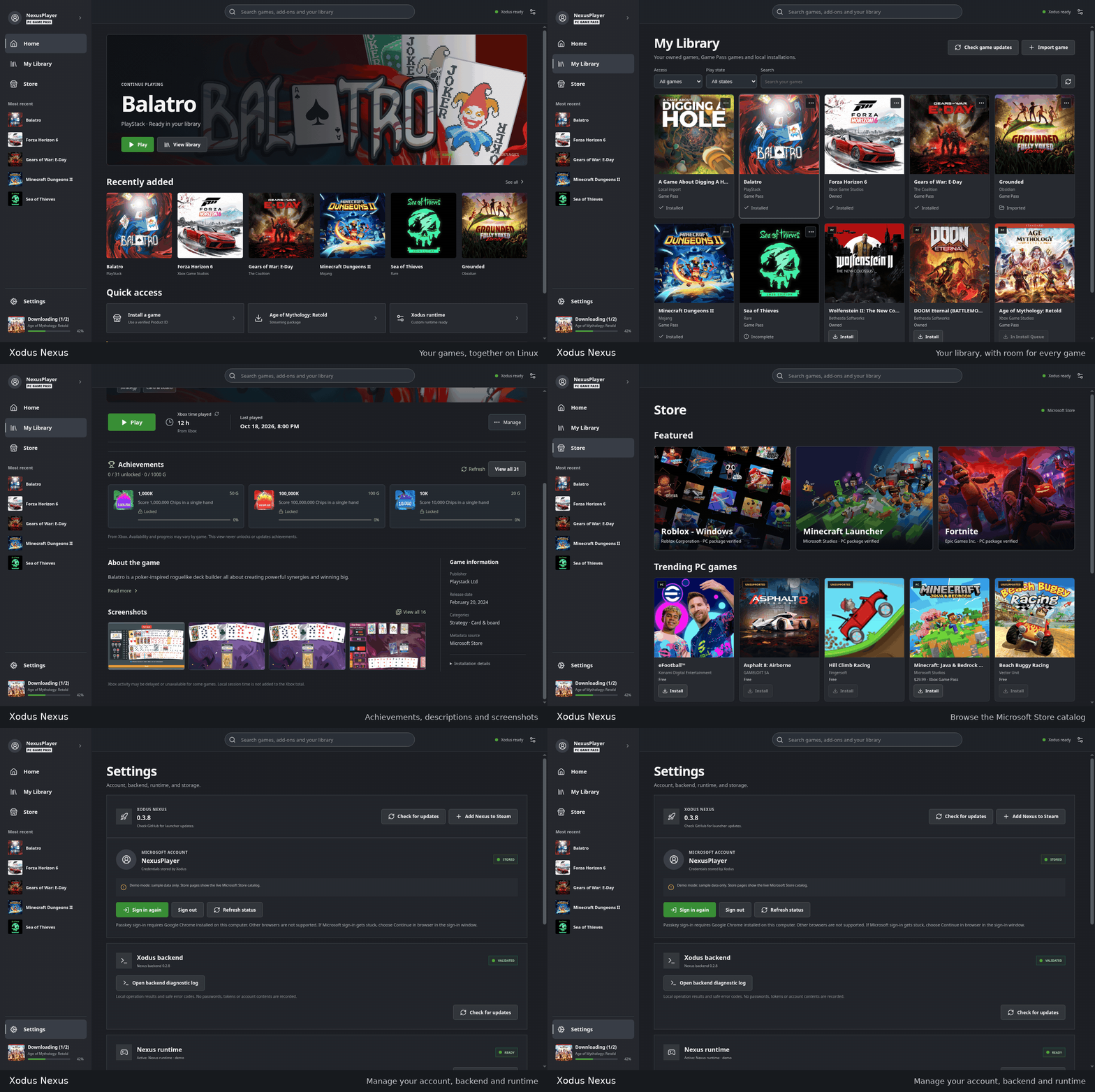
Screenshots

Library · Store · Install queue · Settings

Independent project, not affiliated with Microsoft or Xbox. A valid game license is required. Launcher: MIT license. The separate Xodus backend retains its upstream GPLv3 license and ships with corresponding source. The Nexus runtime includes FFmpeg shared libraries under LGPL 2.1 or later; its corresponding pinned source and build recipe accompany each runtime release. Contributing

xodus-nexus (domsvoboda/xodus-nexus)

Searching Database…

What is this?Xodus Nexus is an unofficial Xbox-inspired desktop launcher for Linux that lets you browse the Microsoft Store, install Xbox PC games you own or can access via subscription, and play them through a shared, patched runtime.
Is this an official Xbox app, or a community project?It is an independent, unofficial project built on top of Xodus; it is not released or supported by the upstream Xodus developers or by Microsoft/Xbox.
How do I install and set it up?Download the latest x86_64 Linux AppImage from Releases, make it executable and run it, then use Settings to install the Nexus backend and runtime and sign in with your Microsoft account.
What do I need to actually play games with it?A Microsoft account with a valid game purchase or an active subscription is required; if passkey sign-in gets stuck, a native or Flatpak install of Google Chrome is needed for browser sign-in.
Does every Microsoft Store game actually work?No, compatibility varies by game: some titles are fully playable online, some only partially (missing matchmaking or online search), and others crash at launch; results come from manual testing and user reports, not a guarantee.
Does it work on any Linux distro, including Steam Deck?It ships as a Linux AppImage with optional application-menu install on supported distributions, and several compatibility reports specifically mention Steam Deck.
Does the diagnostic log expose my account credentials?No, the local backend diagnostic log only contains safe error codes and operation results, not credentials, though you're advised to review it before sharing.
Can I add my Xodus Nexus games to Steam?Yes, using Add to Steam in the game menu or Add Nexus to Steam in Settings creates a Non-Steam shortcut with artwork; this requires a native Linux Steam install, as Flatpak Steam is not yet supported.
Is controller navigation supported?Yes, there's experimental gamepad navigation for standard-mapped controllers (D-pad/stick to move, A to select, B to go back, etc.), alongside normal mouse, touch and keyboard controls.
What happens to save data when I uninstall a game?You can choose to keep or permanently delete the install folder (bypassing Trash); deleting it also removes saves stored inside that folder, while saves stored elsewhere are untouched.
Are Xbox achievements and cloud saves available?Xbox sign-in and cloud saves are available for supported games, and each game page shows its description, categories, screenshots, achievements and time played, depending on account and game support.
Creator
domsvoboda
Size
34 MB
Stars
375
Age
9d
Commits · 90 Days
