MapToPoster JS







MapToPoster JS is a professional-grade, client-side web application designed to help you generate a custom Map To Poster with ease. Whether you're looking to create minimalist city art or a vibrant geographic keepsake, this tool allows you to search for any location in the world and transform it into a stunning Map To Poster piece with fully customizable themes, layouts, and high-fidelity export options. As a versatile Map To Poster generator, the application focuses on high-resolution output suitable for large-format printing, making it the perfect tool for creating unique wall art or personalized gifts.
🚀 Key Features
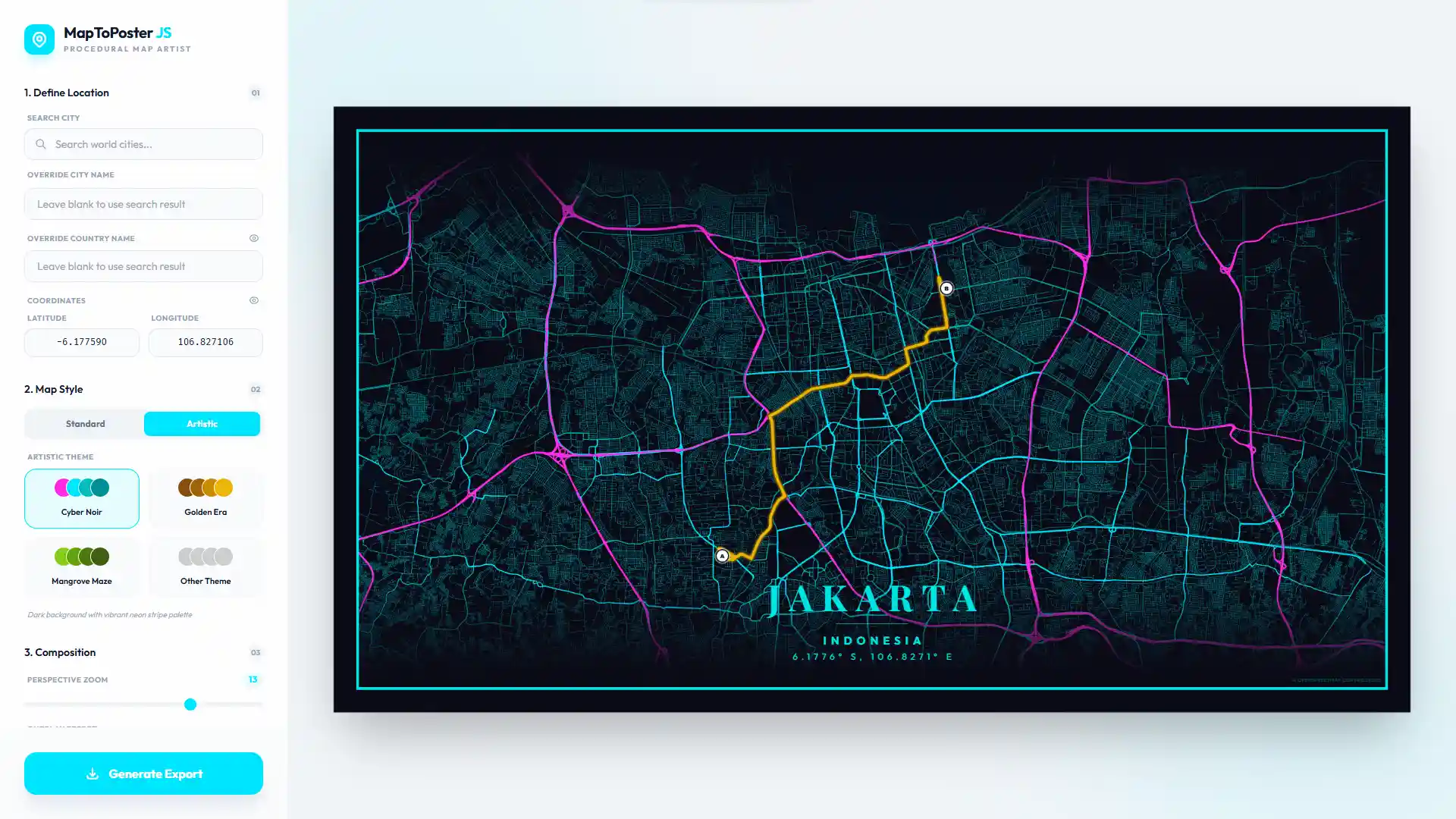
- Hybrid Rendering System: Seamlessly switch between efficient tile-based mapping (Leaflet) and procedural vector artistry (MapLibre GL).
- Precision Geocoding: Instant global location search powered by the Nominatim API.
- Dynamic Markers: Place, drag, and style multiple location indicators with various icons and adjustable sizes.
- Custom Travel Paths: Visualize journeys or specific itineraries with integrated route plotting and dynamic path fetching.
- Mat / Passepartout Framing: Apply a classic gallery-style framing effect with customizable width, border thickness, and opacity.
- Elegant Typography: A curated selection of premium fonts with full support for custom text and coordinate overrides.
- Draggable UI Overlay: A fluid city-label overlay with automatic edge-clamping and symmetric safety padding.
- Background Edge Effects: Improve readability using soft vignette shading or subtle transparency along the edges.
- Layout Flexibility: Independently toggle country names, geographic coordinates, and map labels for a tailored look.
- Pro-Grade Exports: Generate high-fidelity PNG files at custom resolutions or ultra-high resolutions (up to 50,000px).
- Privacy & Performance: Persistent settings via LocalStorage and 100% client-side rendering, your data never leaves your browser.
🎨 Themes
MapToPoster JS offers two distinct ways to style your maps:
Standard Themes (Leaflet)
Based on high-quality raster tiles from established providers:
- Minimal White: Clean and modern (CartoDB Positron).
- Midnight Dark: Sleek dark mode (CartoDB Dark Matter).
- Classic Street: Standard OpenStreetMap cartography.
- Modern Voyager: Colorful and detailed (CartoDB Voyager).
- Satellite View: High-resolution imagery (Esri World Imagery).
Artistic Themes (MapLibre GL)
Hand-crafted vector styles with procedural colors:
- Arctic Frost: Pale blues and crisp whites.
- Aurora Glow: Iridescent greens and pinks.
- Cyber Glitch: Neon accents for a digital look.
- Paper Heritage: Vintage sepia tones and inked roads.
- Volcanic Ash: Deep charcoal with glowing ember accents.
- Blueprint Classic: Technical cyanotype style for an architectural feel.
- ...and many more unique themes like Retro Synth, Charcoal Sketch, and Sakura Bloom.
Customizing Themes
You can easily add your own artistic themes by editing src/core/artistic-themes.js:
- Open
artistic-themes.js.
- Add a new object to the
artisticThemes export:
your_theme_key: {
    name: "Your Theme Name",
    description: "Brief description of the style",
    bg: "#HEXCODE",
    text: "#HEXCODE",
    water: "#HEXCODE",
    parks: "#HEXCODE",
    road_motorway: "#HEXCODE",
    road_primary: "#HEXCODE",
    road_secondary: "#HEXCODE",
    road_default: "#HEXCODE"
}
The application will automatically pick up the new theme and display it in the selection menu.
🛠️ Tech Stack
- Framework: Vanilla JavaScript (ES Modules)
- Bundler: Vite 5
- Mapping: Leaflet (Raster) & MapLibre GL (Vector)
- Styling: Tailwind CSS 3
- Rendering: html2canvas
- Typography: Google Fonts including Outfit, Playfair Display, and Cormorant Garamond
- API: Nominatim (Search) & OSRM (Routing)
📦 Getting Started
Follow these steps to get a local copy up and running.
Prerequisites
- Node.js: Version 18.0.0 or higher
- npm: Usually comes with Node.js
Installation & Setup
Clone the repository
git clone https://github.com/dimartarmizi/map-to-poster.git
cd map-to-poster
Install dependencies
npm install
Start development server
npm run dev
The app will be available at http://localhost:5173.
Build for production
npm run build
Optimized files will be generated in the dist/ folder.
🐳 Deploy with Docker
This project is ready to run as a lightweight Docker container using a multi-stage build:
- Build stage: Uses Node.js to install dependencies and generate the Vite production build.
- Runtime stage: Uses Nginx Alpine to serve the static files from
dist/.
Build the image
docker build -t map-to-poster .
Run the container
docker run -d -p 8080:80 --name map-to-poster map-to-poster
Then open http://localhost:8080.
Update deployment
After pulling new changes, rebuild and recreate the container:
docker build -t map-to-poster .
docker rm -f map-to-poster
docker run -d -p 8080:80 --name map-to-poster map-to-poster
Included Docker files
Dockerfile — multi-stage production image.dockerignore — keeps the build context smalldocker/nginx.conf — Nginx config with SPA fallback to index.html
📜 Technical Overview
- Reactive State Management: Uses an observer-pattern based store (src/core/state.js) to synchronize changes across the UI, Leaflet, and MapLibre engines. All user preferences are persisted via
localStorage.
- Hybrid Mapping Engine: Implements bidirectional viewport synchronization between Leaflet (raster tiles) and MapLibre GL (vector themes), ensuring seamless layout consistency regardless of the active rendering mode.
- Draggable Overlay System: Leverages real-time bounding box calculations to clamp label positions, ensuring a symmetric 8px minimum safety gap from the poster edges.
- Dynamic Asset Integration: Manages custom GeoJSON routing and multi-marker instances with interactive drag-and-drop support across both map engines.
- Mat Framing Layer: Implements a virtual "Mat/Passepartout" interface with customizable inset spacing and inner borders for a gallery-style finish.
- High-Fidelity Rendering Pipeline: Captured exports utilize a multi-stage process in src/core/export.js to generate high-resolution map snapshots using
html2canvas and the onclone callback.
🤝 Credits
- Inspiration: Inspired by originalankur/maptoposter. This project is an independent implementation built with a different stack and architecture.
- Contributors: A huge thank you to all the contributors who have helped improve this project through their code, bug reports, and suggestions. Your support makes this tool better for everyone.
If you have any questions, suggestions, or just want to reach out, feel free to contact me at [email protected].
⚖️ License
This project is open-source and available under the MIT License.

 MapToPoster JS 是一个纯客户端网页应用,能把任意地点变成可定制的高分辨率地图海报,并导出为 PNG 用于打印。