


herdr-web-ui README

The project's README from github.com/devswha/herdr-web-ui. As one markdown file: README.md.

herdr web ui

herdr web ui

English · 简体中文 · 日本語 · 한국어

website · install · try the demo · quick start · docs

MIT license GitHub stars Latest release herdr 0.9.0+ Installable PWA


https://github.com/user-attachments/assets/6162cf5a-b29b-4f14-b2a2-7a01564791d6

Claude Code in a terminal pane, the same session as a chat, then on the phone · recorded live · ▶ the 56-second film

Your agents, in plain conversation. On your desktop and your phone.

A browser and phone client for herdr. Open the sessions you already run, read what your agents are doing, and answer them from wherever you are.


The phone attaches a screenshot and asks Claude to fix the bug; the desktop shows the same message.
Send context from your phone
Attach a screenshot, mention files, queue messages while the agent works.

Claude writes a chart as an SVG file; a click opens it in the file viewer, and a tap on the phone does too.
Open what the agent made
A path in the chat opens in the file viewer, on the desktop and the phone.
The folder button opens the pane's folder and the file Claude wrote opens in the viewer; the phone does the same from the command palette.
Browse a pane's files
Walk the pane's folder and preview or download any file.
Add PC connects to a Linux PC over SSH, installs the bridge, and its session joins the sidebar with a terminal running on that PC.
Every PC in one sidebar
Add Linux and macOS machines over SSH. Remote PCs →

Each clip is a live recording of the desktop and a phone at once. Click one for the full ~20-second video.


install

curl -fsSL https://devswha.github.io/herdr-web-ui/install.sh | sh

Linux (x64, arm64) or macOS. Installs missing herdr 0.9.0+, Bun 1.4+ and Node 18+ prerequisites for your user, then installs the app as a herdr plugin. If an existing herdr installation is older than 0.9.0, update and restart herdr yourself before rerunning the installer. With the default listen address and Tailscale running, successful HTTPS setup provides a tailnet address and QR code.

Windows x64, in PowerShell:

irm https://devswha.github.io/herdr-web-ui/install.ps1 | iex

Requires Git for Windows. Installs missing herdr and Bun for your user, then installs the same plugin. No Node or WSL is needed. Open Phone setup in herdr for phone access. Windows terminals use the screen mirror, with typing and a fixed grid, until herdr supports terminal attach there.

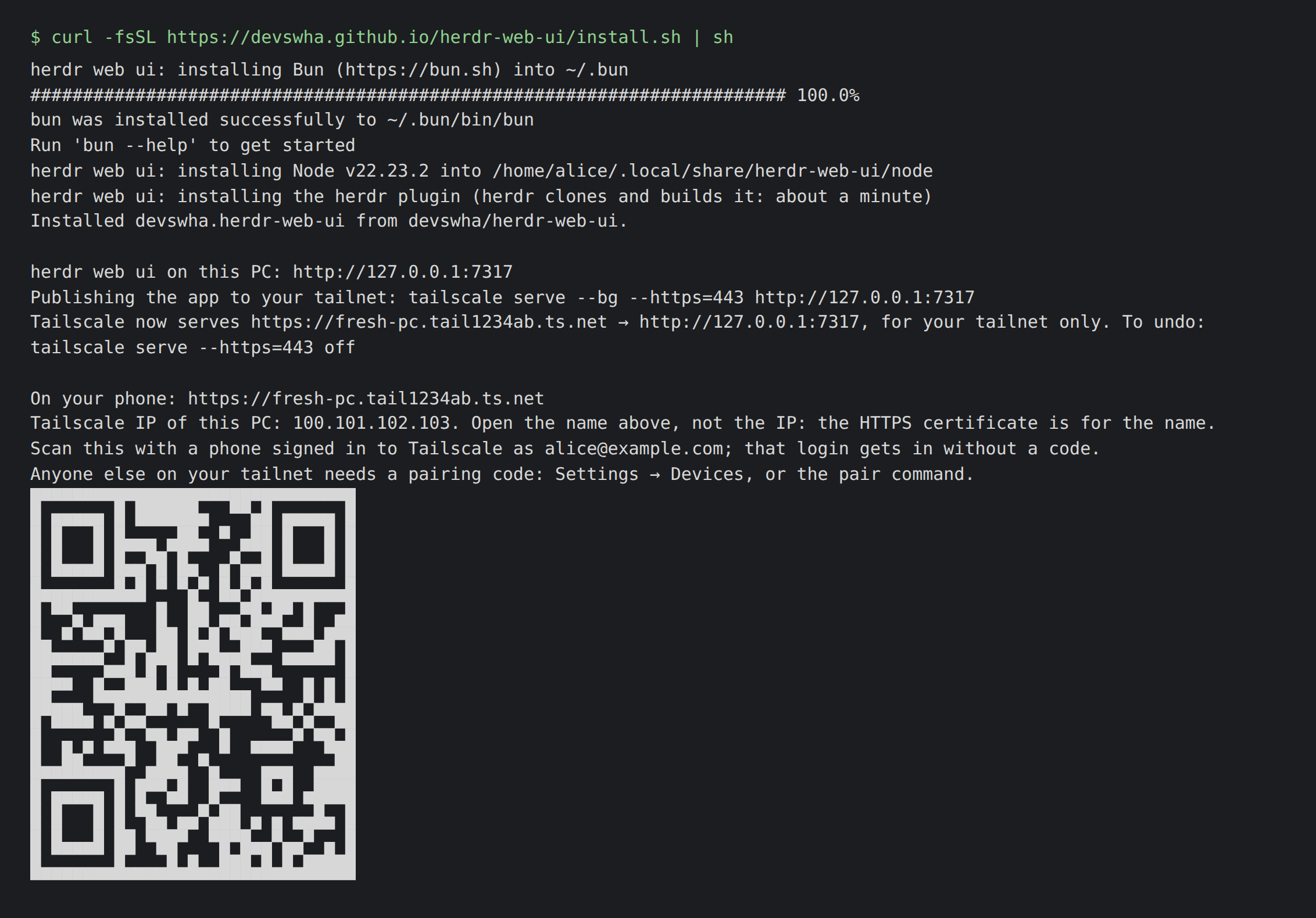
Installer output: Bun, Node and the herdr plugin install, then tailscale serve publishes the app and a QR code for the phone appears.

Already have the prerequisites? Install just the plugin:

herdr plugin install devswha/herdr-web-ui

With herdr running, open localhost:7317. Pick a pane or start an agent with New session. To use your phone, scan the installer's QR code and add the app to your home screen. Quick start →

The server listens on 127.0.0.1 by default. For access from another device, see phone setup and access and safety.

docs

Start with the user guide: quick start · supported agents · features · phone · remote PCs · access and safety · configuration · keyboard shortcuts · FAQ.

For a closer look: how it works · chat transcripts · terminal flow control · app updates · changelog.

thanks

Built on herdr, with inspiration from chatmux, and powered by xterm.js, React, Bun and Lucide.

Thanks to everyone who has contributed, including @Yoonwoo-Ha.

agent instructions

Helping someone install the app? Follow INSTALL.md. For repository changes, follow CONTRIBUTING.md and the committed review rules, plus the local AGENTS.md instructions when present.

development

git clone https://github.com/devswha/herdr-web-ui.git
cd herdr-web-ui
bun install

bun run server      # API + WebSocket on :7317
bun run dev         # Vite on :5173; run in a second terminal
bun run typecheck
bun run test:unit   # no herdr needed
bun test           # isolated herdr test session
bun run test:ui    # browser regression checks

See CONTRIBUTING.md to send a change, development for tests, media and releases, and DESIGN.md for UI conventions. Report security problems privately: SECURITY.md.

license

MIT. Copyright © 2026 devswha.

herdr-web-ui (devswha/herdr-web-ui)

Searching Database…

这是什么?它是 herdr 的浏览器和手机客户端:让你打开已经在运行的智能体会话,与它们聊天,查看每个窗格的实时终端,并随时随地回复。
这是独立应用,还是需要 herdr 已经在运行?它是 herdr 的插件/客户端,不是它的替代品:herdr 仍然运行并掌管这些智能体,这个应用只是通过浏览器或作为手机上的 PWA 连接到它们。
怎么安装和打开它?运行 Linux/macOS 安装器(或 Windows PowerShell 命令),它会为你的用户安装 herdr、Bun 和 Node,并将此 UI 添加为 herdr 插件;然后打开 localhost:7317,选择一个窗格或开始新会话。
需要预先安装什么?在 Linux/macOS 上你需要(或由安装器配置好)herdr 0.9.0+、Bun 1.4+ 和 Node 18+;在 Windows 上只需要 Git for Windows,因为那里不需要 Node 或 WSL。
实时终端在所有操作系统上表现都一样吗?在 Windows 上,它会退化为带输入功能和固定网格的屏幕镜像视图,而不是完整的终端接入,直到 herdr 为 Windows 添加该支持。
我实际上可以和哪些编码智能体对话?对于在 herdr 窗格中运行的 Claude Code、Codex、omp、omo、gjc 和 pi 会话,它会渲染原生对话记录并提供实时终端。
使用语音听写时,我的语音会去哪里?在你按下发送之前,听写内容不会被发送到任何地方;它通过你自己的 OpenAI 密钥或浏览器内置的语音识别来处理。
在家网络之外,我怎么从手机访问这个应用?安装器会通过你的 Tailscale 网络设置 HTTPS,为你提供一个私有的 tailnet 地址和一个二维码,扫码即可在手机上打开 PWA。
除了运行 herdr 的那台机器,它能控制其他机器吗?可以,你可以把其他 Linux 和 macOS 电脑添加到侧边栏,并通过 SSH 连接它们。
智能体的审批和计划提示是如何处理的?来自智能体的审批、提问和计划菜单会被转换成可点击的卡片,并在你的回答发送之前重新检查它们是否仍是最新的。
它是基于什么构建的?它构建在 herdr 之上,从 chatmux 获得灵感,底层使用了 xterm.js、React、Bun 和 Lucide。
What are similar projects?pi-pocket, Codync, agent-router, hapi, WindTerm, Netcatty, happy, zoetrope
Creator
devswha
Size
72.5 MB
Stars
1.2K
Age
1mo
Commits · 90 Days