





1.1K ·GitHub
Что это?

 Это клиент herdr для браузера и телефона: он позволяет открывать уже запущенные сессии агентов, общаться с ними, видеть живой терминал каждой панели и отвечать откуда угодно.
Это клиент herdr для браузера и телефона: он позволяет открывать уже запущенные сессии агентов, общаться с ними, видеть живой терминал каждой панели и отвечать откуда угодно.Это отдельное приложение или ему нужен уже запущенный herdr?Это плагин/клиент для herdr, а не его замена: herdr по-прежнему работает и управляет агентами, а это приложение просто подключается к ним через браузер или как PWA на телефоне.
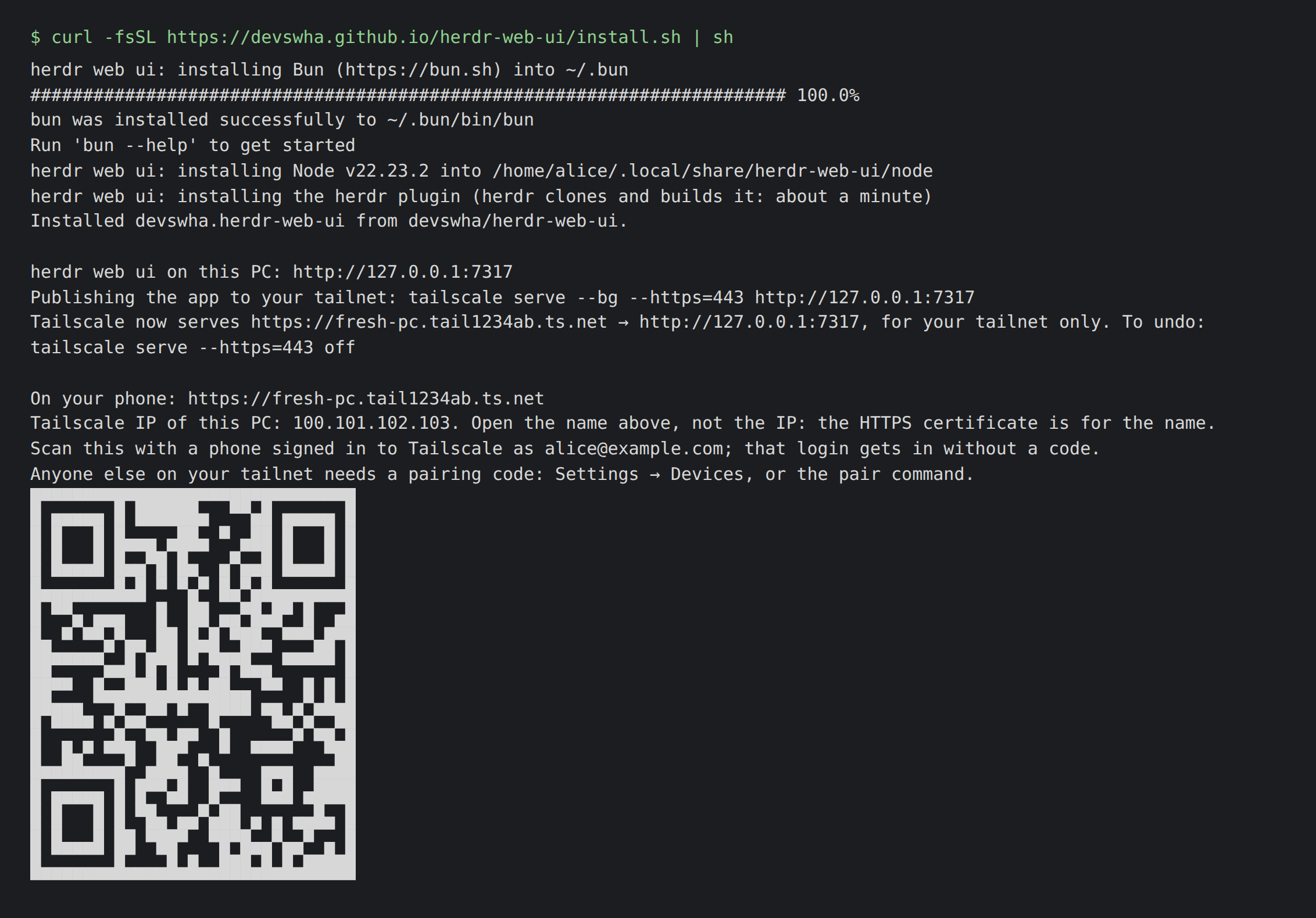
Это плагин/клиент для herdr, а не его замена: herdr по-прежнему работает и управляет агентами, а это приложение просто подключается к ним через браузер или как PWA на телефоне.Как его установить и открыть?Запустите установщик для Linux/macOS (или команду PowerShell на Windows): он установит herdr, Bun и Node для вашего пользователя и добавит этот интерфейс как плагин herdr, затем откройте localhost:7317 и выберите панель или начните новую сессию.
Запустите установщик для Linux/macOS (или команду PowerShell на Windows): он установит herdr, Bun и Node для вашего пользователя и добавит этот интерфейс как плагин herdr, затем откройте localhost:7317 и выберите панель или начните новую сессию.Что должно быть установлено заранее?На Linux/macOS нужны herdr 0.9.0+, Bun 1.4+ и Node 18+ (или установщик сам их поставит); на Windows достаточно Git for Windows — там не требуются ни Node, ни WSL.
На Linux/macOS нужны herdr 0.9.0+, Bun 1.4+ и Node 18+ (или установщик сам их поставит); на Windows достаточно Git for Windows — там не требуются ни Node, ни WSL.Живой терминал работает одинаково на всех ОС?На Windows он переключается на режим зеркального отображения экрана с вводом текста и фиксированной сеткой вместо полноценного подключения к терминалу, пока herdr не добавит такую поддержку для Windows.

На Windows он переключается на режим зеркального отображения экрана с вводом текста и фиксированной сеткой вместо полноценного подключения к терминалу, пока herdr не добавит такую поддержку для Windows.С какими агентами для кодинга можно реально общаться?Он показывает нативные расшифровки диалогов и даёт живой терминал для сессий Claude Code, Codex, omp, omo, gjc и pi, запущенных в панелях herdr.
Он показывает нативные расшифровки диалогов и даёт живой терминал для сессий Claude Code, Codex, omp, omo, gjc и pi, запущенных в панелях herdr.Куда попадает мой голос при использовании диктовки?Продиктованная речь никуда не отправляется, пока вы не нажмёте «отправить», а обрабатывается она вашим собственным ключом OpenAI или встроенным распознаванием речи браузера.
Продиктованная речь никуда не отправляется, пока вы не нажмёте «отправить», а обрабатывается она вашим собственным ключом OpenAI или встроенным распознаванием речи браузера.Как открыть приложение с телефона вне домашней сети?Установщик настраивает HTTPS поверх вашей сети Tailscale, давая вам приватный адрес tailnet и QR-код, который открывает PWA на телефоне.
Установщик настраивает HTTPS поверх вашей сети Tailscale, давая вам приватный адрес tailnet и QR-код, который открывает PWA на телефоне.Может ли он управлять другими машинами, кроме той, где работает herdr?Да, можно добавить другие компьютеры на Linux и macOS в боковую панель и подключаться к ним по SSH.
Да, можно добавить другие компьютеры на Linux и macOS в боковую панель и подключаться к ним по SSH.Как обрабатываются запросы агента на подтверждение и планы?Подтверждения, вопросы и меню планов от агента превращаются в интерактивные карточки, которые проверяются на актуальность непосредственно перед отправкой вашего ответа.
Подтверждения, вопросы и меню планов от агента превращаются в интерактивные карточки, которые проверяются на актуальность непосредственно перед отправкой вашего ответа.На чём построен этот проект?Он построен на herdr, вдохновлён chatmux и под капотом использует xterm.js, React, Bun и Lucide.
Он построен на herdr, вдохновлён chatmux и под капотом использует xterm.js, React, Bun и Lucide.What are similar projects?pi-pocket, Codync, agent-router, hapi, WindTerm, Netcatty, happy, zoetrope
pi-pocket, Codync, agent-router, hapi, WindTerm, Netcatty, happy, zoetropeWhich topics is it in?herdr, herdr-plugin, xterm, ssh-client, push-notifications, tailscale, coding-assistant, remote-desktop, file-manager, remote-access, qr-code, pwa
herdr, herdr-plugin, xterm, ssh-client, push-notifications, tailscale, coding-assistant, remote-desktop, file-manager, remote-access, qr-code, pwa