
Datalab
State of the Art models for Document Intelligence






Marker
Marker converts documents to markdown, JSON, chunks, and HTML quickly and accurately.
- Converts PDF, image, PPTX, DOCX, XLSX, HTML, EPUB files in all languages
- Formats tables, forms, equations, inline math, links, references, and code blocks
- Extracts and saves images
- Removes headers/footers/other artifacts
- Extensible with your own formatting and logic
- Optionally boost accuracy with LLMs (and your own prompt)
- Works on GPU, CPU, or MPS
Our managed platform runs a version of our latest open source model, Chandra — higher accuracy than Marker, with zero data retention by default, SOC 2 Type 2, and custom BAAs.
If you have high volume workloads, we offer a batch processing service that has processed 1B+ pages per week — we manage the infrastructure so your workloads finish on time.
Get started with $5 in free credits — sign up.
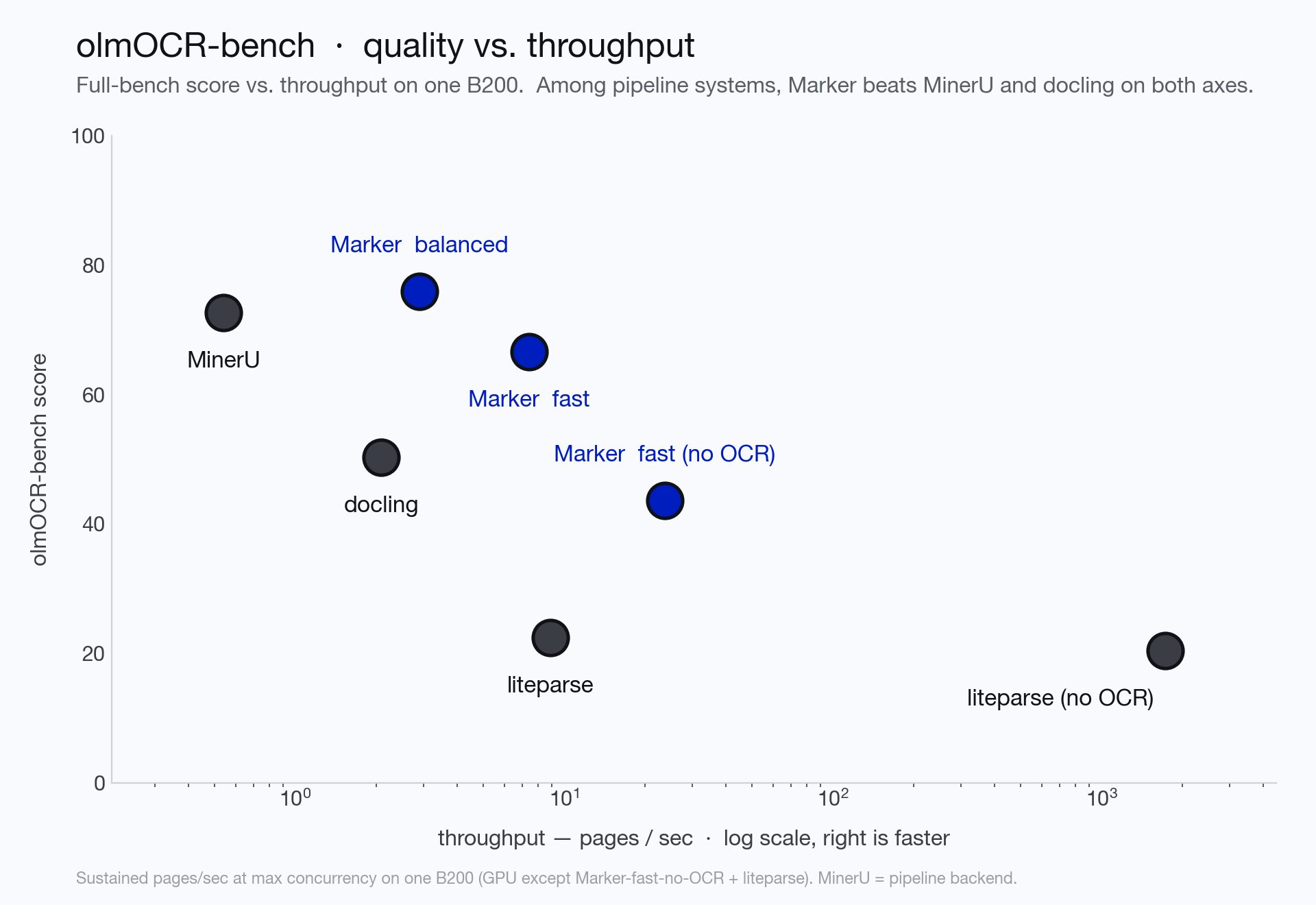
We measure marker on olmocr-bench, a third-party benchmark of 1,403 PDFs with tests covering math, tables, multi-column layout, scans, and hard edge cases. Balanced mode scores 76.0% overall — 83.5% on born-digital PDFs — ahead of MinerU and docling and within range of much larger VLMs, while fast mode runs the layout + text-layer path far cheaper (and a no-OCR mode goes faster still). Scores are the olmocr-bench overall (macro-average across the 8 categories).
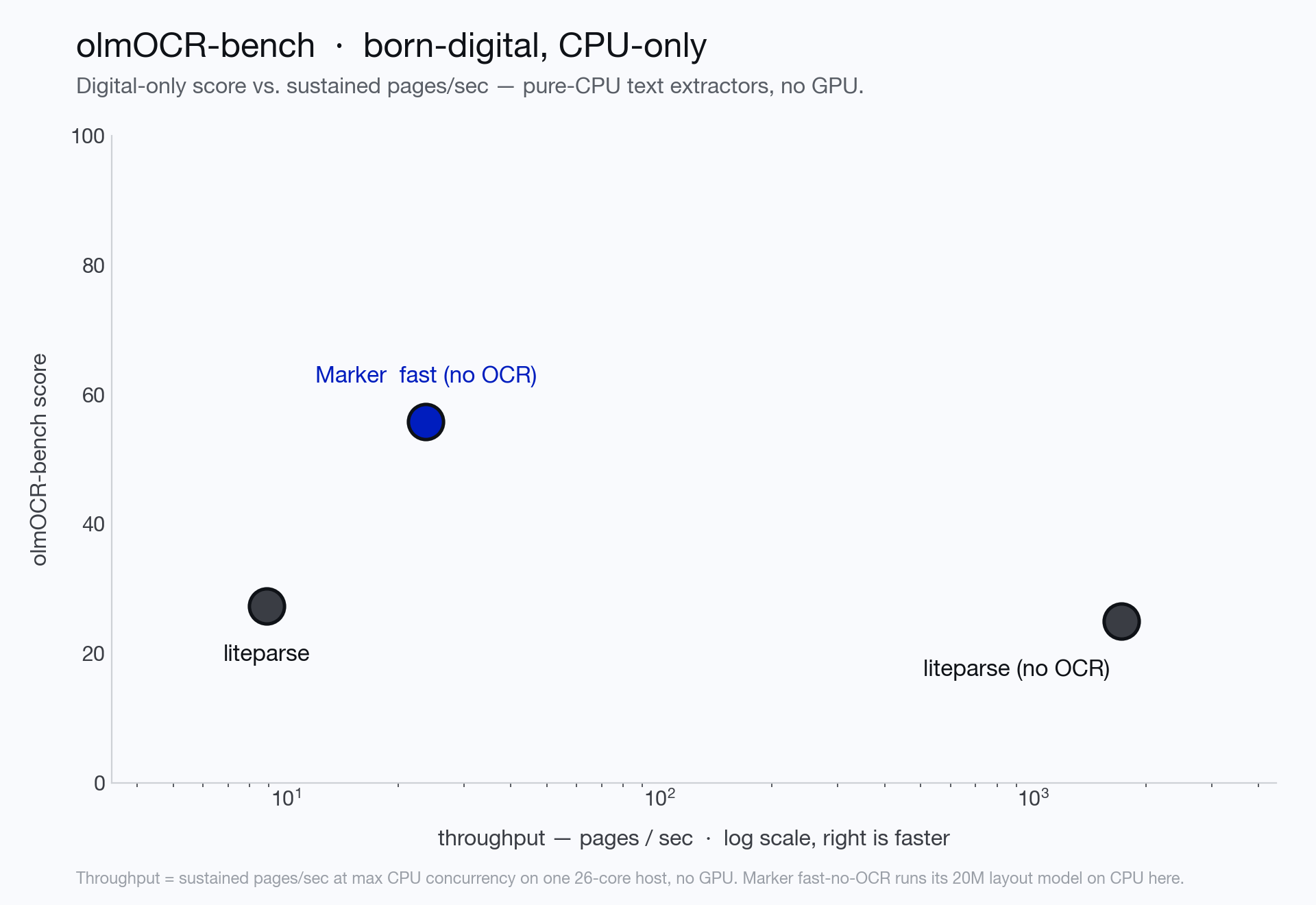
See below for the full per-category scores, the competitive comparison, and instructions on how to run your own benchmarks.
Hybrid Mode
For the highest accuracy, pass the --use_llm flag to use an LLM alongside marker. This will do things like merge tables across pages, handle inline math, format tables properly, and extract values from forms. It works with Gemini, Claude, OpenAI-compatible, Azure, Vertex, OpenRouter, or Ollama models. By default, it uses gemini-3.5-flash. See below for details.
Examples
Commercial usage
Our code is licensed under Apache 2.0 — free to use, including commercially. Our model weights use a modified AI Pubs Open Rail-M license (free for research, personal use, and startups under $5M funding/revenue). For commercial use of the model weights beyond that, visit our pricing page here.
Discord is where we discuss future development.
Installation
You'll need python 3.10+ and PyTorch.
Install with:
pip install marker-pdf
If you want to use marker on documents other than PDFs, you will need to install additional dependencies with:
pip install marker-pdf[full]
Inference backend prerequisites
Surya auto-spawns the server on first use, and you need vllm (NVIDIA GPU) or llama.cpp (CPU / Apple Silicon):
Usage
First, some configuration:
- Mode (
--mode balanced|fast; defaults by device — balanced on GPU, fast on CPU/MPS):
balanced (best on a GPU) uses the surya VLM for layout, OCRs inline math, and re-OCRs the whole page whenever any of its embedded text is bad — highest quality.fast (optimized for CPU) uses the lightweight rf-detr layout detector, extracts text with pdftext, and keeps VLM use minimal: equations, surgical block-level repair of individual garbled/empty blocks, and a single full-page pass only for pages that are scanned or mostly bad. A clean digital document without equations never starts the VLM server.- Tables are reconstructed from the PDF text layer in both modes (scanned tables come from the full-page OCR); low-confidence reconstructions fall back to the VLM, with a stricter bar in balanced.
--disable_ocr turns off all VLM calls (including equations) in either mode — pure text-layer extraction.
- Marker runs layout, OCR, and table recognition through a single surya VLM, served by a local inference server (used for OCR in both modes, and for layout in balanced mode). The server is spawned automatically on first use - vLLM (docker) on NVIDIA GPUs, llama.cpp elsewhere. You can also point marker at an already-running server with
SURYA_INFERENCE_URL=http://host:port/v1.
- Useful server settings (all surya env vars):
SURYA_INFERENCE_BACKEND (vllm or llamacpp), SURYA_INFERENCE_PARALLEL (concurrent requests — by default this auto-scales to the server's capacity: the GPU's max_num_seqs under vllm, a conservative slot count under llama.cpp; set an int only to override), SURYA_INFERENCE_KEEP_ALIVE (keep the server running between invocations), VLLM_GPUS (GPU indices for the server).
- Some PDFs, even digital ones, have bad text in them. Set
--force_ocr to force OCR on all pages, or the strip_existing_ocr to keep all digital text, and strip out any existing OCR text.
- Inline math is converted to LaTeX automatically in balanced mode (
ocr_inline_math); in fast mode, set --force_ocr or --ocr_inline_math to get the same.
Interactive App
I've included a streamlit app that lets you interactively try marker with some basic options. Run it with:
pip install -U streamlit streamlit-ace
marker_gui
Convert a single file
marker_single /path/to/file.pdf
You can pass in PDFs or images.
Options:
--mode [balanced|fast]: Conversion mode (see above). Defaults by device: balanced on GPU, fast on CPU/MPS.--disable_ocr: Never call the VLM - pure text-layer extraction (equations and scanned pages are skipped).--page_range TEXT: Specify which pages to process. Accepts comma-separated page numbers and ranges. Example: --page_range "0,5-10,20" will process pages 0, 5 through 10, and page 20.--output_format [markdown|json|html|chunks]: Specify the format for the output results.--output_dir PATH: Directory where output files will be saved. Defaults to the value specified in settings.OUTPUT_DIR.--paginate_output: Paginates the output, using \n\n{PAGE_NUMBER} followed by - * 48, then \n\n--use_llm: Uses an LLM to improve accuracy. You will need to configure the LLM backend - see below.--force_ocr: Force OCR processing on the entire document, even for pages that might contain extractable text.--block_correction_prompt: if LLM mode is active, an optional prompt that will be used to correct the output of marker. This is useful for custom formatting or logic that you want to apply to the output.--strip_existing_ocr: Remove all existing OCR text in the document and re-OCR with surya.--redo_inline_math: If you want the absolute highest quality inline math conversion, use this along with --use_llm.--disable_image_extraction: Don't extract images from the PDF. If you also specify --use_llm, then images will be replaced with a description.--keep_pageheader_in_output / --keep_pagefooter_in_output: Keep running page headers / footers in the output instead of stripping them (they are removed by default).--debug: Enable debug mode for additional logging and diagnostic information.--processors TEXT: Override the default processors by providing their full module paths, separated by commas. Example: --processors "module1.processor1,module2.processor2"--config_json PATH: Path to a JSON configuration file containing additional settings.config --help: List all available builders, processors, and converters, and their associated configuration. These values can be used to build a JSON configuration file for additional tweaking of marker defaults.--converter_cls: One of marker.converters.pdf.PdfConverter (default) or marker.converters.table.TableConverter. The PdfConverter will convert the whole PDF, the TableConverter will only extract and convert tables.--llm_service: Which llm service to use if --use_llm is passed. This defaults to marker.services.gemini.GoogleGeminiService.--help: see all of the flags that can be passed into marker. (it supports many more options then are listed above)
OCR runs through the surya VLM, which is multilingual - see the surya README for details. If you don't need OCR, marker can work with any language.
Convert multiple files
marker /path/to/input/folder
marker supports all the same options from marker_single above.--workers is the number of conversion workers to run simultaneously. This is automatically set by default, but you can increase it to increase throughput, at the cost of more CPU usage. All workers share a single inference server, which the parent process spawns.- The parent budgets total VLM concurrency automatically: it reads the server's capacity and splits it across workers (aggregate in-flight ≈ 1.5× capacity), so adding workers never over-queues the server. Set
SURYA_INFERENCE_PARALLEL yourself only to override.
- With
--disable_ocr no inference server is started at all, and the pool is sized purely by CPU cores.
--skip_existing skips input files that already have output in --output_dir (resume a run); --max_files N caps how many files are converted; --disable_multiprocessing runs everything in one process.
Batch sizing cheat sheet (e.g. 1000 docs)
- One GPU machine:
marker /folder --output_dir out — defaults handle it: one vllm server, a CPU-sized worker pool, concurrency budgeted to the GPU. Add --mode fast if you want cheaper/faster conversion for mostly-digital corpora.
- Multi-GPU machine: same single command, with the server spanning GPUs:
VLLM_GPUS=0,1,2,3 marker /folder ...
- Multiple machines: shard the file list — run one
marker per node with --num_chunks <nodes> --chunk_idx <this node>. Each node spawns its own server.
- CPU-only / no VLM:
marker /folder --disable_ocr (pure text-layer extraction; equations and scanned pages are skipped).
Use from python
See the PdfConverter class at marker/converters/pdf.py function for additional arguments that can be passed.
from marker.converters.pdf import PdfConverter
from marker.models import create_model_dict
from marker.output import text_from_rendered

converter = PdfConverter(
    artifact_dict=create_model_dict(),
)
rendered = converter("FILEPATH")
text, _, images = text_from_rendered(rendered)
rendered will be a pydantic basemodel with different properties depending on the output type requested. With markdown output (default), you'll have the properties markdown, metadata, and images. For json output, you'll have children, block_type, and metadata.
Custom configuration
You can pass configuration using the ConfigParser. To see all available options, do marker_single --help.
from marker.converters.pdf import PdfConverter
from marker.models import create_model_dict
from marker.config.parser import ConfigParser

config = {
    "output_format": "json",
    "ADDITIONAL_KEY": "VALUE"
}
config_parser = ConfigParser(config)

converter = PdfConverter(
    config=config_parser.generate_config_dict(),
    artifact_dict=create_model_dict(),
    processor_list=config_parser.get_processors(),
    renderer=config_parser.get_renderer(),
    llm_service=config_parser.get_llm_service()
)
rendered = converter("FILEPATH")
Each document consists of one or more pages. Pages contain blocks, which can themselves contain other blocks. It's possible to programmatically manipulate these blocks.
Here's an example of extracting all forms from a document:
from marker.converters.pdf import PdfConverter
from marker.models import create_model_dict
from marker.schema import BlockTypes

converter = PdfConverter(
    artifact_dict=create_model_dict(),
)
document = converter.build_document("FILEPATH")
forms = document.contained_blocks((BlockTypes.Form,))
Look at the processors for more examples of extracting and manipulating blocks.
Other converters
You can also use other converters that define different conversion pipelines:
The TableConverter will only convert and extract tables:
from marker.converters.table import TableConverter
from marker.models import create_model_dict
from marker.output import text_from_rendered

converter = TableConverter(
    artifact_dict=create_model_dict(),
)
rendered = converter("FILEPATH")
text, _, images = text_from_rendered(rendered)
This takes all the same configuration as the PdfConverter. You can specify the configuration force_layout_block=Table to avoid layout detection and instead assume every page is a table. Tables are emitted as HTML (<table>) blocks; output_format=json gives you the table blocks with their page bounding boxes.
You can also run this via the CLI with
marker_single FILENAME --use_llm --force_layout_block Table --converter_cls marker.converters.table.TableConverter --output_format json
OCR Only
If you only want to run OCR, you can also do that through the OCRConverter. Set --keep_chars to keep individual characters and bounding boxes (digital PDFs only - pages that go through the VLM return block-level HTML without character boxes).
from marker.converters.ocr import OCRConverter
from marker.models import create_model_dict

converter = OCRConverter(
    artifact_dict=create_model_dict(),
)
rendered = converter("FILEPATH")
This takes all the same configuration as the PdfConverter.
You can also run this via the CLI with
marker_single FILENAME --converter_cls marker.converters.ocr.OCRConverter
Markdown
Markdown output will include:
- image links (images will be saved in the same folder)
- formatted tables
- embedded LaTeX equations (fenced with
$$)
- Code is fenced with triple backticks
- Superscripts for footnotes
HTML
HTML output is similar to markdown output:
- Images are included via
img tags
- equations are fenced with
<math> tags
- code is in
pre tags
JSON
JSON output will be organized in a tree-like structure, with the leaf nodes being blocks. Examples of leaf nodes are a single list item, a paragraph of text, or an image.
The output will be a list, with each list item representing a page. Each page is considered a block in the internal marker schema. There are different types of blocks to represent different elements.
Pages have the keys:
id - unique id for the block.block_type - the type of block. The possible block types can be seen in marker/schema/__init__.py. As of this writing, they are ["Line", "Span", "FigureGroup", "TableGroup", "ListGroup", "PictureGroup", "Page", "Caption", "Code", "Figure", "Footnote", "Form", "Equation", "Handwriting", "TextInlineMath", "ListItem", "PageFooter", "PageHeader", "Picture", "SectionHeader", "Table", "Text", "TableOfContents", "Document"]html - the HTML for the page. Note that this will have recursive references to children. The content-ref tags must be replaced with the child content if you want the full html. You can see an example of this at marker/output.py:json_to_html. That function will take in a single block from the json output, and turn it into HTML.polygon - the 4-corner polygon of the page, in (x1,y1), (x2,y2), (x3, y3), (x4, y4) format. (x1,y1) is the top left, and coordinates go clockwise.children - the child blocks.
The child blocks have two additional keys:
section_hierarchy - indicates the sections that the block is part of. 1 indicates an h1 tag, 2 an h2, and so on.images - base64 encoded images. The key will be the block id, and the data will be the encoded image.
Note that child blocks of pages can have their own children as well (a tree structure).
{
      "id": "/page/10/Page/366",
      "block_type": "Page",
      "html": "<content-ref src='/page/10/SectionHeader/0'></content-ref><content-ref src='/page/10/SectionHeader/1'></content-ref><content-ref src='/page/10/Text/2'></content-ref><content-ref src='/page/10/Text/3'></content-ref><content-ref src='/page/10/Figure/4'></content-ref><content-ref src='/page/10/SectionHeader/5'></content-ref><content-ref src='/page/10/SectionHeader/6'></content-ref><content-ref src='/page/10/TextInlineMath/7'></content-ref><content-ref src='/page/10/TextInlineMath/8'></content-ref><content-ref src='/page/10/Table/9'></content-ref><content-ref src='/page/10/SectionHeader/10'></content-ref><content-ref src='/page/10/Text/11'></content-ref>",
      "polygon": [[0.0, 0.0], [612.0, 0.0], [612.0, 792.0], [0.0, 792.0]],
      "children": [
        {
          "id": "/page/10/SectionHeader/0",
          "block_type": "SectionHea

 Marker — это инструмент для конвертации документов, который быстро и точно превращает PDF (и другие типы документов) в Markdown, JSON, HTML или вывод, разбитый на фрагменты (chunks), попутно извлекая таблицы, формулы, формы и изображения.