






Что это такое?
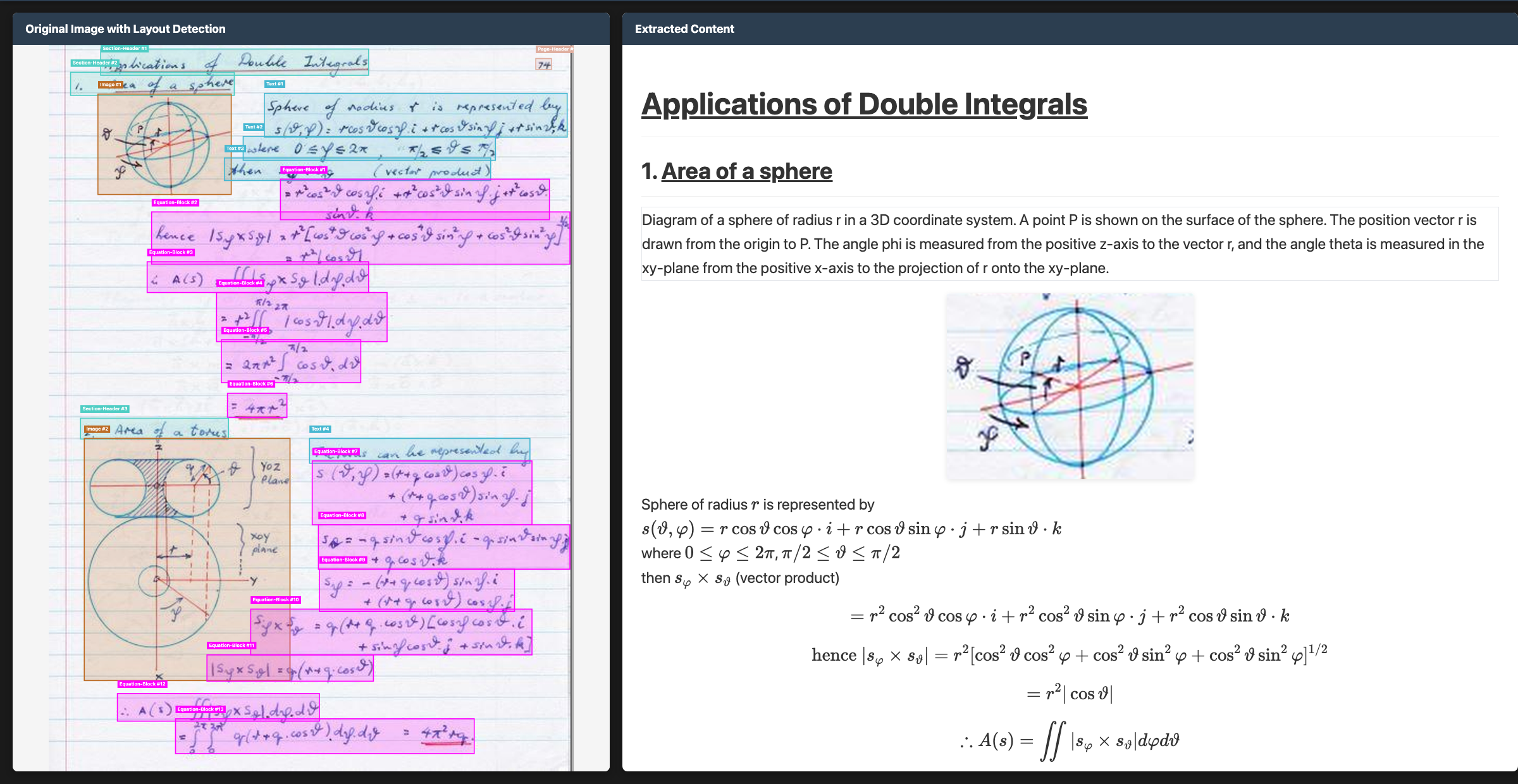
 Chandra OCR 2 — передовая модель распознавания текста (OCR), которая превращает изображения и PDF в структурированный HTML, Markdown или JSON, сохраняя исходную разметку. Она справляется со сложными таблицами, формами, рукописным текстом и формулами и поддерживает более 90 языков.
Chandra OCR 2 — передовая модель распознавания текста (OCR), которая превращает изображения и PDF в структурированный HTML, Markdown или JSON, сохраняя исходную разметку. Она справляется со сложными таблицами, формами, рукописным текстом и формулами и поддерживает более 90 языков.Нужно ли запускать это самостоятельно или это только облачный API?Можно запускать модель у себя локально через HuggingFace или подключаясь к серверу vLLM, а также воспользоваться управляемой облачной версией Datalab с публичной песочницей и пакетной обработкой.
Можно запускать модель у себя локально через HuggingFace или подключаясь к серверу vLLM, а также воспользоваться управляемой облачной версией Datalab с публичной песочницей и пакетной обработкой.Как с его помощью обрабатывать документы?Установите пакет, затем используйте CLI для обработки отдельных файлов или целых папок, выбрав способ инференса 'hf' или 'vllm'. Результат сохраняется для каждого файла в виде .md, .html и metadata.json. Также доступно веб-приложение на Streamlit для интерактивной обработки одной страницы.
Установите пакет, затем используйте CLI для обработки отдельных файлов или целых папок, выбрав способ инференса 'hf' или 'vllm'. Результат сохраняется для каждого файла в виде .md, .html и metadata.json. Также доступно веб-приложение на Streamlit для интерактивной обработки одной страницы.Можно ли бесплатно использовать Chandra в своём продукте?Код распространяется по лицензии Apache 2.0, но веса модели используют изменённую лицензию OpenRAIL-M. Она бесплатна только для исследований, личного использования и стартапов с финансированием или выручкой менее 2 млн долларов, и нельзя использовать модель в конкуренции с собственным API Datalab. Более широкое коммерческое самостоятельное развёртывание требует платной лицензии.
Код распространяется по лицензии Apache 2.0, но веса модели используют изменённую лицензию OpenRAIL-M. Она бесплатна только для исследований, личного использования и стартапов с финансированием или выручкой менее 2 млн долларов, и нельзя использовать модель в конкуренции с собственным API Datalab. Более широкое коммерческое самостоятельное развёртывание требует платной лицензии.Сохраняет ли облачная версия мои данные?Управляемая платформа Datalab по умолчанию не хранит данные (нулевое хранение данных), соответствует стандарту SOC 2 Type 2 и поддерживает индивидуальные соглашения BAA для чувствительных задач.
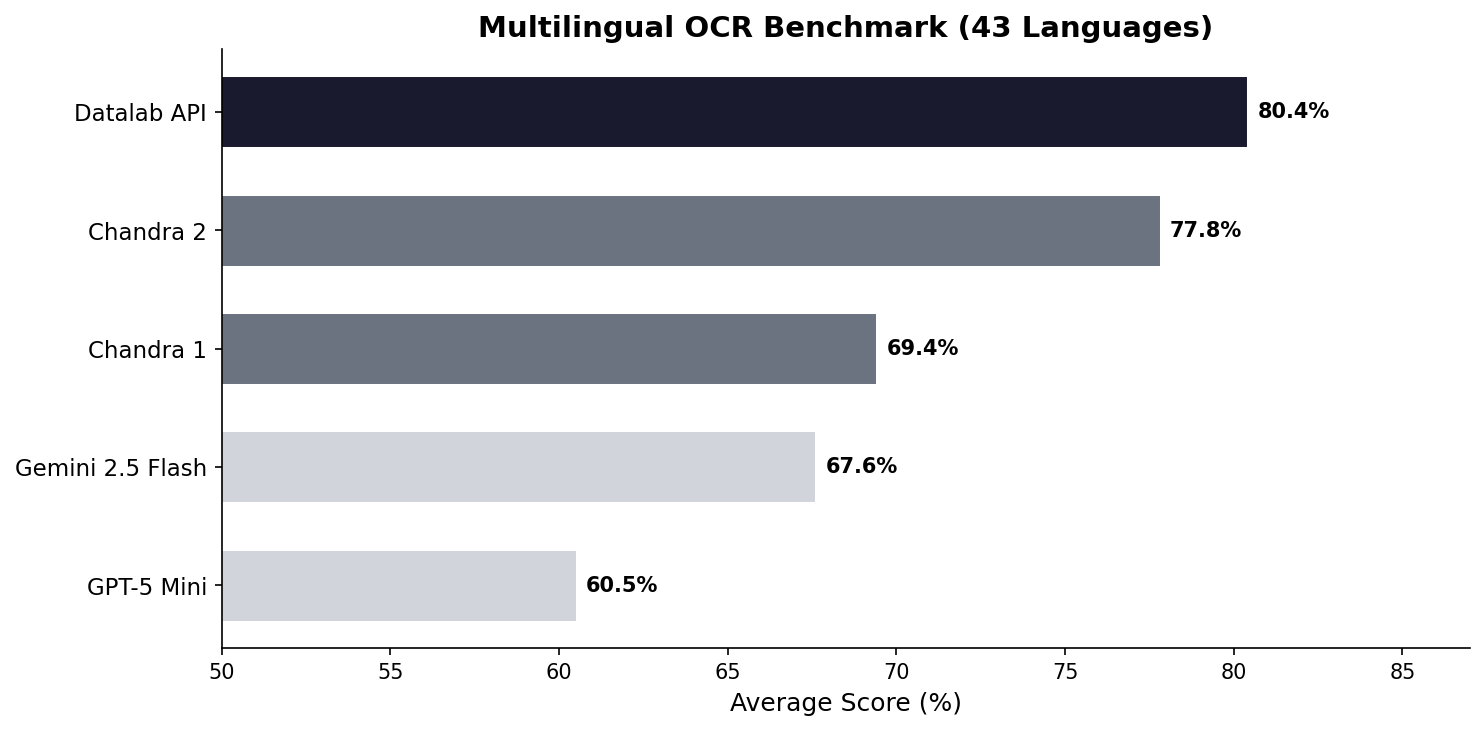
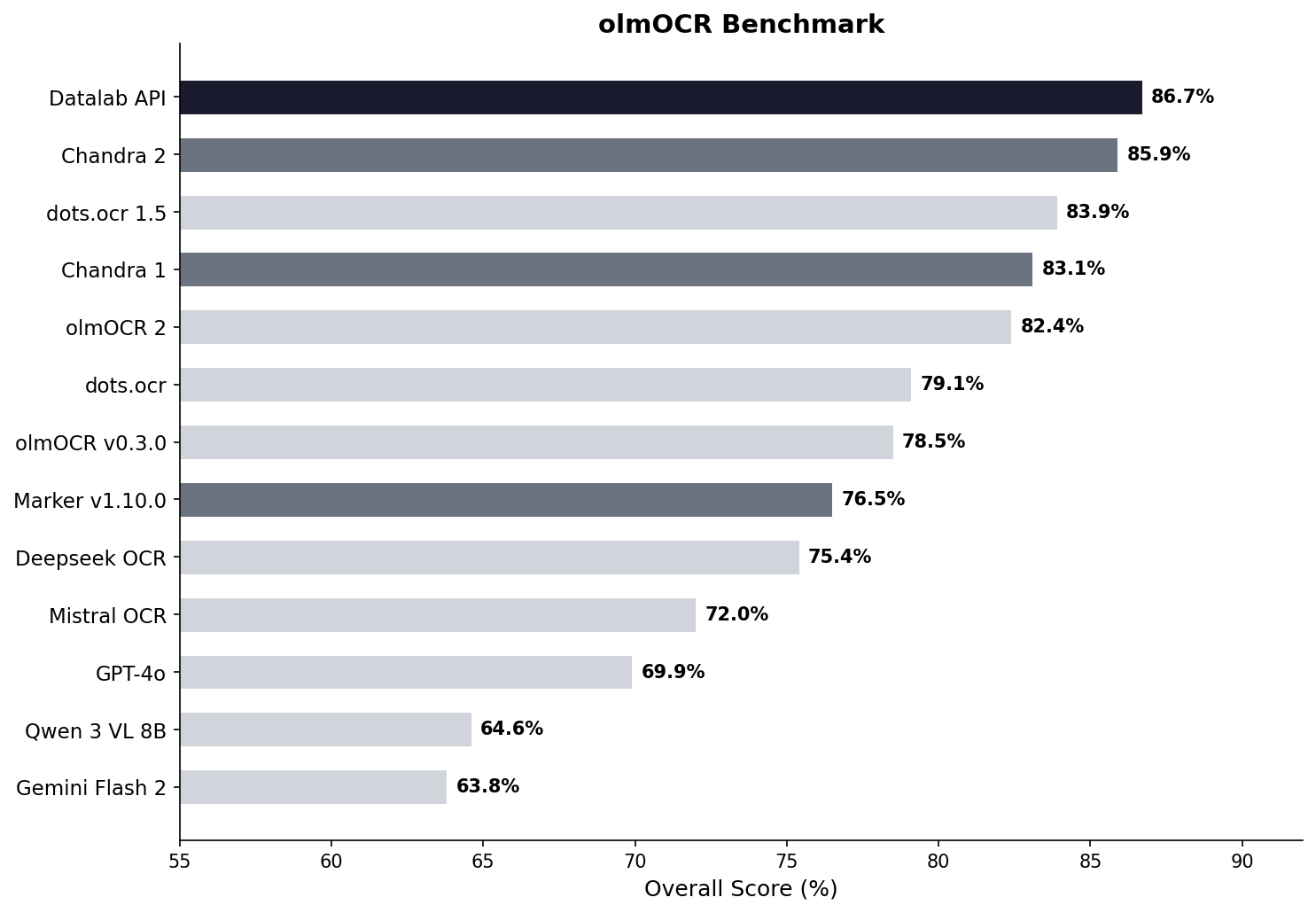
Управляемая платформа Datalab по умолчанию не хранит данные (нулевое хранение данных), соответствует стандарту SOC 2 Type 2 и поддерживает индивидуальные соглашения BAA для чувствительных задач.Чем Chandra отличается от других моделей OCR?По собственным тестам Datalab, Chandra 2 набирает 85,8% в целом, опережая dots.ocr 1.5, olmOCR 2 и Deepseek OCR. По точности на многих языках она лидирует со средним показателем 77,8% против 67,6% у Gemini 2.5 Flash.
По собственным тестам Datalab, Chandra 2 набирает 85,8% в целом, опережая dots.ocr 1.5, olmOCR 2 и Deepseek OCR. По точности на многих языках она лидирует со средним показателем 77,8% против 67,6% у Gemini 2.5 Flash.Какие языки он поддерживает?Chandra 2 поддерживает более 90 языков. Опубликованные тесты охватывают 43 распространённых языка, а отдельная оценка на 90 языках проведена в сравнении с Gemini 2.5 Flash.
Chandra 2 поддерживает более 90 языков. Опубликованные тесты охватывают 43 распространённых языка, а отдельная оценка на 90 языках проведена в сравнении с Gemini 2.5 Flash.В какие форматы можно экспортировать результат?Документы конвертируются в Markdown, HTML или JSON с сохранением таблиц, формул и форм с флажками. Также извлекаются изображения и диаграммы с подписями и структурированными данными.
Документы конвертируются в Markdown, HTML или JSON с сохранением таблиц, формул и форм с флажками. Также извлекаются изображения и диаграммы с подписями и структурированными данными.Насколько это быстро?При работе vLLM с 96 одновременными последовательностями на GPU H100 в тестовом наборе обрабатывается около 1,44 страницы в секунду. Datalab оценивает реальную скорость ближе к 2 страницам в секунду.
При работе vLLM с 96 одновременными последовательностями на GPU H100 в тестовом наборе обрабатывается около 1,44 страницы в секунду. Datalab оценивает реальную скорость ближе к 2 страницам в секунду.What are similar projects?surya, lift, Unlimited-OCR, olmocr, MinerU, PDF-Extract-Kit, docling, marker
surya, lift, Unlimited-OCR, olmocr, MinerU, PDF-Extract-Kit, docling, markerWhich topics is it in?table-extraction, vision-language-model, vllm, ocr, document-processing, multilingual, json, pdf, nvidia, huggingface, computer-vision, cloud
table-extraction, vision-language-model, vllm, ocr, document-processing, multilingual, json, pdf, nvidia, huggingface, computer-vision, cloud