








LifeOS README

The project's README from github.com/danielmiessler/LifeOS. As one markdown file: README.md.


LifeOS

The AI-Powered Life Operating System

Typing SVG

Stars Forks Last Commit Contributors

Release License Built with Claude

TypeScript Bun Pulse Community

Website · Install · Walkthrough · Docs · Releases


https://github.com/user-attachments/assets/329897f5-828b-4c23-b607-1cf9c71cb4ec

LifeOS is a General Purpose AI Harness for doing anything you want to do in life and work with AI. It captures who you are, what you care about, and where you're trying to go, then uses AI that knows you to help you get there.

And because it has your full context, it makes everything you do more efficient and effective, from building apps, to starting a business, to creative projects…basically anything.

[!NOTE] The whole system works on one central concept: moving from your Current State to your Ideal State — in pursuit of Euphoric Surprise.

⭐ If LifeOS is useful to you, star the repo

Stars help more people find the project and keep it moving. It takes one click.

Star LifeOS on GitHub

Install

Give it to your AI. LifeOS is installed by an AI, so the install is just a prompt. Paste this into your AI coding harness — Claude Code, Cursor, Codex, Hermes, or any capable agent — and it does the whole setup for you:

Read https://ourlifeos.ai/install and install LifeOS for me.

Your AI reads the install page and walks the setup, asking permission before it touches anything.

Prefer the terminal? There's a one-line shortcut for Claude Code on macOS/Linux:

curl -fsSL https://ourlifeos.ai/install.sh | bash

Either path needs a capable AI coding harness — we build and run on Claude Code — and bun.

Core Components

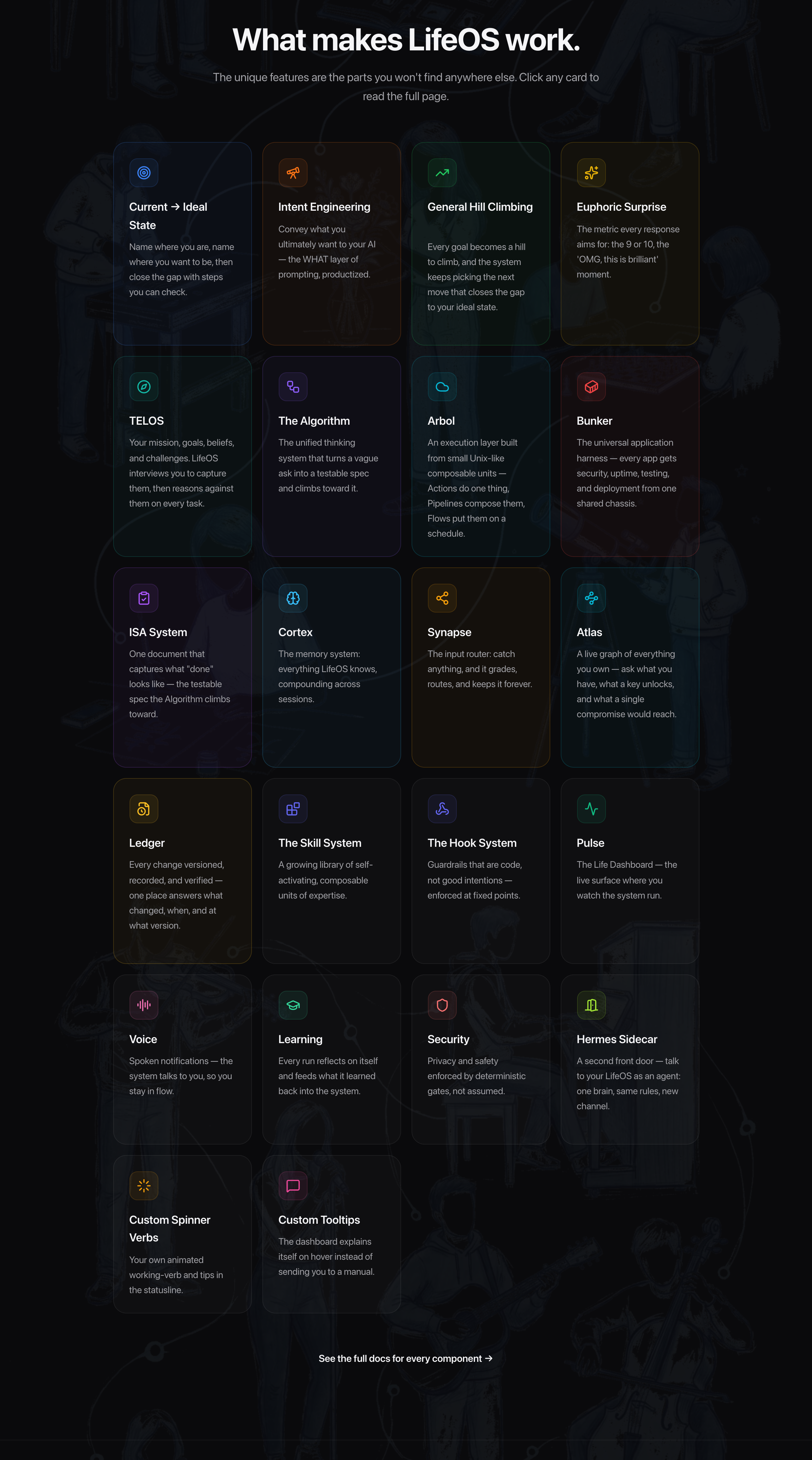
The unique features — the parts you won't find anywhere else. Anything a good harness already provides on its own (built-in subagents, for example) isn't listed; this is only what LifeOS adds. See them live and click through on ourlifeos.ai.

LifeOS core components — Current→Ideal State, Intent Engineering, General Hill Climbing, Euphoric Surprise, TELOS, the Algorithm, Arbol, Bunker, the ISA System, Cortex, Synapse, Atlas, Ledger, the Skill System, the Hook System, Pulse, Voice, Learning, Security, the Hermes Sidecar, Custom Spinner Verbs, and Custom Tooltips. Click to explore them live on ourlifeos.ai.


🧩 Skills

LifeOS installs as one self-contained skill that bundles the whole library — research, security, writing, art, and more. Browse them all on the site.

Browse all skills →


❓ FAQ

How is LifeOS different from using an AI harness on its own?

Your harness gives you raw capability. LifeOS is the layer on top that makes it yours — a system that knows your goals, people, and context, and keeps working toward them:

Your harness is the engine. LifeOS is everything else that makes it your car.

What harness does LifeOS run on?

Any high-end one. LifeOS is harness-agnostic by design — it's built on universal primitives (hooks, skills, context files, agentic routing), not one vendor's features. The code is TypeScript and Bash, and the core ideas — TELOS, the Algorithm, skills, memory — port to any capable agent.

Daniel builds and runs it on Claude Code, so that's the most-tested path today. But LifeOS isn't locked to it, and it's designed to run wherever your AI does.

How is this different from fabric?

Fabric is a collection of AI prompts (patterns) for specific tasks. It's focused on what to ask AI.

LifeOS is infrastructure for how your DA operates—memory, skills, routing, context, self-improvement. They're complementary. Many LifeOS users integrate Fabric patterns into their skills.

What if I break something?

Recovery is straightforward:


🎯 Roadmap

Feature Description
Local Model Support Run LifeOS with local models (Ollama, llama.cpp) for privacy and cost control
Granular Model Routing Route different tasks to different models based on complexity
Remote Access Access your LifeOS from anywhere—mobile, web, other devices
Outbound Phone Calling Voice capabilities for outbound calls
External Notifications Robust notification system for Email, Discord, Telegram, Slack

🌐 Community

GitHub Discussions: Join the conversation

Community Discord: LifeOS is discussed in the community Discord along with other AI projects

Twitter/X: @danielmiessler

Blog: danielmiessler.com

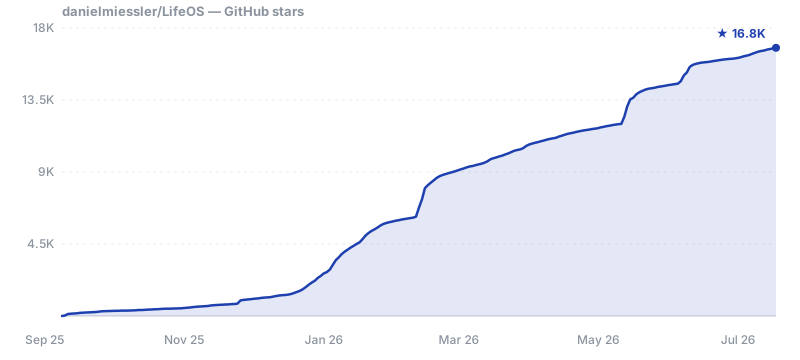
Star History

Star History Chart

🤝 Contributing

We welcome contributions! See our GitHub Issues for open tasks.

  1. Fork the repository
  2. Make your changes — Bug fixes, new skills, documentation improvements
  3. Test thoroughly — Install in a fresh system to verify
  4. Submit a PR with examples and testing evidence

📜 License

MIT License - see LICENSE for details.


🙏 Credits

Anthropic and the Claude Code team — First and foremost. You are moving AI further and faster than anyone right now. Claude Code is the foundation that makes all of this possible.

IndyDevDan — For great videos on meta-prompting and custom agents that have inspired parts of LifeOS.

Contributors

LifeOS is built in the open, and the community's pull requests, forensic bug reports, and fresh-install writeups directly shape every release. The public repo is generated from a private source tree, so community PRs are ported into source with credit rather than merged directly — same fix, durable across releases.

alexfry-axeai asdf8675309 Autodidact-med aveneri bassitone bkolendowski bowlax bytebyrobert christauff dactylmedia danielmiessler Drizzt321 dsather ebrett elhoim emarcelcom emory fayerman-source ForgottenFates7 hjo20 HotSauceHacker IJASolutions imrathion jbmml jnpkr justinkatz94-glitch kaimagnus kirmalyshev ksylvan lgertel lowk3y m4nt0de4 MarnuLombard maxolasersquad mcardinali-data mj-deving Mutdogus mvoehringer neilinger neilsoult ozymandiasscz2 Pfassmeyer PigLardLord pybe qozle rathko sabo961 salmanmkc sauldataman Seadubb smolcompute spazbg spec-vova StarksLabs sti0 theNetworkChuck Trei-D tzioup

LifeOS (danielmiessler/LifeOS)

Searching Database…

19.5K ·GitHub
这是什么?LifeOS 是一个通用的 AI 生活与工作管家:它会记录你是谁、你在乎什么、你想去哪里,然后借助了解你的 AI,帮你从现状一步步走向理想状态。
那它是一个独立的软件,还是装在我的 AI 编码工具里的东西?它不是独立软件——而是作为一个独立完整的技能,装进你现有的 AI 编码工具里。代码用 TypeScript 和 Bash 写成,它在你已有的智能体之上增加记忆、自定义技能和任务路由功能。
我怎么把它跑起来?把安装提示粘贴到你的 AI 工具里——Claude Code、Cursor、Codex、Hermes 或任何能力够强的智能体——它就会完成全部安装过程,并且在改动任何东西之前先征得你的同意。macOS/Linux 上还有一行式的 Claude Code 快捷方式。
我必须用 Claude Code 吗,还是其他智能体也行?任何高端工具都可以——它从设计上就不挑工具,基于通用的底层机制(hooks、技能、上下文文件、智能体路由)构建。Claude Code 只是测试最充分的途径,因为作者自己就用它,另外你还需要 bun。
如果升级或改动把东西弄坏了怎么办?它内置了恢复机制:升级前会先备份 ~/.claude,你在 USER/ 目录里的自定义内容永远不会被碰,设置采用合并而不是覆盖的方式,而且所有内容都有 git 版本管理,可以随时回滚,或者重新跑一遍安装程序。
它能在 Windows 上运行吗,还是只支持 Mac 和 Linux?文档里的一行式快捷方式针对的是 macOS 和 Linux 上的 Claude Code,但 LifeOS 的设计是:你的 AI 智能体能在哪里运行,它就能在哪里运行——它是工具里的文件和技能,而不是依赖特定操作系统的软件。
相比一个普通工具,它到底多加了什么?持久化记忆(助手会记住过去的会话、决定和经验)、针对你最常做的事定制的技能、你的目标/联系人/偏好随时可用而不用反复解释、智能路由(说一句'帮我研究一下'就会触发合适的工作流程),以及自我改进——系统会根据学到的东西不断调整自己。
它和 fabric 有什么区别?Fabric 是一组针对具体任务的 AI 提示词(模式),关注的是向 AI 问什么。LifeOS 则是让你的助手如何运作的基础设施:记忆、技能、路由、上下文、自我改进。两者是互补的,很多用户会把 Fabric 的模式整合进自己的 LifeOS 技能里。
它自带哪些技能?它作为一个独立完整的技能安装,里面打包了一整套技能库——研究、安全、写作、艺术等等。完整目录可以在项目官网 ourlifeos.ai 上浏览。
后续有什么计划?支持本地模型(Ollama、llama.cpp)以保护隐私和控制成本、按任务复杂度精细分配模型、从手机或网页远程访问、主动拨打电话,以及通过 Email、Discord、Telegram 和 Slack 发送外部通知。
Size
462.2 MB
Stars
19.5K
Age
1y
Commits · 90 Days