













What is this?
 LifeOS is a general-purpose AI harness for life and work: it captures who you are, what you care about, and where you're trying to go, then uses AI that knows you to move you from your Current State to your Ideal State.
LifeOS is a general-purpose AI harness for life and work: it captures who you are, what you care about, and where you're trying to go, then uses AI that knows you to move you from your Current State to your Ideal State.So is this a separate app, or something living inside my AI coding agent?It's not a standalone app — it installs as one self-contained skill inside your existing AI coding harness. The code is TypeScript and Bash, and it adds memory, custom skills and routing on top of the agent you already use.
It's not a standalone app — it installs as one self-contained skill inside your existing AI coding harness. The code is TypeScript and Bash, and it adds memory, custom skills and routing on top of the agent you already use.How do I get it running?Paste the install prompt into your AI harness — Claude Code, Cursor, Codex, Hermes or any capable agent — and it performs the whole setup, asking permission before touching anything. A one-line Claude Code shortcut exists for macOS/Linux.
Paste the install prompt into your AI harness — Claude Code, Cursor, Codex, Hermes or any capable agent — and it performs the whole setup, asking permission before touching anything. A one-line Claude Code shortcut exists for macOS/Linux.Do I have to use Claude Code specifically, or will other agents work?Any high-end harness works — it's harness-agnostic by design, built on universal primitives (hooks, skills, context files, agentic routing). Claude Code is just the most-tested path since the author builds on it, and you also need bun.
Any high-end harness works — it's harness-agnostic by design, built on universal primitives (hooks, skills, context files, agentic routing). Claude Code is just the most-tested path since the author builds on it, and you also need bun.What happens if an upgrade or change breaks something?Recovery is built in: back up ~/.claude before upgrading, your customizations in USER/ are never touched, settings merge instead of overwrite, and everything is git-backed so you can roll back or simply re-run the installer.
Recovery is built in: back up ~/.claude before upgrading, your customizations in USER/ are never touched, settings merge instead of overwrite, and everything is git-backed so you can roll back or simply re-run the installer.Does it run on Windows, or is it Mac and Linux only?The documented one-line shortcut targets Claude Code on macOS and Linux, but LifeOS is designed to run wherever your AI agent runs — it's files and skills inside the harness rather than OS-specific software.
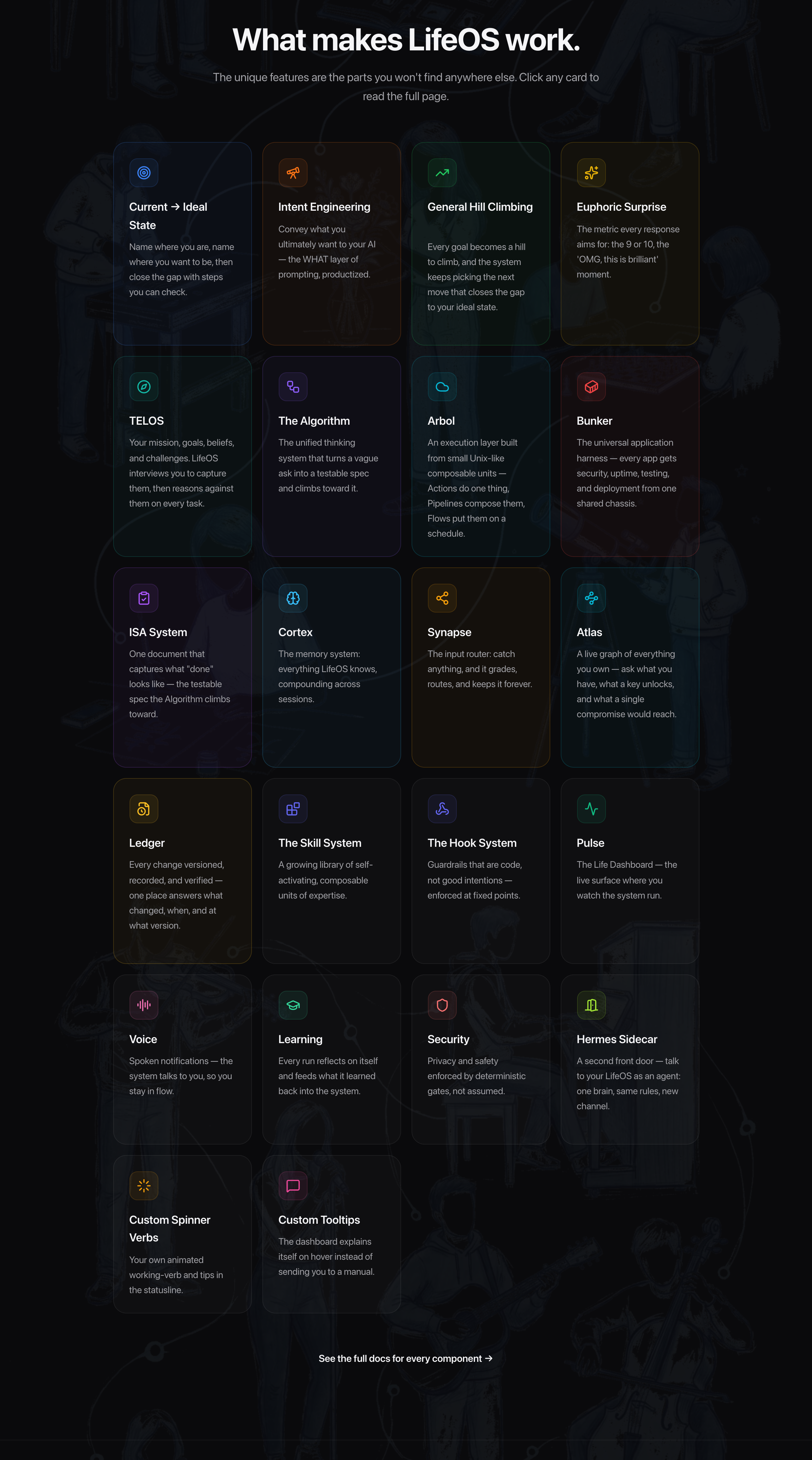
The documented one-line shortcut targets Claude Code on macOS and Linux, but LifeOS is designed to run wherever your AI agent runs — it's files and skills inside the harness rather than OS-specific software.What does it actually add on top of a plain harness?Persistent memory (the assistant remembers past sessions, decisions and learnings), custom skills for what you do most, your goals/contacts/preferences available without re-explaining, intelligent routing where saying 'research this' triggers the right workflow, and self-improvement — the system modifies itself based on what it learns.
Persistent memory (the assistant remembers past sessions, decisions and learnings), custom skills for what you do most, your goals/contacts/preferences available without re-explaining, intelligent routing where saying 'research this' triggers the right workflow, and self-improvement — the system modifies itself based on what it learns.How is it different from fabric?Fabric is a collection of AI prompts (patterns) for specific tasks — focused on what to ask AI. LifeOS is infrastructure for how your assistant operates: memory, skills, routing, context, self-improvement. They're complementary, and many users integrate Fabric patterns into their LifeOS skills.
Fabric is a collection of AI prompts (patterns) for specific tasks — focused on what to ask AI. LifeOS is infrastructure for how your assistant operates: memory, skills, routing, context, self-improvement. They're complementary, and many users integrate Fabric patterns into their LifeOS skills.What skills does it come with?It installs as one self-contained skill that bundles a whole library — research, security, writing, art and more. The full catalog is browsable on the project's site, ourlifeos.ai.
It installs as one self-contained skill that bundles a whole library — research, security, writing, art and more. The full catalog is browsable on the project's site, ourlifeos.ai.What's on the roadmap?Local model support (Ollama, llama.cpp) for privacy and cost control, granular model routing by task complexity, remote access from mobile or web, outbound phone calling, and external notifications via Email, Discord, Telegram and Slack.
Local model support (Ollama, llama.cpp) for privacy and cost control, granular model routing by task complexity, remote access from mobile or web, outbound phone calling, and external notifications via Email, Discord, Telegram and Slack.What are similar projects?fyagent, taskuary, memex, agent-beacon, vicoa, fullstack-agent, leon, awesome-openclaw-tutorial
fyagent, taskuary, memex, agent-beacon, vicoa, fullstack-agent, leon, awesome-openclaw-tutorialWhich topics is it in?augmentation, self-improvement, personal-assistant, personal-ai, routing, coding, hermes-agent, ai-assistant, agent-harness, bash, memory, cursor
augmentation, self-improvement, personal-assistant, personal-ai, routing, coding, hermes-agent, ai-assistant, agent-harness, bash, memory, cursor