

NotepadNext README

The project's README from github.com/dail8859/NotepadNext. As one markdown file: README.md.

Notepad Next

Build Notepad Next

A cross-platform, reimplementation of Notepad++.

Though the application overall is stable and usable, it should not be considered safe for critically important work.

There are numerous bugs and half working implementations. Pull requests are greatly appreciated.

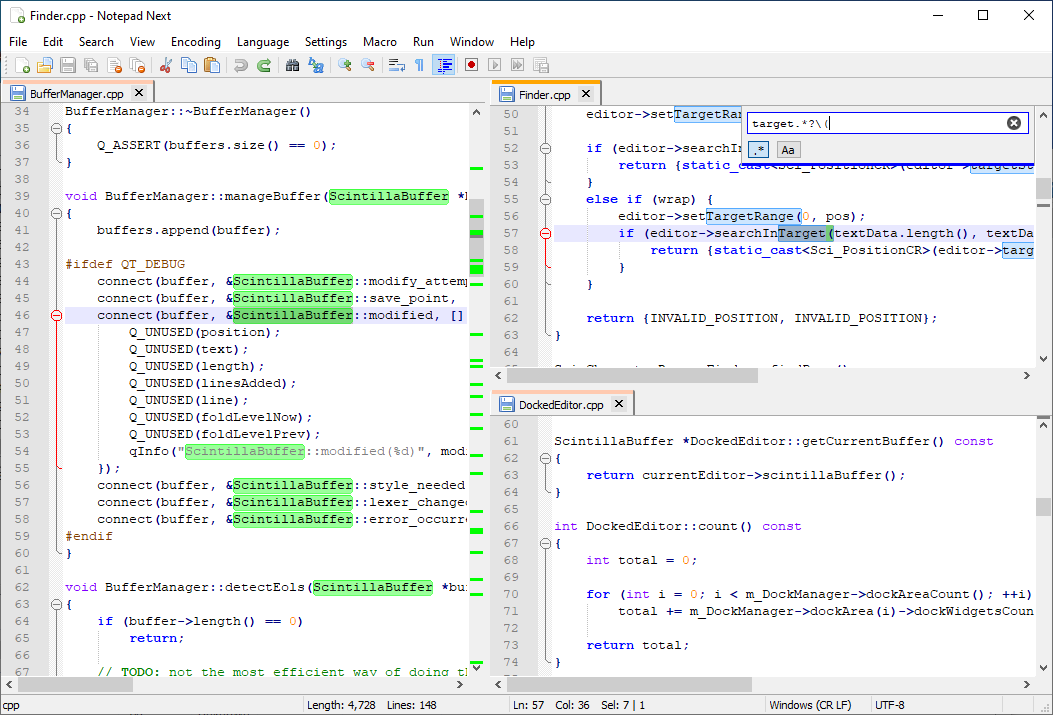
screenshot

Installation

Packages are available for Windows, Linux, and MacOS.

Below are the supported distribution mechanisms. There may be other ways to download/install the application, but this project will likely not be able to offer any support for those since they are made available by other individuals.

Windows

Windows packages are available as an installer or a stand-alone zip file on the release page. The installer provides additional components such as an auto-updater and Windows context menu integration. You can easily install it with Winget:

winget install dail8859.NotepadNext

Linux

Linux packages can be obtained by downloading the stand-alone AppImage on the release page or by installing the flatpak by executing:

flatpak install flathub com.github.dail8859.NotepadNext

If you are using Ubuntu and prefer an up-to-date deb version, you can use the PPA supporting Ubuntu 22.04 and newer provided by Quentin Lienhardt. You can add it by executing:

sudo add-apt-repository ppa:quentiumyt/notepadnext
sudo apt update
sudo apt install notepadnext

MacOS

MacOS disk images can be downloaded from the release page.

It can also be installed using brew:

brew tap dail8859/notepadnext
brew install notepadnext

If you receive warnings that Notepad Next is "damaged", this is an Apple complaining that I have not paid them money to "trust" me. You can bypass this by running:

xattr -d com.apple.quarantine /Applications/NotepadNext.app

MacOS Tweaks

By default, MacOS enables font smoothing which causes text to appear quite differently from the Windows version. This can be disabled system-wide using the following command:

defaults -currentHost write -g AppleFontSmoothing -int 0

A restart is required for this to take effect.

Translations

Translations are contributed by the community. All translations are managed using Crowdin at https://crowdin.com/project/notepadnext. If there is a language missing you would like to contribute, feel free to start a discussion on Crowdin.

Development

Current development is done using QtCreator with the Microsoft Visual C++ (msvc) compiler. Qt 6.5 is the currently supported Qt version. Older versions of Qt are likely to work but are not tested. Any fixes for older versions will be accepted as long as they do not introduce complex fixes. This application is also known to build successfully on various Linux distributions and macOS. Other platforms/compilers should be usable with minor modifications.

If you are familiar with building C++ Qt desktop applications with Qt Creator, then this should be as simple as opening CMakeLists and build/run the project.

If you are new to building C++ Qt desktop applications, there is a more detailed guide here.

License

This code is released under the GNU General Public License version 3.

NotepadNext (dail8859/NotepadNext)

Searching Database…

这是什么?Notepad Next 是 Windows 文本编辑器 Notepad++ 的跨平台重新实现,让 Linux 和 macOS 用户也能获得相似的编辑体验。
它能完全替代 Notepad++ 吗,还是仍处于实验阶段?总体来说它是一个可以正常使用的桌面应用,但项目本身提醒其中存在漏洞和未完善的功能,因此不应用于非常重要的工作。
安装时有哪些需要注意的坑吗?在 macOS 上,未签名的构建可能会弹出“应用已损坏”的警告,需要执行一条绕过命令才能打开;另外,macOS 默认的字体平滑会让文字显示效果与 Windows 不同,除非将其关闭。
它支持较旧的 Qt 版本吗,还是只支持 6.5?Qt 6.5 是官方支持的版本;较旧的 Qt 版本大概率也能运行,但未经测试,相关问题只会接受简单的修复。
它支持哪些操作系统?Windows、Linux 和 macOS 都提供了官方安装包。
为什么不直接用 Wine 运行 Notepad++,而要单独做一个?它是原生的 Qt 重新实现,而不是兼容层封装,能为 Linux 和 macOS 用户提供真正原生的文本编辑器,并模仿 Notepad++ 的外观和操作体验。
我可以帮忙把它翻译成我的语言吗?可以。翻译由社区贡献,通过 Crowdin 管理;如果你的语言缺失,可以在上面发起讨论来添加。
它是用什么图形界面工具包开发的?它使用 Qt 开发(当前为 Qt 6.5),主要的开发环境是 QtCreator。
Creator
dail8859
Size
20.6 MB
Stars
14.7K
Age
6y
Commits · 90 Days