
14.7K ·GitHub
Что это такое?
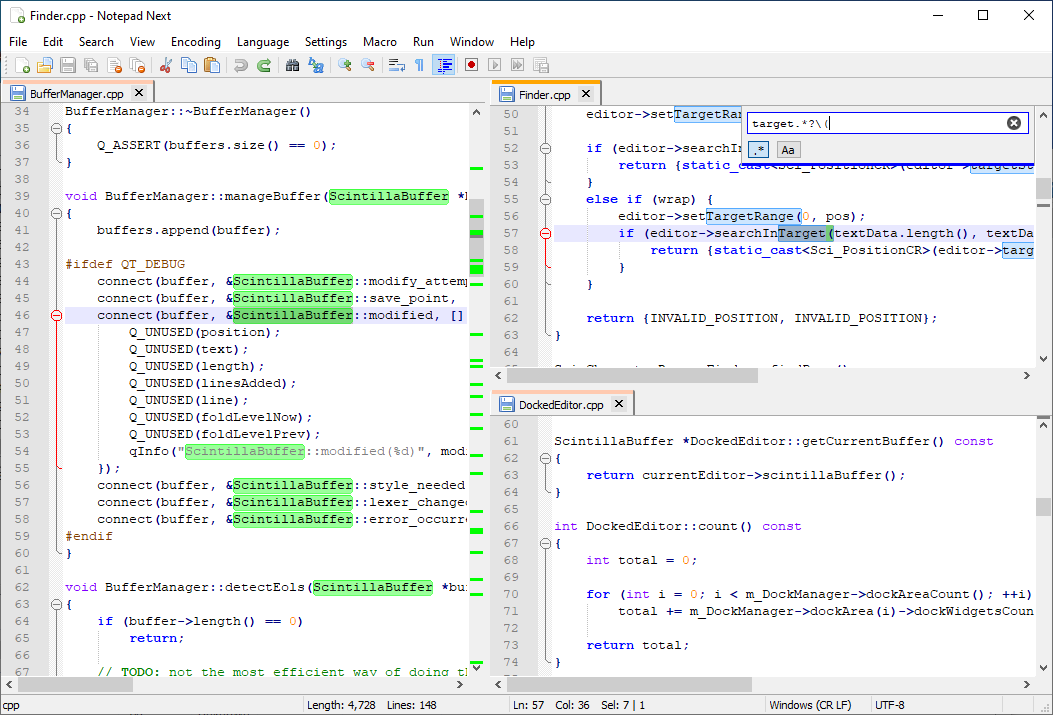
 Notepad Next — это кроссплатформенная переработка текстового редактора Notepad++ для Windows, созданная, чтобы пользователи Linux и macOS могли получить похожий опыт редактирования.
Notepad Next — это кроссплатформенная переработка текстового редактора Notepad++ для Windows, созданная, чтобы пользователи Linux и macOS могли получить похожий опыт редактирования.Это готовая замена Notepad++ или всё ещё экспериментальный проект?В целом это пригодное для работы настольное приложение, но сам проект предупреждает, что в нём есть ошибки и частично работающие функции, поэтому доверять ему критически важную работу не стоит.
В целом это пригодное для работы настольное приложение, но сам проект предупреждает, что в нём есть ошибки и частично работающие функции, поэтому доверять ему критически важную работу не стоит.Есть ли подводные камни при установке, о которых стоит знать?В macOS неподписанные сборки могут вызывать предупреждение «damaged app», для обхода которого нужна специальная команда, а сглаживание шрифтов по умолчанию в macOS делает текст отличающимся от Windows, если его не отключить.
В macOS неподписанные сборки могут вызывать предупреждение «damaged app», для обхода которого нужна специальная команда, а сглаживание шрифтов по умолчанию в macOS делает текст отличающимся от Windows, если его не отключить.Работает ли он на старых версиях Qt или только на 6.5?Официально поддерживается Qt 6.5; старые версии Qt, вероятно, будут работать, но не тестировались, и для них будут приниматься только простые исправления.
Официально поддерживается Qt 6.5; старые версии Qt, вероятно, будут работать, но не тестировались, и для них будут приниматься только простые исправления.На каких операционных системах он доступен?Официальные пакеты есть для Windows, Linux и macOS.
Официальные пакеты есть для Windows, Linux и macOS.Зачем он нужен, если можно просто запустить Notepad++ через Wine?Это нативная переработка на Qt, а не обёртка для совместимости, поэтому пользователи Linux и macOS получают по-настоящему родной текстовый редактор, который копирует внешний вид и поведение Notepad++.
Это нативная переработка на Qt, а не обёртка для совместимости, поэтому пользователи Linux и macOS получают по-настоящему родной текстовый редактор, который копирует внешний вид и поведение Notepad++.Могу ли я помочь с переводом на свой язык?Да, переводы создаются сообществом и ведутся через Crowdin, где можно открыть обсуждение, чтобы добавить недостающий язык.
Да, переводы создаются сообществом и ведутся через Crowdin, где можно открыть обсуждение, чтобы добавить недостающий язык.На каком инструментарии для графического интерфейса он построен?Он построен на Qt (сейчас Qt 6.5), а основной средой разработки используется QtCreator.
Он построен на Qt (сейчас Qt 6.5), а основной средой разработки используется QtCreator.What are similar projects?notepad-plus-plus, notepad--, vnote, Drift, PrismLauncher, Notepads, neovide, neomacs
notepad-plus-plus, notepad--, vnote, Drift, PrismLauncher, Notepads, neovide, neomacsWhich topics is it in?qt6, qt, text-editor, editor, c++, desktop, gplv3, productivity, gui, desktop-app, cross-platform, macos
qt6, qt, text-editor, editor, c++, desktop, gplv3, productivity, gui, desktop-app, cross-platform, macos