
14.7K ·GitHub
What is this?
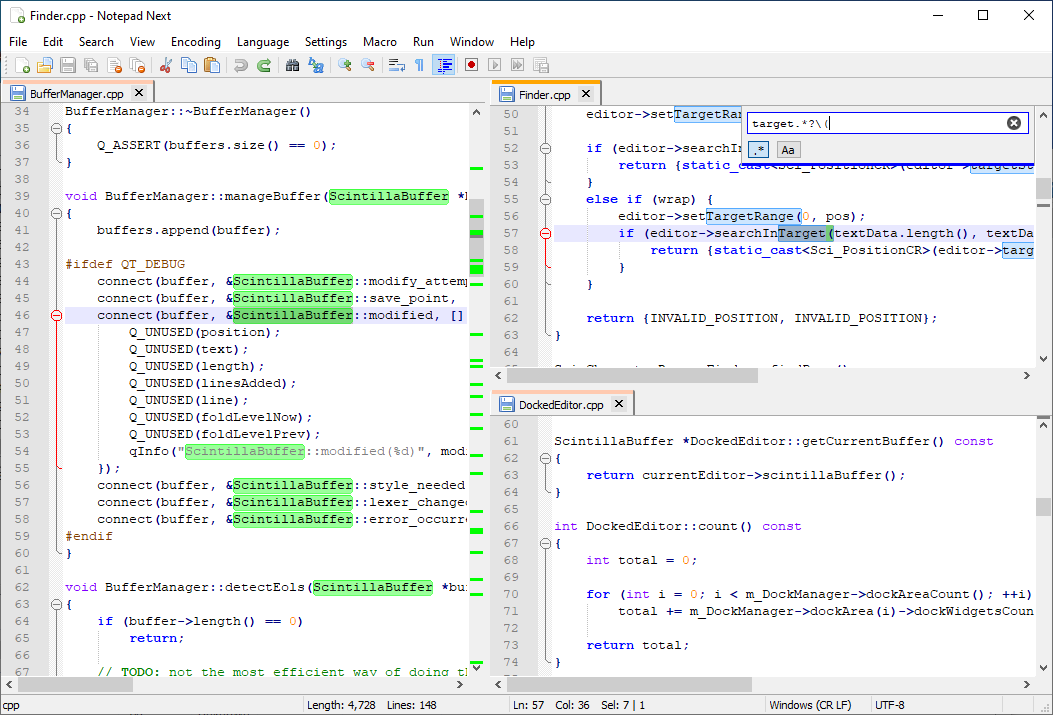
 Notepad Next is a cross-platform reimplementation of the Windows text editor Notepad++, built so Linux and macOS users can get a similar editing experience.
Notepad Next is a cross-platform reimplementation of the Windows text editor Notepad++, built so Linux and macOS users can get a similar editing experience.Is this a finished replacement for Notepad++ or still experimental?It is a usable desktop application overall, but the project itself warns it has bugs and half-working features, so it should not be trusted for critically important work.
It is a usable desktop application overall, but the project itself warns it has bugs and half-working features, so it should not be trusted for critically important work.Any install pitfalls I should know about?On macOS, unsigned builds may trigger a 'damaged app' warning that requires a bypass command, and macOS's default font smoothing makes text render differently than on Windows unless disabled.
On macOS, unsigned builds may trigger a 'damaged app' warning that requires a bypass command, and macOS's default font smoothing makes text render differently than on Windows unless disabled.Does it work on older Qt versions or only 6.5?Qt 6.5 is the officially supported version; older Qt versions are likely to work but are untested, and only simple fixes for them will be accepted.
Qt 6.5 is the officially supported version; older Qt versions are likely to work but are untested, and only simple fixes for them will be accepted.Which operating systems is it available on?Windows, Linux, and macOS all have official packages.
Windows, Linux, and macOS all have official packages.Why does it exist instead of just running Notepad++ via Wine?It is a native Qt reimplementation rather than a compatibility wrapper, giving Linux and macOS users a genuinely native text editor that mimics Notepad++'s look and feel.
It is a native Qt reimplementation rather than a compatibility wrapper, giving Linux and macOS users a genuinely native text editor that mimics Notepad++'s look and feel.Can I help translate it into my language?Yes, translations are community-contributed and managed through Crowdin, where you can start a discussion to add a missing language.
Yes, translations are community-contributed and managed through Crowdin, where you can start a discussion to add a missing language.What GUI toolkit is it built with?It is built with Qt (currently Qt 6.5), using QtCreator as the primary development environment.
It is built with Qt (currently Qt 6.5), using QtCreator as the primary development environment.What are similar projects?notepad-plus-plus, notepad--, vnote, Drift, PrismLauncher, Notepads, neovide, neomacs
notepad-plus-plus, notepad--, vnote, Drift, PrismLauncher, Notepads, neovide, neomacsWhich topics is it in?qt6, qt, text-editor, editor, c++, desktop, gplv3, productivity, gui, desktop-app, cross-platform, macos
qt6, qt, text-editor, editor, c++, desktop, gplv3, productivity, gui, desktop-app, cross-platform, macos