






1.4K ·GitHub
Что это такое?
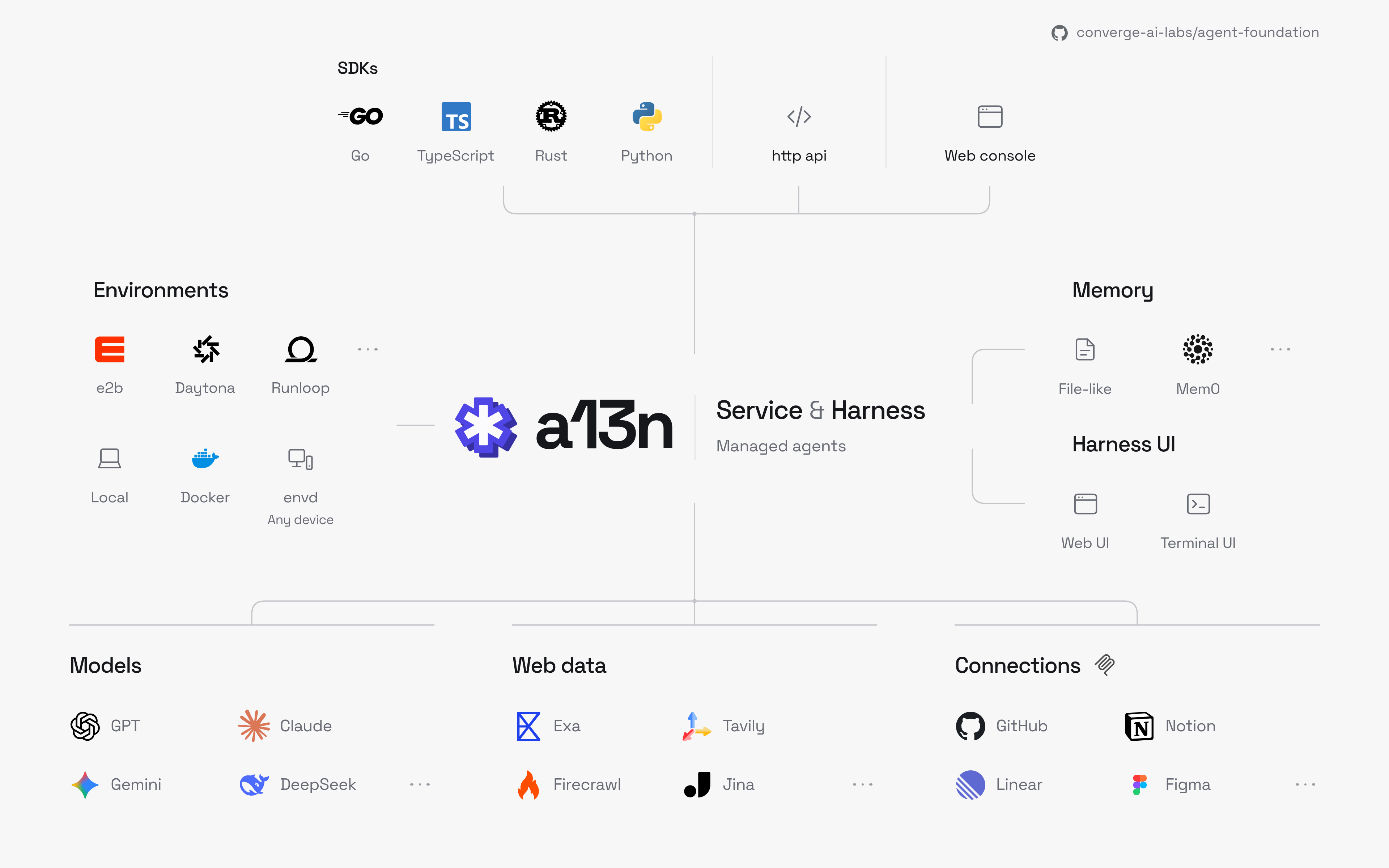
 a13n — это открытая среда выполнения для создания, запуска и управления ИИ-агентами на вашей собственной инфраструктуре. Ваше приложение обращается к агенту по HTTP или через SDK для Python, TypeScript, Go или Rust, а сервис берёт на себя выполнение и восстановление после сбоев.
Это фреймворк, под который я пишу код, или готовый сервис?Это самостоятельно развёртываемый сервис с веб-консолью Console для настройки агентов. Он построен на Harness, который также можно встроить в свой Python-код без развёртывания сервиса.
Это самостоятельно развёртываемый сервис с веб-консолью Console для настройки агентов. Он построен на Harness, который также можно встроить в свой Python-код без развёртывания сервиса.Как его запустить?Установите Docker и Docker Compose, затем следуйте инструкции Quickstart: создайте учётную запись администратора, добавьте модель с API-ключом или подходящей подпиской ChatGPT, создайте агента и попробуйте его в Console. Для Kubernetes есть Helm-чарт.
Установите Docker и Docker Compose, затем следуйте инструкции Quickstart: создайте учётную запись администратора, добавьте модель с API-ключом или подходящей подпиской ChatGPT, создайте агента и попробуйте его в Console. Для Kubernetes есть Helm-чарт.Что мне нужно для начала?Docker с Docker Compose для быстрого старта, а также API-ключ провайдера моделей или подходящая подписка ChatGPT. Стек запускает Service, Console, PostgreSQL и Redis, а окружения агентов используют Docker Engine вашего хоста.
Docker с Docker Compose для быстрого старта, а также API-ключ провайдера моделей или подходящая подписка ChatGPT. Стек запускает Service, Console, PostgreSQL и Redis, а окружения агентов используют Docker Engine вашего хоста.Кто размещает агентов: я или вендор?Вы. Сервис работает на вашей собственной инфраструктуре, а ключи для моделей, песочниц, веб-поиска и памяти используете свои.
Вы. Сервис работает на вашей собственной инфраструктуре, а ключи для моделей, песочниц, веб-поиска и памяти используете свои.Могу ли я развернуть его у себя бесплатно?Да, он распространяется с открытым исходным кодом по лицензии Apache 2.0, так что его можно развернуть у себя. Расходы — это ваша инфраструктура и счета провайдеров.
Да, он распространяется с открытым исходным кодом по лицензии Apache 2.0, так что его можно развернуть у себя. Расходы — это ваша инфраструктура и счета провайдеров.Что будет, если воркер упадёт во время работы?Прерванные запуски возобновляются с сохранённых контрольных точек после сбоев воркеров, а агенты продолжают работать, даже когда клиенты отключаются.
Прерванные запуски возобновляются с сохранённых контрольных точек после сбоев воркеров, а агенты продолжают работать, даже когда клиенты отключаются.Как Harness сравнивается с Codex?На 62 задачах Terminal-Bench 4.0 Harness набрал 58.06%, тогда как опубликованные результаты Codex с той же моделью и тем же reasoning effort — 58.77%, так что они примерно на одном уровне.
На 62 задачах Terminal-Bench 4.0 Harness набрал 58.06%, тогда как опубликованные результаты Codex с той же моделью и тем же reasoning effort — 58.77%, так что они примерно на одном уровне.Как запустить это для всей команды?Helm-чарт разворачивает сервис в Kubernetes с настраиваемым количеством реплик API и воркеров и общим хранилищем для высокой доступности.
Helm-чарт разворачивает сервис в Kubernetes с настраиваемым количеством реплик API и воркеров и общим хранилищем для высокой доступности.Какие есть похожие проекты?omnara, trueforge, OpenAgentCore, cayu, apowerb, goclaw, QuantDinger, Orbital
omnara, trueforge, OpenAgentCore, cayu, apowerb, goclaw, QuantDinger, OrbitalВ каких он темах?agent-runtime, durable-execution, helm, sandboxing, subagents, tool-calling, admin-dashboard, byok, agent-harness, harness, agent-memory, redis
agent-runtime, durable-execution, helm, sandboxing, subagents, tool-calling, admin-dashboard, byok, agent-harness, harness, agent-memory, redis