DeepEval is a simple-to-use, open-source LLM evaluation framework, for evaluating large-language model systems. It is similar to Pytest but specialized for unit testing LLM apps. DeepEval incorporates the latest research to run evals via metrics such as G-Eval, task completion, answer relevancy, hallucination, etc., which use LLM-as-a-judge and other NLP models that run locally on your machine.
Whether you're building AI agents, RAG pipelines, or chatbots, implemented via LangChain or OpenAI, DeepEval has you covered. With it, you can easily evaluate:
LLM apps end-to-end as black boxes
Complete agent trajectories across every decision and action
Individual agent steps such as LLM calls, tool use, retrieval, and sub-agent handoffs
Use these evaluations to determine the optimal models, prompts, and architecture to improve your AI quality, prevent prompt drifting, or even transition from OpenAI to Claude with confidence.
[!IMPORTANT]
Want to compare iterations, share evaluation reports, and monitor your AI in production? Sign up for Confident AI, the enterprise AI evals and observability platform.
Want to talk LLM evaluation, need help picking metrics, or just to say hi? Come join our discord.
🔥 Metrics and Features
📐 Large variety of ready-to-use LLM eval metrics (all with explanations) powered by ANY LLM of your choice, statistical methods, or NLP models that run locally on your machine covering all use cases:
Custom, All-Purpose Metrics:
G-Eval — a research-backed LLM-as-a-judge metric for evaluating on any custom criteria with human-like accuracy
DAG — DeepEval's graph-based deterministic LLM-as-a-judge metric builder
Agentic Metrics
Task Completion — evaluate whether an agent accomplished its goal
Tool Correctness — check if the right tools were called with the right arguments
Goal Accuracy — measure how accurately the agent achieved the intended goal
Step Efficiency — evaluate whether the agent took unnecessary steps
Plan Adherence — check if the agent followed the expected plan
Plan Quality — evaluate the quality of the agent's plan
JSON Correctness — check whether the output matches an expected JSON schema
Prompt Alignment — measure whether the output aligns with instructions in the prompt template
🎯 Supports both end-to-end and component-level LLM evaluation.
🧩 Build your own custom metrics that are automatically integrated with DeepEval's ecosystem.
🔮 Generate both single and multi-turn synthetic datasets for evaluation.
🔗 Integrates seamlessly with ANY CI/CD environment.
🧬 Optimize prompts automatically based on evaluation results.
🏆 Easily benchmark ANY LLM on popular LLM benchmarks in under 10 lines of code., including MMLU, HellaSwag, DROP, BIG-Bench Hard, TruthfulQA, HumanEval, GSM8K.
🔌 Integrations
DeepEval plugs into any LLM framework — OpenAI Agents, LangChain, CrewAI, and more. For enterprise teams standardizing evals and observability across the organization, Confident AI provides a native DeepEval integration.
Frameworks
LangChain — evaluate LangChain applications with a callback handler
LangGraph — evaluate LangGraph agents with a callback handler
Pydantic AI — evaluate Pydantic AI agents with type-safe validation
Anthropic — evaluate and trace Claude applications via a client wrapper
AWS AgentCore — evaluate agents deployed on Amazon AgentCore
Google ADK — evaluate Google ADK agents and multi-agent workflows
AI SDK — evaluate AI SDK generations and tool-loop trajectories
Mastra — evaluate Mastra agents and workflows with native tracing
OpenAI — evaluate and trace OpenAI applications via a client wrapper
OpenAI Agents — evaluate OpenAI Agents end-to-end in under a minute
LlamaIndex — evaluate RAG applications built with LlamaIndex
☁️ Platform + Ecosystem
Confident AI is the enterprise AI evals and observability platform. It gives organizations one consistent standard across product teams, integrates natively with DeepEval, and remains model- and framework-agnostic.
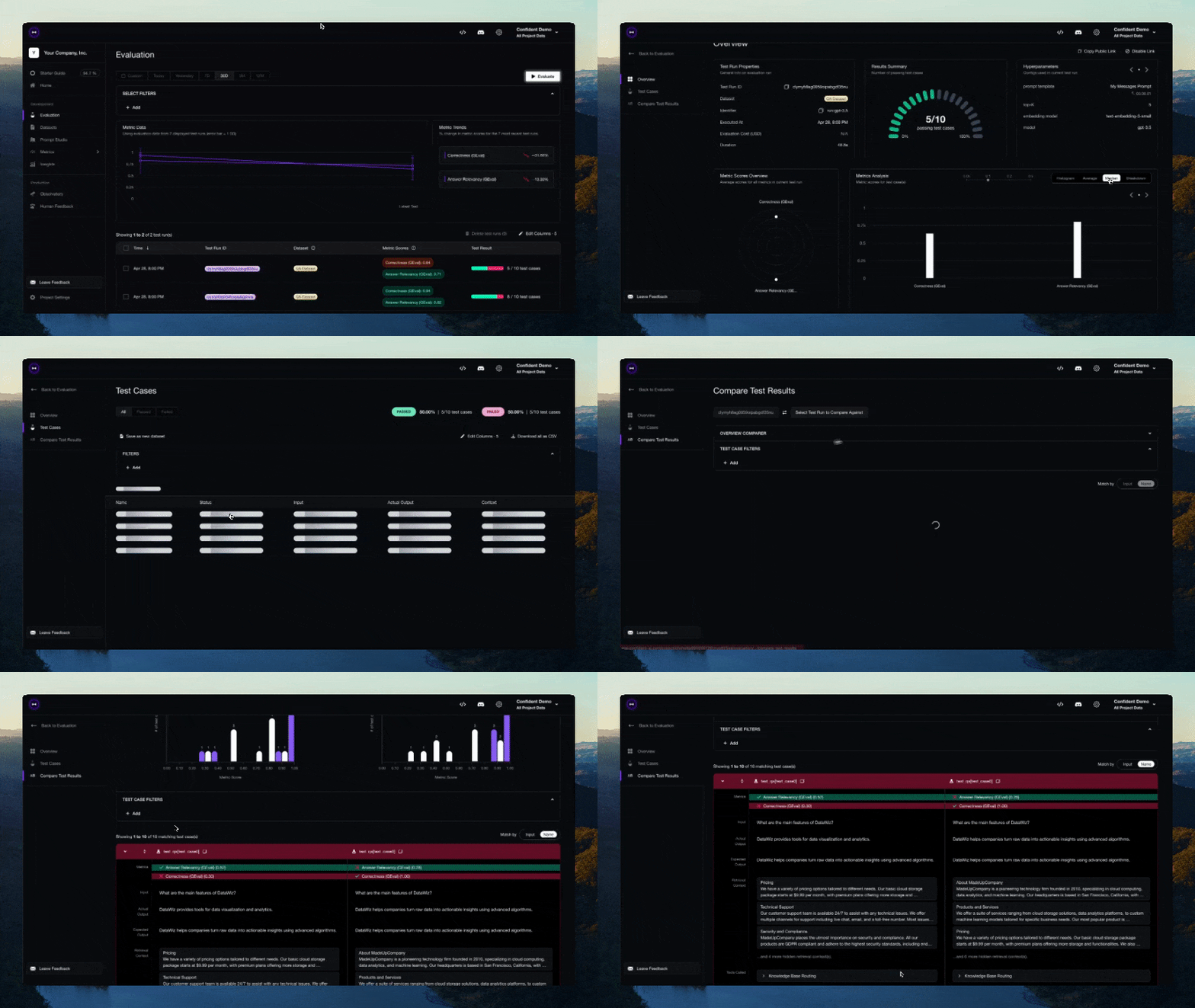
Product teams manage datasets, evaluate AI applications before launch, and monitor live traces with online evals and signals in production.
Platform teams define one organization-wide quality standard and enforce it through governance and native red teaming.
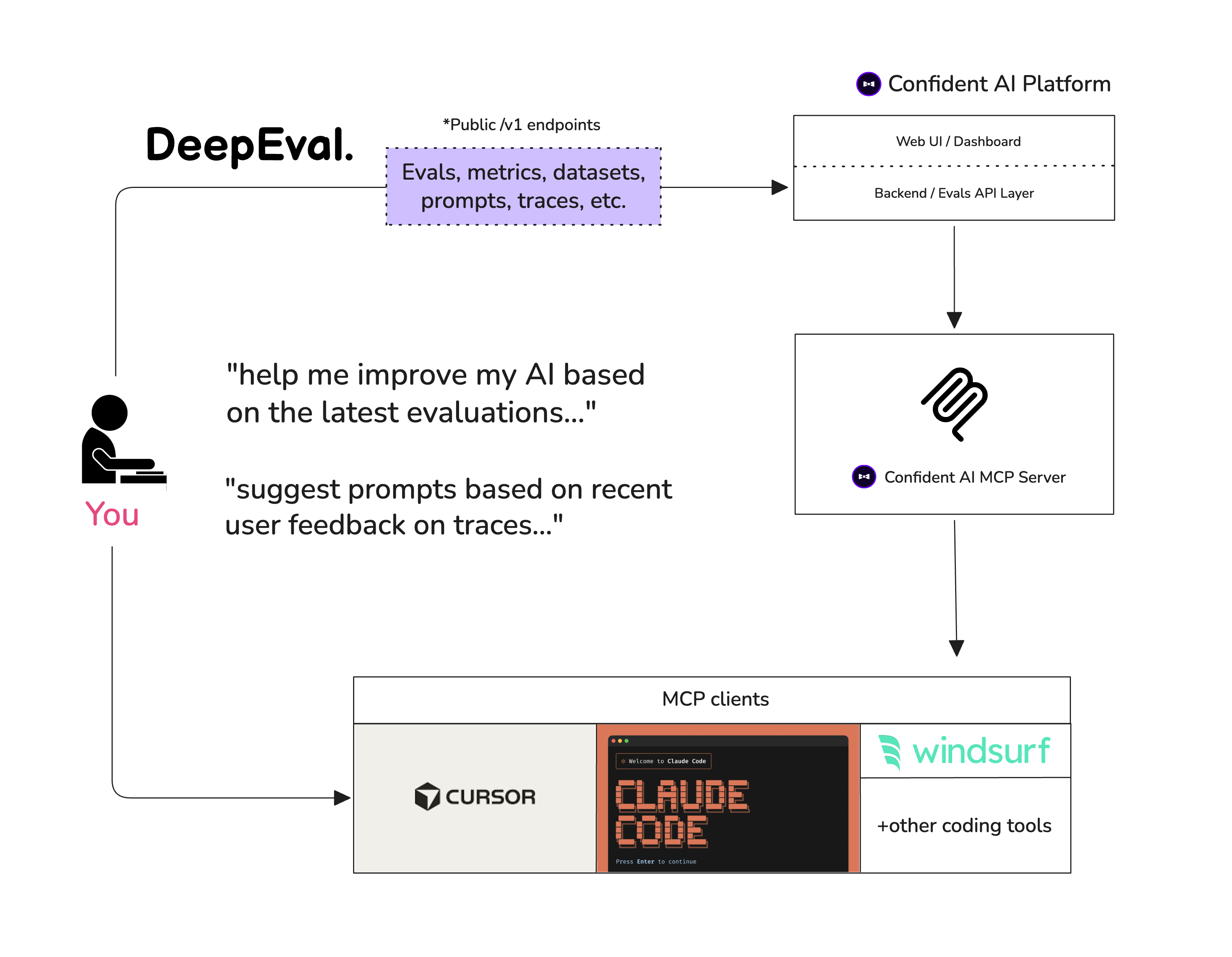
Don't need a UI? Use Confident AI as your persistence layer to run evals, pull datasets, and inspect traces from Claude Code or Cursor through Confident AI's MCP server.
🤖 Vibe-Coder QuickStart
Want your coding agent to add evals and fix failures for you? Install the DeepEval skill, point it at your agent, RAG pipeline, or chatbot, and ask it to generate a dataset, write the eval suite, run deepeval test run, and iterate on the failing metrics.
Let's pretend your LLM application is a RAG based customer support chatbot; here's how DeepEval can help test what you've built.
Installation
Deepeval works with Python>=3.9+.
pip install -U deepeval
Create an account (highly recommended)
Using the deepeval platform will allow you to generate sharable testing reports on the cloud. It is free, takes no additional code to setup, and we highly recommend giving it a try.
To login, run:
deepeval login
Follow the instructions in the CLI to create an account, copy your API key, and paste it into the CLI. All test cases will automatically be logged (find more information on data privacy here).
Write your first test case
Create a test file:
touch test_chatbot.py
Open test_chatbot.py and write your first test case to run an end-to-end evaluation using DeepEval, which treats your LLM app as a black-box:
import pytest
from deepeval import assert_test
from deepeval.metrics import GEval
from deepeval.test_case import LLMTestCase, SingleTurnParams

def test_case():
    correctness_metric = GEval(
        name="Correctness",
        criteria="Determine if the 'actual output' is correct based on the 'expected output'.",
        evaluation_params=[SingleTurnParams.ACTUAL_OUTPUT, SingleTurnParams.EXPECTED_OUTPUT],
        threshold=0.5
    )
    test_case = LLMTestCase(
        input="What if these shoes don't fit?",
        # Replace this with the actual output from your LLM application
        actual_output="You have 30 days to get a full refund at no extra cost.",
        expected_output="We offer a 30-day full refund at no extra costs.",
        retrieval_context=["All customers are eligible for a 30 day full refund at no extra costs."]
    )
    assert_test(test_case, [correctness_metric])
Set your OPENAI_API_KEY as an environment variable (you can also evaluate using your own custom model, for more details visit this part of our docs):
export OPENAI_API_KEY="..."
And finally, run test_chatbot.py in the CLI:
deepeval test run test_chatbot.py
Congratulations! Your test case should have passed ✅ Let's break down what happened.
The variable input mimics a user input, and actual_output is a placeholder for what your application's supposed to output based on this input.
The variable expected_output represents the ideal answer for a given input, and GEval is a research-backed metric provided by deepeval for you to evaluate your LLM outputs on any custom criteria with human-like accuracy.
In this example, the metric criteria is correctness of the actual_output based on the provided expected_output.
All metric scores range from 0 - 1, which the threshold=0.5 ultimately determines if your test has passed or not.
Use evals_iterator() to run the same dataset through your app, whether you instrument it manually or through one of DeepEval's framework integrations. Because tracing captures the ordered sequence of model decisions, tool calls, and intermediate steps, you can run trajectory-based evaluations over the complete path your agent takes.
Here's an example of manual instrumentation:
from deepeval.tracing import observe, update_current_span
from deepeval.test_case import LLMTestCase
from deepeval.metrics import TaskCompletionMetric

@observe()
def inner_component(input: str):
    output = "result"
    update_current_span(test_case=LLMTestCase(input=input, actual_output=output))
    return output

@observe()
def app(input: str):
    return inner_component(input)

# This metric evaluates the complete trajectory captured for this run.
for golden in dataset.evals_iterator(metrics=[TaskCompletionMetric()]):
    app(golden.input)
OpenAI
from deepeval.openai import OpenAI
from deepeval.tracing import trace
from deepeval.metrics import TaskCompletionMetric

client = OpenAI()

# This metric evaluates the complete trajectory captured for this run.
for golden in dataset.evals_iterator():
    with trace(metrics=[TaskCompletionMetric()]):
        client.chat.completions.create(
            model="gpt-4o",
            messages=[{"role": "user", "content": golden.input}],
        )
OpenAI Agents
from agents import Runner
from deepeval.metrics import TaskCompletionMetric

# This metric evaluates the complete trajectory captured for this run.
for golden in dataset.evals_iterator(metrics=[TaskCompletionMetric()]):
    Runner.run_sync(agent, golden.input)
AI SDK (TypeScript)
import { generateText } from "ai";
import { configureAiSdkTracing } from "deepeval/integrations/ai-sdk";
import { TaskCompletionMetric } from "deepeval/metrics";

const tracer = configureAiSdkTracing({ name: "my-agent" });

const ask = (input: string) =>
  generateText({
    model,
    prompt: input,
    experimental_telemetry: { isEnabled: true, tracer },
  });

// This metric evaluates the complete trajectory captured for this run.
for await (const golden of dataset.evalsIterator({
  metrics: [new TaskCompletionMetric()],
})) {
  await ask(golden.input);
}
`
deepeval (confident-ai/deepeval)
Choose a tag and it will appear here. With no tags selected, all catalog projects are shown.
Searching Database…
Choose a tag and it will appear here. With no tags selected, all catalog projects are shown.







 DeepEval 是一个开源的大模型评估框架:用起来很简单,可以用 G-Eval、答案相关性、幻觉检查这类有研究依据的指标来评估大语言模型系统。