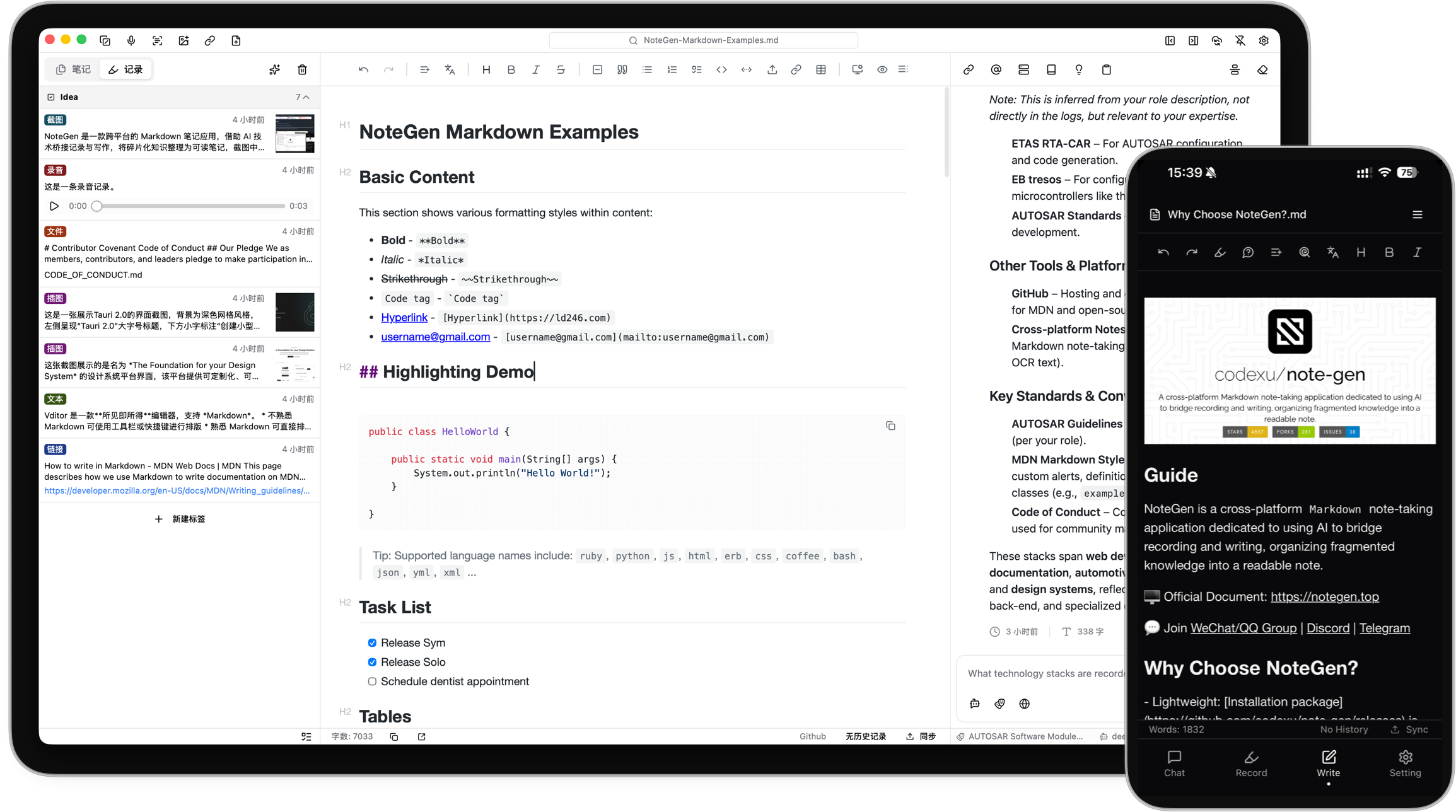

NoteGen × Infistar.cc 无限星河|全模型 API · 让记录、整理与创作更智能
感谢 Infistar.cc 无限星河赞助并为 NoteGen 提供模型服务支持!
- ⚡ 稳定高效的模型服务: 提供企业级高并发通道与多节点冗余,价格低至官方渠道 1 折,稳定支持 NoteGen AI 对话、笔记整理、续写润色、翻译总结及 Agent 长任务。
- 🧠 一个 API Key 接入主流模型: 全面支持 ChatGPT、Claude、Gemini、Kimi、GLM、DeepSeek 等模型,兼容 OpenAI 标准接口,可灵活配置主模型、快速补全、写作及知识库模型。
- 📚 覆盖知识库与多模态能力: 支持视觉理解、图片 OCR、Embedding、Rerank、语音识别与语音合成,满足知识库检索和多模态笔记整理需求。
- 🎁 NoteGen 用户专属福利: 通过专属推广链接注册并完成首次调用,即可领取 10 美元等值测试额度 / 首充专属优惠!
Capture without interrupting your thoughts
An idea may begin as a sentence, a voice recording, a screenshot, or a link you do not have time to read yet. You should not have to choose a title, folder, and structure before saving it.
NoteGen separates capturing from organizing.
Save information as it appears. Later, select the records that belong together and organize them into a structured Markdown note. You can then review the result, add your own thinking, and continue writing.
The goal is not to let AI write everything for you. It is to make sure useful fragments do not disappear before you have time to turn them into something complete.
How it works
Capture what happened
Save a thought, voice recording, screenshot, image, link, file, or todo while it is still fresh.
Choose the material
Filter records by tag, time, or type, then select the items that belong together.
Organize the records
Choose a template or describe what you want to write. NoteGen can organize the selected material into a summary, report, article, or another Markdown structure.
Keep writing
Review the draft in the editor, change the structure, add details, and continue writing in your own words.
What this looks like in practice
- Record parts of a meeting, add two screenshots, and organize them into meeting notes afterward.
- Save links and reading fragments during the week, then organize them into a research note.
- Filter recent records by tag and prepare a weekly report without searching through several apps.
- Collect images and documents for a topic, then ask questions using those materials as context.
Built around Markdown files
Your written notes remain ordinary Markdown files in the workspace you choose.
You can edit them with NoteGen, open them with another Markdown editor, keep them in Git, or move them without exporting from a proprietary format. NoteGen adds recording, AI, search, and organization around those files instead of replacing them.
The editor supports:
- Tables, task lists, code blocks, math, diagrams, and document outlines
- Markdown source mode and visual editing
- Search and replace
- Images, attachments, links, and file references
- Export and printing tools
- File history and workspace management
AI when it is useful
NoteGen connects to the AI providers and models you configure. You can use different models for chat, writing, embeddings, image recognition, OCR, and audio.
AI can help you:
- Organize selected records into a structured note
- Continue, shorten, expand, rewrite, or translate existing text
- Ask questions about notes, records, images, and knowledge base content
- Search local material before answering
- Generate diagrams and charts from your notes
- Work through longer tasks with Agent mode
AI is part of the workflow, but the result remains editable. You decide what to keep.
Search and reuse your own material
A note should remain useful after you finish writing it.
NoteGen can build a searchable knowledge base from your files and combine semantic retrieval with local text search. You can use a note, a group of records, or the knowledge base as context in a conversation instead of copying everything into a new prompt.
For advanced workflows, NoteGen also supports:
- Vector indexing and hybrid retrieval
- Configurable embedding and reranking models
- Long-term memories and reusable prompts
- MCP servers
- Installable Skills
- Agent tools for working with notes and files
More than a document editor
NoteGen includes a canvas workspace for material that is easier to understand visually.
You can create and edit:
- Flowcharts
- Mind maps
- Timelines
- Freehand drawings
- Data charts
- Diagrams generated from note content
Canvas elements remain editable after they are created, including content suggested by AI.
Sync on your terms
Notes are stored locally first. When you need them on another device, you can sync through services you already use.
Supported options include:
- GitHub
- GitLab
- Gitee
- Gitea
- S3-compatible storage
- WebDAV
You can also keep local backups without enabling cloud sync.
Download
GitHub Releases are also available as a fallback mirror:
View the latest GitHub Release
Get started
- Download NoteGen for your platform.
- Choose a workspace for your Markdown files.
- Add your first record or create a note directly.
- Configure an AI provider when you want to use AI features.
- Read the documentation for sync, knowledge base, MCP, Skills, and advanced settings.
You do not need to configure every feature before writing your first note.
| Repository |
Purpose |
| note-gen-docs |
Official website, bilingual documentation, and download pages. |
| note-gen-server |
Sync service and account management, with support for self-hosting. |
| note-gen-clipper |
Browser extension for saving selected text, images, and page links to NoteGen. |
| note-gen-plugin-sdk |
TypeScript API, project scaffolding, CLI, and test tools for developing NoteGen plugins. |
| note-gen-plugins |
Official plugin source code and plugin marketplace publishing tools. |
Contributing
NoteGen is open source and contributions are welcome.
Before opening a pull request, read the contribution guide.
You can also:
Contributors
Thanks to everyone who has reported a problem, proposed an idea, improved a translation, written documentation, or contributed code.
Recognition



Acknowledgements
NoteGen is tested with BrowserStack.
SiliconFlow provides model service support for the project.
We also appreciate the service support provided by:
License
NoteGen is released under the GNU General Public License v3.0.


 NoteGen 是一款本地优先的 Markdown 笔记应用,可以快速记录零散的内容,比如文字、语音、截图、链接或文件,之后再借助 AI 把它们整理成结构化的笔记。