





Что это такое?
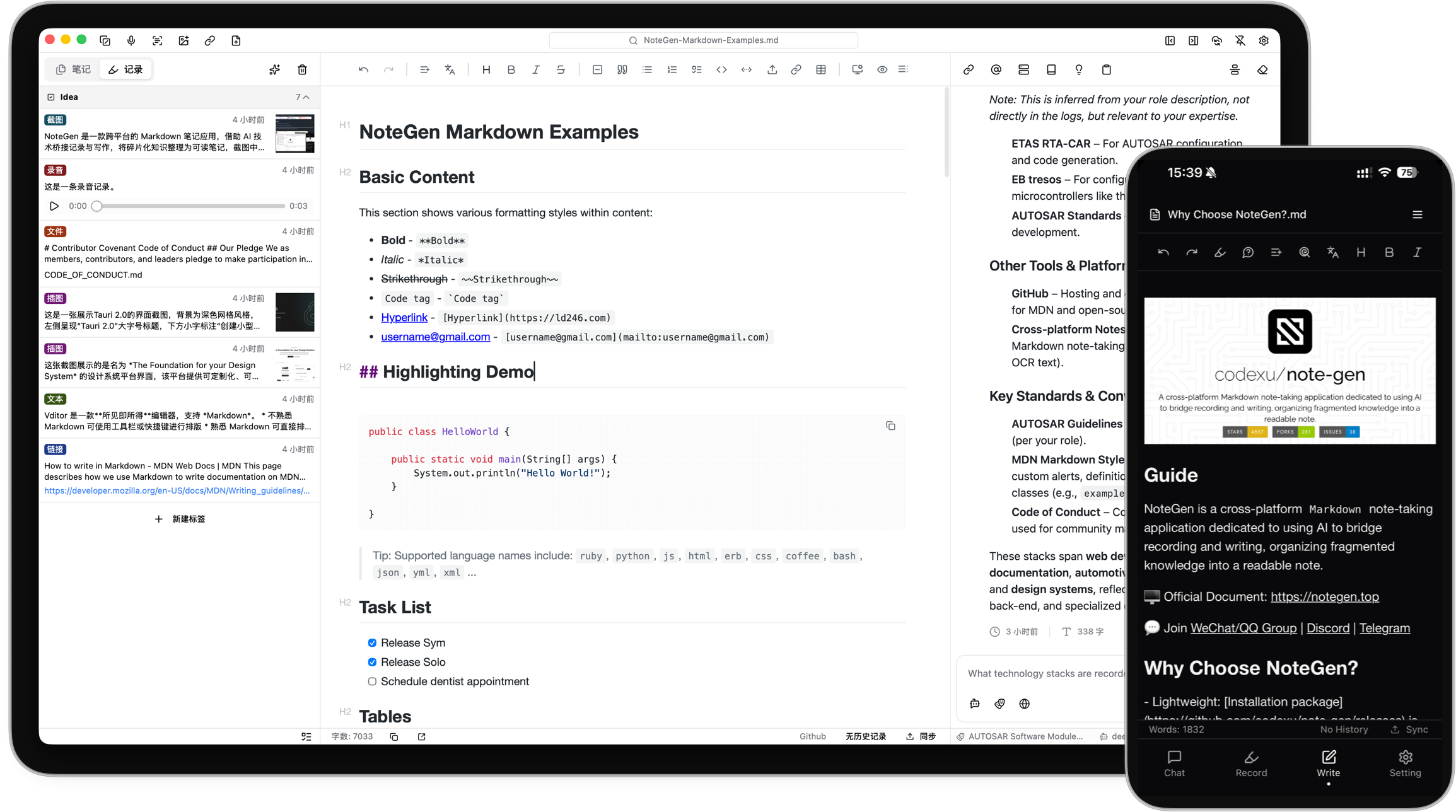
 NoteGen — приложение для заметок в формате Markdown, которое хранит данные локально. Оно позволяет быстро сохранять разрозненные фрагменты: текст, голосовые записи, скриншоты, ссылки или файлы, а позже с помощью ИИ упорядочить их в структурированные заметки.
NoteGen — приложение для заметок в формате Markdown, которое хранит данные локально. Оно позволяет быстро сохранять разрозненные фрагменты: текст, голосовые записи, скриншоты, ссылки или файлы, а позже с помощью ИИ упорядочить их в структурированные заметки.Это самостоятельное приложение или плагин для другого редактора?Это самостоятельное кроссплатформенное приложение, созданное на Tauri для компьютеров и с нативными сборками для мобильных устройств, а не плагин и не библиотека. Ваши заметки остаются обычными файлами Markdown, которые можно открыть в любом другом редакторе или хранить в Git.
Это самостоятельное кроссплатформенное приложение, созданное на Tauri для компьютеров и с нативными сборками для мобильных устройств, а не плагин и не библиотека. Ваши заметки остаются обычными файлами Markdown, которые можно открыть в любом другом редакторе или хранить в Git.Как его запустить?Скачайте сборку для своей платформы (Windows, macOS на Apple Silicon или Intel, Linux в формате AppImage, DEB или RPM, APK для Android либо подключитесь к iOS через TestFlight), а затем выберите рабочую папку, где будут храниться ваши файлы Markdown.
Скачайте сборку для своей платформы (Windows, macOS на Apple Silicon или Intel, Linux в формате AppImage, DEB или RPM, APK для Android либо подключитесь к iOS через TestFlight), а затем выберите рабочую папку, где будут храниться ваши файлы Markdown.Нужно ли настраивать провайдера ИИ, прежде чем начать пользоваться приложением?Нет, заметки можно создавать и писать без какой-либо настройки ИИ. Функции ИИ — упорядочивание записей, чат, эмбеддинги, OCR или работа с аудио — требуют подключения собственного провайдера ИИ и моделей.
Нет, заметки можно создавать и писать без какой-либо настройки ИИ. Функции ИИ — упорядочивание записей, чат, эмбеддинги, OCR или работа с аудио — требуют подключения собственного провайдера ИИ и моделей.Все ли сборки для платформ готовы к ежедневному использованию?Сборки для Windows, macOS и Linux помечены как Beta, сборка для Android — как Alpha (только ARM64), а iOS — как Alpha и доступна только через TestFlight, поэтому поддержка мобильных платформ пока на раннем этапе.
Сборки для Windows, macOS и Linux помечены как Beta, сборка для Android — как Alpha (только ARM64), а iOS — как Alpha и доступна только через TestFlight, поэтому поддержка мобильных платформ пока на раннем этапе.Где на самом деле хранятся мои данные?Заметки — это обычные файлы Markdown, которые сначала сохраняются локально, в выбранной вами рабочей папке. Синхронизация с облаком (GitHub, GitLab, Gitee, Gitea, хранилища, совместимые с S3, или WebDAV) необязательна, а вместо нее можно вести только локальные резервные копии.
Заметки — это обычные файлы Markdown, которые сначала сохраняются локально, в выбранной вами рабочей папке. Синхронизация с облаком (GitHub, GitLab, Gitee, Gitea, хранилища, совместимые с S3, или WebDAV) необязательна, а вместо нее можно вести только локальные резервные копии.Чем рабочая область Canvas отличается от редактора Markdown?Canvas — это отдельная визуальная рабочая область для блок-схем, интеллект-карт, таймлайнов, рисунков от руки и диаграмм данных, в том числе диаграмм, созданных по содержимому заметок. Элементы остаются редактируемыми после создания, даже те, что предложил ИИ.
Canvas — это отдельная визуальная рабочая область для блок-схем, интеллект-карт, таймлайнов, рисунков от руки и диаграмм данных, в том числе диаграмм, созданных по содержимому заметок. Элементы остаются редактируемыми после создания, даже те, что предложил ИИ.Для чего нужна база знаний?NoteGen может построить по вашим файлам базу знаний с возможностью поиска, которая сочетает семантический (векторный) поиск с локальным текстовым поиском. Так одну заметку, группу записей или всю базу знаний можно использовать как контекст для чата, не копируя всё вручную в промпт.
NoteGen может построить по вашим файлам базу знаний с возможностью поиска, которая сочетает семантический (векторный) поиск с локальным текстовым поиском. Так одну заметку, группу записей или всю базу знаний можно использовать как контекст для чата, не копируя всё вручную в промпт.Как работает синхронизация между несколькими устройствами?Поскольку заметки хранятся локально, синхронизация необязательна: вы подключаете NoteGen к сервису, которым уже пользуетесь (GitHub, GitLab, Gitee, Gitea, хранилище, совместимое с S3, или WebDAV), чтобы одни и те же файлы Markdown синхронизировались между устройствами.
Поскольку заметки хранятся локально, синхронизация необязательна: вы подключаете NoteGen к сервису, которым уже пользуетесь (GitHub, GitLab, Gitee, Gitea, хранилище, совместимое с S3, или WebDAV), чтобы одни и те же файлы Markdown синхронизировались между устройствами.Для чего нужна поддержка MCP и Skills?NoteGen может подключаться к серверам MCP и устанавливать Skills, давая режиму Agent дополнительные инструменты для более длинных задач по упорядочиванию заметок, выходящих за рамки простого чата.
NoteGen может подключаться к серверам MCP и устанавливать Skills, давая режиму Agent дополнительные инструменты для более длинных задач по упорядочиванию заметок, выходящих за рамки простого чата.What are similar projects?solomd, siyuan, tolaria, open-knowledge, logseq, EnvoyMesh, atlas, PrivacyNotes.app
solomd, siyuan, tolaria, open-knowledge, logseq, EnvoyMesh, atlas, PrivacyNotes.appWhich topics is it in?personal-knowledge-management, webdav, markdown-editor, vector-search, knowledge-management, canvas, note-taking, tauri, embeddings, plugin-system, knowledge-base, nextjs
personal-knowledge-management, webdav, markdown-editor, vector-search, knowledge-management, canvas, note-taking, tauri, embeddings, plugin-system, knowledge-base, nextjs