 TeleOCR
TeleOCR: Navigating Document Parsing Across Digital and Camera-Captured Documents



A lightweight Vision-Language Model for unified document parsing across digital and camera-captured documents.
🔥 News
- 2026/09/10 - We have renamed NaviDC-OCR to TeleOCR, and all subsequent model iterations will be developed and released under the TeleOCR version.
- 2026/09/01 - We noticed that EMNLP 2026 is hosting the Dr.DocBench Challenge, a document parsing competition. We evaluated NaviDC-OCR with its native weights, achieving better results than MinerU 2.5 Pro and PaddleOCR-VL 1.6. Detailed results are shown below dr.docbench-challenge. We welcome the use of NaviDC‑OCR for competitions. Going forward, we will continue to deliver competitive parsing models for the community.
- 2026/08/29 — Thanks to Nandraj for the GGUF conversion and llama.cpp support 🔗 NaviDC-OCR-GGUF, and to the community for sharing their experience deploying NaviDC-OCR on Ascend 910B!
- 2026/08/17 — NaviDC-OCR model weights and technical report have been released.
📖 Introduction
TeleOCR is a lightweight (~1.2B parameters), open-source Vision-Language Model designed specifically for document understanding.
Unlike existing approaches that primarily focus on either digital documents or camera-captured documents, TeleOCR provides a unified framework for both scenarios.
TeleOCR introduces the following key techniques:
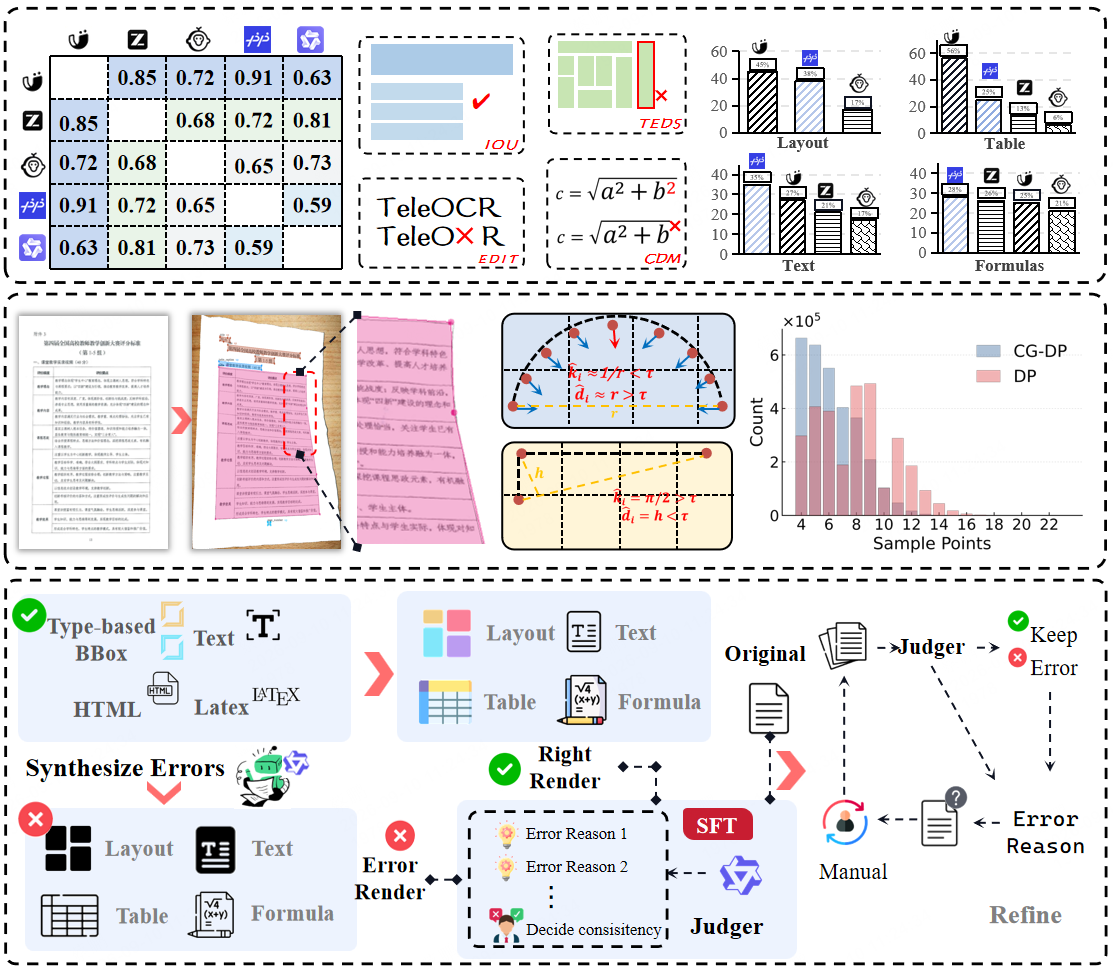
- Multi-node Consensus Voting (MCV) for automatic pseudo-label generation
- Geometry-aware Document Modeling for camera-captured documents
- Curvature-Guided Douglas-Peucker Sampling (CGDP)
- Image-to-Image Self-Verification for automatic data refinement
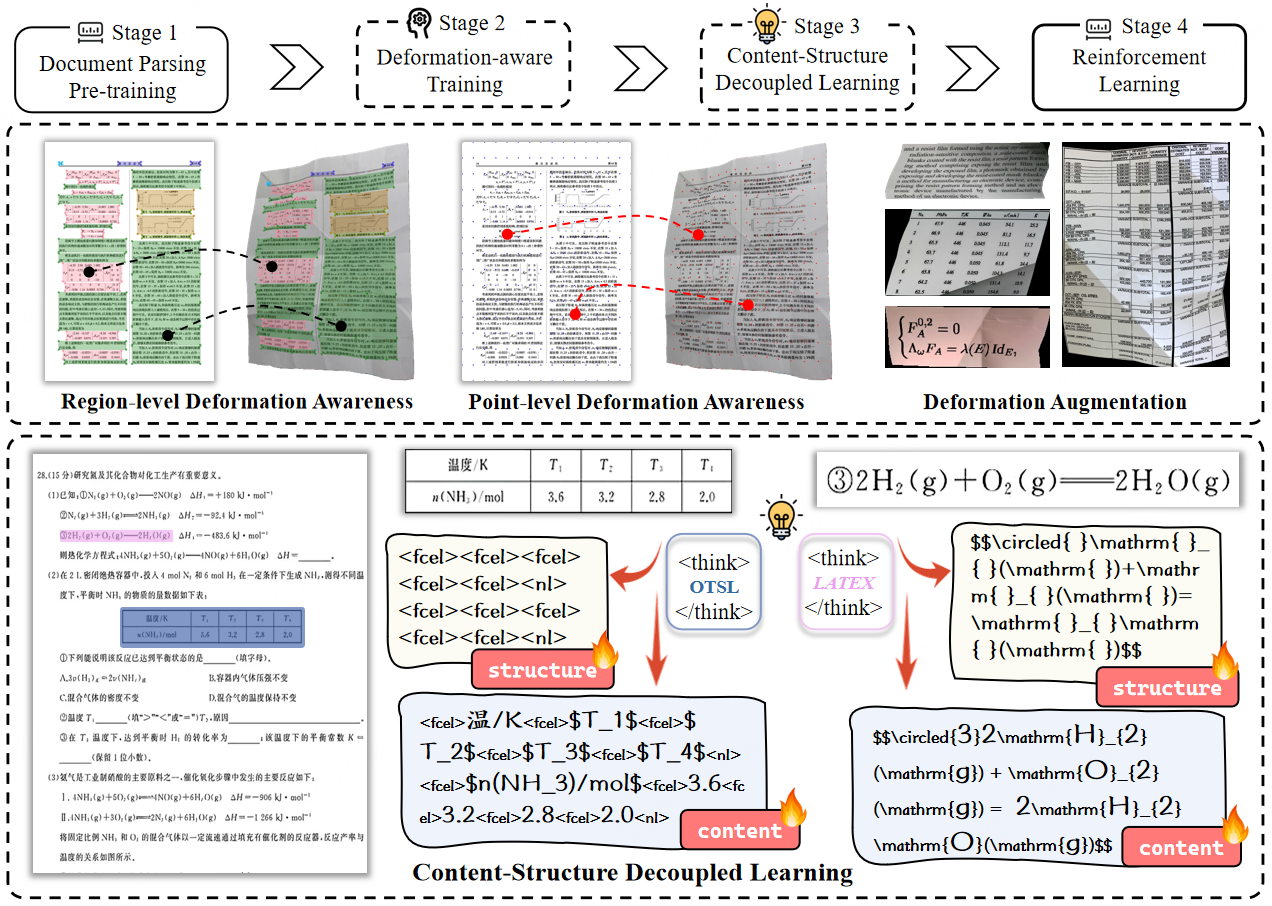
- Progressive Four-Stage Training pipeline
- Content-Structure Decoupled Learning for tables and formulas
These techniques enable TeleOCR to achieve strong performance across both digital and camera-captured document benchmarks while maintaining a lightweight architecture suitable for practical deployment.
⚙️ Data Engine
TeleOCR adopts an automated data engine consisting of four major components:
| Component |
Description |
| Multi-node Consensus Voting |
Generates reliable pseudo-labels from heterogeneous model predictions |
| Geometry-aware Data Synthesis |
Produces realistic camera-captured document samples |
| Image-to-Image Self-Verification |
Verifies model predictions through visual rendering |
| Progressive Data Cleaning |
Iteratively filters and refines training data |
Most of the generated training data requires no manual annotation.
🧠 Progressive Training
TeleOCR is trained through a progressive four-stage training pipeline:
| Stage |
Objective |
| Stage 1 |
Vision-Language Alignment |
| Stage 2 |
Geometry-aware Document Parsing |
| Stage 3 |
Content-Structure Decoupled Learning |
| Stage 4 |
Reinforcement Learning |
This progressive strategy gradually improves the model from basic vision-language alignment to fine-grained document understanding and structured output generation.
📊 Experimental Results
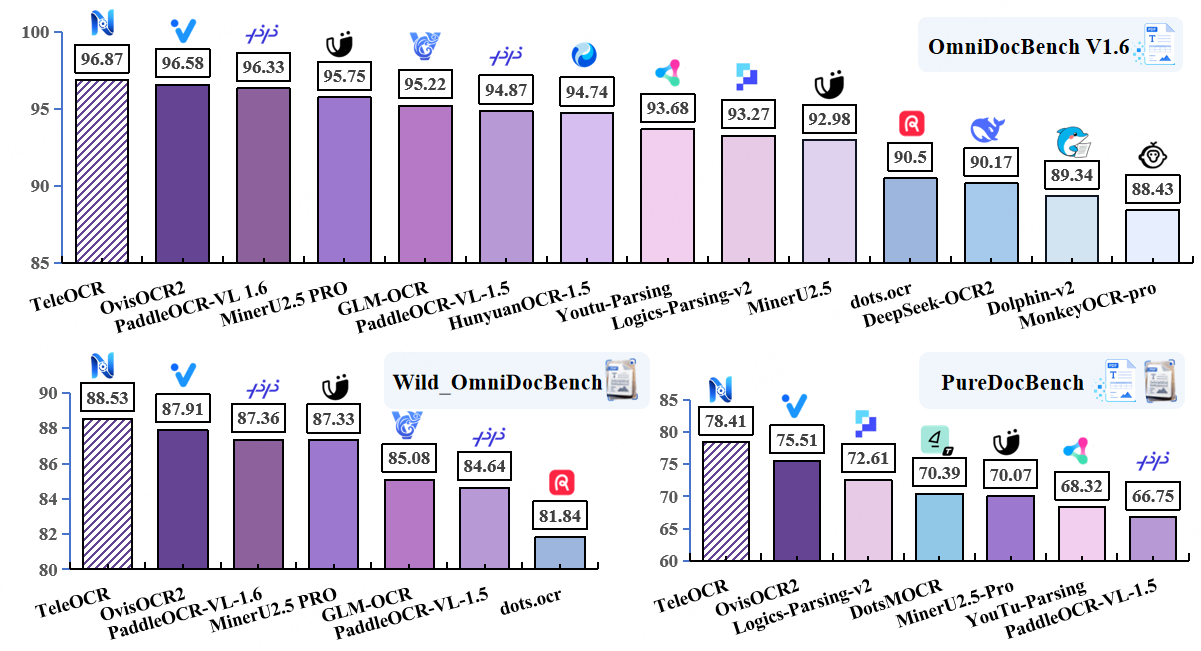
TeleOCR is evaluated on OmniDocBench v1.6, Wild-OmniDocBench, PureDocBench, and the ICDAR 2026 Sci-ImageMiner Challenge.
Bold indicates the best result, while underline indicates the second-best result.
It should be noted that all metrics reported in this report were evaluated using the Docker image provided by OmniDocBench v1.6. For Wild-OmniDocBench, we used the Docker image provided by OmniDocBench v1.6 for evaluation, with the metrics obtained by inspecting the Sub-v1.5 results. PureDocBench was also evaluated using the Docker image provided by OmniDocBench v1.6; however, the ground-truth JSON files were converted from the files provided by PureDocBench. In addition, for the real-world degraded tracks in Wild-OmniDocBench and PureDocBench, we recommend enabling LAYOUT_MODE="Segmentation".
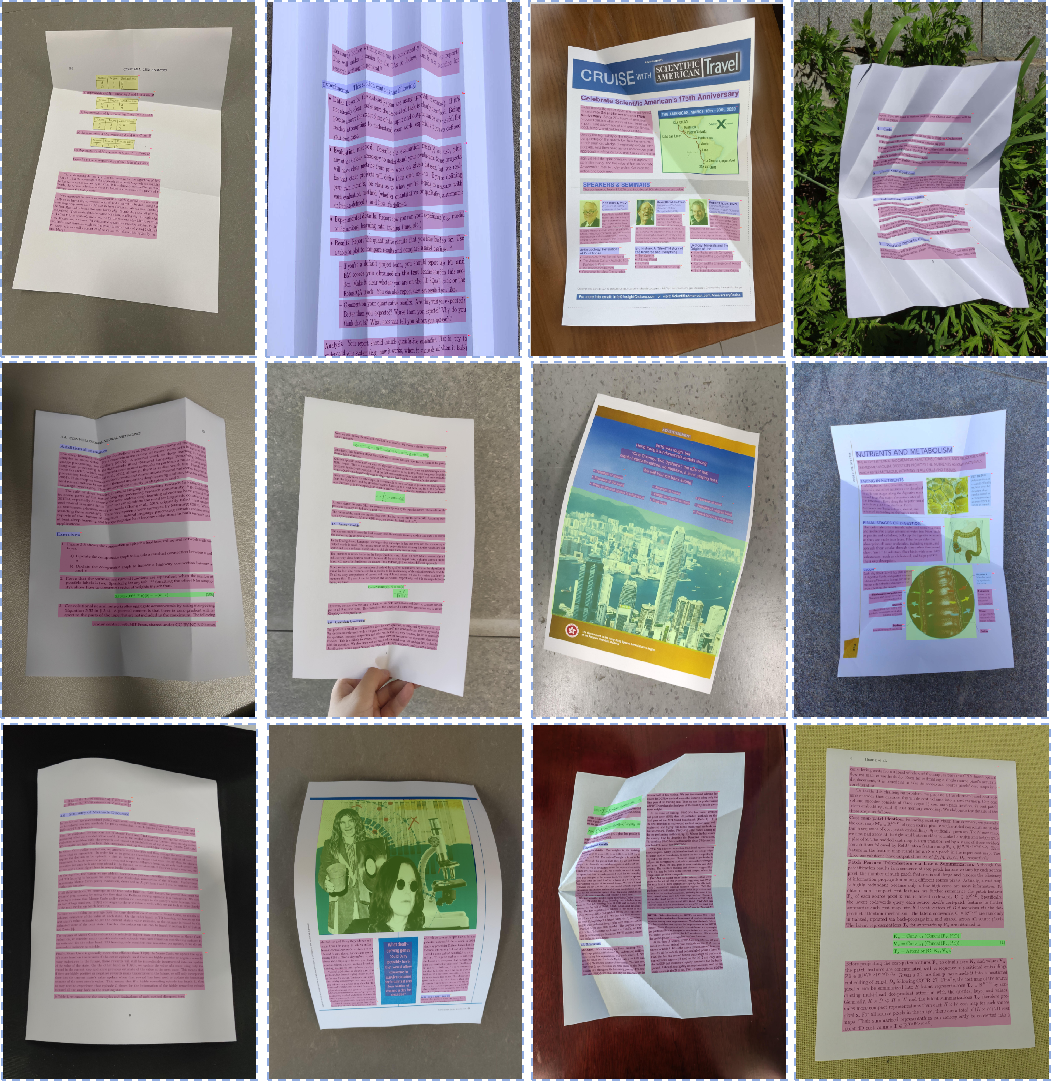
Layout Visualization of Distorted Documents
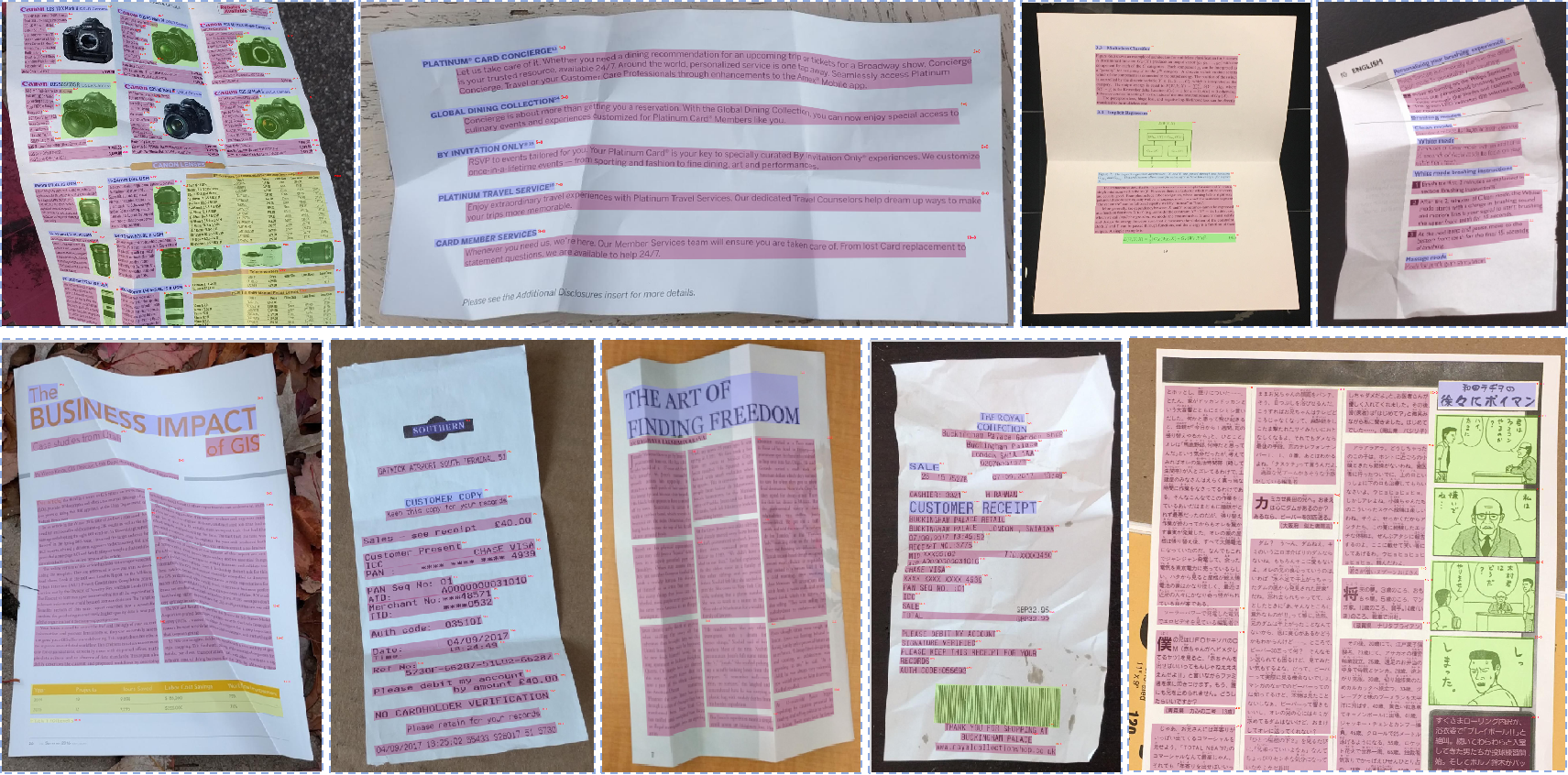
To evaluate the model's ability to understand complex document deformations, we conduct a visual evaluation on the public dewarping datasets DocUNet and DIR300, with representative results shown in Figure. TeleOCR directly performs layout and content parsing on distorted documents without dewarping preprocessing or a dedicated rectification model, demonstrating robust parsing under complex geometric deformations.
Dr.DocBench Challenge
| 模型 |
overall ↑ |
Text edit ↓ |
formula cdm ↑ |
Table teds ↑ |
order edit ↓ |
| Specialized VLMs |
|
|
|
|
|
| TeleOCR |
67.96 |
0.1903 |
0.02 |
64.97 |
0.398 |
| Mineru 2.5 pro |
62.26 |
0.3402 |
0.04 |
67.75 |
0.356 |
| OvisOCR2 |
59.25 |
0.3883 |
0.00 |
61.59 |
0.3791 |
| PaddleOCRvl 1.6 |
55.11 |
0.4364 |
0.21 |
51.34 |
0.412 |
OmniDocBench v1.6
OmniDocBench
| Model Type |
Method |
Params |
Overall ↑ |
Text Edit ↓ |
Formula CDM ↑ |
Table TEDS ↑ |
Table TEDS-S ↑ |
Read Order Edit ↓ |
| Specialized VLMs |
TeleOCR |
1.2B |
96.87 |
0.027 |
96.36 |
97.05 |
98.52 |
0.122 |
|
OvisOCR2 |
0.8B |
96.58 |
0.025 |
97.53 |
94.76 |
97.16 |
0.111 |
|
PaddleOCR-VL-1.6 |
0.9B |
96.33 |
0.033 |
97.49 |
94.76 |
97.11 |
0.127 |
|
MinerU2.5-Pro |
1.2B |
95.75 |
0.036 |
97.45 |
93.42 |
95.92 |
0.120 |
|
GLM-OCR |
0.9B |
95.22 |
0.044 |
97.18 |
92.83 |
95.39 |
0.133 |
|
PaddleOCR-VL-1.5 |
0.9B |
94.87 |
0.038 |
96.69 |
91.67 |
94.37 |
0.130 |
|
HunyuanOCR-1.5 |
1B |
94.74 |
0.033 |
97.49 |
94.76 |
97.11 |
0.127 |
|
PaddleOCR-VL |
0.9B |
94.11 |
0.040 |
95.70 |
90.65 |
93.74 |
0.135 |
|
Youtu-Parsing |
2.5B |
93.68 |
0.044 |
93.45 |
92.02 |
95.00 |
0.116 |
|
Logics-Parsing-v2 |
4B |
93.27 |
0.041 |
95.47 |
88.42 |
91.98 |
0.137 |
|
FireRed-OCR |
2B |
93.20 |
0.037 |
95.27 |
88.04 |
91.06 |
0.131 |
|
MinerU2.5 |
1.2B |
92.98 |
0.045 |
95.59 |
87.88 |
91.47 |
0.130 |
|
OpenDoc-0.1B |
0.1B |
90.64 |
0.049 |
92.93 |
83.88 |
87.45 |
0.140 |
|
dots.ocr |
3B |
90.50 |
0.048 |
89.12 |
87.18 |
90.58 |
0.138 |
|
DeepSeek-OCR 2 |
3B |
90.17 |
0.050 |
91.59 |
83.89 |
87.75 |
0.144 |
|
HunyuanOCR |
1B |
89.87 |
0.089 |
87.44 |
91.01 |
93.23 |
0.171 |
|
Dolphin-v2 |
3B |
89.34 |
0.069 |
90.53 |
84.40 |
87.44 |
0.150 |
|
OCRVerse |
4B |
88.44 |
0.063 |
89.14 |
82.44 |
86.27 |
0.163 |
|
MonkeyOCR-pro-3B |
3B |
88.43 |
0.074 |
88.33 |
84.35 |
88.62 |
0.189 |
| General VLMs |
Ovis2.6-30B-A3B |
30B |
93.62 |
0.035 |
94.93 |
89.44 |
92.40 |
0.135 |
|
Gemini 3 Pro |
-- |
92.85 |
0.064 |
95.83 |
89.15 |
92.96 |
0.165 |
|
Gemini 3 Flash |
-- |
92.58 |
0.066 |
95.03 |
89.29 |
93.51 |
0.173 |
|
Qwen3-VL-235B |
235B |
89.78 |
0.063 |
92.53 |
83.07 |
86.75 |
0.166 |
|
GPT-5.2 |
-- |
86.52 |
0.114 |
88.00 |
82.95 |
87.93 |
0.193 |
|
InternVL3.5-241B |
241B |
83.61 |
0.130 |
89.52 |
74.35 |
79.78 |
0.215 |
Wild-OmniDocBench
Wild-OmniDocBench
| Model Type |
Method |
Params |
Overall ↑ |
Text Edit ↓ |
Formula CDM ↑ |
Table TEDS ↑ |
Table TEDS-S ↑ |
Read Order Edit ↓ |
| Decoupled VLMs |
TeleOCR |
1.2B |
88.53 |
0.1173 |
88.26 |
89.05 |
92.14 |
0.2011 |
|
PaddleOCR-VL-1.6 |
0.9B |
87.36 |
0.1369 |
88.42 |
85.76 |
90.14 |
0.2057 |
|
MinerU2.5-Pro |
1.2B |
87.33 |
0.1362 |
90.15 |
85.46 |
90.12 |
0.2013 |
|
GLM-OCR |
0.9B |
85.08 |
0.1514 |
89.09 |
81.31 |
85.90 |
0.2228 |
|
PaddleOCR-VL-1.5 |
0.9B |
84.64 |
0.1461 |
86.72 |
81.80 |
86.52 |
0.2138 |
| End-to-End VLMs |
OvisOCR2 |
0.8B |
87.91 |
0.129 |
90.37 |
85.13 |
89.11 |
0.2021 |
|
dots.ocr |
3B |
81.84 |
0.1483 |
85.00 |
75.32 |
80.20 |
0.2200 |
|
HunyuanOCR-1.5 |
1B |
77.62 |
0.1979 |
85.12 |
67.54 |
70.67 |
0.2750 |
|
Logics-Parsing-v2 |
4B |
77.10 |
0.4029 |
91.40 |
80.19 |
87.16 |
0.2355 |
PureDocBench
PureDocBench
| Model Type |
Model |
Clean Overall ↑ |
Clean Text ↓ |
Clean Formula ↑ |
Clean Table ↑ |
Digital Degraded Overall ↑ |
Digital Degraded Text ↓ |
Digital Degraded Formula ↑ |
Digital Degraded Table ↑ |
Real Degraded Overall ↑ |
Real Degraded Text ↓ |
Real Degraded Formula ↑ |
Real Degraded Table ↑ |
| Decoupled VLM |
TeleOCR |
86.90 |
0.111 |
81.01 |
91.09 |
77.47 |
0.206 |
72.59 |
80.45 |
70.85 |
0.302 |
65.11 |
77.66 |
|
DotsMOCR |
76.27 |
0.151 |
66.23 |
77.65 |
73.16 |
0.198 |
64.32 |
74.95 |
61.73 |
0.312 |
54.39 |
61.97 |
|
MinerU2.5-Pro |
75.87 |
0.222 |
65.14 |
84.68 |
71.77 |
0.272 |
61.79 |
80.73 |
62.56 |
0.375 |
52.70 |
72.47 |
|
YouTu-Parsing |
75.02 |
0.230 |
67.34 |
80.74 |
69.66 |
0.270 |
61.44 |
74.49 |
60.29 |
0.360 |
52.20 |
64.69 |
|
PaddleOCR-VL-1.5 |
73.01 |
0.266 |
63.53 |
82.12 |
66.73 |
0.339 |
58.03 |
76.07 |
60.50 |
0.398 |
54.00 |
67.33 |
|
GLM-OCR |
68.65 |
0.314 |
57.89 |
79.44 |
63.06 |
0.383 |
53.23 |
74.21 |
58.31 |
0.433 |
50.34 |
67.83 |
|
Dolphin-v2 |
65.90 |
0.342 |
59.80 |
72.12 |
60.24 |
0.393 |
52.20 |
67.86 |
44.92 |
0.553 |
39.98 |
50.04 |
|
MonkeyOCR-pro-3B |
62.23 |
0.346 |
48.46 |
72.83 |
57.40 |
0.397 |
45.57 |
66.32 |
46.49 |
0.511 |
38.18 |
52.43 |
| End-to-End VLM |
OvisOCR2 |
82.14 |
0.149 |
71.29 |
90.12 |
77.77 |
0.192 |
67.87 |
84.71 |
66.61 |
0.316 |
57.64 |
73.79 |
|
FD-RL |
78.38 |
0.193 |
68.21 |
86.22 |
76.33 |
0.214 |
67.16 |
83.22 |
67.04 |
0.298 |
58.82 |
72.08 |
|
Logics-Parsing-v2 |
76.35 |
0.213 |
67.67 |
82.67 |
73.85 |
0.248 |
67.33 |
79.02 |
67.64 |
0.304 |
61.65 |
71.64 |
|
dots.ocr |
72.01 |
0.248 |
61.37 |
79.51 |
65.95 |
0.307 |
56.67 |
71.86 |
55.68 |
0.403 |
47.70 |
59.63 |
|
Qianfan-OCR |
57.22 |
0.370 |
49.79 |
58.83 |
50.85 |
0.438 |
44.41 |
51.96 |
45.06 |
0.494 |
39.08 |
45.53 |
| General VLMs |
Qwen3-VL-8B |
72.44 |
0.261 |
65.10 |
78.35 |
72.03 |
0.266 |
64.88 |
77.82 |
62.73 |
0.342 |
55.55 |
66.81 |
|
Kimi K2.6 |
72.32 |
0.303 |
66.93 |
80.30 |
69.95 |
0.322 |
64.69 |
77.31 |
68.02 |
0.335 |
62.44 |
75.14 |
|
Gemini-3.1-Pro |
70.04 |
0.306 |
65.63 |
75.08 |
69.28 |
0.322 |
65.81 |
74.24 |
71.98 |
0.300 |
68.62 |
77.26 |
|
Qwen3.5-397B-A17B |
69.12 |
0.233 |
65.26 |
65.40 |
68.34 |
0.244 |
63.91 |
65.53 |
62.70 |
0.287 |
60.70 |
56.12 |
ICDAR 2026 Sci-ImageMiner Challenge
Challenge Website
| Rank |
Team |
RMS |
TEDS |
Weighted |
| 1 |
TeleOCR |
17.23 |
66.39 |
41.81 |
| 2 |
VLMinators |
17.29 |
64.31 |
40.80 |
| 3 |
Ricoh_SRCB |
16.23 |
61.12 |
38.67 |
| 4 |
Vassilis Sioros |
14.94 |
55.20 |
35.07 |
| 5 |
DocMiner |
12.67 |
53.72 |
33.19 |
| 6 |
Qwen3 VL 8B |
14.08 |
57.86 |
35.97 |
🚀 Installation & Usage
1. Environment Installation
TeleOCR requires Python 3.10+ and a CUDA-enabled environment for GPU inference.
git clone https://github.com/caipeng328/TeleOCR.git
cd TeleOCR
conda create -n teleocr python=3.10 -y
conda activate teleocr
Install Dependencies
Install TeleOCR and its dependencies in editable mode:
pip install -e .
The -e option installs the project in editable mode, allowing modifications to the source code to take effect immediately without reinstalling the package.
2. Inference
TeleOCR provides infer.py for batch inference on document images.
Before running inference, configure:
- Input image directory
- Output directory
- Model path
A typical inference command is:
#!/bin/bash
set -e

IMAGE_SUB_PATH="/path/to/input/images"
RESULT_SAVE_PATH="/path/to/output/results"

python infer.py \
    --image_sub_path "${IMAGE_SUB_PATH}" \
    --result_save_path "${RESULT_SAVE_PATH}" \
    --us

 TeleOCR is a lightweight (~1.2B parameter) open-source Vision-Language Model built specifically for document parsing, handling both regular digital documents and messy camera-captured photos with a single unified model.