

brig README

The project's README from github.com/brig-sh/brig. As one markdown file: README.md.

brig

Release CI Coverage Go License: Apache 2.0

Brig runs a coding agent inside a microVM on your own machine.

An agent working unattended can only damage what you handed it. Point it at one project, and a bad edit or a bad command reaches no further than that project. When you are done, throw the sandbox away and start clean.

How it works

One command starts a sandbox and runs the agent in it:

brig run claude ~/code/demo

A session is <agent> or <agent>@<label>, the ref every command takes. claude and claude@refactor are two independent sessions of the same agent, each with its own sandbox. The guest home is the host directory holding a session's settings and history. claude resolves to the claude-code agent, so its guest home is ~/brig/claude-code, and claude@refactor's is the sibling ~/brig/claude-code-refactor, not a directory inside it.

Name a project on the run line, and Brig mounts it read-write at /work/<name>, where the agent starts. Credentials reach the guest only when you deliver them: the sandbox boots with none, and the agent asks you to log in. What the guest does not get: every other host directory, your keychain, and your SSH agent. docs/sessions.md is the full model.

Requirements

Host Supported
Mac, Apple silicon, macOS 15 or newer Yes
Mac, Apple silicon, macOS 14 Yes, with BRIG_HYPERVISOR=vz
Intel Mac No
Linux, x86-64 or arm64 Yes, with nerdctl, containerd and the urunc shim

macOS 15 is the floor: six of the eight built-in profiles need the hvi backend. See docs/install.md#platform-support for the rest.

Install

brew tap brig-sh/brig
brew trust brig-sh/brig
brew install --cask brig

The cask brings hull and cosign with it. For install.sh, Linux, or a source build, see docs/install.md.

First run

brig doctor

Each line is a check. A !! line prints its fix beside it.

mkdir -p ~/code/demo
brig run claude ~/code/demo

Brig prints brig: image and boot assets verified, Claude Code asks you to log in inside the sandbox, and pwd inside the agent prints /work/demo. The first run pulls the guest image and the boot assets, so it is slow. docs/authentication.md covers the login and how to carry one in from the host.

brig stop claude    # stop the sandbox, keep its name
brig rm claude      # stop it and remove it

Neither touches ~/brig/claude-code or ~/code/demo. docs/quickstart.md walks through all of this, explained.

The boundary

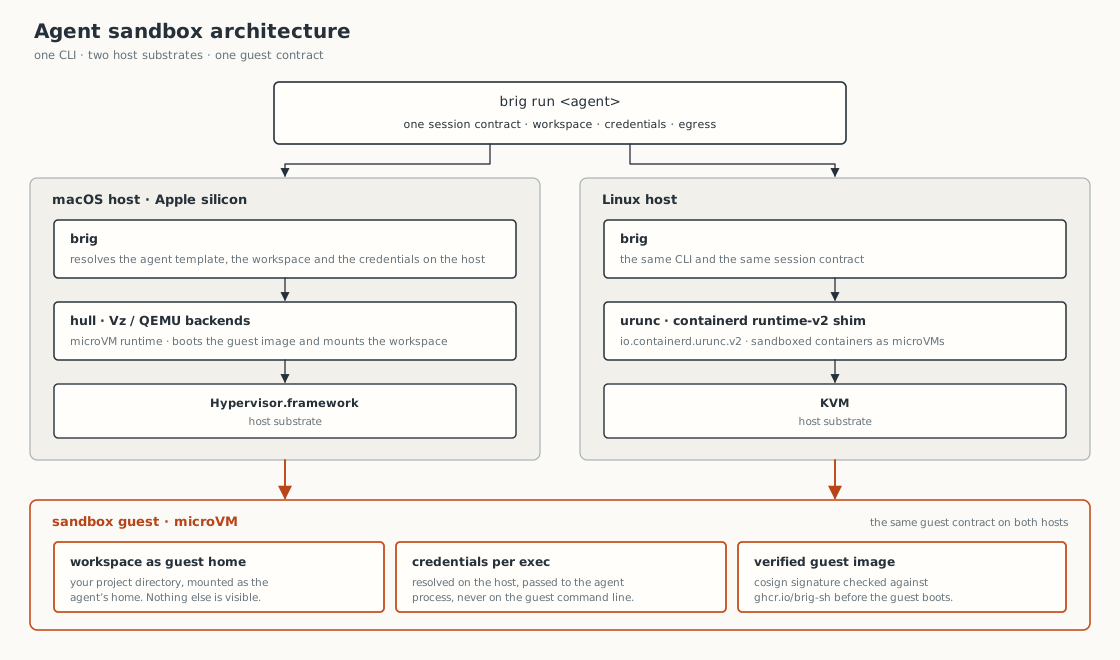
brig sandbox architecture. brig run resolves the session on the host. hull drives a microVM on macOS, urunc over KVM on Linux. Both give the guest the same contract: a guest home, a project mount, per-exec credentials, and an image whose signature brig checks

The project mount is read-write, and those are your real files: the agent can change anything under it. On the default shared network the agent reaches the internet, so anything it can read it can also send. Brig enforces egress policy only on hull's hvi backend, and refuses a policy-bound run on any other backend rather than run it unenforced. Image verification defaults to warn, which reports an unverifiable image and boots it anyway. Set BRIG_VERIFY=require to refuse one instead. docs/security.md has the full picture.

Documentation

If you want to Read
Install Brig on any supported host docs/install.md
Get a first agent running, step by step docs/quickstart.md
Understand homes, projects and sessions docs/sessions.md
Log an agent in, or give it Git access docs/authentication.md, docs/secrets.md
Look up a command, a flag or a variable docs/cli.md
Run your own agent or your own image docs/profiles.md, docs/guest-image.md
Restrict what the guest can reach docs/policies.md
Understand the isolation, and its limits docs/security.md
Know what Brig counts, and turn it off docs/telemetry.md
Fix something that went wrong docs/troubleshooting.md
Move off a retired command spelling docs/migration.md
Know what is stable and what is not docs/stability.md

The full index is docs/README.md.

Project status

Brig is a prerelease, in the 0.1.0-rc series. brig version prints yours, and docs/stability.md says what you can script against today. docs/support.md says where to ask a question or file a bug, and SECURITY.md is where to report a vulnerability instead of a public issue. CONTRIBUTING.md covers the build, the tests and the review norms, and AI_POLICY.md says how AI-assisted contributions are handled. Brig ships under the Apache License 2.0. See LICENSE.

Brig itself counts nothing. On macOS the hull runtime it drives counts a few events, and on Linux nothing is sent. brig telemetry status shows the current setting, and brig telemetry off turns it off. docs/telemetry.md has the field-by-field detail.

NOFire AI

brig (brig-sh/brig)

Searching Database…

232 ·GitHub
这是什么?Brig 是一个 Go 命令行工具(brig),带有一个会话守护进程(brigd),可以在你自己电脑上的 microVM 沙箱里运行编程代理,这样无人值守的代理最多只能损坏你交给它的那一个项目。
那我实际运行的是什么——命令行工具、服务,还是虚拟机?既是命令行工具也是守护进程:一条命令就能启动一个 microVM 沙箱并在其中运行代理,而且每个命令都可以用会话引用来操作,比如 claude 或 claude@refactor。
怎么安装?第一次运行是什么样的?安装 Homebrew cask 即可——它会一并带上 hull 运行时和 cosign;install.sh、Linux 和源码构建方式见 docs/install.md。第一次运行会拉取客户机镜像和启动所需的资源文件,所以会比较慢。
我的电脑能跑吗,还是需要特殊硬件?需要 macOS 15 或更新版本的 Apple Silicon Mac;macOS 14 可以通过设置 BRIGHYPERVISOR=vz 来运行,Intel Mac 不受支持。x86-64 或 arm64 架构的 Linux 也可以,但需要 nerdctl、containerd 和 urunc shim。
这个代理到底被限制得多严?项目目录以读写方式挂载,里面放的是你的真实文件,所以代理可以改动目录下的任何内容。在默认的共享网络下,它还能访问互联网——凡是它能读到的内容,它都能发出去。
代理会不会偷看我的其他文件、密码或 SSH 密钥?不会:沙箱启动时不含任何凭据,只有当代理需要你登录时,你才会提供凭据。它拿不到你主机上的其他目录、钥匙串或 SSH agent。
为什么非要把编程代理放进沙箱里运行?无人值守的代理最多只能损坏你交给它的东西:把它指向一个项目,一次糟糕的修改或一条糟糕的命令最多波及到那个项目为止。用完之后,你把沙箱整个丢掉,从头再来就是干净的。
开箱即用支持哪些编程代理?内置了 Claude Code:会话名 claude 会解析到 claude-code 代理,它会在首次运行时让你在沙箱内登录。要运行自己的代理请看 docs/profiles.md,要使用自己的客户机镜像请看 docs/guest-image.md。
What are similar projects?coop, nvx, smolvm, box, arcbox, agentbox, CubeSandbox, qwen-code
Creator
brig-sh
Size
25 MB
Stars
232
Age
2mo
Commits · 90 Days