[!IMPORTANT]
Source code is licensed under Apache 2.0. Breeze TTS 2 model weights, derivative models, and self-hosted outputs are for research and non-commercial use only. See License.
📰 News
📖 Introduction
Breeze TTS 2 is an open-weight text-to-speech model built for real-time interaction. It ranks #1 among open-weight models on the Artificial Analysis TTS leaderboard, while outperforming frontier proprietary systems. Its open-ended natural-language instruction-following capability supports reference-free voice design and reference-guided voice direction, while ultra-low-latency streaming enables responsive, expressive interaction.
✨ Highlights
- 🎙️ Voice Clone — Uses reference audio with its exact transcript to preserve timbre, rhythm, emotion, and style.
- 🎨 Voice Design — Creates a distinctive voice from a natural-language description, without reference audio.
- 🎛️ Voice Direction — Clones a voice from reference audio while steering tone, emotion, pace, and delivery.
- 🎭 Vocal Events — Adds expressive inline events directly in the text: use parentheses in English, such as
(laugh), (cough), (clears throat), and (sigh); use square brackets in Chinese, such as [笑], [咳嗽], [清嗓子], and [叹气].
- ⚡ Ultra-Low Latency — Achieves under 40 ms time to first audio (TTFA) with the warmed-up fast path on an NVIDIA H100.
- 🌊 Real-Time Streaming — Reaches a 0.32 real-time factor (RTF), generating audio at approximately 3.1× real time with the warmed-up fast path on an NVIDIA H100.
- 💾 GPU-Efficient — Eager inference uses approximately 7.7 GiB of GPU memory; a 12 GB GPU is the minimum recommended configuration.
- 🌏 Bilingual Support — Generates natural English and Chinese speech with a single model.
🚀 Quick Start
Requirements
- Linux and Python 3.10 or newer
- A CUDA-capable NVIDIA GPU
- GPU memory: approximately 7.7 GiB for eager inference or 14.4 GiB with
--fast-all; use a 12 GB GPU for eager or a 24 GB GPU for the fast path
- The Breeze TTS 2 checkpoint
Installation
Download the inference code:
git clone https://github.com/breezeblue-ai/breeze-tts.git
cd breeze-tts
Install the dependencies:
python -m pip install -r requirements.txt
All required model components are included in the Breeze TTS 2 checkpoint.
For the tested CUDA environment, build the included Docker image:
bash docker/build.sh
The default image targets H100/Hopper (sm90). For A100:
FLASH_ATTN_CUDA_ARCHS=80 bash docker/build.sh
🎙️ Voice Clone
Clone a speaker from clean reference audio and its exact transcript.
English
python infer.py ../breeze-tts-2 \
  --ref-audio reference_en.wav \
  --ref-text "This is the exact transcript of the English reference audio." \
  --text "(sigh) It is good to hear your voice again after all this time." \
  --output outputs/voice_clone_en.wav
Chinese
python infer.py ../breeze-tts-2 \
  --ref-audio reference_zh.wav \
  --ref-text "这是中文参考音频的准确文字稿。" \
  --text "[叹气] 没想到过了这么久,你还记得我的声音。" \
  --output outputs/voice_clone_zh.wav
Reference audio should contain clean, non-looping speech with minimal background
noise. --ref-text should match the complete spoken content of the reference
audio; if speech is repeated in the audio, include those repetitions in the
transcript. Voice Clone does not use an instruction. Adding --instruction
selects Voice Direction instead.
🎨 Voice Design
Create a voice from a natural-language description without reference audio. Match the instruction language to the target text. Use --cfg-scale 4 to strengthen instruction-following.
English
python infer.py ../breeze-tts-2 \
  --text "(sigh) Welcome aboard. Your journey begins now." \
  --instruction "A warm, thoughtful young woman with a clear voice and a calm, reflective delivery." \
  --cfg-scale 4 \
  --output outputs/voice_design_en.wav
Chinese
python infer.py ../breeze-tts-2 \
  --text "[笑] 欢迎来到今晚的故事时间,让我们一起开始吧。" \
  --instruction "一位温柔自信的年轻女性,声音清晰,语气亲切,表达轻快而富有感染力。" \
  --cfg-scale 4 \
  --output outputs/voice_design_zh.wav
🎛️ Voice Direction
Keep the identity of a reference speaker while directing tone, emotion, pace, and delivery. Use --cfg-scale 4 to strengthen instruction-following.
python infer.py ../breeze-tts-2 \
  --ref-audio reference.wav \
  --ref-text "This is the exact transcript of the reference audio." \
  --text "(clears throat) We need to discuss what happened last night." \
  --instruction "Speak slowly with a restrained, serious tone." \
  --cfg-scale 4 \
  --output outputs/voice_direction.wav
🌐 Streaming API
Start the single-concurrency streaming API. It uses the same PyTorch runtime and eager execution by default:
python -m breeze_infer.api ../breeze-tts-2 --host 0.0.0.0 --port 7860
Send a Voice Direction request with reference audio and CFG 4:
curl -X POST http://127.0.0.1:7860/v1/audio/speech \
  -F "cfg_scale=4" \
  -F "[email protected]" \
  -F "ref_text=This is the exact transcript of the reference audio." \
  -F "text=(clears throat) We need to discuss what happened last night." \
  -F "instruction=Speak slowly with a restrained, serious tone." \
  -F "seed=42" \
  --output voice_direction.pcm
The response is streaming mono 24 kHz signed 16-bit little-endian PCM. Start the API with --fast-all to enable the fast path.
⚡ Fast Inference Options
Both the CLI and API use eager streaming by default and skip graph warmup. Pass --fast-all to enable the best configuration for every inference stage when the additional cold-start time is acceptable. Each stage can also be controlled independently:
| Stage |
Fast parameter |
Disabled |
Enabled |
| Text encoder |
--[no-]fast-text-encoder |
Native eager forward |
Static CUDA Graph selected by CFG shape and text-length bucket |
| Backbone prefill |
--[no-]fast-backbone-prefill |
Native eager prefill |
CUDA Graph selected by CFG shape and prompt-length bucket |
| Backbone decode |
--[no-]fast-backbone-decode |
Native eager token step |
StaticCache-backed graph selected by CFG shape |
| Depth decoder |
--[no-]fast-depth-decoder |
Native eager depth loop |
Full-graph compilation with CFG-shape CUDA Graphs |
| Codec |
--[no-]fast-codec |
Eager streaming decode |
Single-request streaming CUDA Graph with one-frame chunks |
Individual stage flags are intended for profiling and debugging.
License and Responsible Use
The source code is licensed under the Apache License, Version 2.0. The audio tokenizer is based on Qwen3-TTS by the Alibaba Qwen Team and is licensed under the Apache License, Version 2.0. Model weights, checkpoints, adapters, derivative models, and self-hosted outputs are governed separately by the BreezeBlue Research and Non-Commercial License. The Apache License does not grant rights to use the model commercially.
If you have an active paid subscription, outputs you generate through BreezeBlue's hosted platform or API at breezeblue.ai can be used commercially, subject to our Terms of Service. A paid subscription does not grant commercial rights to the open-weight model or self-hosted outputs.
You are responsible for complying with applicable laws and obtaining all necessary rights and consents for inputs, reference audio, voices, and outputs. Unauthorized voice cloning, impersonation, fraud, and other unlawful or harmful uses are prohibited.
The code and Model Materials are provided "AS IS," without warranties or liability to the maximum extent permitted by law. Third-party components remain subject to their respective licenses.






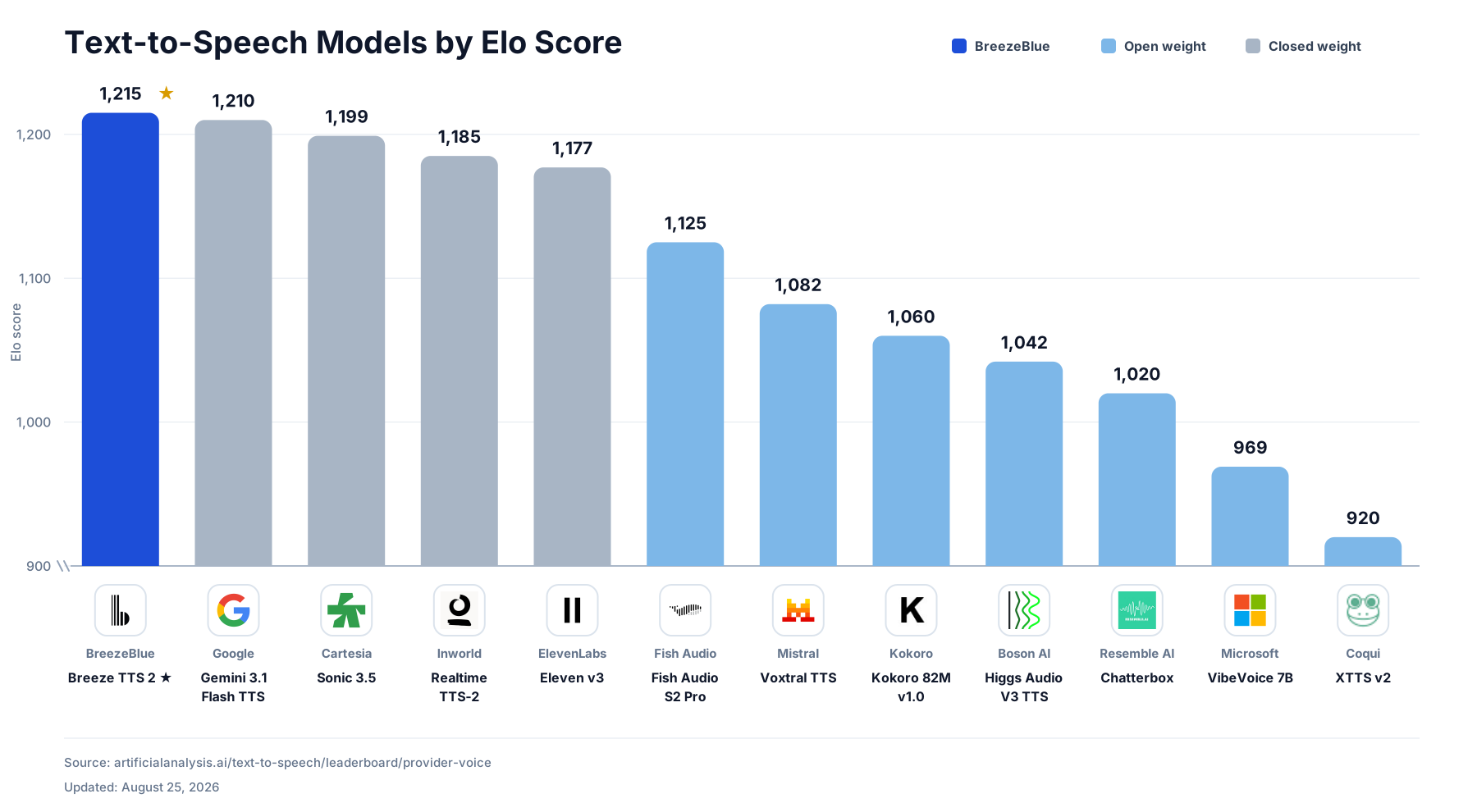

 Breeze TTS 2 是一个为实时交互打造的开源权重文本转语音模型,本仓库是它的官方 PyTorch 推理代码。它在 Artificial Analysis TTS 排行榜上位列开源权重模型第一,并超越了一些专有系统。