

decimen-optical-transfer README

The project's README from github.com/bashalarmistalt/decimen-optical-transfer. As one markdown file: README.md.

Decimen Optical Transfer: fountain-coded QR file transfer

Send a file between two devices using nothing but a screen and a camera. One page displays the file as an endless stream of animated QR codes; another device points its camera at it and reconstructs the file. No network path between the devices, no app, no pairing, no permissions beyond the camera. The payload travels as light.

Try it

→ decimen.app

Open it on both devices and go — nothing to install. Works offline after the first visit, and installs as an app on both iOS and Android if you want it on a home screen.

Files up to 64 MB (or a pasted text snippet), filename and media type preserved, gzip only when it helps, SHA-256 verified before anything is offered — and received video plays right in the page. A stream can also be exported as a looping animation (APNG, or a PNG sequence for video editors): any camera pointed at the file playing — in a page, a stream, a video lesson — receives it like the live sender. The interface speaks twelve languages (English, español, português, français, Deutsch, italiano, русский, हिन्दी, 简体中文, 日本語, 한국어, العربية — with right-to-left layout where it belongs); machine-drafted translations say so on the page until a native speaker has reviewed them. Currently measured at 418.5 KB/s sustained screen to camera — records with receipts.

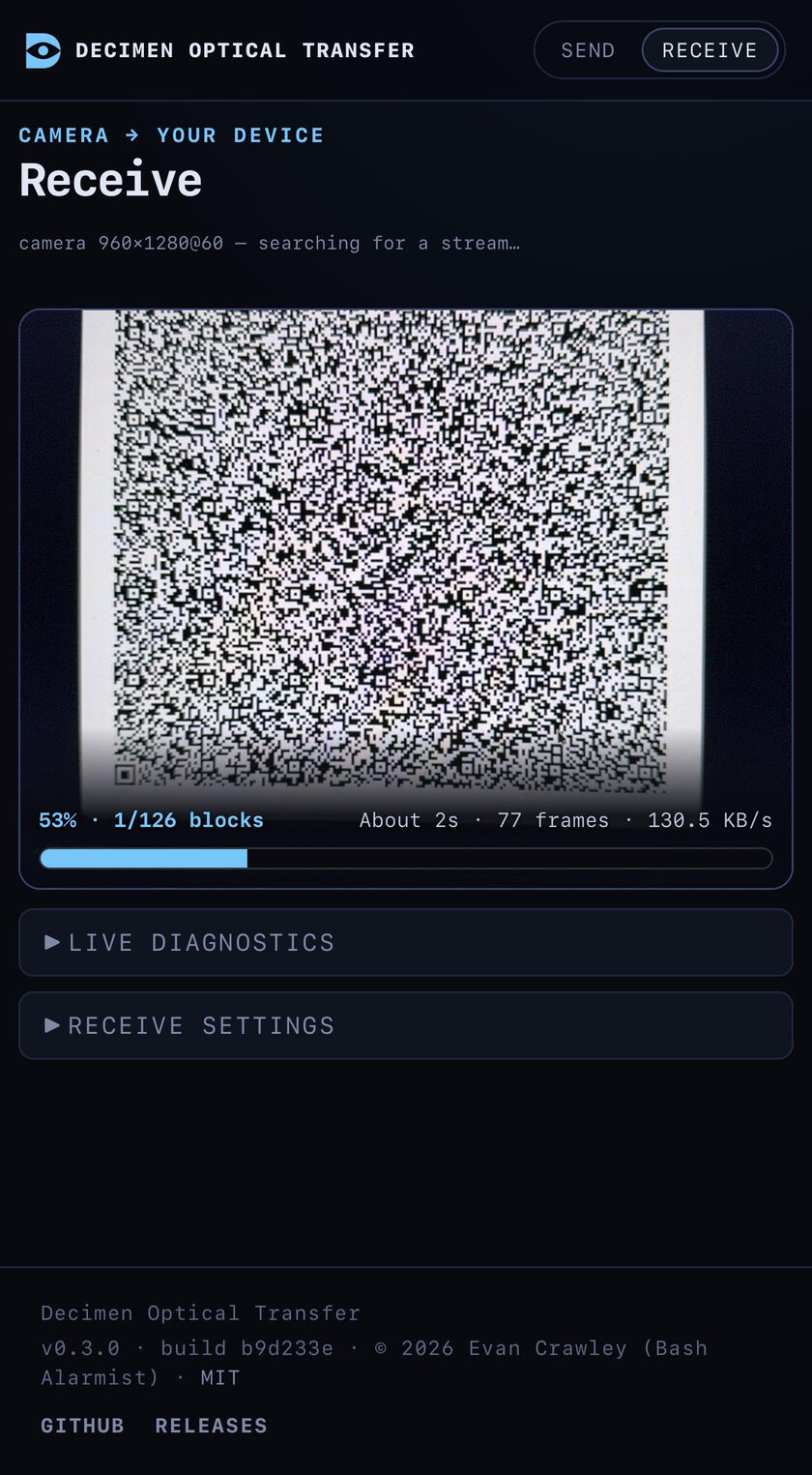
Phone receiving a file over light: 130.5 KB/s goodput, halfway through decoding the sender's animated QR stream

Mid-transfer: a phone pulling a file out of the air at 130 KB/s.

Neither mode is encrypted: whatever is on the sending screen is readable by any camera pointed at it. The property this gives you is no network, not confidentiality — see privacy.

Measured speed

sustained record

One record run per device pair. Sustained is whole-transfer goodput; peak is the best ≥1 s window inside that same run. Every row links to the full diagnostics run report that produced it (how these are measured).

pair sustained peak transfer codes devices when receipt
desktop → phone 418.5 KB/s 601.5 KB/s 1.0 MB in 2.5 s 4 Odyssey G9 49″ → iPhone 17 Pro Max 2026-08-09 (v0.4.0) run
phone → phone 199.2 KB/s 340.8 KB/s 1.0 MB in 5.1 s 2 iPhone 17 Pro Max → iPhone 17 Pro Max 2026-08-09 (v0.4.0) run

Documentation

Using it — quick start · sending · receiving · troubleshooting · install & offline · privacy

How it's built — architecture · protocol · platform quirks · build & release · localization

The short version of the protocol: a screen-to-camera link has no back-channel, so the sender streams fountain-coded frames (Luby transform) — the receiver collects any ~K·1.15 distinct frames in any order and peels the file out. Dropped frames cost time, never correctness.

Run it yourself

npm install
npm run dev               # https dev server with HMR
npm run serve             # build, then serve the production bundle
npm run demo              # demo mode: only the bundled payloads can be sent
npm run diagnostics       # dev server + per-transfer run reports in the terminal
npm run benchmark         # diagnostics + sender locked to the canonical 1 MB payload
npm run benchmark:promote # declare your best captured run a record (updates the table above)
npm test                  # golden wire-format vectors and unit tests
npm run build             # the hosted site → dist/
npm run build:standalone  # both self-contained pages → dist-standalone/
npm run build:all         # everything

Open https://localhost:5173/send/ on the sending device and the printed Network URL on the receiving phone (accept the self-signed certificate once). Walkthrough: quick start.

Similar projects

The concept here was arrived at independently. It turns out several people have had similar ideas, and their takes are all worth a look:

Project Creator/Maintainer

Built by Evan Crawley (Bash Alarmist), with node-qrcode and decimen-codec, a custom zxing-cpp build.

License

AGPL-3.0-or-later, as of v0.4.0. Releases up to and including v0.3.0 were MIT-licensed and remain available under those terms.

Portions were contributed under MIT, and the vendored decimen-codec decoder (AGPL-3.0-or-later) incorporates zxing-cpp under Apache-2.0 — see NOTICE.

decimen-optical-transfer (bashalarmistalt/decimen-optical-transfer)

Searching Database…

这是什么?它只靠屏幕和摄像头就能在两台设备之间传文件:发送方把文件显示成一串不停循环的动态二维码,另一台设备用摄像头扫描后重新还原出文件——不用网络、不用装应用、也不用配对。
这是原生应用还是只是一个网站?它完全在浏览器里以 PWA 的形式运行,网址是 decimen.app——不需要安装任何东西。首次访问后即可离线使用,在 iOS 和 Android 上还能添加到主屏幕。
怎么把文件从一台设备传到另一台?在两台设备上都打开 decimen.app:发送方播放动态二维码流,接收方把摄像头对准屏幕。如果是自己部署的版本,在发送方打开它,然后在接收的手机上加载页面显示的 Network URL,并接受一次自签名证书。
两台设备需要在同一个 Wi-Fi 网络里吗?不需要——设备之间根本没有网络连接,数据是靠光来传输的。每一方只需要一个浏览器:一块显示二维码的屏幕和一个读取二维码的摄像头,除摄像头外不需要任何其他权限。
我能传多大的文件?最大 64 MB,也可以直接粘贴一段文本。文件名和媒体类型都会保留,gzip 只在有帮助时才使用,并且在提供给你之前所有内容都会经过 SHA-256 校验。
传输是私密的吗,还是附近的任何摄像头都能读取?把它当成公开的来对待:两种模式都没有加密,屏幕上显示的内容,任何对准它的摄像头都能读取。它给你的是无网络传输,而不是保密性。
代码是开源的吗,我可以随意使用吗?可以——从 v0.4.0 起采用 AGPL-3.0-or-later 协议,而 v0.3.0 及之前的版本仍以 MIT 协议提供。它基于 node-qrcode、一个定制的 zxing-cpp 构建版本以及 decimen-codec 解码器构建。
实际用起来速度怎么样?有实测数据并附有公开的运行报告:从台式机显示器到 iPhone 的持续速度为 418.5 KB/s(2.5 秒传完 1 MB,峰值 601.5 KB/s),手机对手机为 199.2 KB/s。
如果摄像头漏扫了部分二维码帧怎么办?不会有任何问题。发送方以喷泉码(Luby transform)的方式发送帧,接收方只需以任意顺序收集约 K·1.15 个互不相同的帧即可——丢帧只会多花点时间,绝不会影响正确性。
我能把二维码流导出成视频让别人扫描吗?可以——二维码流可以导出为循环播放的 APNG 或 PNG 序列,方便视频编辑软件使用;任何对准它进行扫描的页面、流媒体或视频课程,都能像实时发送方一样收到这个文件。
界面支持哪些语言?十二种,从英语、西班牙语到印地语、日语和阿拉伯语,并在需要的地方使用从右到左的排版。机器起草的翻译会在页面上明确标注,直到母语者审校为止。
Size
7.3 MB
Stars
6.9K
Age
2mo
Commits · 90 Days