


What is this?
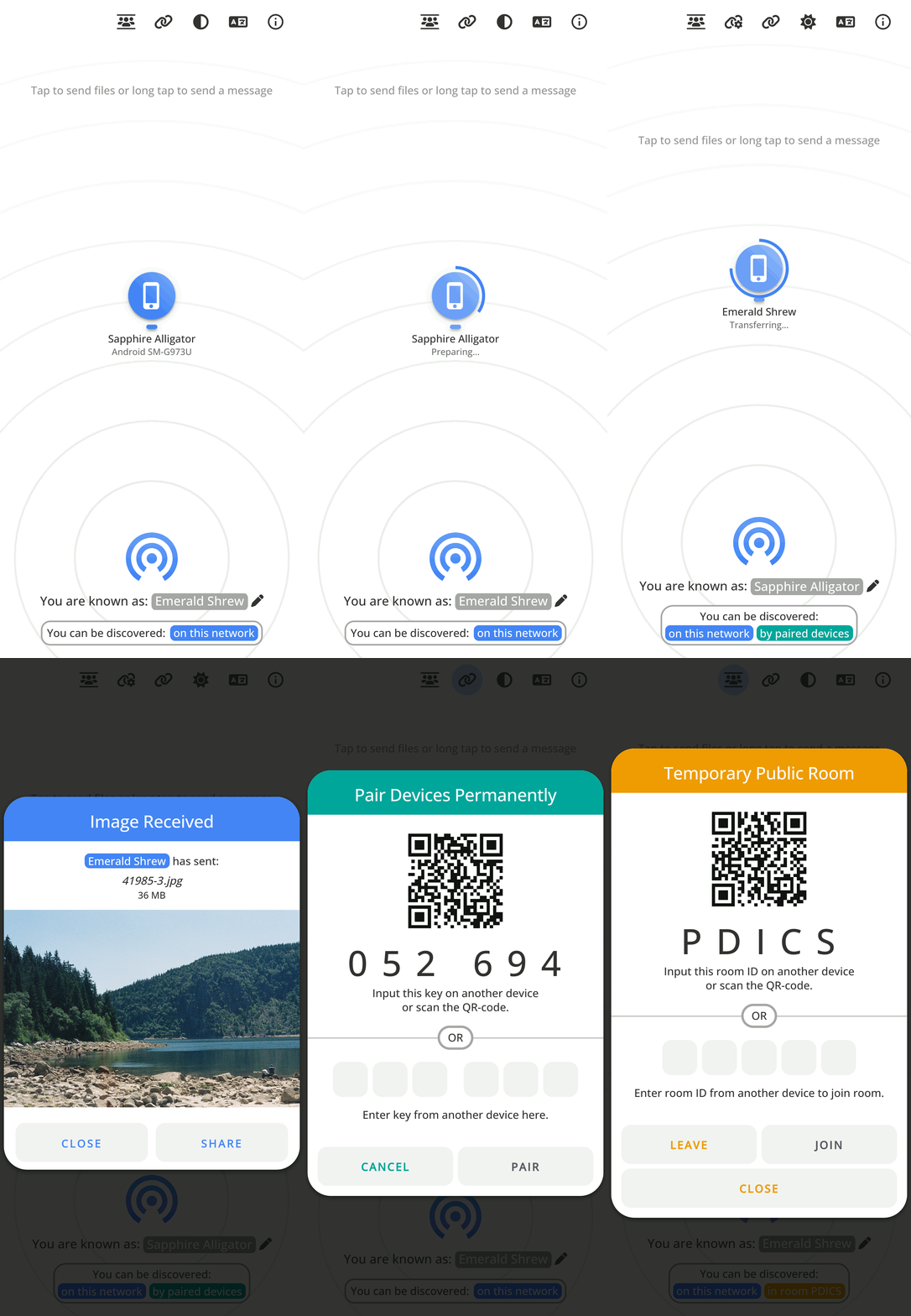
 PairDrop is a web app for transferring files and text between devices on the same local network, inspired by Apple AirDrop and built as a fork of Snapdrop. It also supports pairing devices and joining temporary public rooms to transfer over the Internet.
PairDrop is a web app for transferring files and text between devices on the same local network, inspired by Apple AirDrop and built as a fork of Snapdrop. It also supports pairing devices and joining temporary public rooms to transfer over the Internet.Is this a desktop app or something I open in a browser?It is a progressive web app (PWA) that runs in any modern browser, with a Vanilla HTML5/JS/CSS frontend and a Node.js backend handling WebSocket signaling.
It is a progressive web app (PWA) that runs in any modern browser, with a Vanilla HTML5/JS/CSS frontend and a Node.js backend handling WebSocket signaling.How do I start sharing files with it?Open PairDrop in a browser on two devices on the same network and they'll discover each other automatically; to run your own server, use Docker or Node.js.
Open PairDrop in a browser on two devices on the same network and they'll discover each other automatically; to run your own server, use Docker or Node.js.What do I need to self-host a server?A Node.js environment (v15+) is required, and the server depends on express, ws, express-rate-limit, ua-parser-js and unique-names-generator; a Docker image is also provided.
A Node.js environment (v15+) is required, and the server depends on express, ws, express-rate-limit, ua-parser-js and unique-names-generator; a Docker image is also provided.Does file transfer work across the open Internet by default?By default transfers rely on local network discovery; to reach devices outside your LAN you need to pair them or join a public room, and devices behind NAT are auto-connected via PairDrop's own TURN server.
By default transfers rely on local network discovery; to reach devices outside your LAN you need to pair them or join a public room, and devices behind NAT are auto-connected via PairDrop's own TURN server.Who is PairDrop useful for?Anyone who wants to move files between phones, laptops and computers across different operating systems without installing an app or creating an account - e.g. sharing photos between Android and iOS, or files between Linux machines.
Anyone who wants to move files between phones, laptops and computers across different operating systems without installing an app or creating an account - e.g. sharing photos between Android and iOS, or files between Linux machines.Can I run my own PairDrop server, e.g. on a Raspberry Pi?Yes, you can self-host PairDrop on your local network, for example on a Raspberry Pi, and configure your own STUN/TURN servers.
Yes, you can self-host PairDrop on your local network, for example on a Raspberry Pi, and configure your own STUN/TURN servers.Is the connection peer-to-peer or does the server see my files?Transfers happen directly peer-to-peer via WebRTC; the Node.js server only handles signaling/discovery via WebSockets, not the file content itself.
Transfers happen directly peer-to-peer via WebRTC; the Node.js server only handles signaling/discovery via WebSockets, not the file content itself.How does persistent device pairing work?You pair two devices once using a 6-digit code or QR code; after pairing, the devices automatically find each other via shared secrets on any network, even after reopening the app, and pairings can be edited or removed.
You pair two devices once using a 6-digit code or QR code; after pairing, the devices automatically find each other via shared secrets on any network, even after reopening the app, and pairings can be edited or removed.What are public rooms used for?Public rooms let devices that aren't paired or on the same LAN connect temporarily by entering a shared 5-letter code or scanning a QR code, useful for one-off transfers over the Internet or complex networks like public Wi-Fi.
Public rooms let devices that aren't paired or on the same LAN connect temporarily by entering a shared 5-letter code or scanning a QR code, useful for one-off transfers over the Internet or complex networks like public Wi-Fi.Can I send files without opening the web page first?Yes, PairDrop integrates with the OS share/context menu: send files directly from the right-click menu on Windows and Ubuntu (Nautilus), the Share menu on iOS/Android, or via a command-line interface.
Yes, PairDrop integrates with the OS share/context menu: send files directly from the right-click menu on Windows and Ubuntu (Nautilus), the Share menu on iOS/Android, or via a command-line interface.How is PairDrop different from the original Snapdrop it forked?PairDrop adds persistent paired devices, temporary public rooms for Internet transfers, auto-downloading and ZIP bundling of multiple files, share/context-menu/CLI integration, display name customization, and a pure Node.js backend, among other stability and UI improvements.
PairDrop adds persistent paired devices, temporary public rooms for Internet transfers, auto-downloading and ZIP bundling of multiple files, share/context-menu/CLI integration, display name customization, and a pure Node.js backend, among other stability and UI improvements.What are similar projects?snapdrop, sharedrop, filepizza, openGym, YesPlayMusic, yjs, WebRTC-Experiment, netbird
snapdrop, sharedrop, filepizza, openGym, YesPlayMusic, yjs, WebRTC-Experiment, netbirdWhich topics is it in?indexeddb, progressive-web-app, websockets, file-sharing, webrtc, express, pwa, p2p, raspberry-pi, gplv3, ios, android
indexeddb, progressive-web-app, websockets, file-sharing, webrtc, express, pwa, p2p, raspberry-pi, gplv3, ios, android