Codex Subscription Router
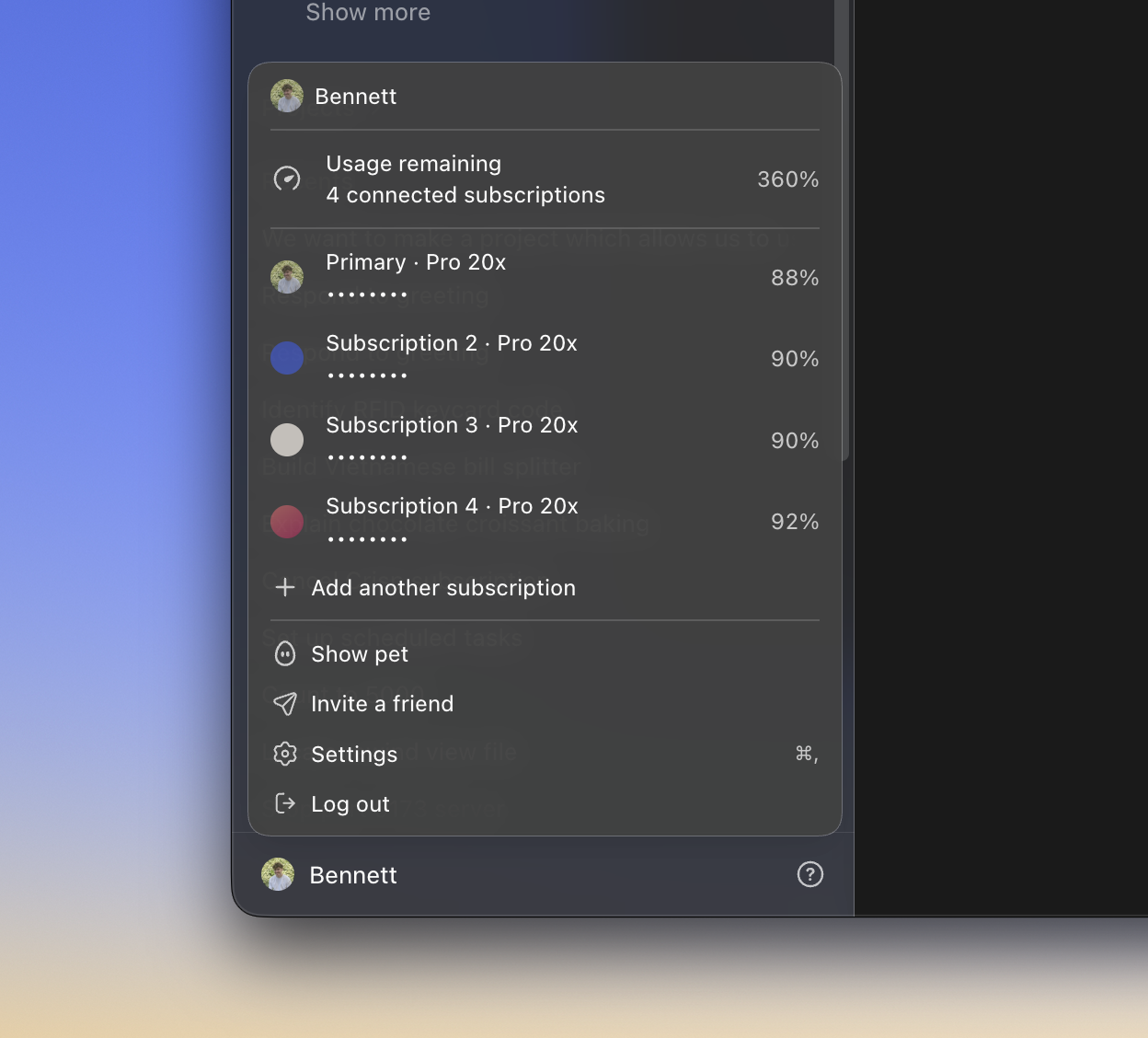
Use multiple ChatGPT subscriptions from one independent macOS desktop app.
Codex Subscription Router creates a locally patched copy of the official
ChatGPT app, balances new chats across connected subscriptions, and keeps every
thread on one subscription so follow-up turns retain conversation context and
benefit from account-level caching.
The official ChatGPT installation is used only as build input and is never
modified. This repository contains source code and build tooling—not OpenAI
binaries or a prebuilt application.
[!WARNING]
This is an unofficial, version-sensitive project. It is not affiliated with
or supported by OpenAI. Review the source and ensure your use complies with
the terms governing every connected subscription.
Highlights
- Quota-aware routing. New chats favour weekly allowance that will expire
sooner, with a bounded boost for accounts holding banked usage resets.
- Sticky conversations. Once a thread is assigned, every follow-up returns
to the same subscription unless that subscription is depleted.
- Automatic failover. A depleted thread continues through another account
with quota; if the whole pool is empty, the app shows one combined alert.
- Native account management. The existing profile menu shows pooled usage,
profile photos, plan names, masked emails, and device-code sign-in.
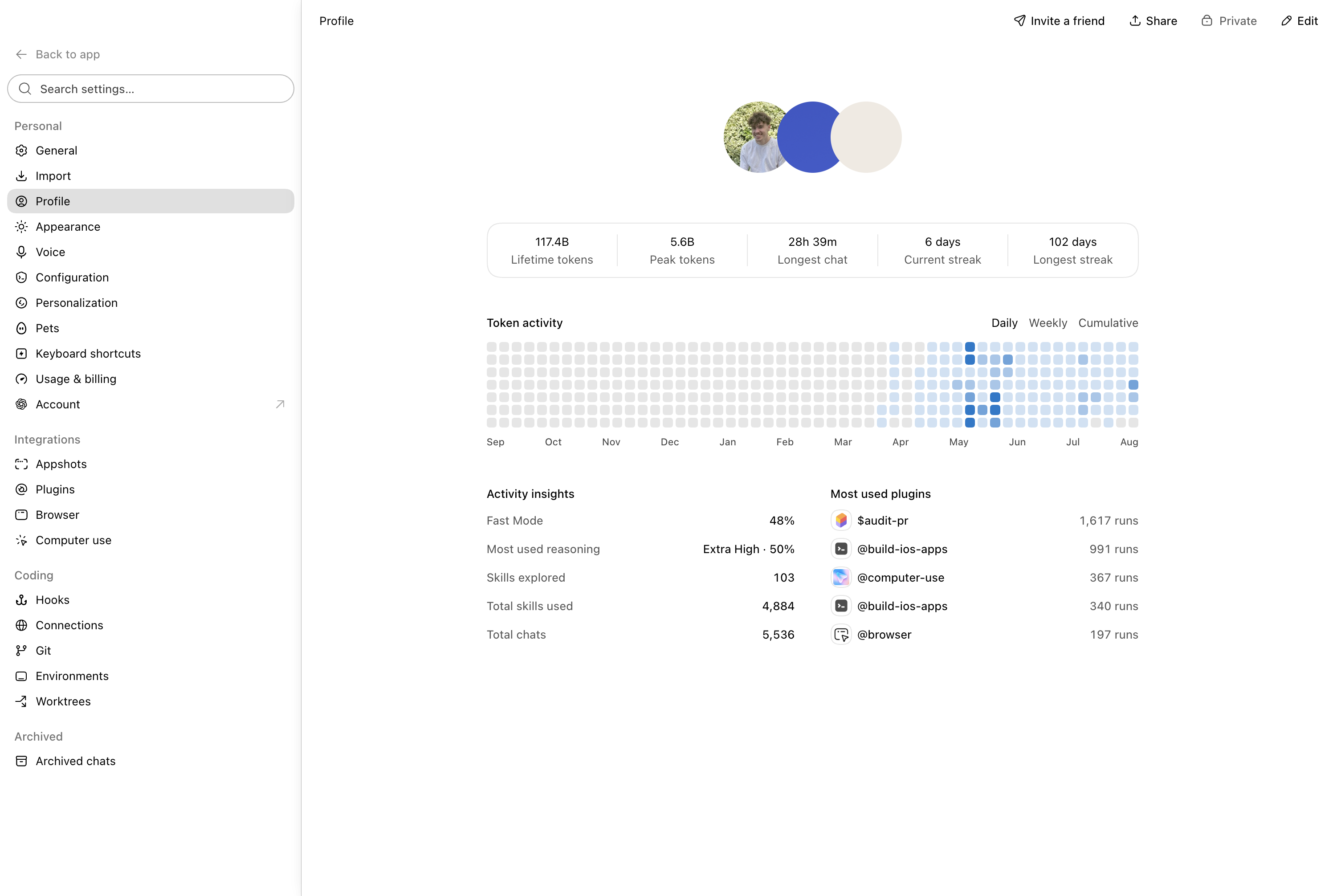
- Account-aware settings. Profile statistics can be viewed together or per
subscription, while the Plugins page can switch Apps and MCP connections
between accounts.
- Per-account resets. The native rate-limit sheet shows and consumes resets
for the selected subscription.
- Working macOS integrations. The copied Appshots and Computer Use helper is
independently identified and signed so it can receive its own privacy grants.
How it works
The patched desktop still opens one app-server connection. A small Go
multiplexer fans that connection out to one official Codex child per account.
Each child has an isolated Codex home, while the multiplexer records the owner
of every thread.
Codex Subscription Router.app
        │
        │ one app-server connection
        ▼
    codex-mux
    ├── Primary       → ~/.codex
    ├── Subscription 2 → isolated Codex home
    └── Subscription 3 → isolated Codex home
             │
             └── thread ID → persistent account owner
New-thread routing compares the quota burn rate needed before each weekly reset,
then applies a capped banked-reset boost. Short-window usage, pinned-thread
count, and stable account order break close results. Existing threads do not
migrate merely for load balancing.
Read the architecture for the request flow and
the security model for trust boundaries.
Compatibility
Codex Subscription Router currently targets:
| Component |
Supported value |
| Platform |
macOS on Apple silicon |
| Official ChatGPT version |
26.803.61601 |
| Official bundle build |
6396 |
| Go |
1.26 or newer |
| Node.js |
22.12 or newer |
The patcher verifies the official version, build, ASAR hash, renderer anchors,
and native binary constants before changing anything. An unknown upstream build
is rejected by default rather than being partially patched. See
Compatibility for the recorded hash and test details.
Requirements
- The official ChatGPT app installed at
/Applications/ChatGPT.app
- Xcode Command Line Tools
- Go 1.26+
- Node.js 22.12+ and npm
- An Apple Development or Developer ID Application signing identity
A team-backed signing identity is required for reliable Appshots and Computer
Use permissions. Ad-hoc signing is intended only for diagnostics.
Install
Run one command. It downloads or updates the source, installs the locked build
dependency, creates the independently signed app, and launches it:
curl -fsSL https://raw.githubusercontent.com/b-nnett/codex-subscription-router/main/install.sh | /bin/bash
The installer keeps its source checkout in
~/.codex-subscription-router/source. On an existing installation it uses the
same account state, creates a recoverable backup, and requires signing-team
continuity so macOS privacy grants remain valid. It stops with a clear message
instead of making a partial installation when a prerequisite or upstream
compatibility check fails.
[!TIP]
To inspect the installer before running it, open
install.sh or download it without piping it into a shell.
Install via prompt
Install Codex Subscription Router from https://github.com/b-nnett/codex-subscription-router on this Mac using the repository's supported one-command installer, without modifying the official ChatGPT app or deleting any existing router state. Verify the resulting app and Computer Use helper signatures, launch the app, and ask me only if a prerequisite or macOS permission requires interaction.
Install from a clone
git clone https://github.com/b-nnett/codex-subscription-router.git
cd codex-subscription-router
npm ci --ignore-scripts
python3 scripts/patch_app.py
open "$HOME/Applications/Codex Subscription Router.app"
This creates:
~/Applications/Codex Subscription Router.app~/Applications/Codex Subscription Router Computer Use.app- an independent desktop profile under
~/Library/Application Support/Codex Subscription Router
The first valid Developer ID Application identity is selected, falling back to
an Apple Development identity. Select a certificate explicitly when needed:
CODEX_MUX_SIGNING_IDENTITY="Developer ID Application: Example Corp (TEAMID1234)" \
  python3 scripts/patch_app.py
Reuse the same Apple team for every rebuild. Changing teams changes the app's
designated requirement and can invalidate existing macOS privacy consent. The
patcher refuses an unexpected team change unless you deliberately pass
--allow-signing-team-change.
For diagnostic builds without a certificate:
python3 scripts/patch_app.py --allow-adhoc-signing
Appshots and Computer Use may not function with an ad-hoc signature.
Grant macOS permissions
Open System Settings → Privacy & Security and grant:
| Permission |
Application |
| Accessibility |
Codex Subscription Router |
| Screen & System Audio Recording |
Codex Subscription Router Computer Use |
When macOS offers Quit & Reopen, use it. If the app does not relaunch,
reopen Codex Subscription Router manually. If the Computer Use row does not
appear, press the plus button and choose
~/Applications/Codex Subscription Router Computer Use.app.
Do not select the official ChatGPT or Codex Computer Use helper for this build;
the independent app has its own identity and permission rows. macOS may also
request Automation access the first time Computer Use controls another app.
Add subscriptions
- Open the profile menu at the bottom of the sidebar.
- Select Add another subscription.
- Complete the displayed device-code sign-in in your browser.
- Return to Codex Subscription Router and wait for the account row to appear.
While the code is visible, clicking away does not dismiss the menu. Clicking
the code copies it and opens the verification page.
The profile menu displays combined weekly usage followed by one row per
subscription. Email addresses remain masked until hovered. The final row always
starts another sign-in.
Routing behavior
| Situation |
Behaviour |
| New chat |
Assigned by quota-at-risk, banked resets, and short-window pressure |
| Follow-up |
Sent to the thread's persisted account owner |
| Owner depleted |
Continued through another account with capacity |
| Every account depleted |
Combined quota alert with the next known reset |
| Account disabled |
Excluded from routing and pooled usable quota |
The subscription assigned to the current thread appears in its pinned summary.
Profiles, plugins, and resets
Profile statistics begin in a combined view with overlapping account
photos. Select a photo to see only that subscription's identity and statistics;
select it again to return to the combined view.
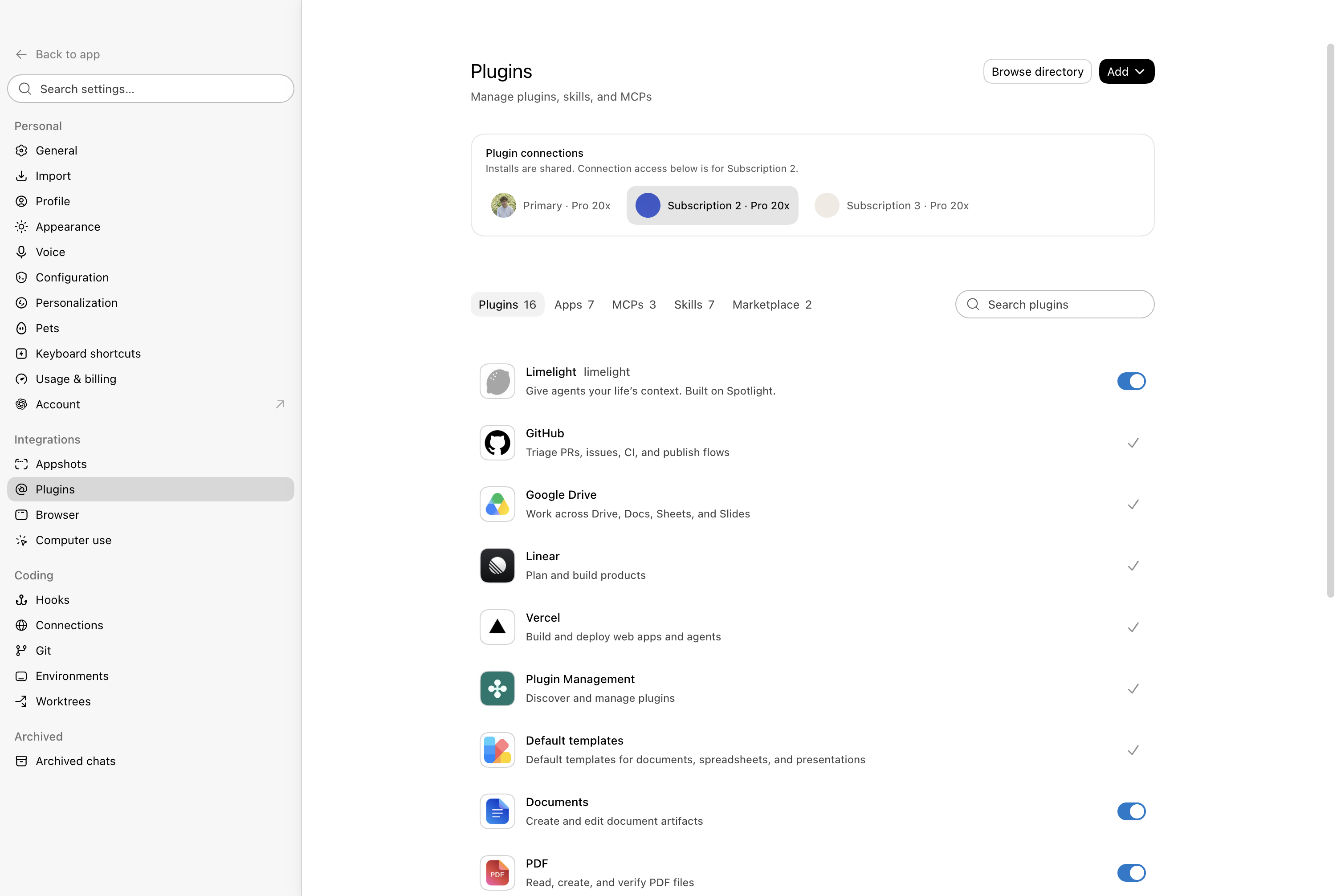
Settings → Plugins includes a subscription picker. Plugin definitions and
managed MCP configuration are shared, while Apps, connection status, and OAuth
login are scoped to the selected subscription.
Rate-limit resets remain native to the app, with an account picker added to
the sheet. Selecting a subscription changes the displayed balance and ensures
the reset is consumed only for that account.
Update or rebuild
The copied app's updater is disabled so an official update cannot overwrite the
patch. Update /Applications/ChatGPT.app, verify that the new build is listed
as compatible, then rebuild:
python3 scripts/patch_app.py --force
Quit Codex Subscription Router and its Computer Use helper first. Existing
destinations are moved to timestamped directories under ~/.codex-mux/backups;
account state and credentials are stored outside the app bundle and remain
intact. Delete old backups manually after the rebuilt app passes the smoke test.
Build separately for each macOS user. Generated bundles contain user-specific
helper and socket paths and are not relocatable or intended for redistribution.
Local data and security
| Path |
Purpose |
~/.codex |
Primary credentials, conversations, and cache |
~/.codex-mux/state.json |
Account metadata and sticky thread ownership |
~/.codex-mux/accounts/<id>/codex-home |
Isolated secondary account data |
~/.codex-mux/control-token |
Token for the loopback-only control service |
~/.codex-mux/backups |
Recoverable app and helper backups |
~/Library/Application Support/Codex Subscription Router |
Independent desktop profile |
The control service binds only to 127.0.0.1 and protects private routes with a
random 256-bit token. OAuth tokens stay inside their account's Codex home and
are never returned by the control API. Account directories are owner-only.
Plugin configuration is intentionally synchronized from the Primary account.
Inline secrets inside shared MCP configuration are therefore copied to each
isolated account home; the account homes are not separate secret boundaries.
See SECURITY.md before reporting a credential, signing, or local
control-service issue.
Development and verification
npm ci --ignore-scripts
npm run check
npm run release:check
The Go backend and injected renderer have no runtime third-party dependencies.
@electron/asar is build-only. Deterministic UI preview routes are enabled only
when CODEX_MUX_UI_TESTS=1 is present at launch and remain token-authenticated.
The signed-app test procedure is in SMOKE-TEST.md. The
latest completed run is recorded in
E2E-REPORT-0.1.0.md.
Known limitations
- Upstream ChatGPT updates can require new, reviewed patch anchors.
- The initial merged history fetch is limited to 500 threads per account.
- Combined “skills explored” totals can count the same skill once per account
because the upstream profile response exposes counts rather than skill IDs.
- Generated app bundles are tied to one macOS user and signing team.
- Releases are source-only; patched OpenAI binaries are never distributed.
Contributing and releases
Read CONTRIBUTING.md before submitting changes. Releases use
the source-only process in RELEASING.md and require a
completed signed-app smoke test for the exact tagged commit.
License
Project source is available under the MIT License. ChatGPT, Codex,
and the official macOS application are OpenAI products and are not covered by
this license.

 Codex Subscription Router 是一个非官方的 macOS 桌面应用,它会在本地构建官方 ChatGPT 应用的补丁副本,让你在一个窗口里使用多个 ChatGPT/Codex 订阅,新对话会自动在剩余额度最多的账户之间均衡分配。