OpenUsage
Track your AI coding subscriptions from the macOS menu bar — native Swift edition.
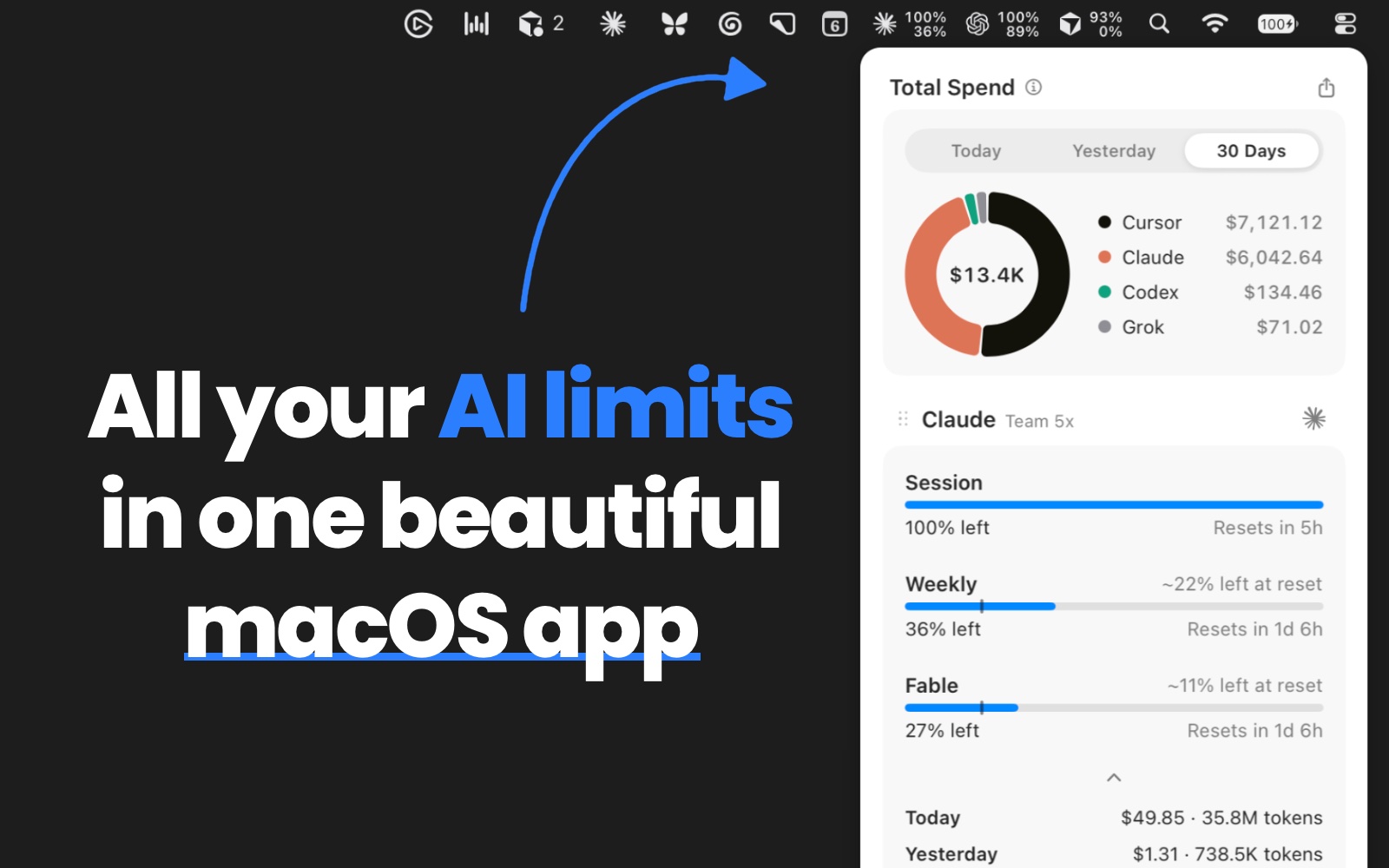
OpenUsage shows how much of your AI coding plans you've used: session and weekly limits, credits, and spend, all in one popover. Pin your most important metrics straight into the menu bar.
Installation
Homebrew:
brew install --cask openusage
Direct download: grab the latest universal DMG from the releases page, open it, and drag OpenUsage to your Applications folder.
Either way, the app updates itself in place via signed, notarized Sparkle updates. Requires macOS 15 (Sequoia) or later.
Supported Providers
- Antigravity — shared Gemini and Claude pool quotas, 5-hour and weekly windows
- Claude — session, weekly, model-specific limits, extra usage, local daily spend
- Codex — session, weekly, credits, local daily spend
- Copilot — AI credits, extra usage, organization billing, chat and completions
- Cursor — credits, total usage, Grok Bot, Cursor Models, Other Models, requests, on-demand, per-day spend
- Devin — weekly and daily quota, extra usage balance
- Grok — weekly shared pool, pay-as-you-go, local daily spend
- Ollama — Ollama Cloud session and weekly limits, recent activity spend
- OpenCode — Go session/weekly/monthly caps, Zen spend, local daily spend
- OpenRouter — credit balance, daily/weekly/monthly spend (API key)
- Z.ai — session, weekly, web-search quotas (GLM Coding Plan, API key)
Most providers read the credentials already on your machine (keychain, auth files, app state) — no extra login. OpenRouter and Z.ai are the exceptions: they have no local credential to reuse, so you supply an API key (see OpenRouter setup or Z.ai setup). Credentials are used only for the corresponding provider requests. OpenUsage's separate anonymous summaries and public pricing downloads are documented under Privacy & usage data.
Features
- Menu bar pins. Pin metrics to the menu bar (up to 2 per provider); render as compact text or mini bars. The strip hides metrics with no data instead of showing placeholders.
- Dashboard popover. Provider-grouped meters with live reset countdowns and pace indicators. Click usage or reset values to flip their display everywhere; right-click a row to hide or star it, refresh its provider, or open Customize.
- Global shortcut. Toggle the popover from anywhere — record any combo in Settings.
- Customize. Turn providers and metrics on or off, choose which rows stay Always Visible or On Demand, and drag-reorder both.
- Stale-while-revalidate. Cached values display instantly at launch; refresh runs every 5 minutes.
- One-shot CLI. Agents can read stable limit JSON through the same five-minute cache with
openusage, or bypass freshness with openusage --force; the menu-bar app does not need to be running.
- Local HTTP API. Other apps can read machine-friendly limits from
127.0.0.1:6736/v1/limits; the legacy /v1/usage UI contract remains supported. It is loopback-only and never serves credentials; note that browser pages can read it too — see the privacy note.
- Proxy support. Route provider requests through SOCKS5 or HTTP(S) via
~/.openusage/config.json.
- Native settings. Launch at login, global shortcut, icon style, theme, density, 12/24-hour time — see Settings.
- Automatic updates. Signed, notarized in-app updates via Sparkle, with an optional beta channel.
Documentation
Behavior docs live in docs/: the dashboard, menu bar pins, settings, refresh & caching, the CLI, the local HTTP API, the proxy, and one page per provider.
For working on the code, see the developer docs: architecture, adding a provider, and debugging & capturing logs.
Requirements
- macOS 15 (Sequoia) or later
- Universal binary — runs natively on both Apple Silicon and Intel Macs
The Today / Yesterday / Last 30 Days spend tiles are computed natively from local CLI logs (Claude,
Codex, and Grok) or Cursor's usage export — no Node.js or other runtime needed. Dollars are estimated
with dynamically refreshed model pricing.
Building
swift build            # debug build
swift test             # run the test suite
./script/build_and_run.sh   # build and launch the dev app from dist/ (no install)
Architecture
SwiftPM package, SwiftUI content hosted in an AppKit-owned NSStatusItem + custom key-capable NSPanel, Swift 6 strict concurrency. The app and CLI share one module: providers implement a small ProviderRuntime protocol (auth store → usage client → mapper → ProviderSnapshot), and both surfaces read the same normalized data — see the architecture overview for how the pieces fit together and AGENTS.md for engineering conventions.
Releasing
Releases are automated: pushing a v* tag on main builds, signs, notarizes, and publishes a new version. A plain tag (v0.7.1) ships to everyone; a pre-release suffix (v0.7.1-beta.1) ships to the beta channel. The pipeline lives in .github/workflows/release.yml, and the step-by-step is in the release-swift skill.
Release setup (one-time)
The release workflow needs these repository secrets (Settings → Secrets and variables → Actions):
| Secret |
What it is |
APPLE_CERTIFICATE |
base64 of your Developer ID Application .p12 |
APPLE_CERTIFICATE_PASSWORD |
the password set when exporting that .p12 |
APPLE_ID |
the Apple ID email used for notarization |
APPLE_PASSWORD |
an app-specific password for that Apple ID |
APPLE_TEAM_ID |
your Apple Developer team ID |
APPLE_DEVELOPER_ID_ICLOUD_PROFILE |
base64 Developer ID provisioning profile for the production iCloud container |
SPARKLE_PUBLIC_KEY |
base64 EdDSA public key, baked into the build as SUPublicEDKey |
SPARKLE_PRIVATE_KEY |
base64 EdDSA private key used to sign the DMG |
POSTHOG_CLI_API_KEY |
PostHog personal API key used to upload dSYMs for crash symbolication |
POSTHOG_CLI_PROJECT_ID |
numeric PostHog project ID the dSYMs upload to |
Export the Developer ID Application cert (with its private key) from Keychain Access as a .p12, then base64 -i DeveloperID.p12 | pbcopy. App-specific passwords come from appleid.apple.com → Sign-In and Security → App-Specific Passwords. Generate the Sparkle EdDSA key pair once with Sparkle's generate_keys tool; the public and private values must be a matching pair or signing is silently skipped.
For iCloud Sync, store the original development and Developer ID provisioning profiles in 1Password as secure documents. Install the development profile on each registered Mac; base64-encode the Developer ID profile and store it only in the APPLE_DEVELOPER_ID_ICLOUD_PROFILE Actions secret. See iCloud Sync for the container identifiers, build command, and file-inspection command.
The two POSTHOG_CLI_* secrets are only used to upload debug symbols (dSYMs) so PostHog can symbolicate crash reports: POSTHOG_CLI_API_KEY is a PostHog personal API key (PostHog → Settings → Personal API keys) and POSTHOG_CLI_PROJECT_ID is the numeric ID from your project URL. The upload host is hardcoded in the workflow (https://us.i.posthog.com), so there is no POSTHOG_CLI_HOST secret. Unlike the secrets above these don't block a release — if POSTHOG_CLI_API_KEY is unset the workflow skips the upload with a warning and the release still ships, but crash reports for that version show raw addresses instead of symbolicated stack traces.
The repository must be public (Sparkle fetches the DMG and appcast anonymously), and the appcast is served from GitHub Pages — confirm Settings → Pages points at the gh-pages branch after the first release.
Contributing
Issues are welcome. Pull requests are strict and issue-first: comment on an issue, wait for a maintainer to add the approved label and assign it to you, then reference it in your PR with Fixes #123. Automation closes external PRs without an approved issue assigned to their author, and warns when an accepted PR adds more than 1,000 lines. Read CONTRIBUTING.md before opening one. Report security issues privately per SECURITY.md. The OpenUsage name and logo are covered by the trademark policy.
License
MIT

 OpenUsage is a free, open-source native macOS menu bar app written in Swift that tracks how much of your AI coding subscriptions (Claude, Codex, Copilot, Cursor and more) you've used — session and weekly limits, credits, and spend — all in one popover.