

这是干什么的?
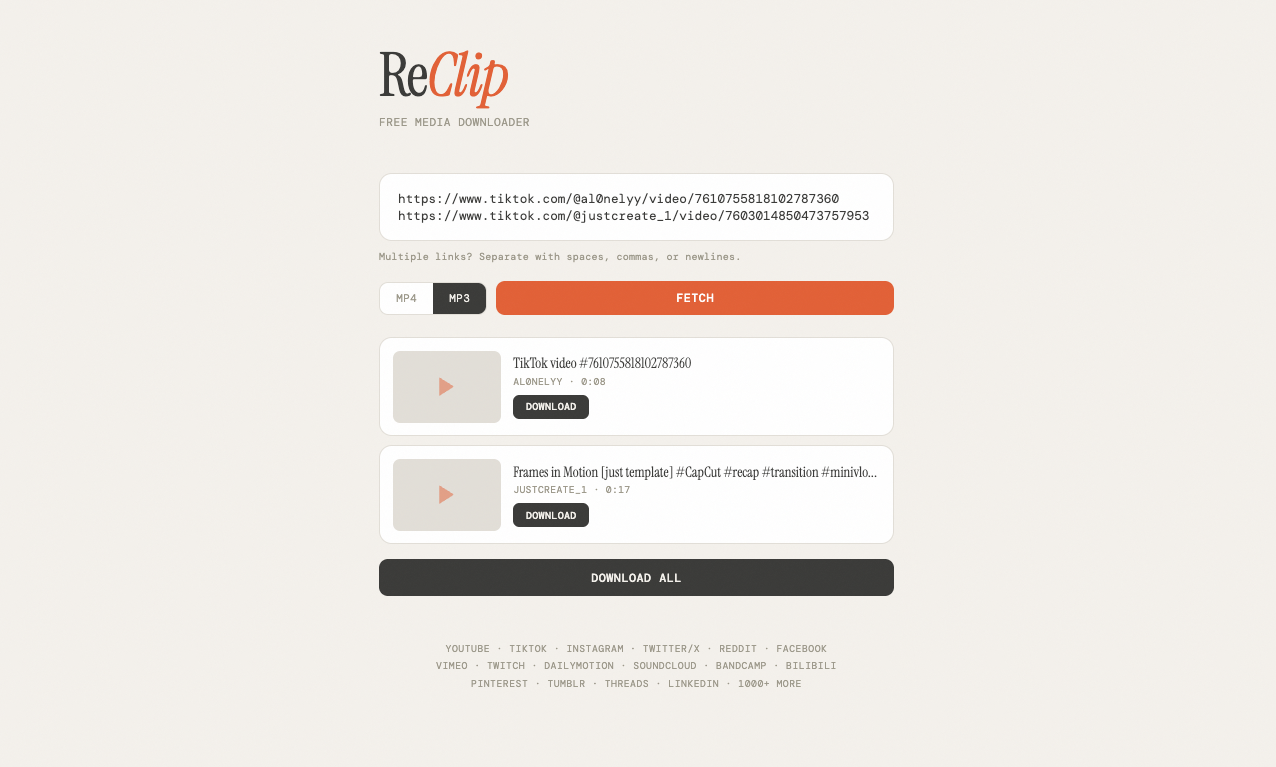
 ReClip 是一个自托管的网页应用,用来下载视频和音频:粘贴 YouTube、TikTok、Instagram 或其他 1000 多个受支持网站的链接,就能保存为 MP4 或 MP3。
ReClip 是一个自托管的网页应用,用来下载视频和音频:粘贴 YouTube、TikTok、Instagram 或其他 1000 多个受支持网站的链接,就能保存为 MP4 或 MP3。那它是要安装的应用,还是我自己搭的网站?是你自己搭建的网站:一个小型 Flask 服务器,提供浏览器界面。你把它部署在自己的电脑或服务器上,通过浏览器使用——手机上什么都不用装。
是你自己搭建的网站:一个小型 Flask 服务器,提供浏览器界面。你把它部署在自己的电脑或服务器上,通过浏览器使用——手机上什么都不用装。我怎么把它跑起来?Quick Start 里有两种方式:直接用 Python 运行,或者通过 Docker 启动——仓库里带有 Dockerfile 和 docker-compose 文件。跑起来之后,打开它的网页,粘贴链接就能用。
Quick Start 里有两种方式:直接用 Python 运行,或者通过 Docker 启动——仓库里带有 Dockerfile 和 docker-compose 文件。跑起来之后,打开它的网页,粘贴链接就能用。我的电脑上需要先装 Python 和 ffmpeg 吗?直接运行的方式只需要 Python 加两个依赖——Flask 和 yt-dlp——再加上 ffmpeg,yt-dlp 用它作为媒体处理引擎。用 Docker 的话,本地环境完全不用配。
直接运行的方式只需要 Python 加两个依赖——Flask 和 yt-dlp——再加上 ffmpeg,yt-dlp 用它作为媒体处理引擎。用 Docker 的话,本地环境完全不用配。从这些网站下载东西真的没问题吗?README 说明它仅供个人使用:要遵守版权法和各平台的服务条款,作者对滥用行为不承担任何责任。
README 说明它仅供个人使用:要遵守版权法和各平台的服务条款,作者对滥用行为不承担任何责任。它实际支持哪些网站?凡是 yt-dlp 支持的都行——总共 1000 多个网站,README 里列出了 YouTube、TikTok、Instagram、Twitter/X、Reddit、Facebook、Vimeo、Twitch、SoundCloud、Dailymotion 等等。
凡是 yt-dlp 支持的都行——总共 1000 多个网站,README 里列出了 YouTube、TikTok、Instagram、Twitter/X、Reddit、Facebook、Vimeo、Twitch、SoundCloud、Dailymotion 等等。我可以一次排队下载好几个视频吗?可以——一次粘贴多个链接就能批量下载,重复的链接会自动去重。你可以逐个下载,也可以点 Download All 全部下载。
可以——一次粘贴多个链接就能批量下载,重复的链接会自动去重。你可以逐个下载,也可以点 Download All 全部下载。下载的东西能选清晰度吗?在 Fetch 加载出视频的信息和缩略图后,会有一个选择器,保存前可以从可用的分辨率里挑选。
在 Fetch 加载出视频的信息和缩略图后,会有一个选择器,保存前可以从可用的分辨率里挑选。后端真的就一个 Python 文件吗?是的——整个后端就是一个约 150 行的 Flask 文件,前端也是单个原生 HTML/CSS/JS 文件,不用任何框架,也没有构建步骤。
是的——整个后端就是一个约 150 行的 Flask 文件,前端也是单个原生 HTML/CSS/JS 文件,不用任何框架,也没有构建步骤。What are similar projects?linksift, wechat-article-exporter, metube, ytDownloader, Seal, pytube, Douyin_TikTok_Download_API, you-get
linksift, wechat-article-exporter, metube, ytDownloader, Seal, pytube, Douyin_TikTok_Download_API, you-getWhich topics is it in?yt-dlp, flask, video-downloader, download, downloader, audio, video, css, docker-compose, html, web-app, free
yt-dlp, flask, video-downloader, download, downloader, audio, video, css, docker-compose, html, web-app, free