



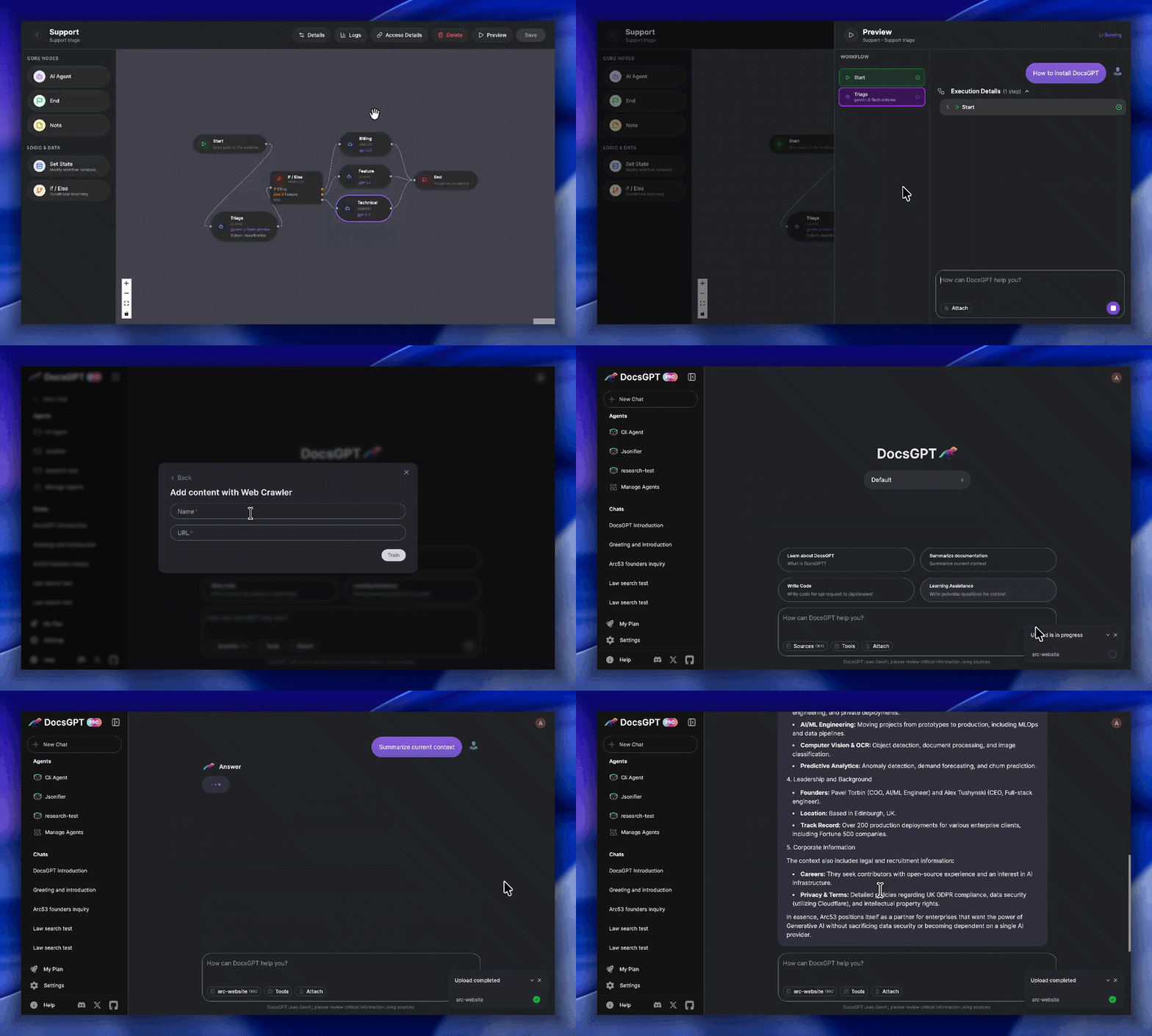

What is this?
 DocsGPT is a private, self-hosted AI platform for building agents, assistants, and enterprise search tools, with a built-in Agent Builder, document analysis, deep research mode, and support for multiple LLM providers.
DocsGPT is a private, self-hosted AI platform for building agents, assistants, and enterprise search tools, with a built-in Agent Builder, document analysis, deep research mode, and support for multiple LLM providers.Is this a hosted service or something I run myself?It is a self-hosted application you deploy yourself (Flask backend, React frontend, Docker-based setup) rather than a SaaS product, built for private and secure operation with Kubernetes support for production.
It is a self-hosted application you deploy yourself (Flask backend, React frontend, Docker-based setup) rather than a SaaS product, built for private and secure operation with Kubernetes support for production.How do I get it running?Clone the repository, then run the provided setup script (shell script for macOS/Linux, PowerShell script for Windows), which walks you through five options: public API, running locally, connecting to a local inference engine, using a cloud API provider, or building the Docker image yourself.
Clone the repository, then run the provided setup script (shell script for macOS/Linux, PowerShell script for Windows), which walks you through five options: public API, running locally, connecting to a local inference engine, using a cloud API provider, or building the Docker image yourself.Do I need Docker before I start?Yes, Docker must be installed before running the setup script; the script then automatically configures your .env file and handles any needed downloads based on the option you pick.
Yes, Docker must be installed before running the setup script; the script then automatically configures your .env file and handles any needed downloads based on the option you pick.Is this ready to drop into production as-is?The core platform is open source and self-hostable, but for live enterprise deployments the team explicitly offers personalized setup help, and major admin/security features like OIDC/SSO, RBAC, and team-scoped sharing were only completed in mid-2026.
The core platform is open source and self-hostable, but for live enterprise deployments the team explicitly offers personalized setup help, and major admin/security features like OIDC/SSO, RBAC, and team-scoped sharing were only completed in mid-2026.Does it run on Windows too, not just Linux/macOS?Yes, there's a dedicated PowerShell setup script for Windows alongside the shell script for macOS and Linux, and it also supports Kubernetes for larger deployments.
Yes, there's a dedicated PowerShell setup script for Windows alongside the shell script for macOS and Linux, and it also supports Kubernetes for larger deployments.Does my data stay private if I use this?Yes, DocsGPT is built to run privately and securely, and you can pair it with local models like Ollama or llama.cpp so documents never have to leave your own infrastructure.
Yes, DocsGPT is built to run privately and securely, and you can pair it with local models like Ollama or llama.cpp so documents never have to leave your own infrastructure.Which LLM providers can I plug into DocsGPT?It works with major cloud LLMs (OpenAI, Google, Anthropic) as well as local inference engines like Ollama and llama.cpp, including a Bring Your Own Model option.
It works with major cloud LLMs (OpenAI, Google, Anthropic) as well as local inference engines like Ollama and llama.cpp, including a Bring Your Own Model option.What kinds of files and sources can it ingest?It reads PDF, DOCX, CSV, XLSX, EPUB, MD, RST, HTML, MDX, JSON, PPTX, images, and audio files, plus content pulled from URLs, sitemaps, Reddit, GitHub, and web crawlers.
It reads PDF, DOCX, CSV, XLSX, EPUB, MD, RST, HTML, MDX, JSON, PPTX, images, and audio files, plus content pulled from URLs, sitemaps, Reddit, GitHub, and web crawlers.What integrations come built in?DocsGPT ships with ready-made HTML/React chat widgets, search tools, and Discord/Telegram bots, along with connectors for SharePoint and Confluence.
DocsGPT ships with ready-made HTML/React chat widgets, search tools, and Discord/Telegram bots, along with connectors for SharePoint and Confluence.What does the Agent Builder actually let me do?It's a visual workflow builder with conditional nodes for chaining tools, data sources, and LLM calls into custom agents without writing backend code.
It's a visual workflow builder with conditional nodes for chaining tools, data sources, and LLM calls into custom agents without writing backend code.What are similar projects?production-agentic-rag-course, bisheng, onyx, open-webui, txtai, WeKnora, jevbox, quivr
production-agentic-rag-course, bisheng, onyx, open-webui, txtai, WeKnora, jevbox, quivrWhich topics is it in?information-retrieval, flask, language-model, sso, rbac, discord, natural-language-processing, transformers, semantic-search, telegram, document-processing, search
information-retrieval, flask, language-model, sso, rbac, discord, natural-language-processing, transformers, semantic-search, telegram, document-processing, search