
ApexCharts
Modern, interactive JavaScript charts your users will love, built for dashboards, SaaS, and data-heavy UIs.





Live demos ·
Documentation ·
License
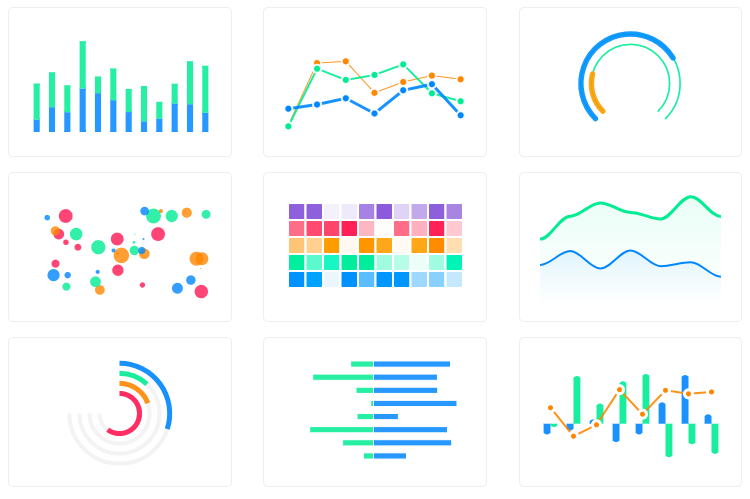
Why ApexCharts
- 18+ chart types out of the box: line, area, bar, column, pie, donut, radar, heatmap, treemap, candlestick, boxplot, violin, funnel, pyramid, gauge, unit (dot / pictogram / waffle / beeswarm) and more
- SSR support for Next.js, Nuxt, SvelteKit, Astro, and other meta-frameworks: render real SVG on the server, hydrate on the client
- Tree-shakable: import only the chart types and features you need; typical bundles are 30-60% smaller than the full build
- TypeScript-first: full type definitions ship with the package, no
@types/* install needed
- Zero runtime dependencies: no React/Vue/D3 required; works in any framework or vanilla JS
- Accessibility: keyboard navigation and ARIA support built in
- Free for most users: see License
New in v6
Version 6 turns a chart from a picture you look at into a surface you investigate, author, and share. Most features below are opt-in and tree-shakeable; existing configs keep working unchanged.
- Plugin platform: publish reusable chart plugins to npm against a stable, versioned API.
ApexCharts.registerPlugin(def), then activate per chart with plugins: [{ name }].
- Canvas rendering for dense series:
chart: { renderer: 'auto' } paints the series layer to canvas above a point threshold while axes, tooltips, annotations, and exports stay SVG. Hundreds of thousands of points, same config.
- Undo / redo:
chart: { history: { enabled: true } } records zooms, series toggles, option changes, and annotation edits. Ctrl-Z just works, and chart.history exposes undo, redo, jump, and transactions.
- Shareable view state:
chart.perspectives.capture() serializes the exact view (zoom window, hidden series, selections, annotations, theme) into a compact token you can put in a URL and restore anywhere.
- Design tokens and OS-aware themes: define
--apx-* CSS custom properties once and every chart reads them; theme: { follow: 'os' } tracks the system light/dark preference with zero JS, and ApexCharts.registerTheme registers named brand themes.
- Custom series types:
ApexCharts.registerSeriesType(name, { renderItem }) draws primitives per datum and inherits tooltips, events, legend, and keyboard navigation for free.
- Native-feeling touch: two-finger pinch-zoom, two-finger pan, and kinetic inertia with axis rails, on by default.
- Pluggable easing:
chart.animations.easing accepts named curves, cubic-bezier arrays, or functions; add your own with ApexCharts.registerEasing.
- Coherent data transitions: updates that add or remove data points animate as one coordinated motion. New bars grow from the baseline, removed ones shrink away, line and area fills reshape without tearing, and markers, bubbles, and axis labels ride along. On by default for animated charts.
- Crossfilter dashboards: link charts into a shared filter engine with
ApexCharts.crossfilter. Click a slice or brush a range in one chart and every linked chart filters to match.
- Annotation authoring:
chart: { ink: { enabled: true } } makes annotations draggable and resizable, adds click-to-create, snap, and a floating editor card (rename, recolor, restyle, delete), all wired into undo.
- Measure ruler: hold a key and drag to read the change, percent, and slope between two points; pinned rulers re-project on zoom and resize (
chart.measure).
- Context menu: right-click or long-press a data point for actions that operate at that exact point, with custom items supported (
chart.contextMenu).
- Real-time streaming: rolling-window updates scroll at constant velocity instead of warping in place, and
chart.streaming bounds memory for long-running feeds.
- Scrollytelling:
chart.storyboard.bind({ beats }) pairs prose sections with saved chart views; the chart morphs to each view as the reader scrolls and reverses when they scroll back.
Install
npm install apexcharts
Or via CDN:
<script src="https://cdn.jsdelivr.net/npm/apexcharts"></script>
Quick start
import ApexCharts from 'apexcharts'

const chart = new ApexCharts(document.querySelector('#chart'), {
  chart: { type: 'bar' },
  series: [{ name: 'Sales', data: [30, 40, 35, 50, 49, 60, 70, 91, 125] }],
  xaxis: { categories: [1991, 1992, 1993, 1994, 1995, 1996, 1997, 1998, 1999] }
})

chart.render()
Browse 100+ ready-to-use samples: copy, paste, ship.
Chart types
Combine any of the above as mixed/combo charts, stacked variants, sparklines, or synchronized multi-chart layouts.
Framework wrappers
Official:
Community:
Server-side rendering
Render chart HTML on the server, then hydrate in the browser. Works with Next.js, Nuxt, SvelteKit, Astro, Remix, and any Node-based framework.
// Server
import ApexCharts from 'apexcharts/ssr'

const chartHTML = await ApexCharts.renderToHTML({
  chart: { type: 'bar' },
  series: [{ data: [30, 40, 35, 50, 49, 60, 70, 91, 125] }],
  xaxis: { categories: [1991, 1992, 1993, 1994, 1995, 1996, 1997, 1998, 1999] }
}, { width: 500, height: 300 })

// Returns hydration-ready HTML with embedded SVG
// Client
import ApexCharts from 'apexcharts/client'

ApexCharts.hydrate(document.getElementById('my-chart'))
// or: ApexCharts.hydrateAll()
No more dynamic(() => import(...), { ssr: false }) workarounds: the chart renders on the server and becomes interactive on hydration.
Tree-shaking: ship only what you use
import ApexCharts from 'apexcharts' gives you every chart type and the
everyday features. Nine optional features ship outside it and are imported
explicitly (marked opt-in below); each warns in the console if its config is
set but the feature is absent. Adding one to the default bundle is a single
line, and the two share one copy of the core:
import ApexCharts from 'apexcharts'
import 'apexcharts/features/trellis'
For a smaller bundle still, start from apexcharts/core and add only what you
need:
import ApexCharts from 'apexcharts/core'   // bare class: no chart types, no features

// Chart types (match the value of chart.type)
import 'apexcharts/line'
import 'apexcharts/bar'
// import 'apexcharts/area'
// import 'apexcharts/scatter'
// import 'apexcharts/unit'         // dot / pictogram / waffle / beeswarm (premium; 'waffle' aliases this)

// Optional features
import 'apexcharts/features/legend'
import 'apexcharts/features/toolbar'      // zoom/pan toolbar
// import 'apexcharts/features/exports'      // SVG/PNG/CSV download
// import 'apexcharts/features/annotations'
// import 'apexcharts/features/keyboard'     // keyboard navigation
// import 'apexcharts/features/drilldown'    // hierarchical drill-down
// import 'apexcharts/features/morph'        // animated chart-type morphs
// import 'apexcharts/features/history'      // undo/redo (premium, opt-in)
// import 'apexcharts/features/perspectives' // shareable view state (premium, opt-in)
// import 'apexcharts/features/storyboard'   // scrollytelling, incl. perspectives (premium, opt-in)
// import 'apexcharts/features/facet'        // design tokens + OS themes
// import 'apexcharts/features/weave'        // plugin platform
// import 'apexcharts/features/marks'        // custom series types
// import 'apexcharts/features/link'         // crossfilter / linked views (premium, opt-in)
// import 'apexcharts/features/ink'          // on-chart annotation editing (premium, opt-in)
// import 'apexcharts/features/measure'      // measure/delta ruler (premium, opt-in)
// import 'apexcharts/features/context-menu' // right-click context menu (premium, opt-in)
// import 'apexcharts/features/renderer-canvas' // canvas series renderer (opt-in)
// import 'apexcharts/features/trellis'     // small multiples (premium, opt-in)
// import 'apexcharts/features/raincloud'   // raincloud chart type statistics (premium, opt-in)
A page without a bundler gets the same choice. apexcharts.js stays
batteries-included, and apexcharts.core.min.js is the lean baseline you build
up from:
<script src="https://cdn.jsdelivr.net/npm/apexcharts/dist/apexcharts.core.min.js"></script>
<script src="https://cdn.jsdelivr.net/npm/apexcharts/dist/line.js"></script>
<script src="https://cdn.jsdelivr.net/npm/apexcharts/dist/features/legend.js"></script>
Opt-in features work the same way there: load dist/features/<name>.js after
whichever bundle the page already has.
See the tree-shaking guide for the complete list of entry points.
Shapes for the unit chart
apexcharts/unit-shapes is a companion kit: 39 shapes a unit chart can pack its dots into, as silhouettes (heart, house, globe, tree), stroked glyphs (checkmark, arrow, heartbeat trace) and a composer that draws a number in its own dots. Every shape is a plain function of the marks and the plot rectangle, so it repacks at any dot count and any size, and importing one costs about 4 KB gzipped with the rest shaken out.
import ApexCharts from 'apexcharts'
import { heart } from 'apexcharts/unit-shapes'

new ApexCharts(el, {
  chart: { type: 'unit' },
  series: [576, 168, 42, 34],
  labels: ['Owned', 'Mortgaged', 'Renting', 'Other'],
  plotOptions: { unit: { layout: 'custom', positions: heart } },
}).render()
Shapes are composable (outlined(heart) traces it instead of filling it, heart.with({ order: 'cols' }) changes where each series band lands), and preview(heart, { series }) renders one to an SVG string with no chart and no DOM, for docs and build-time images. From a script tag, dist/unit-shapes.js exposes the same kit as ApexUnitShapes and registers every shape by name.
The shape you want is probably not one of the 39, and it does not have to be. positions takes any function of the marks and the plot rectangle, so there are three ways in, none of which needs a release from us:
import { shapeFrom, strokeFrom } from 'apexcharts/unit-shapes'

shapeFrom('M 26 71 A 24 21 0 1 1 74 71 …')        // your own outline, packed like ours
strokeFrom('M 6 76 L 24 44 L 40 60 …', { width: 12 })  // a centreline, for a line
positions: (objects, rect) => objects.map(…)      // your own rule, no kit at all
Working demo of all three, including the outline-authoring rules (subpaths union, a reverse-wound one cuts a hole): bring-your-own-shape.
Premium features & licensing
Most of ApexCharts is free and open source. A small set of advanced features are premium and require a license key:
| Feature |
Enabled by |
| Unit chart type (dot / pictogram / waffle / beeswarm) |
chart.type: 'unit' / chart.type: 'waffle' |
| Raincloud chart type (half-density + box + raw points) |
chart.type: 'raincloud' (needs apexcharts/features/raincloud, not in the default bundle) |
| Storyboard (scrollytelling) |
chart.storyboard.bind(...) |
| Linked views / crossfilter |
chart.link.enabled / chart.link.dimension / ApexCharts.crossfilter() |
| Ink layer (on-chart annotation editing) |
chart.ink.enabled |
| Measure / delta ruler |
chart.measure.enabled |
| Context menu (right-click) |
chart.contextMenu.enabled |
| Perspectives (shareable view state) |
chart.perspectives.apply() / .save() / ApexCharts.perspectives.decode() |
| History (undo/redo) |
chart.history.enabled |
Without a valid key these features still work (trial mode), but the chart shows an "APEXCHARTS" watermark. A valid key removes it. Every other chart type and feature is free and never watermarked; the premium chart types are unit (aliased by waffle) and raincloud, both listed above.
import ApexCharts from 'apexcharts'

// Set once, before rendering. Applies to every chart on the page.
ApexCharts.setLicense('APEX-xxxxxxxx')
Alternatives to setLicense:
// Global variable (used when setLicense was not called):
window.Apex = { license: 'APEX-xxxxxxxx' }

// Per-chart override (most specific wins):
new ApexCharts(el, { chart: { license: 'APEX-xxxxxxxx' /* ... */ } })
Precedence per chart: chart.license -> ApexCharts.setLicense() -> window.Apex.license -> unlicensed (trial). The watermark is re-evaluated on every render, so a late setLicense(validKey) followed by chart.update() clears it.
Keys are shared across the whole ApexCharts family (apexgantt, apextree, apexsankey, apex-grid-enterprise, apexstock), so one customer key works everywhere. Get a license at apexcharts.com/pricing.
Browser support
ApexCharts works in all modern evergreen browsers (Chrome, Firefox, Safari, Edge). For server-side rendering, Node.js 18+ is required.
Documentation
Contributing
npm install
npm run dev     # vite build --watch
npm test        # e2e + unit
See CONTRIBUTING.md for setup, coding conventions, and PR guidelines.
License
ApexCharts uses a revenue-based license:
- Free for individuals, and organizations with under $2M USD in annual gross revenue, including commercial and internal use. No registration required.
- Commercial license required for organizations at or above $2M USD annual gross revenue.
Full terms: apexcharts.com/license
Need an enterprise data grid?
We've partnered with Infragistics, creators of Ignite UI: high-performance data grids that handle unlimited rows and columns, with custom templates and real-time updates.
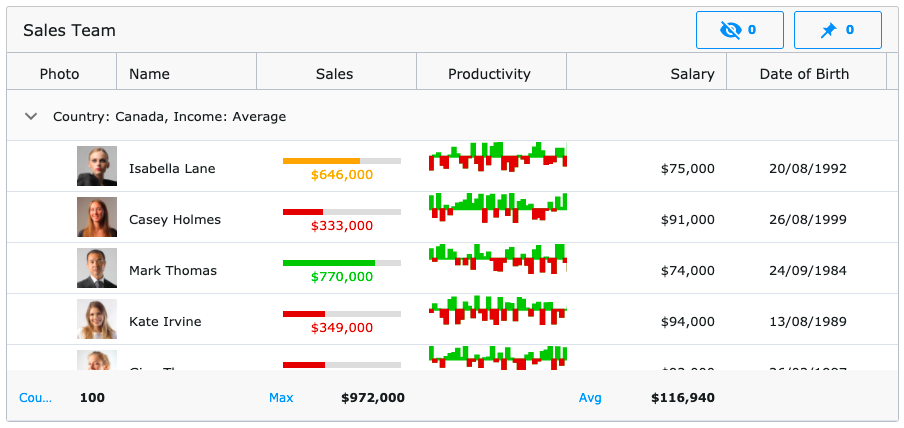
Available for:
Angular · React · Blazor · Web Components · jQuery

 ApexCharts is a JavaScript charting library for building interactive, SVG-based charts, designed for dashboards, SaaS products, and data-heavy UIs.