

Now in Android App
Learn how this app was designed and built in the design case study, architecture learning journey and modularization learning journey.
This is the repository for the Now in Android
app. It is a work in progress 🚧.
Now in Android is a fully functional Android app built entirely with Kotlin and Jetpack Compose. It
follows Android design and development best practices and is intended to be a useful reference
for developers. As a running app, it's intended to help developers keep up-to-date with the world
of Android development by providing regular news updates.
The app is currently in development. The prodRelease variant is available on the Play Store.
Features
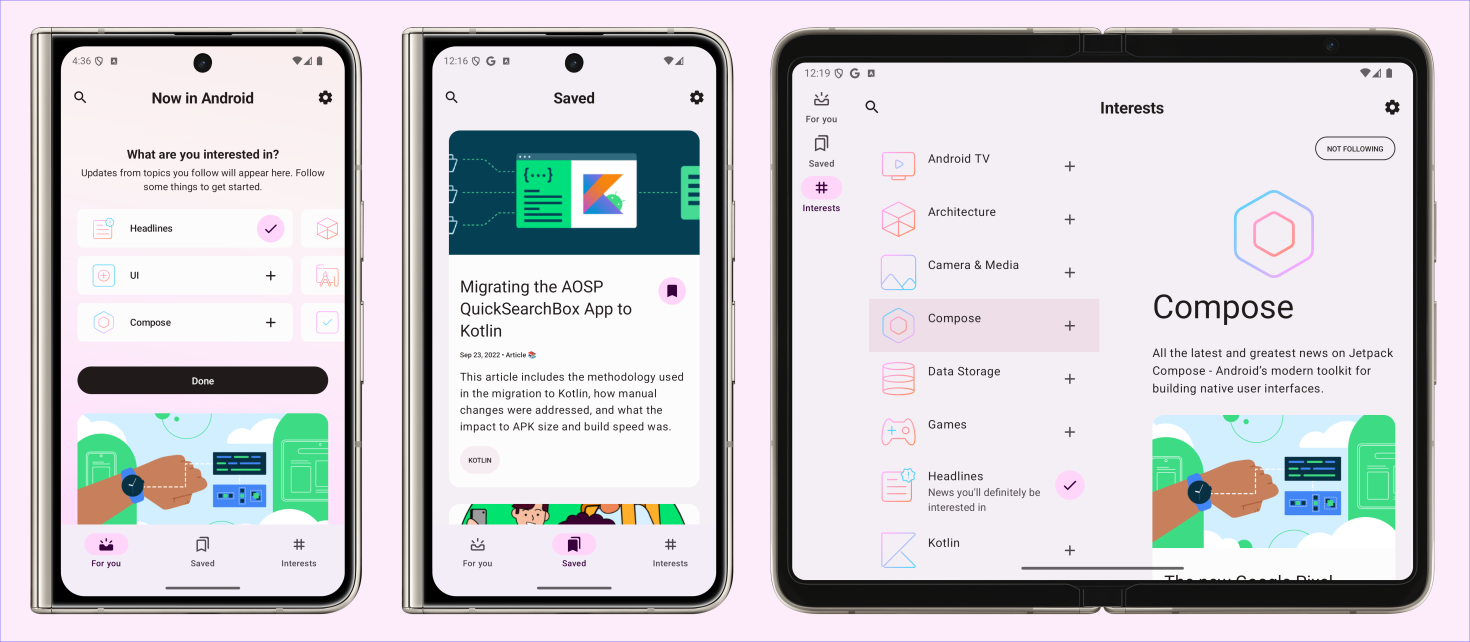
Now in Android displays content from the
Now in Android series. Users can browse for
links to recent videos, articles and other content. Users can also follow topics they are interested
in, and be notified when new content is published which matches interests they are following.
Screenshots
Development Environment
Now in Android uses the Gradle build system and can be imported directly into Android Studio (make sure you are using the latest stable version available here).
Change the run configuration to app.

The demoDebug and demoRelease build variants can be built and run (the prod variants use a backend server which is not currently publicly available).

Once you're up and running, you can refer to the learning journeys below to get a better
understanding of which libraries and tools are being used, the reasoning behind the approaches to
UI, testing, architecture and more, and how all of these different pieces of the project fit
together to create a complete app.
Architecture
The Now in Android app follows the
official architecture guidance
and is described in detail in the
architecture learning journey.
Modularization
The Now in Android app has been fully modularized and you can find the detailed guidance and
description of the modularization strategy used in
modularization learning journey.
Build
The app contains the usual debug and release build variants.
In addition, the benchmark variant of app is used to test startup performance and generate a
baseline profile (see below for more information).
app-nia-catalog is a standalone app that displays the list of components that are stylized for
Now in Android.
The app also uses
product flavors to
control where content for the app should be loaded from.
The demo flavor uses static local data to allow immediate building and exploring of the UI.
The prod flavor makes real network calls to a backend server, providing up-to-date content. At
this time, there is not a public backend available.
For normal development use the demoDebug variant. For UI performance testing use the
demoRelease variant.
Testing
To facilitate testing of components, Now in Android uses dependency injection with
Hilt.
Most data layer components are defined as interfaces.
Then, concrete implementations (with various dependencies) are bound to provide those interfaces to
other components in the app.
In tests, Now in Android notably does not use any mocking libraries.
Instead, the production implementations can be replaced with test doubles using Hilt's testing APIs
(or via manual constructor injection for ViewModel tests).
These test doubles implement the same interface as the production implementations and generally
provide a simplified (but still realistic) implementation with additional testing hooks.
This results in less brittle tests that may exercise more production code, instead of just verifying
specific calls against mocks.
Examples:
In instrumentation tests, a temporary folder is used to store the user's preferences, which is
wiped after each test.
This allows using the real DataStore and exercising all related code, instead of mocking the
flow of data updates.
There are Test implementations of each repository, which implement the normal, full repository
interface and also provide test-only hooks.
ViewModel tests use these Test repositories, and thus can use the test-only hooks to
manipulate the state of the Test repository and verify the resulting behavior, instead of
checking that specific repository methods were called.
To run the tests execute the following gradle tasks:
testDemoDebug run all local tests against the demoDebug variant. Screenshot tests will fail
(see below for explanation). To avoid this, run recordRoborazziDemoDebug prior to running unit tests.connectedDemoDebugAndroidTest run all instrumented tests against the demoDebug variant.
[!NOTE]
You should not run ./gradlew test or ./gradlew connectedAndroidTest as this will execute
tests against all build variants which is both unnecessary and will result in failures as only the
demoDebug variant is supported. No other variants have any tests (although this might change in future).
Screenshot tests
A screenshot test takes a screenshot of a screen or a UI component within the app, and compares it
with a previously recorded screenshot which is known to be rendered correctly.
For example, Now in Android has screenshot tests
to verify that the navigation is displayed correctly on different screen sizes
(known correct screenshots).
Now In Android uses Roborazzi to run screenshot tests
of certain screens and UI components. When working with screenshot tests the following gradle tasks are useful:
verifyRoborazziDemoDebug run all screenshot tests, verifying the screenshots against the known
correct screenshots.recordRoborazziDemoDebug record new "known correct" screenshots. Use this command when you have
made changes to the UI and manually verified that they are rendered correctly. Screenshots will be
stored in modulename/src/test/screenshots.compareRoborazziDemoDebug create comparison images between failed tests and the known correct
images. These can also be found in modulename/src/test/screenshots.
[!NOTE]
Note on failing screenshot tests
The known correct screenshots stored in this repository are recorded on CI using Linux. Other
platforms may (and probably will) generate slightly different images, making the screenshot tests fail.
When working on a non-Linux platform, a workaround to this is to run recordRoborazziDemoDebug on the
main branch before starting work. After making changes, verifyRoborazziDemoDebug will identify only
legitimate changes.
For more information about screenshot testing
check out this talk.
UI
The app was designed using Material 3 guidelines. Learn more about the design process and
obtain the design files in the Now in Android Material 3 Case Study (design assets also available as a PDF).
The Screens and UI elements are built entirely using Jetpack Compose.
The app has two themes:
- Dynamic color - uses colors based on the user's current color theme (if supported)
- Default theme - uses predefined colors when dynamic color is not supported
Each theme also supports dark mode.
The app uses adaptive layouts to
support different screen sizes.
Find out more about the UI architecture here.
Benchmarks
Find all tests written using Macrobenchmark
in the benchmarks module. This module also contains the test to generate the Baseline profile.
Baseline profiles
The baseline profile for this app is located at app/src/main/baseline-prof.txt.
It contains rules that enable AOT compilation of the critical user path taken during app launch.
For more information on baseline profiles, read this document.
[!NOTE]
The baseline profile needs to be re-generated for release builds that touch code which changes app startup.
To generate the baseline profile, select the benchmark build variant and run the
BaselineProfileGenerator benchmark test on an AOSP Android Emulator.
Then copy the resulting baseline profile from the emulator to app/src/main/baseline-prof.txt.
Compose compiler metrics
Run the following command to get and analyze compose compiler metrics:
./gradlew assembleRelease -PenableComposeCompilerMetrics=true -PenableComposeCompilerReports=true
The reports files will be added to build/compose-reports. The metrics files will also be
added to build/compose-metrics.
For more information on Compose compiler metrics, see this blog post.
License
Now in Android is distributed under the terms of the Apache License (Version 2.0). See the
license for more information.

 Now in Android 是一个完全用 Kotlin 和 Jetpack Compose 构建的功能完整的 Android 应用。它既是 Android 设计和开发最佳实践的官方参考示例,同时作为一个实际运行的应用,提供 Android 开发方面的新闻资讯。