OpenWorker
openworker.com · Download · Issues

Beta - OpenWorker is in open beta: fully usable, updates itself, and we're actively polishing rough edges. Issues welcome.
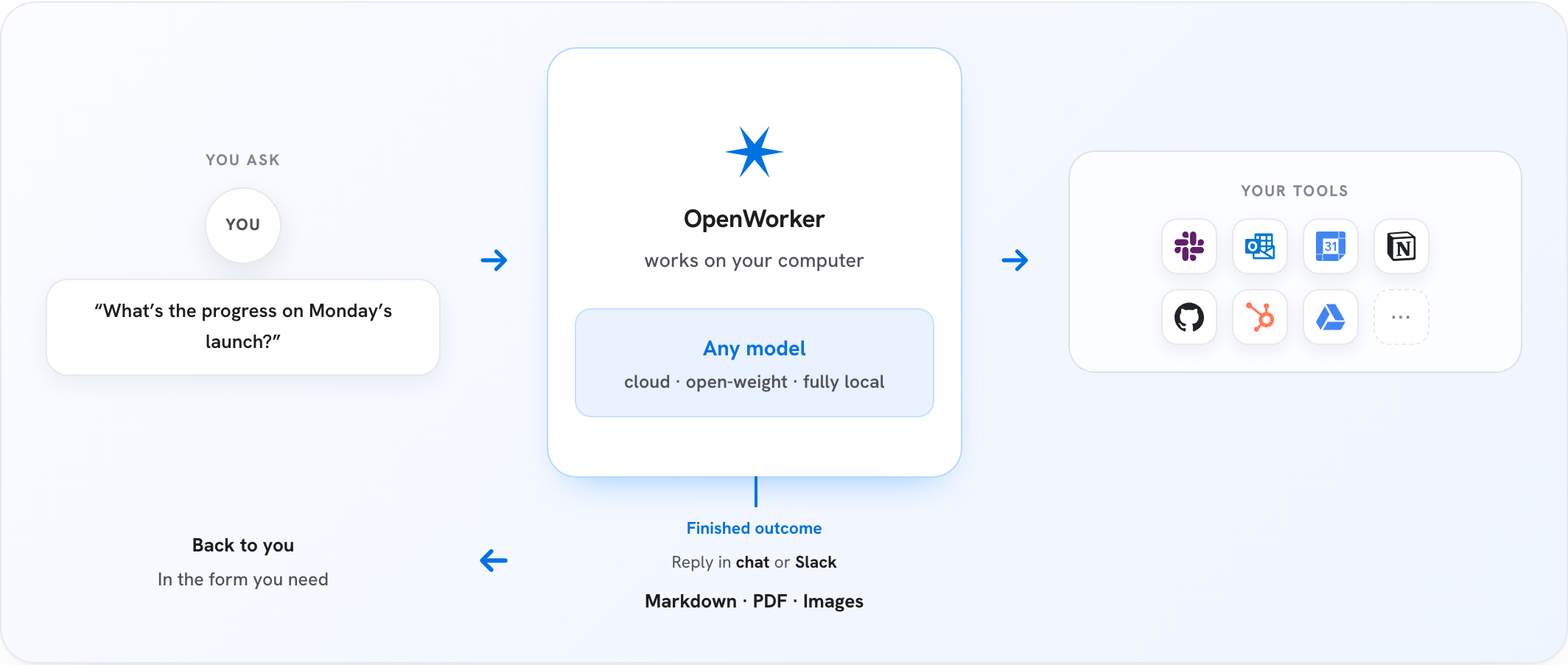
AI that gets your everyday tasks done. OpenWorker is an open-source AI coworker that lives on your desktop and delivers finished work, not just chat: your code reviewed for vulnerabilities with fixes ready to go, a polished document, a Slack reply with the numbers, a triaged inbox. It ships specialist Security coworkers first — attackers already use AI, and defenders deserve the same leverage, governed.
It runs on your machine and doesn't lock you into any model: bring your own API key for OpenAI, Anthropic, Google, or an open-weight provider, or run fully local with Ollama. Your data leaves your machine only through the model and integrations you choose. Every action an agent takes is governed and logged — see Governed by design.
Download
⬇ macOS (Apple Silicon)
macOS 12+ · signed & notarized · auto-updates
⬇ Windows 10/11 (x64)
builds are not yet code-signed, so SmartScreen will warn; signing is in progress
Open the app, add a model key (or point it at Ollama), and ask for something real.
Use cases
Pick a coworker, point it at real work, get a finished deliverable:
- Security review - scan a codebase and its dependencies for real risk. Findings come from deterministic scanners (like semgrep) plus model reasoning; proposed fixes are re-scanned and diff-reviewed before you approve them - the fixer is never the only checker.
- Cloud posture - audit cloud configuration against common misconfiguration classes and draft the remediation plan.
- Incident triage - work a security or ops incident: gather context across your tools, draft the timeline, prepare the report.
- Everyday work - prep a customer call from your CRM and inbox, turn scattered notes into a shippable plan, produce documents and spreadsheets, keep your calendar and Slack threads handled.
- Standing automations - a morning brief, a weekly report, a watch over a channel - on a schedule, with full transcripts.
Specialist coworkers arrive with the tools, working style, and check-ins for one job already set up. Security coworkers ship first.
How it works
- Tell OpenWorker the outcome you want - "prepare a customer brief," "untangle my calendar," "draft a report," "check where the release stands across Jira and GitHub."
- It breaks the task into steps and works across your desktop, files, and connected apps.
- Before anything consequential - sending a message, changing a calendar, running a command - it checks in and you approve or redirect.
- You get the finished deliverable, not a to-do list.
Under the hood:
┌────────────────────────────────────────────────┐
│              OpenWorker desktop app            │  native shell + GUI
├────────────────────────────────────────────────┤
│           local agent server (Python)          │  engine · tools · connectors - built on aisuite
├───────────────┬────────────────┬───────────────┤
│  your files   │   your tools   │  your model   │  everything runs with your keys,
│  & terminal   │ 25+ connectors │  any provider │  on your machine
└───────────────┴────────────────┴───────────────┘
Governed by design
Governance is the architecture, not a plugin - the agent can't grant itself new permissions, and no prompt can talk it past a gate. Three tiers, all in this repo:
- Hard floors. A set of dangerous and irreversible operations is human-only, always. No mode - including full auto-approve - lowers these floors; they always escalate to you.
- A ladder of earned autonomy. Actions are approval-gated by default. One-off approvals can graduate into standing rules, then into config allowlists - each step explicit, visible, and revocable. In auto-approve mode a reviewer model lets routine actions through and escalates anything it isn't sure about to you; repeated denials trip a circuit breaker that pauses the reviewer and hands control back. Reviewer verdicts are judgments, not guarantees - the floors and the audit trail are what backstop them.
- An audit trail that answers "who did this, and why?" Every tool call is recorded with its approval provenance - auto-approved, user-approved, or denied, with the reviewer's reasoning attached - and persisted with the conversation.
Unattended runs never self-approve: their asks park in an inbox until a human answers. Found a vulnerability? See SECURITY.md.
What it can do
- Produce real deliverables - documents, spreadsheets, reports, and web pages land as files you can open and share.
- Work from Slack - mention
@OpenWorker in a channel; a session opens on your desktop, the work happens with your tools, and the answer comes back as a thread reply.
- Use your everyday tools - 25+ integrations including GitHub, Slack, Jira, Notion, Linear, HubSpot, Outlook, monday.com, Gmail, and Google Calendar, plus your terminal and local files. Any tool reachable over MCP plugs in too, with per-tool control.
- Run on a schedule - automations for recurring work: a morning brief, a weekly report, a standing watch over a channel. Runs land in the app with full transcripts.
- Ask before acting - writes, sends, and shell commands are approval-gated, with an optional auto-approve mode that still escalates anything uncertain - see Governed by design.
Bring your own model
Model access is yours: pick a provider, paste your key, switch anytime. Supported out of the box:
OpenAI · Anthropic · Google Gemini · BytePlus Ark · Volcengine Ark Agent Plan · Inkling (Thinking Machines) · GLM (Z.ai) · DeepSeek · Kimi (Moonshot) · Qwen · MiniMax · Mistral · Grok (xAI) - plus open-weight models via Together and Fireworks, and fully local models via Ollama.
A curated model list marks what we've verified for tool-calling work. Adding any model string works at your own risk.
Privacy
OpenWorker is local-first. Everything lives on your machine: the agent loop, your conversations, connector tokens, and model keys - all in the app's local secret store. The only cloud piece is a small service that brokers OAuth handshakes for connectors. You can always use the App without signing-in - use the connectors via manually-created credentials/API-keys.
Run from source
Prerequisites: Python 3.10+, Node 20+, and (for the desktop shell) the Rust toolchain via rustup.
git clone https://github.com/andrewyng/openworker
cd openworker

# 1. One-time bootstrap - creates the Python venv at .venv
#    (on Windows, run from Git Bash or WSL)
bash packaging/setup_dev_env.sh

# 2. Start the local agent server
.venv/bin/openworker-server --cwd ~/some/project --port 8765
#    (Windows: .venv\Scripts\openworker-server.exe)

# 3. In a second terminal, start the UI
cd surfaces/gui
npm install
npm run dev        # browser UI on the Vite dev port
The standalone server creates a per-launch token at
<state-dir>/sidecar-8765.token; Vite reads that user-only file when it starts.
For direct API calls, send its value in the X-OpenWorker-Token header. The
desktop app uses an in-memory launch token instead and never writes it to disk.
To run the full desktop app instead of the browser UI, replace step 3 with npm run tauri dev (from surfaces/gui/) - the Tauri shell launches the window and supervises the server itself.
Tests: .venv/bin/pytest (server), npm test and npm run e2e in surfaces/gui (GUI unit + hermetic end-to-end). Desktop bundles are built with packaging/build_dmg.sh / packaging/build_windows.ps1.
Repository layout
| Directory |
What's in it |
coworker/ |
Python backend - agent engine, model providers, connectors, MCP client, memory, automations |
surfaces/gui/ |
Desktop app - React UI + Tauri shell that supervises the server |
stt/ |
Speech-to-text sidecar (Rust) for voice input |
packaging/ |
Installer builds (macOS DMG, Windows), auto-update manifest, dev bootstrap |
docs/ |
Design specs and decision logs |
tests/ |
Backend test suite |
Built on aisuite
OpenWorker's engine is built on aisuite, a lightweight Python library providing a unified chat-completions API across LLM providers and an agents layer with tools, toolkits, and MCP support. If you want to build your own agent harness rather than use ours, start there; this repo is a working reference for what aisuite can carry.
OpenWorker was originally developed inside the aisuite repository before moving to its own home here; thanks to the aisuite contributors whose work it builds on.
Contributing
Contributions and bug reports are welcome - open an issue or a pull request. The app updates itself, so fixes reach installs quickly.
For any PR, please attach screenshots of what was broken and how it is fixed now. We will shortly add features that you can contribute to.
Please note that we are actively developing based off a internal list and goal, so we may not approve PRs that add features that are already under-development or deviates from our vision.
License
MIT - see LICENSE.

 OpenWorker 是一款开源的 AI 办公助手,它常驻在你的桌面上,交付的是成品而不只是聊天:经过审查并附带修复的代码、打磨好的文档、包含真实数据的 Slack 回复,以及分类整理好的收件箱。