18.6K ·GitHub
Что это такое?
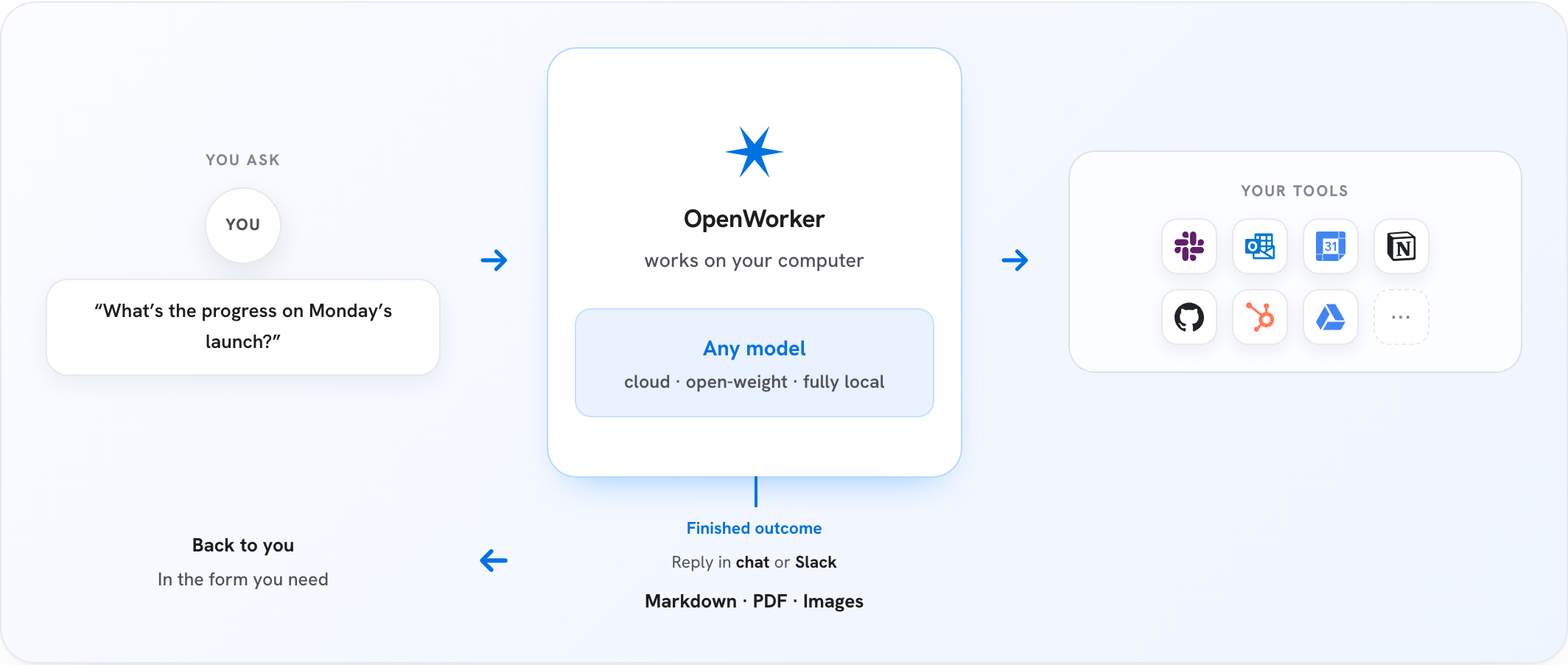
 OpenWorker — это ИИ-помощник для работы с открытым исходным кодом, который живёт на вашем компьютере и выдаёт готовый результат, а не просто ведёт переписку: проверенный код с исправлениями, аккуратные документы, ответы в Slack с реальными цифрами, разобранная почта.
OpenWorker — это ИИ-помощник для работы с открытым исходным кодом, который живёт на вашем компьютере и выдаёт готовый результат, а не просто ведёт переписку: проверенный код с исправлениями, аккуратные документы, ответы в Slack с реальными цифрами, разобранная почта.Это просто чат-бот или он реально выполняет задачи за меня?Это агентное десктопное приложение: вы описываете нужный результат, оно разбивает задачу на шаги и работает с вашими файлами и подключёнными приложениями, сверяясь с вами перед любым важным действием, и отдаёт готовый результат, а не ответ или список дел.
Это агентное десктопное приложение: вы описываете нужный результат, оно разбивает задачу на шаги и работает с вашими файлами и подключёнными приложениями, сверяясь с вами перед любым важным действием, и отдаёт готовый результат, а не ответ или список дел.Как это запустить?Скачайте подписанную сборку для macOS (Apple Silicon, macOS 12+) или Windows 10/11 (x64), откройте приложение, добавьте ключ API модели или укажите Ollama и попросите что-нибудь реальное. Также его можно запустить из исходников с Python 3.10+, Node 20+ и набором инструментов Rust.
Скачайте подписанную сборку для macOS (Apple Silicon, macOS 12+) или Windows 10/11 (x64), откройте приложение, добавьте ключ API модели или укажите Ollama и попросите что-нибудь реальное. Также его можно запустить из исходников с Python 3.10+, Node 20+ и набором инструментов Rust.Каких провайдеров ИИ можно использовать вместе с ним?Вы используете собственный ключ для OpenAI, Anthropic, Google Gemini, DeepSeek, Kimi, Qwen, MiniMax, Mistral, Grok, моделей с открытыми весами через Together/Fireworks или полностью локальной работы через Ollama — привязки к одному провайдеру нет.
Вы используете собственный ключ для OpenAI, Anthropic, Google Gemini, DeepSeek, Kimi, Qwen, MiniMax, Mistral, Grok, моделей с открытыми весами через Together/Fireworks или полностью локальной работы через Ollama — привязки к одному провайдеру нет.Готова ли сборка для Windows к использованию прямо сейчас?Она работает, но пока не подписана цифровым сертификатом, поэтому при открытии Windows SmartScreen покажет предупреждение, пока идёт подписание; сборка для macOS уже подписана и прошла нотаризацию.
Она работает, но пока не подписана цифровым сертификатом, поэтому при открытии Windows SmartScreen покажет предупреждение, пока идёт подписание; сборка для macOS уже подписана и прошла нотаризацию.Можно ли запустить это на Linux или только на Mac и Windows?Предлагаются только загрузки для macOS (Apple Silicon, macOS 12+) и Windows 10/11 (x64); Linux в списке поддерживаемых сборок не указан.
Предлагаются только загрузки для macOS (Apple Silicon, macOS 12+) и Windows 10/11 (x64); Linux в списке поддерживаемых сборок не указан.Как OpenWorker сам не даёт себе сделать что-нибудь вредное?Набор опасных необратимых операций составляет «жёсткие ограничения», которые может подтвердить только человек, и их не обходит ни один режим, включая auto-approve. Обычные действия проходят по лестнице: от разовых подтверждений к постоянным правилам и далее к спискам разрешённых действий в конфигурации; каждый вызов инструмента логируется с указанием источника подтверждения и обоснованием.
Набор опасных необратимых операций составляет «жёсткие ограничения», которые может подтвердить только человек, и их не обходит ни один режим, включая auto-approve. Обычные действия проходят по лестнице: от разовых подтверждений к постоянным правилам и далее к спискам разрешённых действий в конфигурации; каждый вызов инструмента логируется с указанием источника подтверждения и обоснованием.Может ли он работать внутри Slack, а не в своём окне приложения?Да — упомяните @OpenWorker в канале Slack, на вашем компьютере откроется сессия с использованием подключённых инструментов, а готовый ответ вернётся ответом в треде.
Да — упомяните @OpenWorker в канале Slack, на вашем компьютере откроется сессия с использованием подключённых инструментов, а готовый ответ вернётся ответом в треде.Что такое aisuite и зачем о нём упоминается в README?aisuite — это лёгкая библиотека на Python, которая предоставляет единый API chat completions и слой агентов и инструментов для разных провайдеров LLM. Движок OpenWorker построен на её основе, а сам проект изначально появился внутри репозитория aisuite, прежде чем переехать в собственный репозиторий.
aisuite — это лёгкая библиотека на Python, которая предоставляет единый API chat completions и слой агентов и инструментов для разных провайдеров LLM. Движок OpenWorker построен на её основе, а сам проект изначально появился внутри репозитория aisuite, прежде чем переехать в собственный репозиторий.С какими инструментами и приложениями он может работать из коробки?25+ интеграций, включая GitHub, Slack, Jira, Notion, Linear, HubSpot, Outlook, monday.com, Gmail и Google Calendar, а также ваш терминал и локальные файлы; любой дополнительный инструмент подключается через MCP.
25+ интеграций, включая GitHub, Slack, Jira, Notion, Linear, HubSpot, Outlook, monday.com, Gmail и Google Calendar, а также ваш терминал и локальные файлы; любой дополнительный инструмент подключается через MCP.What are similar projects?laya, starnet, taskuary, evenfire, brigade, open-swe, openfang, opensquilla
laya, starnet, taskuary, evenfire, brigade, open-swe, openfang, opensquillaWhich topics is it in?jira, notion, governance, assistant, slack, code-review, tauri, workflow-automation, ollama, security-tools, gemini, anthropic
jira, notion, governance, assistant, slack, code-review, tauri, workflow-automation, ollama, security-tools, gemini, anthropic