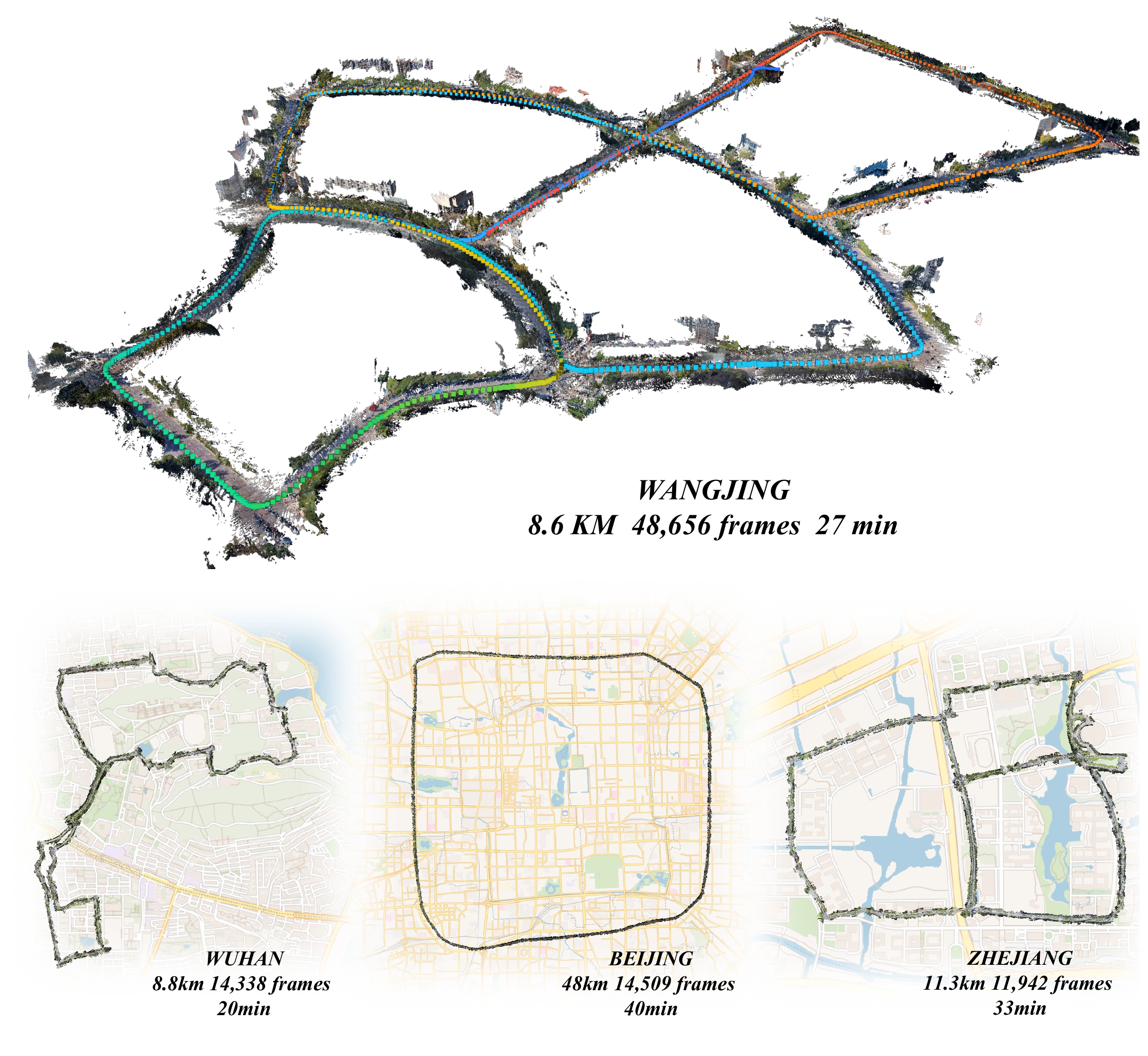
In one sentence: ABot-Recon reconstructs long video streams with a fixed 12-frame local context, composing current-frame geometry and adjacent relative poses into a global reconstruction without persistent learned long-range memory.
📣 News
- 2026-08-31: Thanks to the Hugging Face team, an interactive ABot-Recon Demo is now available online. Try it out!
Why local context?
Long-horizon streaming reconstruction is often approached by adding increasingly elaborate mechanisms for retaining and fusing long-range state. ABot-Recon takes a deliberately local route. At each time step, it solves the same bounded prediction problem:
- cache KV features from the preceding 11 frames;
- predict a point map $P_i$ in the current camera coordinate system;
- estimate the adjacent relative pose $T_{i-1\leftarrow i}$; and
- recover the global trajectory and point cloud through sequential pose composition.
This design keeps model-state memory and per-frame computation independent of the elapsed sequence length. A lightweight motion-visual rotation refiner and composition-aware pose loss are used to limit drift when local poses are composed over long horizons.
Results at a glance
| Evaluation |
Result |
Setting |
| Oxford Spires camera pose |
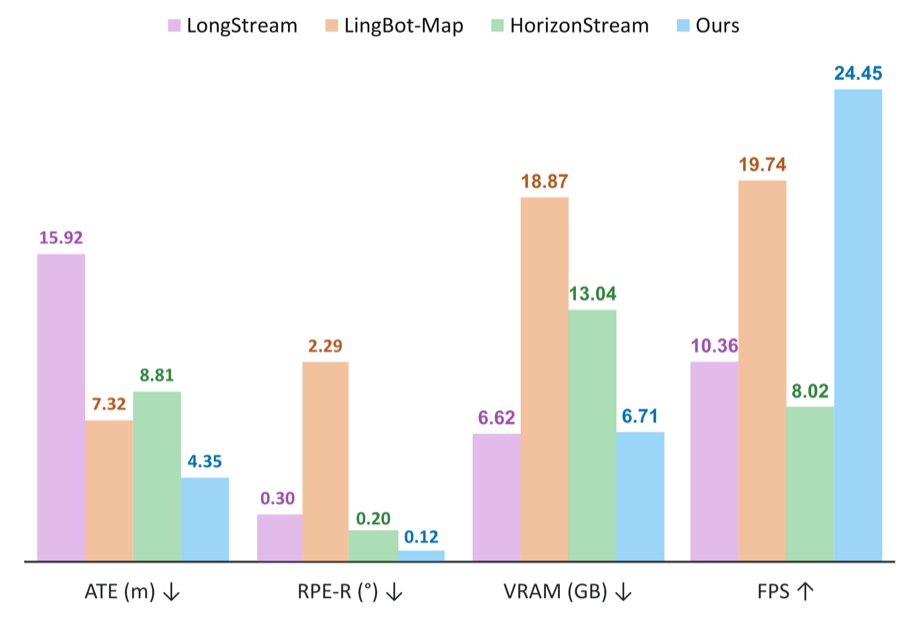
ATE 4.35 m, RPE-R 0.12° |
Streaming model only; no loop closure |
| Oxford Spires dense reconstruction |
CD 1.37 m, F1 91.81% |
F1 threshold $\tau=4$ m |
| KITTI-02 streaming efficiency |
24.45 FPS, 6.71 GiB |
504×280, NVIDIA H100, input storage excluded |
The full paper reports camera-pose results on KITTI, Oxford Spires, and VBR, together with dense reconstruction on 7Scenes, TUM-Dynamic, and Oxford Spires.
Installation
The released configuration targets Linux, Python 3.10 or later, PyTorch 2.5.1, and CUDA 12.1. The release environment was validated on NVIDIA A100, while the paper's runtime benchmark uses an NVIDIA H100.
conda create -n abot-recon python=3.11 -y
conda activate abot-recon

pip install torch==2.5.1 torchvision==0.20.1 \
  --index-url https://download.pytorch.org/whl/cu121
pip install -e .
Recommended acceleration
ABot-Recon uses paged KV-cache operators from FlashInfer when they are available and falls back to PyTorch SDPA otherwise. Compiling cuRoPE further accelerates rotary position encoding.
pip install flashinfer-python
flashinfer show-config

cd abot_recon/modeling/pi3/models/curope
pip install ninja
python setup.py build_ext --inplace
cd -
Model checkpoint
The released checkpoint is available on Hugging Face and ModelScope. The Python API and demo download it automatically from Hugging Face and reuse the local cache. For offline inference, download the checkpoint manually and place it at:
checkpoints/abot_recon.safetensors
Quick start
The base model requires neither loop-closure dependencies nor loop assets. Input images are sorted lexicographically, so frame names should be zero-padded (for example, 000001.jpg, 000002.jpg, ...).
python demo.py \
  --image-dir examples/images \
  --output-dir outputs/demo \
  --attention-backend auto \
  --no-loop-closure
This minimal example performs one causal pass and writes the raw camera trajectory, adjacent relative poses, local point maps, confidence maps, and run metadata. See Optional loop closure for trajectory refinement on sequences with revisited regions.
Useful output controls:
| Option |
Effect |
--save-world-points |
Transform local point maps using the final trajectory and save a global point cloud |
--no-save-local-points |
Skip per-frame local point maps |
--no-save-confidence |
Skip confidence maps |
--confidence-threshold T |
Mask points below confidence T in [0, 1] |
--loop-closure / --no-loop-closure |
Enable or disable optional loop-closure refinement; enabled by default |
--start, --end, --stride |
Select frames from the ordered input stream |
--dense-stride N |
Estimate every selected-frame pose but save dense outputs every N frames |
--max-frames N |
Set the maximum supported stream length; default: 22000 |
Python API
from pathlib import Path
from abot_recon import ABotRecon

images = sorted(Path("examples/images").glob("*.jpg"))

model = ABotRecon.from_pretrained(
    "acvlab/ABot-Recon",
    device="cuda",
    attention_backend="auto",
    loop_closure=False,
)

result = model.infer(images)

trajectory = result.camera_poses
relative_poses = result.relative_poses
local_points = result.local_points
confidence = result.confidence
The checkpoint is downloaded once and then loaded from the Hugging Face cache.
For offline inference, replace the repository ID with a local checkpoint path.
Set output_world_points=True to return point maps transformed by the final trajectory. Use dense_output_indices when dense geometry is needed for only a subset of frames.
Optional loop closure
The learned model does not depend on loop closure. When a sequence contains useful revisits, the optional backend retrieves candidate frame pairs with DINOv2-SALAD descriptors, predicts relative-pose constraints with ABot-Recon, and refines the trajectory through sparse pose-graph optimization.
Install the optional dependencies and download the retrieval checkpoints:
pip install -e ".[loop]"
python scripts/download_loop_assets.py --output-dir checkpoints/loop
Expected files:
checkpoints/
├── abot_recon.safetensors
└── loop/
    ├── dino_salad.ckpt
    └── dinov2_vitb14_pretrain.pth
Run inference with loop closure:
python demo.py \
  --image-dir examples/images \
  --output-dir outputs/demo_loop \
  --attention-backend auto \
  --loop-closure
When loop closure is enabled, camera_poses stores the refined trajectory, while camera_poses_noloop preserves the raw streaming prediction.
Outputs
The exact set of files follows the selected output options:
outputs/demo/
├── camera_poses.npy
├── relative_poses.npy
├── camera_poses_noloop.npy
├── relative_poses_noloop.npy
├── camera_poses_loop.npy       # only with loop closure
├── relative_poses_loop.npy     # only with loop closure
├── local_points.pt             # enabled by default
├── world_points.pt             # with --save-world-points
├── colors.pt                   # RGB aligned with saved point maps
├── confidence.pt               # enabled by default
├── confidence_mask.pt          # enabled by default
└── metadata.json
Local point maps remain in their corresponding camera coordinate systems. World points are generated using the final selected trajectory.
Visualization
python scripts/export_reconstruction_ply.py \
  --poses outputs/demo/camera_poses.npy \
  --points outputs/demo/local_points.pt \
  --colors outputs/demo/colors.pt \
  --output outputs/demo/reconstruction.ply \
  --bev-output outputs/demo/trajectory_bev.png
This creates an RGB point-cloud PLY and a separate BEV trajectory PNG.
Evaluation
Camera-pose and dense-reconstruction protocols are maintained on the eval branch:
git switch eval
That branch documents dataset preparation, third-party checkpoints, benchmark commands, and metric aggregation. Dense reconstruction is evaluated without loop closure to match the paper protocol.
Tests
pytest -q
CUDA-specific and real-checkpoint tests are available separately:
ABOT_RECON_REQUIRE_CUROPE=1 pytest -q tests/test_curope_parity.py

ABOT_RECON_CHECKPOINT=checkpoints/abot_recon.safetensors \
ABOT_RECON_IMAGE_DIR=examples/images \
ABOT_RECON_DEVICE=cuda \
pytest -q tests/integration/test_real_checkpoint.py
Release status
- Training code and recipes (to be released by September 30)
- Public model checkpoint
- Inference and evaluation code
Citation
@misc{han2026revisitinglocalcontextlonghorizon,
      title={Revisiting Local Context for Long-Horizon Streaming 3D Reconstruction},
      author={Jiarong Han and Jincheng Xiong and Yuzhou Liu and Linzhe Shi and Changjie Wu and Ning Guo and Mu Xu and Hang Zhang and Ming Qian},
      year={2026},
      eprint={2608.27529},
      archivePrefix={arXiv},
      primaryClass={cs.CV},
      url={https://arxiv.org/abs/2608.27529},
}
License and acknowledgements
Source code is released under the Apache License 2.0. Model weights are governed by MODEL_LICENSE.md, and third-party components are documented in THIRD_PARTY_NOTICES.md.
Before using the model, please review the Model Usage Guidelines.
ABot-Recon builds on Pi3 and draws inspiration from CroCo, DUSt3R, DINOv2, SALAD, FlashInfer, LingBot-Map, HorizonStream, and LongStream. We thank their authors and contributors.
We would also like to express our sincere gratitude to Zengye Ge, Hongyu Pan, Zhongxu Sun, Bentao Wang, Yuting Xu, Tianjian Ouyang, Haoming Yu, Chuzi Chen, and Zhiyang Zhang for their valuable support and contributions to this project.
Other Works from Our Group


 ABot-Recon 是一个流式 3D 重建系统:给它输入视频流,它就能恢复相机轨迹并生成 3D 点云,只使用固定 12 帧的局部上下文,而不依赖持久的长程记忆。