


1.4K ·GitHub
Что это такое?
 ABot-Recon — это система потоковой 3D-реконструкции: подаёте ей видеопоток, а она восстанавливает траекторию камеры и 3D-облако точек, используя только фиксированный локальный контекст из 12 кадров вместо долговременной памяти.
ABot-Recon — это система потоковой 3D-реконструкции: подаёте ей видеопоток, а она восстанавливает траекторию камеры и 3D-облако точек, используя только фиксированный локальный контекст из 12 кадров вместо долговременной памяти.Это модель, которую скачивают, Python-библиотека или веб-приложение?Это исследовательская кодовая база вокруг предобученного чекпоинта: инференс запускается через Python API или CLI-скрипты, а на Hugging Face есть ещё интерактивная онлайн-демка, если хочется сначала просто попробовать.
Это исследовательская кодовая база вокруг предобученного чекпоинта: инференс запускается через Python API или CLI-скрипты, а на Hugging Face есть ещё интерактивная онлайн-демка, если хочется сначала просто попробовать.Как запустить её на своём видео?Установите на Linux с Python 3.10+, PyTorch 2.5.1 и CUDA 12.1, затем запустите быстрый инференс — чекпоинт скачается с Hugging Face автоматически и закэшируется для последующих запусков.
Установите на Linux с Python 3.10+, PyTorch 2.5.1 и CUDA 12.1, затем запустите быстрый инференс — чекпоинт скачается с Hugging Face автоматически и закэшируется для последующих запусков.Есть ли подводные камни при подготовке входного видео?Файлы кадров сортируются лексикографически, поэтому имена файлов должны быть с ведущими нулями (000001.jpg, 000002.jpg, ...). Длина потока по умолчанию ограничена 22000 кадрами, лимит меняется через --max-frames.
Файлы кадров сортируются лексикографически, поэтому имена файлов должны быть с ведущими нулями (000001.jpg, 000002.jpg, ...). Длина потока по умолчанию ограничена 22000 кадрами, лимит меняется через --max-frames.Можно ли запустить без интернета?Да. Чекпоинт один раз скачивается с Hugging Face и кэшируется; для работы офлайн скачайте его вручную и передайте локальный путь вместо ID репозитория. Опциональное замыкание петель дополнительно требует отдельно скачанных чекпоинтов для retrieval.
Да. Чекпоинт один раз скачивается с Hugging Face и кэшируется; для работы офлайн скачайте его вручную и передайте локальный путь вместо ID репозитория. Опциональное замыкание петель дополнительно требует отдельно скачанных чекпоинтов для retrieval.Всё распространяется по лицензии Apache 2.0, включая веса?Нет — исходный код под Apache 2.0, но веса модели регулируются отдельным файлом MODELLICENSE.md, и перед их использованием нужно ознакомиться с правилами применения модели.
Нет — исходный код под Apache 2.0, но веса модели регулируются отдельным файлом MODELLICENSE.md, и перед их использованием нужно ознакомиться с правилами применения модели.Мне нужна какая-то особенная GPU?Да, GPU от NVIDIA: среда выпуска проверялась на A100, а бенчмарк из статьи гоняли на H100. Если доступны операторы paged KV-cache из FlashInfer, используются они, иначе происходит откат на PyTorch SDPA.
Да, GPU от NVIDIA: среда выпуска проверялась на A100, а бенчмарк из статьи гоняли на H100. Если доступны операторы paged KV-cache из FlashInfer, используются они, иначе происходит откат на PyTorch SDPA.Зачем использовать только локальный контекст из 12 кадров вместо долговременной памяти?Это осознанное проектное решение: потребление памяти под состояние модели и вычисления на кадр не зависят от длины потока. Накопление дрейфа при композиции поз на длинных отрезках сдерживается лёгким уточнителем motion-visual rotation и композицией-осознанной функцией потерь для поз.
Это осознанное проектное решение: потребление памяти под состояние модели и вычисления на кадр не зависят от длины потока. Накопление дрейфа при композиции поз на длинных отрезках сдерживается лёгким уточнителем motion-visual rotation и композицией-осознанной функцией потерь для поз.Что происходит, когда камера возвращается в уже виденное место?Базовой модели замыкание петель вообще не требуется. Опционально уточняющий бэкенд находит пары кадров с повторным посещением по дескрипторам DINOv2-SALAD и уточняет траекторию с помощью разреженной pose-graph оптимизации — в CLI включено по умолчанию, если установлены её дополнительные зависимости.
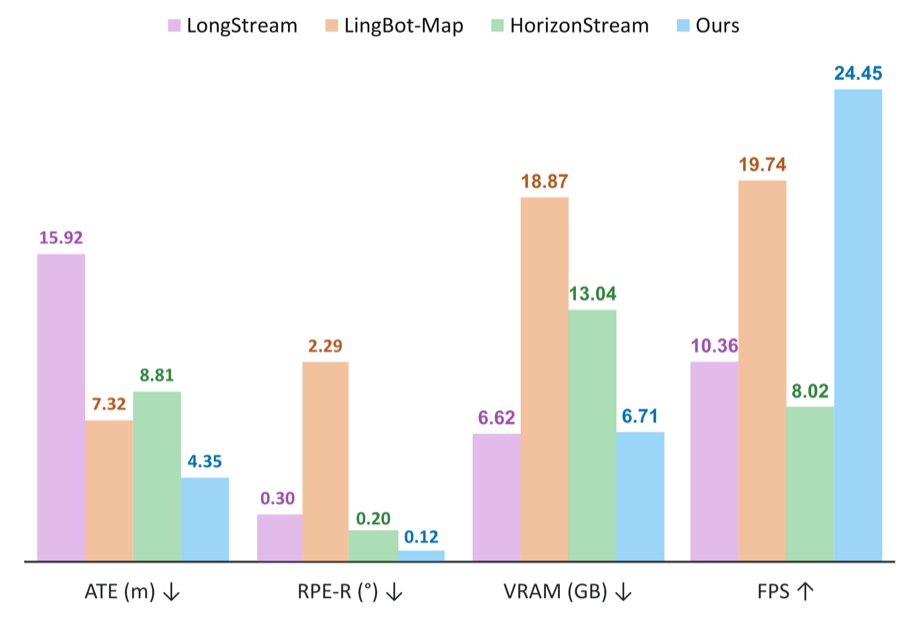
Базовой модели замыкание петель вообще не требуется. Опционально уточняющий бэкенд находит пары кадров с повторным посещением по дескрипторам DINOv2-SALAD и уточняет траекторию с помощью разреженной pose-graph оптимизации — в CLI включено по умолчанию, если установлены её дополнительные зависимости.Насколько это быстро и насколько точны результаты?Работает на скорости 24.45 FPS, используя 6.71 GiB на H100 при разрешении 504×280. На Oxford Spires одна лишь потоковая модель без какого-либо замыкания петель достигает ATE 4.35 м по позе камеры и 91.81% F1 по плотной реконструкции.
Работает на скорости 24.45 FPS, используя 6.71 GiB на H100 при разрешении 504×280. На Oxford Spires одна лишь потоковая модель без какого-либо замыкания петель достигает ATE 4.35 м по позе камеры и 91.81% F1 по плотной реконструкции.На каких существующих наработках это построено?Оно построено на Pi3 и вдохновлено CroCo, DUSt3R, DINOv2, SALAD, FlashInfer, LingBot-Map, HorizonStream и LongStream.
Оно построено на Pi3 и вдохновлено CroCo, DUSt3R, DINOv2, SALAD, FlashInfer, LingBot-Map, HorizonStream и LongStream.What are similar projects?wuji-ego-mint, lingbot-map, WorldSculpt, ZDTaichu5.0-9B, video-prediction-policy-2, InsertAny3D, pointdit, openpose
wuji-ego-mint, lingbot-map, WorldSculpt, ZDTaichu5.0-9B, video-prediction-policy-2, InsertAny3D, pointdit, openposeWhich topics is it in?slam, photogrammetry, pose-estimation, 3d-reconstruction, pretrained-models, robotics, streaming, inference, huggingface, computer-vision, cuda, pytorch
slam, photogrammetry, pose-estimation, 3d-reconstruction, pretrained-models, robotics, streaming, inference, huggingface, computer-vision, cuda, pytorch