





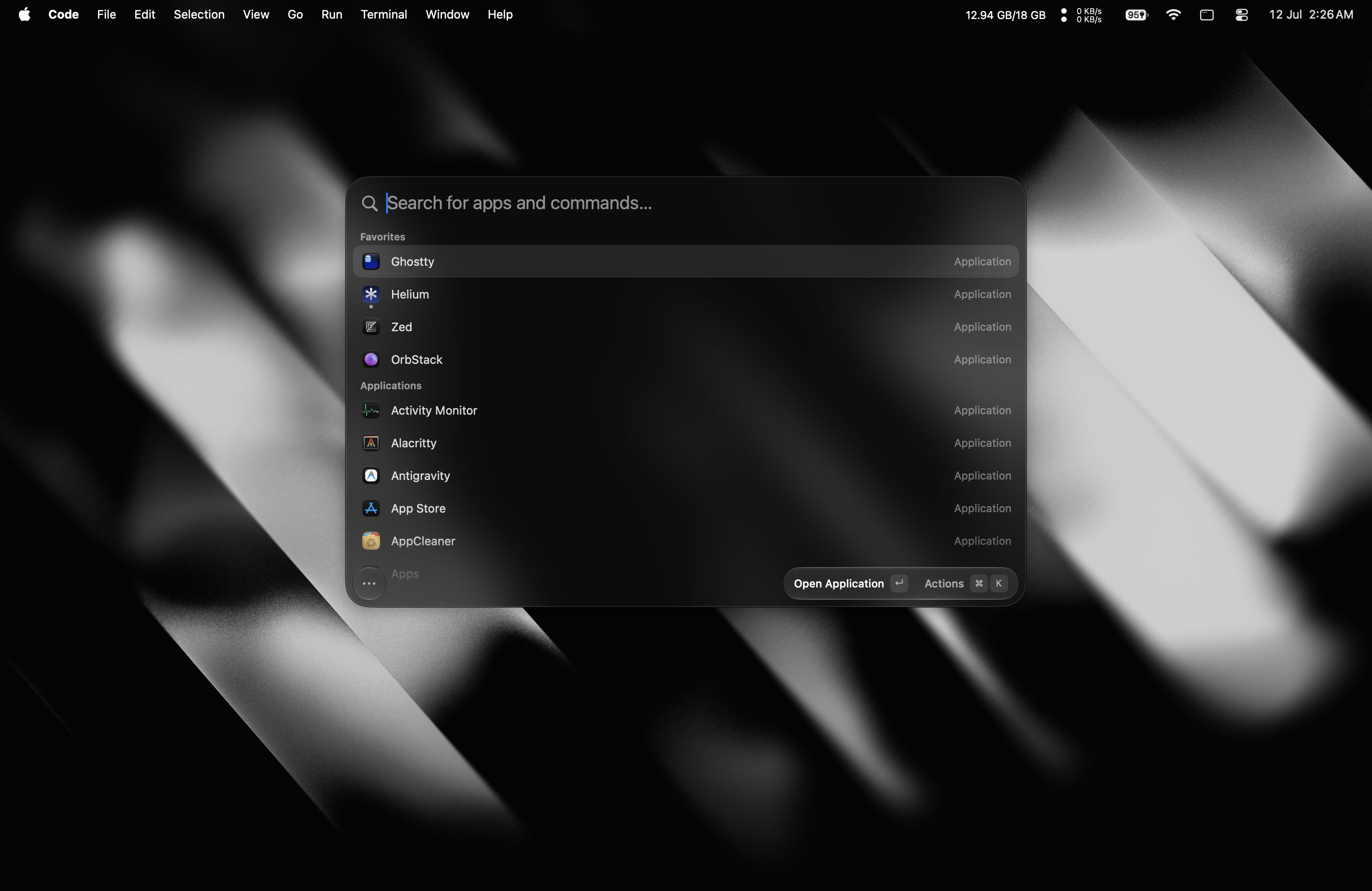

Что это такое?
 Tinycast — это крошечный полностью нативный лаунчер для macOS: одно глобальное сочетание клавиш вызывает панель для запуска приложений, истории буфера обмена, сниппетов, раскладки окон и многого другого — и всё это меньше чем в 100 МБ оперативной памяти.
Tinycast — это крошечный полностью нативный лаунчер для macOS: одно глобальное сочетание клавиш вызывает панель для запуска приложений, истории буфера обмена, сниппетов, раскладки окон и многого другого — и всё это меньше чем в 100 МБ оперативной памяти.Это приложение, которое я устанавливаю на Mac, или библиотека для разработчиков?Обычное приложение для macOS — сделано на SwiftUI и AppKit, без сторонних зависимостей и без Electron. Оно даже отображает расширения Raycast как нативный SwiftUI.
Обычное приложение для macOS — сделано на SwiftUI и AppKit, без сторонних зависимостей и без Electron. Оно даже отображает расширения Raycast как нативный SwiftUI.Он запустится на моём Mac?Нужна только свежая macOS: на Mac с чипом Apple — macOS 26 или новее, на Intel — macOS 26 через cask tinycast-universal. Homebrew сам проверит ваш чип и не даст поставить не ту версию.
Нужна только свежая macOS: на Mac с чипом Apple — macOS 26 или новее, на Intel — macOS 26 через cask tinycast-universal. Homebrew сам проверит ваш чип и не даст поставить не ту версию.Нужны ли какие-то особые системные разрешения?Всего одно — «Универсальный доступ», и только когда Tinycast вставляет или разворачивает текст в другом приложении: раскрытие сниппетов по ключевому слову — единственная функция, которой это нужно. Запрос на разрешение появится при первом использовании такой функции.
Всего одно — «Универсальный доступ», и только когда Tinycast вставляет или разворачивает текст в другом приложении: раскрытие сниппетов по ключевому слову — единственная функция, которой это нужно. Запрос на разрешение появится при первом использовании такой функции.Он собирает какие-нибудь мои данные?Никакой телеметрии, а нажатия клавиш для сниппетов обрабатываются локально — они нигде не хранятся и никуда не отправляются. Функции И изначально выключены и работают с вашим собственным ключом.
Никакой телеметрии, а нажатия клавиш для сниппетов обрабатываются локально — они нигде не хранятся и никуда не отправляются. Функции И изначально выключены и работают с вашим собственным ключом.Что есть внутри, кроме запуска приложений?История буфера обмена для текста и картинок, сниппеты Markdown с динамическими подстановками, 34 действия с окнами в духе Rectangle (половины, четверти, трети, Spaces), встроенный калькулятор с переводом единиц, живыми курсами валют и криптовалют, быстрые ссылки, Apple Shortcuts, заметки в обычном Markdown, выбор эмодзи, системные действия и присоединение к встречам из календаря одной клавишей или автоматически.
История буфера обмена для текста и картинок, сниппеты Markdown с динамическими подстановками, 34 действия с окнами в духе Rectangle (половины, четверти, трети, Spaces), встроенный калькулятор с переводом единиц, живыми курсами валют и криптовалют, быстрые ссылки, Apple Shortcuts, заметки в обычном Markdown, выбор эмодзи, системные действия и присоединение к встречам из календаря одной клавишей или автоматически.Что умеют функции ИИ?Можно общаться в чате прямо из панели, используя свой API-ключ или установленный аккаунт ИИ, а Quick Actions исправляют грамматику, переписывают, переводят или пересказывают выделенный текст в любом приложении. Все функции ИИ по умолчанию выключены.
Можно общаться в чате прямо из панели, используя свой API-ключ или установленный аккаунт ИИ, а Quick Actions исправляют грамматику, переписывают, переводят или пересказывают выделенный текст в любом приложении. Все функции ИИ по умолчанию выключены.Есть ли бета-канал?Да — команда brew install --cask tinycast@beta ставит Tinycast Beta.app рядом со стабильной версией, со своими настройками и разрешениями.
Да — команда brew install --cask tinycast@beta ставит Tinycast Beta.app рядом со стабильной версией, со своими настройками и разрешениями.What are similar projects?rustcast, Maccy, Sapphire, BrewUI, KiwiDesk, Wox, MacPacker, vorssaint-utils
rustcast, Maccy, Sapphire, BrewUI, KiwiDesk, Wox, MacPacker, vorssaint-utilsWhich topics is it in?clipboard-manager, tiling, app-launcher, emoji, raycast, clipboard, snippets, window-management, launcher, calendar, keyboard, swiftui
clipboard-manager, tiling, app-launcher, emoji, raycast, clipboard, snippets, window-management, launcher, calendar, keyboard, swiftui