Viscose
A portfolio carousel rendered as a single WebGL shader. Project cards ride a
ring that sits mostly off-screen, so you see a tall arc of work sweeping past.
Scroll, drag or swipe to turn it; it settles with a card facing front.
Viscose: a viscous state, and a fibre spun by drawing that state into a
thread. Which is what the cards do when they pull apart.


The cards are not images in a grid. The whole ring is one full-screen fragment
shader drawing signed distance fields, which is what lets neighbouring cards
melt into one another as they close up and string thin threads as they pull
apart. The cursor doesn't draw anything — it softens the surface under itself,
leans nearby cards toward it and webs honey back between them.
Read the breakdown → — where the idea came from, how
viscosity became a distance field, and the four things that only showed up
once it moved.
Quick start
Requires Node 20 or newer.
git clone https://github.com/Yousuf-developer/viscose.git
cd viscose
npm install
npm run dev
Then open http://localhost:3000.
|
|
npm run dev |
dev server |
npm run build |
production build |
npm start |
serve the build |
npm run lint |
eslint |
Built with Next.js 16 (App Router), React 19, Three.js, GSAP and Tailwind v4.
PP Neue Montreal is bundled for development only and is not licensed for
commercial use by this project. See Fonts.
What you can interact with
- Scroll or drag to turn the ring. It has momentum and snaps to the
nearest card.
- Hover a card to soften the field around it, push its neighbours aside
and string threads between them.
- Click an off-centre card to turn the ring smoothly until it's at the
front.
- On touch, swipe to turn and press-and-hold for the hover effects — a
finger has no hover state, so it sits behind a deliberate gesture.
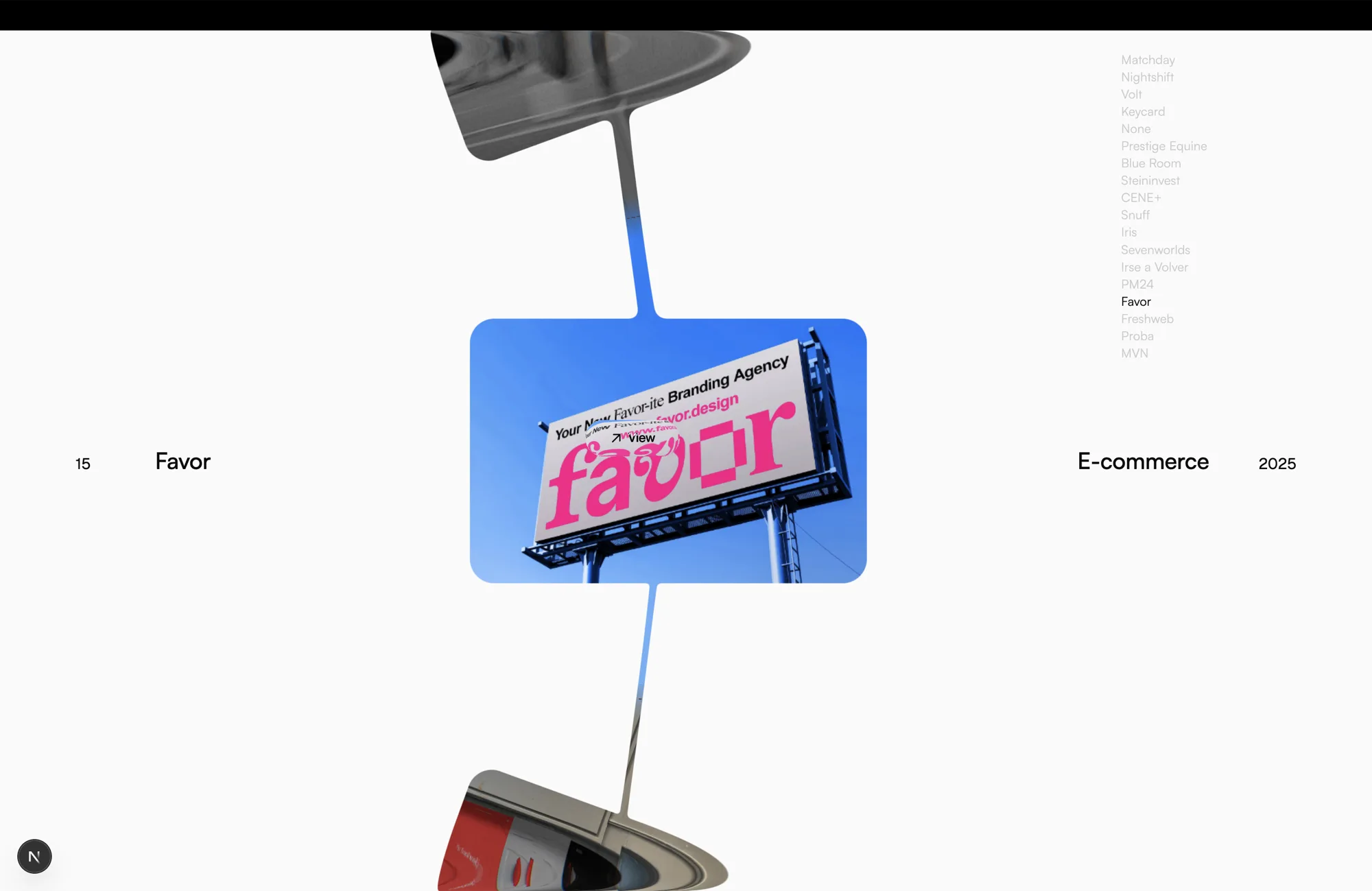
The threads are not drawn between the cards — they're part of the same
distance field, so they thin, sag and dissolve on their own as the gap opens.
The glass lip along the top and bottom edges is refracting the two neighbours
into those swept shapes, and that too is the same shader pass.
The dev panel
In development a lil-gui panel appears
top-right with every tunable in the project — around 136 of them, grouped by
what they affect. Drag a slider and the change is live.
It never ships: the panel and lil-gui itself are both behind a dynamic import
guarded by NODE_ENV === "development".
Before you tune anything, open the fit folder and check that scale
reads 1.000. Every pixel measurement in the project is quoted against a
reference window (a 14" MacBook Pro, 1512 points wide). On a different screen
you'd be tuning against a scale factor that isn't 1, and the result will look
right for you and wrong for everyone else. There's a use this window as ref button that fixes this in one click.
| Folder |
What's in it |
fit |
reference window, scale clamps, the two responsive breakpoints |
shape |
card size, count, ring radius, corner, art crossfade |
timing / stage |
the entry animation |
meta |
the type either side of the ring, and its morph |
pointer / side cards |
how the ring reacts to a cursor |
honey |
the threads between cards |
glass |
the refracting lip along the top and bottom edges |
Making it yours
Projects
Everything lives in one array, components/ring/projects.js:
{ file: "10.webp", name: "Matchday", type: "Motion", year: "2025" }
Drop an image in public/, add a row, done. The array does four jobs at once —
it's the atlas packing order, the order art is dealt around the ring, the
project column top-right, and the 01–18 numbering. Reordering rows moves
all four together.
The list is in ring order, not filename order. It reads shuffled against
the file numbers, and that's deliberate: entry n sits one slot along the
ring from entry n−1, which is what lets the column count up as the carousel
turns. Reorder these rows to change the sequence; don't reach for
imageOffset, which rotates the art without moving the list with it.
All of the sample data is placeholder: every type and year is invented,
names marked (*) are guesses at the subject, and the images are other
people's work collected to build the layout against. See
About the artwork.
Fonts
Three families, declared in app/globals.css and looked up by name from
components/ring/params.js — so if you swap one, change it in both places.
| Family |
Used for |
Weights |
Licence |
| Satoshi |
project name, discipline, index column |
400, 500 |
Fontshare, free |
| Geist |
number, year, load counter |
400 |
OFL |
| PP Neue Montreal |
intro heading, cursor tag |
400 |
Pangram Pangram, commercial |
[!IMPORTANT]
PP Neue Montreal is not licensed by this project. It is a commercial
typeface from Pangram Pangram
and the file is included here for local development and evaluation only.
It is not covered by this repo's MIT licence and must not be used for
commercial purposes. If you ship anything with it, buy your own licence —
or swap textFont in params.js for Satoshi, which is free for commercial
work and already included.
Satoshi and Geist are both free to redistribute and use commercially.
Fonts are served as .otf/.ttf (~340 KB total). Converting to woff2
would cut that by roughly 60% — worth doing before this goes anywhere real.
How it's put together
app/
  page.js            renders <Carousel />
  globals.css        Tailwind, @font-face, page background

components/
  Carousel.jsx      the component — renderer, resize, input, per-frame
                     layout, entry timeline
  ring/
    projects.js      the work
    params.js        every tunable
    utils.js         maths helpers
    atlas.js         packs all the art into one texture
    meta.js          the type either side of the ring
    splitText.js     the intro heading
    tag.js           the "View" tag on the cursor
    gui.js           the dev panel
  shaders/
    planeShaders.js  the ring — SDFs, goo, glass, tag
    textShaders.js   the heading's per-glyph reveal
Two ideas explain most of the rest.
One shader, one draw call. The ring, the threads between cards, the glass
lip along the screen edges and the cursor tag are all evaluated per pixel in
planeShaders.js. Card positions arrive as uniform arrays, and the fragment
shader blends their distance fields with a smooth minimum — that soft blend is
the goo. Because the tag is drawn in the same pass, its label can invert
against whatever pixels it happens to be sitting on.

The entry is the clearest look at what the smooth minimum is doing. Every card
starts merged inside the one before it and peels away in sequence, so at any
moment during the unfurl some pairs have fully separated, some are joined by a
thinning neck, and some are still one blob.
Loading is part of the animation. The atlas binds on the first frame and
fills in as images arrive, with the first card's art requested at high priority
so it can be shown while the rest are still downloading. The counter at the
bottom of the screen isn't a readout beside the entry — it is the gate. The
seed card is born, holds at centre, and the ring launches on the frame the
number reaches 100.
For the deeper technical notes — coordinate conventions, the responsive model,
and the handful of things here that look like bugs but aren't — see
AGENTS.md.
Status
This is a work in progress, published because the rendering approach might be
useful to someone. Known gaps:
- Clicking a card centres it but doesn't open anything. The "View" tag
promises a destination that doesn't exist yet.
- No reduced-motion support. Six seconds of animated blur with no escape
hatch.
- No keyboard control. Arrow keys should step the ring; the project column
can't be clicked to jump.
- Phone widths are approximate. The tight breakpoint was tuned at the 640
end of its range and drifts below ~500px.
- No tests.
npm run build and npm run lint are the whole safety net,
and GLSL only compiles at runtime — a shader typo builds green.
Contributing
Issues and pull requests are welcome.
- Run
npm run lint and npx prettier --write . before opening a PR.
- Load the page after touching anything in
components/shaders/ — GLSL is
compiled in the browser, so a build passing proves nothing about it.
- New tunables belong in
params.js with a matching control in ring/gui.js,
not hardcoded in the layout loop.
- Please don't commit font binaries or client artwork.
Credits
- The gooey text morph — two blurred copies fused through an SVG alpha
threshold — is a widely circulated CodePen technique, adapted here to run
one-shot per card change instead of on a loop.
- Simplex noise in the ring shader is
webgl-noise by Ian McEwan (Ashima
Arts) and Stefan Gustavson, MIT.
- Arrow icon from SVG Repo.
License
MIT for the source code. Not for anything in public/.
About the artwork
The project images are not mine. I picked them up from Behance, more or
less at random, purely so there was real work to build and judge the layout
against — a carousel full of grey rectangles tells you nothing about whether
the thing looks good.
I claim no ownership of any of it, the MIT licence above does not extend to
it, and none of this is an endorsement of reusing it. If you fork this,
replace the images with your own work.
The names, disciplines and years shown next to them are invented placeholders
and are not claims about who made what.
If you made one of these pieces and would like to be credited, or would
like it removed, please open an issue and I'll sort it out
straight away.
The bundled PP Neue Montreal is likewise not licensed by this project — see
Fonts.

 Viscose 是一个完全用单个 WebGL 片段着色器渲染的作品集轮播。卡片排在一个大部分在屏幕外的圆环上;当它们靠拢时会像液体一样彼此融合,分开时又会在相互之间拉出细丝。