




Что это такое?
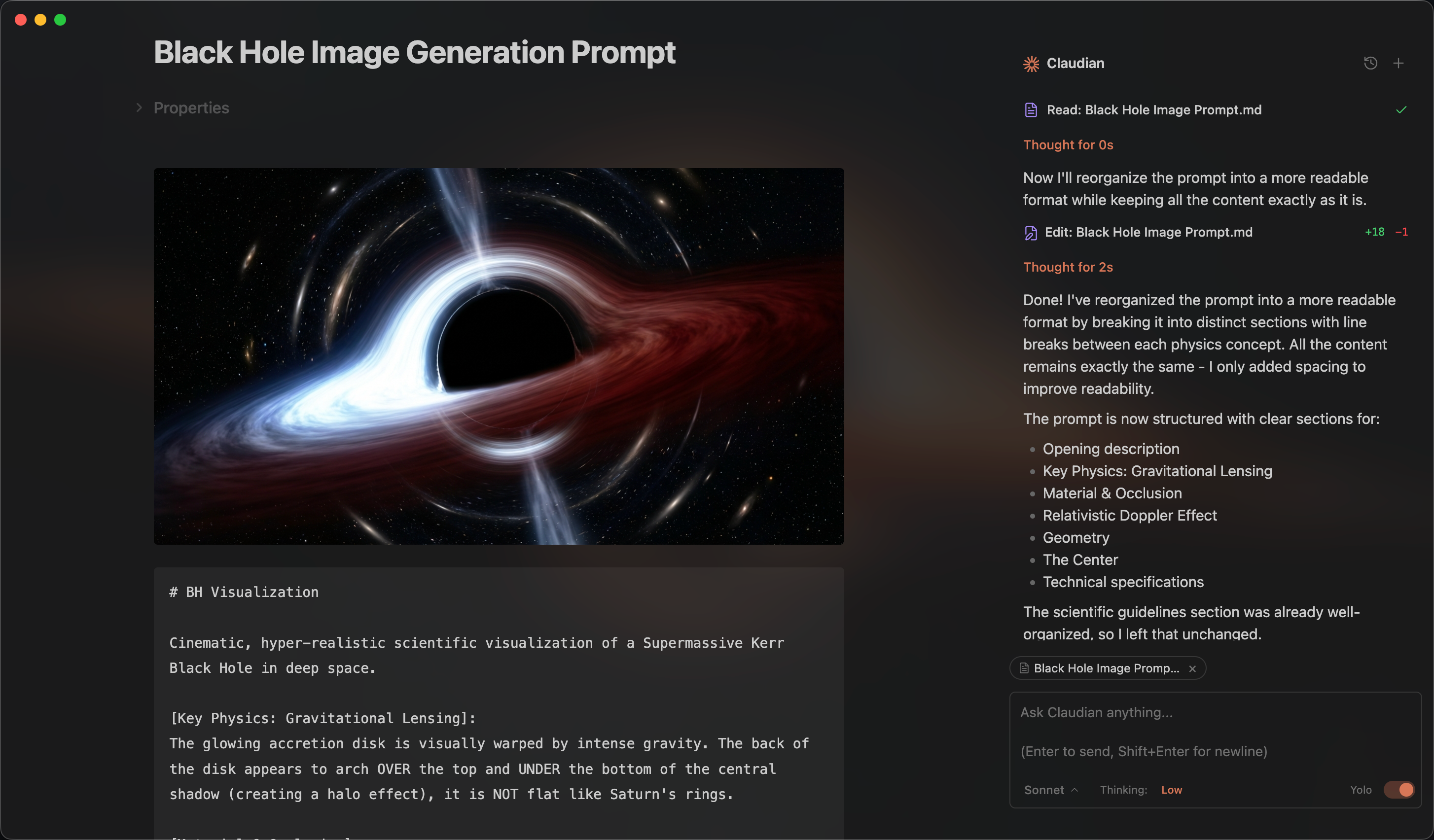
 Claudian — плагин для Obsidian, который встраивает ИИ-агентов для программирования (Claude Code, Codex, Grok, Opencode, Pi) в ваше хранилище и делает хранилище рабочей папкой агента: он может читать и записывать файлы, искать и выполнять команды bash.
Claudian — плагин для Obsidian, который встраивает ИИ-агентов для программирования (Claude Code, Codex, Grok, Opencode, Pi) в ваше хранилище и делает хранилище рабочей папкой агента: он может читать и записывать файлы, искать и выполнять команды bash.Это отдельное приложение или нужно, чтобы был запущен Obsidian?Это плагин для Obsidian, а не отдельное приложение: он работает внутри настольной версии Obsidian и управляет внешними CLI-инструментами ИИ-агентов, которые у вас уже установлены.
Это плагин для Obsidian, а не отдельное приложение: он работает внутри настольной версии Obsidian и управляет внешними CLI-инструментами ИИ-агентов, которые у вас уже установлены.Как мне установить Claudian?Установите его через каталог сторонних плагинов Obsidian: найдите «Claudian», нажмите «Установить» и включите; либо склонируйте репозиторий в папку plugins вашего хранилища и соберите плагин из исходного кода.
Установите его через каталог сторонних плагинов Obsidian: найдите «Claudian», нажмите «Установить» и включите; либо склонируйте репозиторий в папку plugins вашего хранилища и соберите плагин из исходного кода.Нужно ли мне сначала установить Claude Code или другой CLI?Да — должен быть установлен хотя бы один харнесс (Claude Code CLI, Codex CLI, Grok Build, OpenCode или Pi), а также совместимая подписка или API-провайдер, например OpenRouter, Kimi, GLM или DeepSeek, и Obsidian версии v1.13.0+.
Да — должен быть установлен хотя бы один харнесс (Claude Code CLI, Codex CLI, Grok Build, OpenCode или Pi), а также совместимая подписка или API-провайдер, например OpenRouter, Kimi, GLM или DeepSeek, и Obsidian версии v1.13.0+.Какие подводные камни при установке мне стоит знать?Сборка плагина теперь весит более 5 МБ из-за Claude Agent SDK, поэтому официальная синхронизация Obsidian Sync её не переносит — устанавливать и обновлять плагин придётся вручную на каждом устройстве. Автоопределение CLI также может не сработать в Windows, если CLI провайдера не добавлен в PATH для графических приложений.
Сборка плагина теперь весит более 5 МБ из-за Claude Agent SDK, поэтому официальная синхронизация Obsidian Sync её не переносит — устанавливать и обновлять плагин придётся вручную на каждом устройстве. Автоопределение CLI также может не сработать в Windows, если CLI провайдера не добавлен в PATH для графических приложений.Claudian работает в мобильной версии Obsidian или только на компьютере?Только на компьютере — macOS, Linux и Windows. Мобильная версия не поддерживается, а для Collab Mode дополнительно нужен Git.
Только на компьютере — macOS, Linux и Windows. Мобильная версия не поддерживается, а для Collab Mode дополнительно нужен Git.Куда уходят данные моего хранилища, когда я использую Claudian?Ваш ввод, прикреплённые файлы, изображения и результаты вызовов инструментов отправляются выбранному провайдеру (Anthropic, OpenAI, xAI или бэкенду, настроенному в OpenCode или Pi); собственной телеметрии у плагина нет.
Ваш ввод, прикреплённые файлы, изображения и результаты вызовов инструментов отправляются выбранному провайдеру (Anthropic, OpenAI, xAI или бэкенду, настроенному в OpenCode или Pi); собственной телеметрии у плагина нет.Что такое Collab Mode?Экспериментальная функция, которая позволяет нескольким пользователям Claudian совместно работать над общим проектом; данные проекта в Git и служебные метаданные синхронизируются напрямую между устройствами участников по локальной сети, без участия облачного сервиса Claudian.
Экспериментальная функция, которая позволяет нескольким пользователям Claudian совместно работать над общим проектом; данные проекта в Git и служебные метаданные синхронизируются напрямую между устройствами участников по локальной сети, без участия облачного сервиса Claudian.Что делает Inline Edit?Выделите текст или поставьте курсор и нажмите горячую клавишу — агент отредактирует заметку прямо на месте, а перед применением изменений вы увидите предпросмотр правок по словам.
Выделите текст или поставьте курсор и нажмите горячую клавишу — агент отредактирует заметку прямо на месте, а перед применением изменений вы увидите предпросмотр правок по словам.Можно ли подключить MCP-серверы к Claudian?Да — MCP-серверы настраиваются через собственную конфигурацию MCP каждого ИИ-агента, которой управляет его CLI, а не через отдельную настройку Claudian.
Да — MCP-серверы настраиваются через собственную конфигурацию MCP каждого ИИ-агента, которой управляет его CLI, а не через отдельную настройку Claudian.Почему мейнтейнер не принимает PR с добавлением новых провайдеров агентов?В руководстве для контрибьюторов прямо сказано, что это граница поддержки и качества продукта, поэтому новые интеграции провайдеров не принимаются как pull request от сообщества.
В руководстве для контрибьюторов прямо сказано, что это граница поддержки и качества продукта, поэтому новые интеграции провайдеров не принимаются как pull request от сообщества.What are similar projects?obsidian-git, operator-memory, pstack, cc-switch, overmind, plannotator, claude-obsidian, obsidian-second-brain
obsidian-git, operator-memory, pstack, cc-switch, overmind, plannotator, claude-obsidian, obsidian-second-brainWhich topics is it in?obsidian-plugin, diff, pi, obsidian, grok, ide, note-taking, opencode, model-context-protocol, knowledge-base, anthropic, coding-agent
obsidian-plugin, diff, pi, obsidian, grok, ide, note-taking, opencode, model-context-protocol, knowledge-base, anthropic, coding-agent