




What is this?
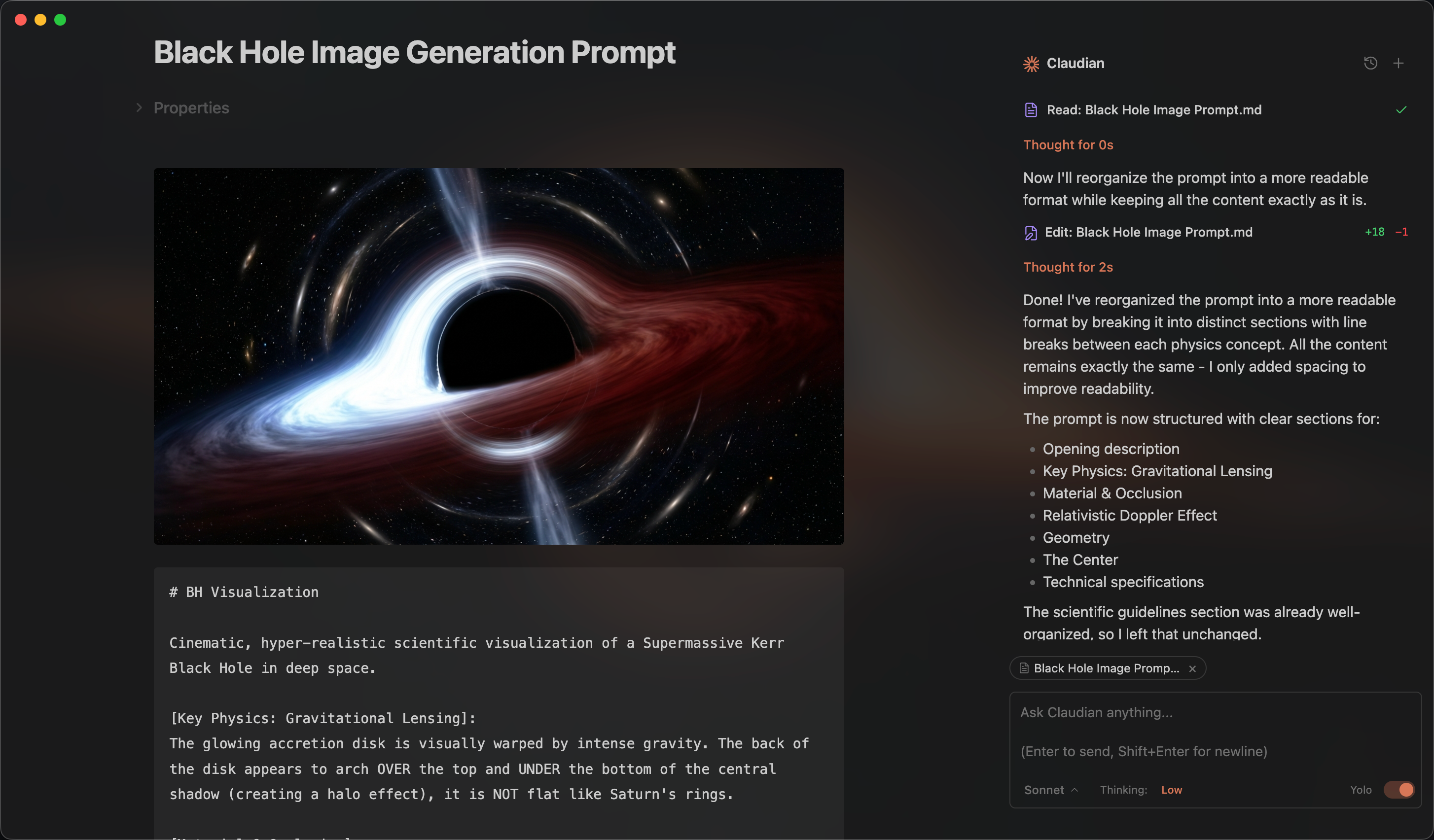
 Claudian is an Obsidian plugin that embeds AI coding agents (Claude Code, Codex, Grok, Opencode, Pi) into your vault, turning the vault into the agent's working directory for file read/write, search, and bash commands.
Claudian is an Obsidian plugin that embeds AI coding agents (Claude Code, Codex, Grok, Opencode, Pi) into your vault, turning the vault into the agent's working directory for file read/write, search, and bash commands.Is this a standalone app or does it need Obsidian running?It's an Obsidian plugin, not a standalone app — it lives inside the Obsidian desktop app and drives external coding-agent CLIs you already have installed.
It's an Obsidian plugin, not a standalone app — it lives inside the Obsidian desktop app and drives external coding-agent CLIs you already have installed.How do I install Claudian?Install it from Obsidian's Community Plugins browser by searching for 'Claudian' and clicking Install, then enable it; alternatively, clone the repo into your vault's plugins folder and build it from source.
Install it from Obsidian's Community Plugins browser by searching for 'Claudian' and clicking Install, then enable it; alternatively, clone the repo into your vault's plugins folder and build it from source.Do I need Claude Code or another CLI installed first?Yes — at least one harness (Claude Code CLI, Codex CLI, Grok Build, OpenCode, or Pi) must be installed, plus a compatible subscription or API provider such as OpenRouter, Kimi, GLM, or DeepSeek, and Obsidian v1.13.0+.
Yes — at least one harness (Claude Code CLI, Codex CLI, Grok Build, OpenCode, or Pi) must be installed, plus a compatible subscription or API provider such as OpenRouter, Kimi, GLM, or DeepSeek, and Obsidian v1.13.0+.Any install pitfalls I should know about?The plugin bundle is now over 5 MB because of the Claude Agent SDK, so Obsidian's official Sync can't sync it — you need to install and update it manually on each device. CLI auto-detection can also fail on Windows if the provider CLI isn't on PATH for GUI apps.
The plugin bundle is now over 5 MB because of the Claude Agent SDK, so Obsidian's official Sync can't sync it — you need to install and update it manually on each device. CLI auto-detection can also fail on Windows if the provider CLI isn't on PATH for GUI apps.Does Claudian work on mobile Obsidian or only desktop?Desktop only — macOS, Linux, and Windows. There's no mobile support, and Collab Mode additionally requires Git.
Desktop only — macOS, Linux, and Windows. There's no mobile support, and Collab Mode additionally requires Git.Where does my vault data go when I use Claudian?Your input, attached files, images, and tool call outputs are sent to whichever provider you select (Anthropic, OpenAI, xAI, or an OpenCode/Pi-configured backend); the plugin runs no telemetry of its own.
Your input, attached files, images, and tool call outputs are sent to whichever provider you select (Anthropic, OpenAI, xAI, or an OpenCode/Pi-configured backend); the plugin runs no telemetry of its own.What is Collab Mode?An experimental feature letting multiple Claudian users work on a shared project together; Git-based project data and coordination metadata sync directly between teammates' devices over the local network, with no Claudian cloud service involved.
An experimental feature letting multiple Claudian users work on a shared project together; Git-based project data and coordination metadata sync directly between teammates' devices over the local network, with no Claudian cloud service involved.What does Inline Edit do?Select text or place the cursor and trigger a hotkey to have the agent edit directly in your notes, with a word-level diff preview before changes are applied.
Select text or place the cursor and trigger a hotkey to have the agent edit directly in your notes, with a word-level diff preview before changes are applied.Can I connect MCP servers to Claudian?Yes — MCP servers are configured through each coding agent's own native CLI-managed MCP configuration rather than a separate Claudian setting.
Yes — MCP servers are configured through each coding agent's own native CLI-managed MCP configuration rather than a separate Claudian setting.Why won't the maintainer accept PRs adding new agent providers?The contribution guide explicitly draws this as a maintenance and product-quality boundary, so new provider integrations are not accepted as community pull requests.
The contribution guide explicitly draws this as a maintenance and product-quality boundary, so new provider integrations are not accepted as community pull requests.What are similar projects?obsidian-git, operator-memory, pstack, overmind, cc-switch, plannotator, claude-obsidian, obsidian-second-brain
obsidian-git, operator-memory, pstack, overmind, cc-switch, plannotator, claude-obsidian, obsidian-second-brainWhich topics is it in?obsidian-plugin, diff, pi, obsidian, grok, ide, note-taking, opencode, model-context-protocol, knowledge-base, anthropic, coding-agent
obsidian-plugin, diff, pi, obsidian, grok, ide, note-taking, opencode, model-context-protocol, knowledge-base, anthropic, coding-agent