Xiaomi Home Integration for Home Assistant
English | 简体中文
Xiaomi Home Integration is an integrated component of Home Assistant supported by Xiaomi official. It allows you to use Xiaomi IoT smart devices in Home Assistant.
Installation
Home Assistant version requirement:
- Core $\geq$ 2024.4.4
- Operating System $\geq$ 13.0
Method 1: Git clone from GitHub
cd config
git clone https://github.com/XiaoMi/ha_xiaomi_home.git
cd ha_xiaomi_home
./install.sh /config
We recommend this installation method, for it is convenient to switch to a tag when updating xiaomi_home to a certain version.
For example, update to version v1.0.0
cd config/ha_xiaomi_home
git fetch
git checkout v1.0.0
./install.sh /config
Method 2: HACS
One-click installation from HACS:

Or, HACS > In the search box, type Xiaomi Home > Click Xiaomi Home, getting into the detail page > DOWNLOAD
Method 3: Manually installation via Samba / FTPS
Download and copy custom_components/xiaomi_home folder to config/custom_components folder in your Home Assistant.
Configuration
Login
Settings > Devices & services > ADD INTEGRATION > Search Xiaomi Home > NEXT > Click here to login > Sign in with Xiaomi account

Add MIoT Devices
After logging in successfully, a dialog box named "Select Home and Devices" pops up. You can select the home containing the device that you want to import in Home Assistant.
Multiple User Login
After a Xiaomi account login and its user configuration are completed, you can continue to add other Xiaomi accounts in the configured Xiaomi Home Integration page.
Method: Settings > Devices & services > Configured > Xiaomi Home > ADD HUB > NEXT > Click here to login > Sign in with Xiaomi account

Update Configurations
You can change the configurations in the "Configuration Options" dialog box, in which you can update your user nickname and the list of the devices importing from Xiaomi Home APP, etc.
Method: Settings > Devices & services > Configured > Xiaomi Home > CONFIGURE > Select the option to update
Debug Mode for Action
You can manually send Action command message with parameters to the device when the debug mode for action is activated. The user interface for sending the Action command with parameters is shown as a Text entity.
Method: Settings > Devices & services > Configured > Xiaomi Home > CONFIGURE > Debug mode for action
Security
Xiaomi Home Integration and the affiliated cloud interface is provided by Xiaomi officially. You need to use your Xiaomi account to login to get your device list. Xiaomi Home Integration implements OAuth 2.0 login process, which does not keep your account password in the Home Assistant application. However, due to the limitation of the Home Assistant platform, the user information (including device information, certificates, tokens, etc.) of your Xiaomi account will be saved in the Home Assistant configuration file in clear text after successful login. You need to ensure that your Home Assistant configuration file is properly stored. The exposure of your configuration file may result in others logging in with your identity.
If you suspect that your OAuth 2.0 token has been leaked, you can revoke the login authorization of your Xiaomi account by the following steps: Xiaomi Home APP -> Profile -> Click your username and get into Xiaomi Account management page -> Basic info: Apps -> Xiaomi Home (Home Assistant Integration) -> Remove
FAQ
Does Xiaomi Home Integration support all Xiaomi smart devices?
Xiaomi Home Integration currently supports most categories of the smart device. Only a few categories are not supported. They are Bluetooth device, infrared device and virtual device.
Does Xiaomi Home Integration support multiple Xiaomi accounts?
Yes, it supports multiple Xiaomi accounts. Furthermore, Xiaomi Home Integration allows that devices belonging to different accounts can be added to a same area.
Does Xiaomi Home Integration support local mode?
Local mode is implemented by Xiaomi Central Hub Gateway (firmware version 3.3.0_0023 and above) or Xiaomi smart devices with built-in central hub gateway (software version 0.8.9 and above) inside. If you do not have a Xiaomi central hub gateway or other devices having central hub gateway function, all control commands are sent through Xiaomi Cloud. The firmware for Xiaomi central hub gateway including the built-in central hub gateway supporting Home Assistant local mode feature has been released.
Xiaomi central hub gateway is only available in mainland China. In other regions, it is not available.
Xiaomi Home Integration can also implement partial local mode by enabling Xiaomi LAN control function. Xiaomi LAN control function can only control IP devices (devices connected to the router via WiFi or ethernet cable) in the same local area network as Home Assistant. It cannot control BLE Mesh, ZigBee, etc. devices. This function may cause some abnormalities. We recommend NOT using this function. Xiaomi LAN control function is enabled by Settings > Devices & services > Configured > Xiaomi Home > CONFIGURE > Update LAN control configuration.
Xiaomi LAN control function is not restricted by region. It is available in all regions. However, if there is a central gateway in the local area network where Home Assistant is located, even Xiaomi LAN control function is enabled in the integration, it will not take effect.
In which regions is Xiaomi Home Integration available?
Xiaomi Home Integration can be used in the mainland of China, Europe, India, Russia, Singapore, and USA. As user data in Xiaomi Cloud of different regions is isolated, you need to choose your region when importing MIoT devices in the configuration process. Xiaomi Home Integration allows you to import devices of different regions to a same area.
Principle of Messaging
Control through the Cloud
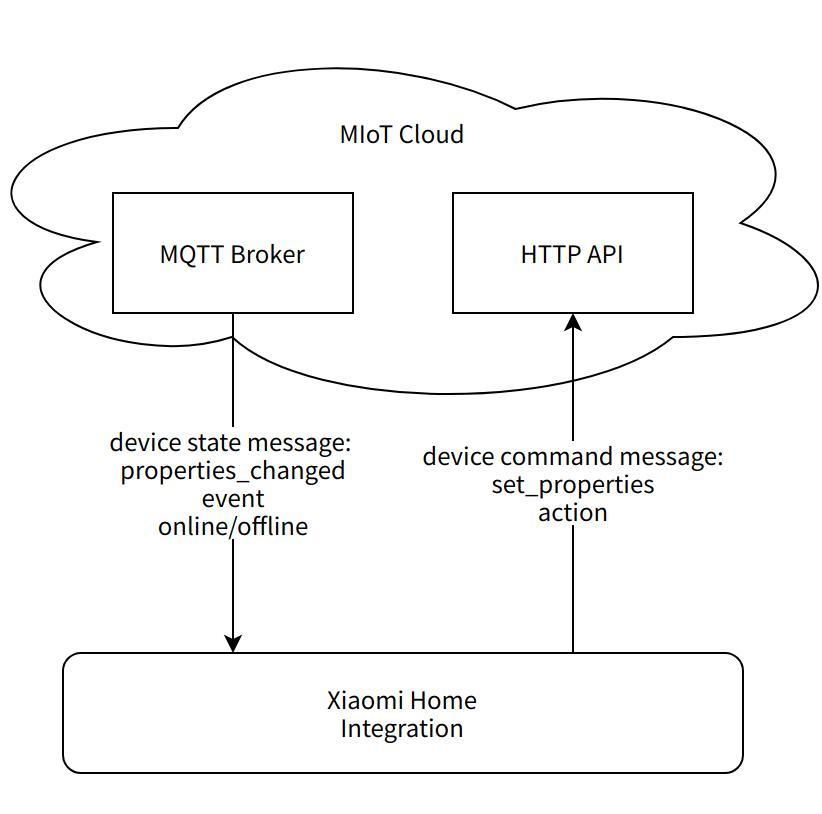
Image 1: Cloud control architecture
Xiaomi Home Integration subscribes to the interested device messages on the MQTT Broker in MIoT Cloud. When a device property changes or a device event occurs, the device sends an upstream message to MIoT Cloud, and the MQTT Broker pushes the subscribed device message to Xiaomi Home Integration. Because Xiaomi Home Integration does not need to poll to obtain the current device property value in the cloud, it can immediately receive the notification message when the properties change or the events occur. Thanks to the message subscription mechanism, Xiaomi Home Integration only queries the properties of all devices from the cloud once when the integration configuration is completed, which puts little access pressure on the cloud.
Xiaomi Home Integration sends command messages to the devices via the HTTP interface of MIoT Cloud to control devices. The device reacts and responds after receiving the downstream message sent forward by MIoT Cloud.
Control locally
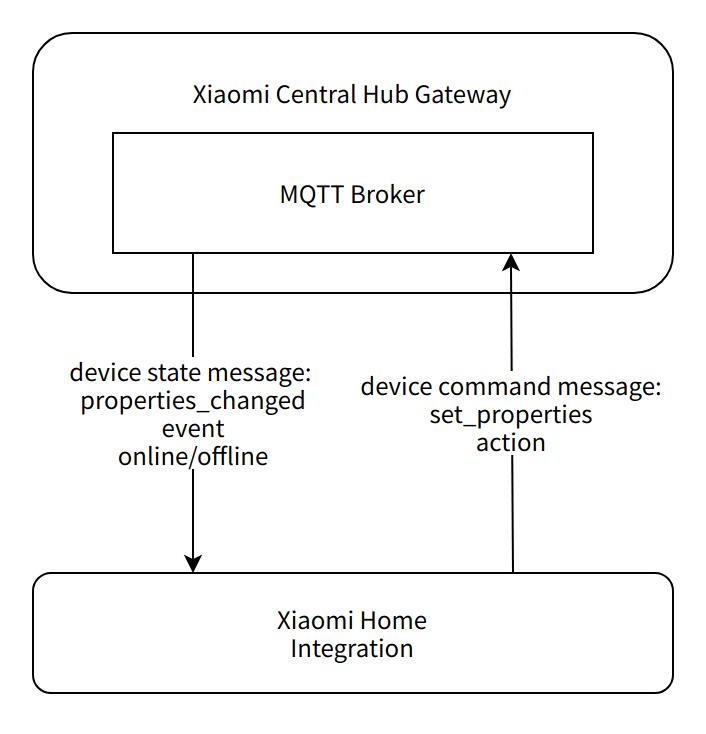
Image 2: Local control architecture
Xiaomi central hub gateway contains a standard MQTT Broker, which implements a complete subscribe-publish mechanism. Xiaomi Home Integration subscribes to the interested device messages through Xiaomi central hub gateway. When a device property changes or a device event occurs, the device sends an upstream message to Xiaomi central hub gateway, and the MQTT Broker pushes the subscribed device message to Xiaomi Home Integration.
When Xiaomi Home Integration needs to control a device, it publishes a device command message to the MQTT Broker, which is then forwarded to the device by Xiaomi central hub gateway. The device reacts and responds after receiving the downstream message from the gateway.
Mapping Relationship between MIoT-Spec-V2 and Home Assistant Entity
MIoT-Spec-V2 is the abbreviation for MIoT Specification Version 2, which is an IoT protocol formulated by Xiaomi IoT platform to give a standard functional description of IoT devices. It includes function definition (referred to as data model by other IoT platforms), interaction model, message format, and encoding.
In MIoT-Spec-V2 protocol, a product is defined as a device. A device contains several services. A service may have some properties, events and actions. Xiaomi Home Integration creates Home Assistant entities according to MIoT-Spec-V2. The conversion relationship is as follows.
General Conversion
| access |
format |
value-list |
value-range |
Entity in Home Assistant |
| writable |
string |
- |
- |
Text |
| writable |
bool |
- |
- |
Switch |
| writable |
not string & not bool |
existent |
- |
Select |
| writable |
not string & not bool |
non-existent |
existent |
Number |
| not writable |
- |
- |
- |
Sensor |
MIoT-Spec-V2 event is transformed to Event entity in Home Assistant. The event's parameters are also passed to entity's _trigger_event.
MIoT-Spec-V2 event's arguments field is the list of parameters of the event. The list elements represent the piid of the property in the same service. For example, the MIoT-Spec-V2 of the Xiaomi Wireless Double-key Switch contains the siid=2 Switch Sensor service. The eiid=1014 Long Press event of the service is triggered when a button is long pressed. The debug level log will print Press and hold, attributes: {'Button Type': 1}. This is an example log that the button type is 1, which means the right button is long pressed.
| in |
Entity in Home Assistant |
| empty |
Button |
| not empty |
Notify |
If the debug mode for action is activated, the Text entity will be created when the "in" field in the action spec is not empty.
The "Attribute" item in the entity details page displays the format of the input parameter which is an ordered list, enclosed in square brackets []. The string elements in the list are enclosed in double quotation marks "".
For example, the "Attributes" item in the details page of the Notify entity converted by the "Intelligent Speaker Execute Text Directive" action of xiaomi.wifispeaker.s12 siid=5, aiid=5 instance shows the action params as [Text Content(str), Silent Execution(bool)]. A properly formatted input is ["Hello", true].
Specific Conversion
MIoT-Spec-V2 uses URN for defining types. The format is urn:<namespace>:<type>:<name>:<value>[:<vendor-product>:<version>], in which name is a human-readable word or phrase describing the instance of device, service, property, event and action. Xiaomi Home Integration first determines whether to convert the MIoT-Spec-V2 instance into a specific Home Assistant entity based on the instance's name. For the instance that does not meet the specific conversion rules, general conversion rules are used for conversion.
namespace is the namespace of MIoT-Spec-V2 instance. When its value is miot-spec-v2, it means that the specification is defined by Xiaomi. When its value is bluetooth-spec, it means that the specification is defined by Bluetooth Special Interest Group (SIG). When its value is not miot-spec-v2 or bluetooth-spec, it means that the specification is defined by other vendors. If MIoT-Spec-V2 namespace is not miot-spec-v2, a star mark * is added in front of the entity's name .
The conversion follows SPEC_DEVICE_TRANS_MAP.
{
    '<device instance name>':{
        'required':{
            '<service instance name>':{
                'required':{
                    'properties': {
                        '<property instance name>': set<property access: str>
                    },
                    'events': set<event instance name: str>,
                    'actions': set<action instance name: str>
                },
                'optional':{
                    'properties': set<property instance name: str>,
                    'events': set<event instance name: str>,
                    'actions': set<action instance name: str>
                }
            }
        },
        'optional':{
            '<service instance name>':{
                'required':{
                    'properties': {
                        '<property instance name>': set<property access: str>
                    },
                    'events': set<event instance name: str>,
                    'actions': set<action instance name: str>
                },
                'optional':{
                    'properties': set<property instance name: str>,
                    'events': set<event instance name: str>,
                    'actions': set<action instance name: str>
                }
            }
        },
        'entity': str
    }
}
The "required" field under "device instance name" indicates the required services of the device. The "optional" field under "device instance name" indicates the optional services of the device. The "entity" field indicates the Home Assistant entity to be created. The "required" and the "optional" field under "service instance name" are required and optional properties, events and actions of the service respectively. The value of "property instance name" under "required" "properties" field is the access mode of the property. The condition for a successful match is that the value of "property instance name" is a subset of the access mode of the corresponding MIoT-Spec-V2 property instance.
Home Assistant entity will not be created if MIoT-Spec-V2 device instance does not contain all required services, properties, events or actions.
The conversion follows SPEC_SERVICE_TRANS_MAP.
{
    '<service instance name>':{
        'required':{
            'properties': {
                '<property instance name>': set<property access: str>
            },
            'events': set<event instance name: str>,
            'actions': set<action instance name: str>
        },
        'optional':{
            'properties': set<property instance name: str>,
            'events': set<event instance name: str>,
            'actions': set<action instance name: str>
        },
        'entity': str
    }
}
The "required" field under "service instance name" indicates the required properties, events and actions of the service. The "optional" field indicates the optional properties, events and actions of the service. The "entity" field indicates the Home Assistant entity to be created. The value of "property instance name" under "required" "properties" field is the access mode of the property. The condition for a successful match is that the value of "property instance name" is a subset of the access mode of the corresponding MIoT-Spec-V2 property instance.
Home Assistant entity will not be created if MIoT-Spec-V2 service instance does not contain all required properties, events or actions.
The conversion follows SPEC_PROP_TRANS_MAP.
{
    'entities':{
        '<entity name>':{
            'format': set<str>,
            'access': set<str>
        }
    },
    'properties': {
        '<property instance name>':{
            'device_class': str,
            'entity': str
        }
    }
}
The "format" field under "entity name" represents the data format of the property, and matching with one value indicates a successful match. The "access" field under "entity name" represents the access mode of the property, and matching with all values is considered a successful match.
The "entity" field under "property instance name", of which value is one of entity name under "entities" field, indicates the Home Assistant entity to be created. The "device_class" field under "property instance name" indicates the Home Assistant entity's _attr_device_class.
The conversion follows SPEC_EVENT_TRANS_MAP.
{
    '<event instance name>': str
}
The value of the event instance name indicates _attr_device_class of the Home Assistant entity to be created.
MIoT-Spec-V2 Filter
spec_filter.yaml is used to filter out the MIoT-Spec-V2 instance that will not be converted to Home Assistant entity.
The format of spec_filter.yaml is as follows.
<MIoT-Spec-V2 device instance urn without the version field>:
    services: list<service_iid: str>
    properties: list<service_iid.property_iid: str>
    events: list<service_iid.event_iid: str>
    actions: list<service_iid.action_iid: str>
The key of spec_filter.yaml dictionary is the urn excluding the "version" field of the MIoT-Spec-V2 device instance. The firmware of different versions of the same product may be associated with the MIoT-Spec-V2 device instances of different versions. It is required that the MIoT-Spec-V2 instance of a higher version must contain all MIoT-Spec-V2 instances of the lower versions when a vendor defines the MIoT-Spec-V2 of its product on MIoT platform. Thus, the key of spec_filter.yaml does not need to specify the version number of MIoT-Spec-V2 device instance.
The value of "services", "properties", "events" or "actions" fields under "device instance" is the instance id (iid) of the service, property, event or action that will be ignored in the conversion process. Wildcard matching is supported.
Example:
urn:miot-spec-v2:device:television:0000A010:xiaomi-rmi1:
    services:
    - '*'   # Filter out all services. It is equivalent to completely ignoring the device with such MIoT-Spec-V2.
urn:miot-spec-v2:device:gateway:0000A019:xiaomi-hub1:
    services:
    - '3'   # Filter out the siid=3 service.
    properties:
    - '4.*' # Filter out all properties in the siid=4 service.
    events:
    - '4.1' # Filter out the eiid=1 event in the siid=4 service.
    actions:
    - '4.1' # Filter out the aiid=1 action in the siid=4 service.
Device information service (urn:miot-spec-v2:service:device-information:00007801) of all devices will never be converted to Home Assistant entity.
Multiple Language Support
There are 13 languages available for selection in the config flow language option of Xiaomi Home, including Simplified Chinese, Traditional Chinese, English, Spanish, Russian, French, German, Japanese, Italian, Dutch, Portuguese, Brazilian Portuguese, and Turkish. The config flow page in Simplified Chinese and English has been manually reviewed by the developer. Other languages are translated by machine translation or community contributions. If you want to modify the words and sentences in the config flow page, you need to modify the json file of the certain language in custom_components/xiaomi_home/translations/ and custom_components/xiaomi_home/miot/i18n/ directory.
When displaying Home Assistant entity name, Xiaomi Home downloads the multiple language file configured by the device vendor from MIoT Cloud, which contains translations for MIoT-Spec-V2 instances of the device. multi_lang.json is a locally maintained multiple language dictionary, which has a higher priority than the multiple language file obtained from the cloud and can be used to supplement or modify the multiple language translation of devices.
The format of multi_lang.json is as follows.
{
    "<MIoT-Spec-V2 device instance>": {
        "<language code>": {
            "<instance code>": <translation: str>
        }
    }
}
The key of multi_lang.json dictionary is the urn excluding the "version" field of the MIoT-Spec-V2 device instance.
The language code is zh-Hans, zh-Hant, en, es, ru, fr, de, ja, it, nl, pt, pt-BR, or tr, corresponding to the 13 selectable languages mentioned above.
The instance code is the code of the MIoT-Spec-V2 instance, which is in the format of:
service:<siid>                  # service
service:<siid>:property:<piid>  # property
service:<siid>:property:<piid>:valuelist:<index> # The index of a value in the value-list of a property
service:<siid>:event:<eiid>     # event
service:<siid>:action:<aiid>    # action
siid, piid, eiid, aiid and value are all decimal three-digit integers.
Example:
{
    "urn:miot-spec-v2:device:health-pot:0000A051:chunmi-a1": {
        "zh-Hant": {
            "service:002": "養生壺",
            "service:002:property:001": "工作狀態",
            "service:002:property:001:valuelist:000": "待機中",
            "service:002:action:002": "停止烹飪",
            "service:005:event:001": "烹飪完成"
        }
    }
}
If you edit any files in the custom_components/xiaomi_home/miot/specs directory (spec_filter.yaml, spec_modify.yaml, multi_lang.json, etc.) in your Home Assistant, you need to update the entity conversion rule in the integration's CONFIGURE page to take effect. Method: Settings > Devices & services > Configured > Xiaomi Home > CONFIGURE > Update entity conversion rules
Documents
Directory Structure
- miot: core code.
- miot/miot_client: Adding a login user in the integration needs adding a miot_client instance.
- miot/miot_cloud: Contains functions related to the cloud service, including OAuth login process, HTTP interface functions (to get the user information, to send the device control command, etc.)
- miot/miot_device: Device entity, including device information, processing logic of property, event and action.
- miot/miot_mips: Message bus for subscribing and publishing method.
- miot/miot_spec: Parse MIoT-Spec-V2.
- miot/miot_lan: Device LAN control, including device discovery, device control, etc.
- miot/miot_mdns: Central hub gateway service LAN discovery.
- miot/miot_network: Obtain network status and network information.
- miot/miot_storage: File storage for the integration.
- miot/test: Test scripts.
- config_flow: Config flow.

 这是 Home Assistant 的官方 Xiaomi Home 集成:它把你的小米 IoT 智能设备接入 Home Assistant,让你在 Home Assistant 里查看和控制这些设备。